
GravityView merge tag modifiers
A modifier changes how a merge tag prints its value. It goes after the field ID, separated by a colon: {Name:3:strtoupper} prints the name in capital letters. GravityView adds the modifiers on this page to Gravity Forms merge tags, and they work wherever Gravity Forms fills a merge tag, such as a View’s Custom Content field, a confirmation, or a notification. GravityView also adds merge tags of its own.
Note: You don’t have to type modifiers by hand. With Visual Merge Tags, wherever a merge tag shows as a chip, click it and choose a change under Change the output, such as UPPERCASE or Limit to N words. The modifier is added to the tag for you. Learn how to change what a merge tag shows.
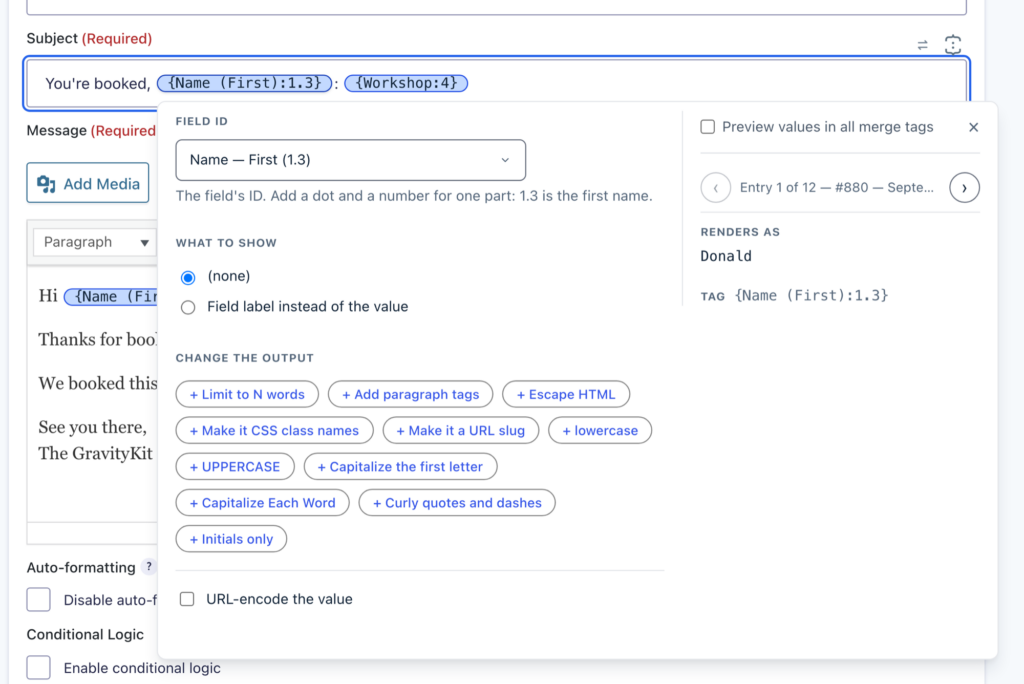
Modifier list #
| Modifier | What it does |
|---|---|
:esc_html | Escapes HTML, so the value can go inside an HTML attribute |
:sanitize_html_class | Makes the value usable as CSS class names |
:sanitize_title | Turns the value into a URL slug |
:urlencode | Encodes the value for a URL, with a space written as + |
:rawurlencode | Encodes the value for a URL, with a space written as %20 |
:wpautop | Wraps paragraphs in <p> tags |
:wptexturize | Changes typed punctuation into typographic punctuation |
:maxwords:{number} | Keeps the first {number} words |
:strtolower | Prints the value in lowercase |
:strtoupper | Prints the value in uppercase |
:ucfirst | Capitalizes the first letter |
:ucwords | Capitalizes the first letter of each word |
:initials | Prints the initials of a name |
:timestamp | Converts a date to a Unix timestamp |
:human | Shows a Date or Time field as a time relative to now |
:format:{format} | Prints a date or time in the format you write |
:explode | Prints a list as words separated by spaces |
Note: Modifiers are not applied to the {all_fields} merge tag.
Escape HTML with :esc_html #
Gravity Forms already escapes a Single Line Text value when it prints in HTML. With or without :esc_html, {Business Name:1} holding The "World's Best" Astronaut Ice Cream prints The "World's Best" Astronaut Ice Cream.
A Paragraph field with the rich text editor on keeps its HTML, so its quotes and tags can break an HTML attribute. Add :esc_html when such a value goes inside an attribute:
<a href="{Website:2}" title="{Bio:4:esc_html}">{Business Name:1}</a>Without the modifier, a quote in the Paragraph field ends the title attribute early and the link breaks. With it, the tags and quotes print as <, >, and ", so the whole value stays inside the attribute.
Make CSS class names with :sanitize_html_class #
:sanitize_html_class removes the characters a CSS class name cannot hold. It keeps spaces, so a value of several words becomes several classes, where WordPress’s own sanitize_html_class() would join them into one.
<div class="{Profession:10:sanitize_html_class}">With the value Scientist, Astronaut!, this prints <div class="Scientist Astronaut">.
Make URL slugs with :sanitize_title #
:sanitize_title turns the value into a slug, the lowercase form with hyphens that WordPress uses in URLs. {Profession:10:sanitize_title} prints scientist-astronaut for the value Scientist, Astronaut!.
Encode values for URLs with :urlencode and :rawurlencode #
Both modifiers encode the characters a URL cannot hold as they are, such as & and spaces. :urlencode writes a space as +, the form used in query strings. :rawurlencode writes it as %20, which is what an email link needs.
For the value rocket science & space travel:
| Merge tag | Output |
|---|---|
{Search Query:6:urlencode} | rocket+science+%26+space+travel |
{Search Query:6:rawurlencode} | rocket%20science%20%26%20space%20travel |
<a href="https://example.com/search?q={Search Query:6:urlencode}">Search</a>
<a href="mailto:hello@example.com?subject={Search Query:6:rawurlencode}">Email us</a>Add paragraphs with :wpautop #
Gravity Forms prints each line break in a Paragraph field as a <br /> tag. :wpautop wraps each paragraph in <p> tags instead and keeps single line breaks as <br />. For a Paragraph field with a blank line between two paragraphs, {Bio:4} prints:
Ice cream shop on Mission Street.<br />
Open daily from noon.<br />
<br />
We ship freeze-dried ice cream to astronauts.And {Bio:4:wpautop} prints:
<p>Ice cream shop on Mission Street.<br />
Open daily from noon.</p>
<p>We ship freeze-dried ice cream to astronauts.</p>Change punctuation with :wptexturize #
:wptexturize runs the WordPress function wptexturize() on the value. Three dots become an ellipsis, a double hyphen between numbers becomes an en dash, and a double hyphen with spaces around it becomes an em dash. Quotes stay straight, because Gravity Forms has already escaped them.
For the value Open 9--5, weekends too..., {Quote:11:wptexturize} prints Open 9–5, weekends too…, the HTML codes for the en dash and the ellipsis.
Limit the number of words with :maxwords #
:maxwords:{number} keeps the first {number} words of the value. When it removes words, it adds an ellipsis (…).
A Paragraph field named Quote holds this testimonial of 30 words:
I really enjoyed the service that I received. Thank you for all your help! In the future, I will have no reservations about referring people to your business. Thanks again!
{Quote:11:maxwords:10} prints I really enjoyed the service that I received. Thank you….
Punctuation stays with its word: Example with comma, to be trimmed with :maxwords:3 prints Example with comma,…. A character with a space on each side, such as &, counts as a word.
Change letter case #
| Merge tag | Value | Output |
|---|---|---|
{Name:3:strtolower} | JOHN DOE | john doe |
{Name:3:strtoupper} | John Doe | JOHN DOE |
{Description:12:ucfirst} | rocket scientist | Rocket scientist |
{Job Title:13:ucwords} | senior rocket scientist | Senior Rocket Scientist |
:ucfirst and :ucwords only add capitals, so rOCKET sCIENTIST becomes ROCKET SCIENTIST with :ucwords. They also leave a first letter with an accent as it is: with :ucwords, émile zola prints émile Zola. :strtolower and :strtoupper change accented letters too.
Show initials with :initials #
:initials prints the first letter of each word, each followed by a period. {Name:3:initials} prints J.M.D. for John Michael Doe. To show a Name field as initials in a View, turn on the field’s Show as initials setting.
Convert dates to timestamps with :timestamp #
:timestamp converts a date to a Unix timestamp, the number of seconds since January 1, 1970, UTC. On a Date field it reads the stored date, so the field’s date format does not matter. A value that is not a date prints -1.
| Merge tag | Value | Output |
|---|---|---|
{Launch date:7:timestamp} | 07/07/2003 | 1057536000 |
{Description:12:timestamp} | July 14, 2015, 11:49 GMT | 1436874540 |
{Description:12:timestamp} | To be announced | -1 |
Timestamps are numbers, so the [gvlogic] shortcode can compare them. This prints Launched once the launch date has passed, and Upcoming before it:
[gvlogic if="{Launch date:7:timestamp}" less_than="{now:timestamp}"]Launched[else]Upcoming[/gvlogic]Show relative dates with :human #
:human shows the value of a Date or Time field as a time relative to now. For the date 07/07/2003, {Launch date:7:human} prints 23 years ago.
A Time field is compared with the time now: at 2:34 pm, a Launch time of 2:30 pm prints 4 minutes ago. A Date field has no time of day, so it is compared from midnight: in the afternoon, tomorrow’s date prints a number of hours, such as 9 hours from now.
For the date an entry was created, use the {date_created} merge tag, which has its own :human and :diff modifiers.
Format dates and times with :format #
:format:{format} prints a date or time in the format you write after it, with the same letters as the WordPress date and time formats. It works on Date and Time fields and on the {date_created}, {date_updated}, {now}, {yesterday}, and {tomorrow} merge tags.
For a Launch date of 07/07/2003, a Launch time of 2:30 pm, and an entry created on October 2, 2026 at 10:30 am:
| Merge tag | Output |
|---|---|
{Launch date:7} | 07/07/2003 |
{Launch date:7:format:F j\, Y} | July 7, 2003 |
{Launch date:7:format:l\, F jS} | Monday, July 7th |
{Launch date:7:format:Y-m-d} | 2003-07-07 |
{Launch time:8:format:g:i A} | 2:30 PM |
{Launch time:8:format:H:i} | 14:30 |
{date_created:format:F j\, Y \a\t g\:i a} | October 2, 2026 at 10:30 am |
{now:format:Y} | The current year |
Characters that need a backslash
Put a backslash before these characters in a format:
- A comma, written
\,. Commas separate modifiers, so in a field’s merge tag the format ends at the first comma:{Launch date:7:format:F j, Y}prints onlyJuly 7. - A colon in
{date_created}and{date_updated}, written\:. Without the backslash,{date_created:format:g:i a}prints only the hour. Date and Time fields and{now}take a colon either way. - A letter you want printed as text, as
\a\tdoes in the table. Without the backslashes,aprints am or pm andtprints the number of days in the month.
A Date field’s date prints as entered, whatever the site’s time zone. {date_created} and {date_updated} print in the site’s time zone.
Split lists with :explode #
:explode prints a list as words separated by spaces. It reads the list a Multiple Select field stores, and a comma-separated value in a text field.
| Merge tag | Stored value | Output |
|---|---|---|
{Categories:5} | ["Science","Technology","Space"] | Science, Technology, Space |
{Categories:5:explode} | ["Science","Technology","Space"] | Science Technology Space |
{Tags:9:explode} | rocket,satellite,launch | rocket satellite launch |
With :sanitize_html_class after it, each choice becomes a CSS class:
<div class="{Categories:5:explode,sanitize_html_class}">This prints <div class="Science Technology Space">. A choice with a space in it, such as Rocket Science, becomes two classes.
Use more than one modifier #
Separate modifiers with commas. GravityView applies them in the order you write them, so the order can change the result:
| Merge tag | Output |
|---|---|
{Description:12:wpautop,urlencode} | %3Cp%3Erocket+scientist%3C%2Fp%3E |
{Description:12:urlencode,wpautop} | <p>rocket+scientist</p> |
Gravity Forms modifiers such as :value can go anywhere in the list. For a Mission type choice of Crewed flight with the value crewed, {Mission type:14:value,strtoupper} and {Mission type:14:strtoupper,value} both print CREWED.
Other combinations work the same way:
{Name:3:strtolower,sanitize_html_class}printsjohn doeforJohn Doe, which is two CSS classes.{Quote:11:maxwords:20,wpautop}keeps the first 20 words, then wraps them in<p>tags.
Was this page helpful?


- Modifier list
- Escape HTML with :esc_html
- Make CSS class names with :sanitize_html_class
- Make URL slugs with :sanitize_title
- Encode values for URLs with :urlencode and :rawurlencode
- Add paragraphs with :wpautop
- Change punctuation with :wptexturize
- Limit the number of words with :maxwords
- Change letter case
- Show initials with :initials
- Convert dates to timestamps with :timestamp
- Show relative dates with :human
- Format dates and times with :format
- Split lists with :explode
- Use more than one modifier