

GravityBoard
Display Gravity Forms entries on collaborative kanban boards: manage projects, coordinate with your team, and streamline your workflows.


Turn form entries into actionable workflows
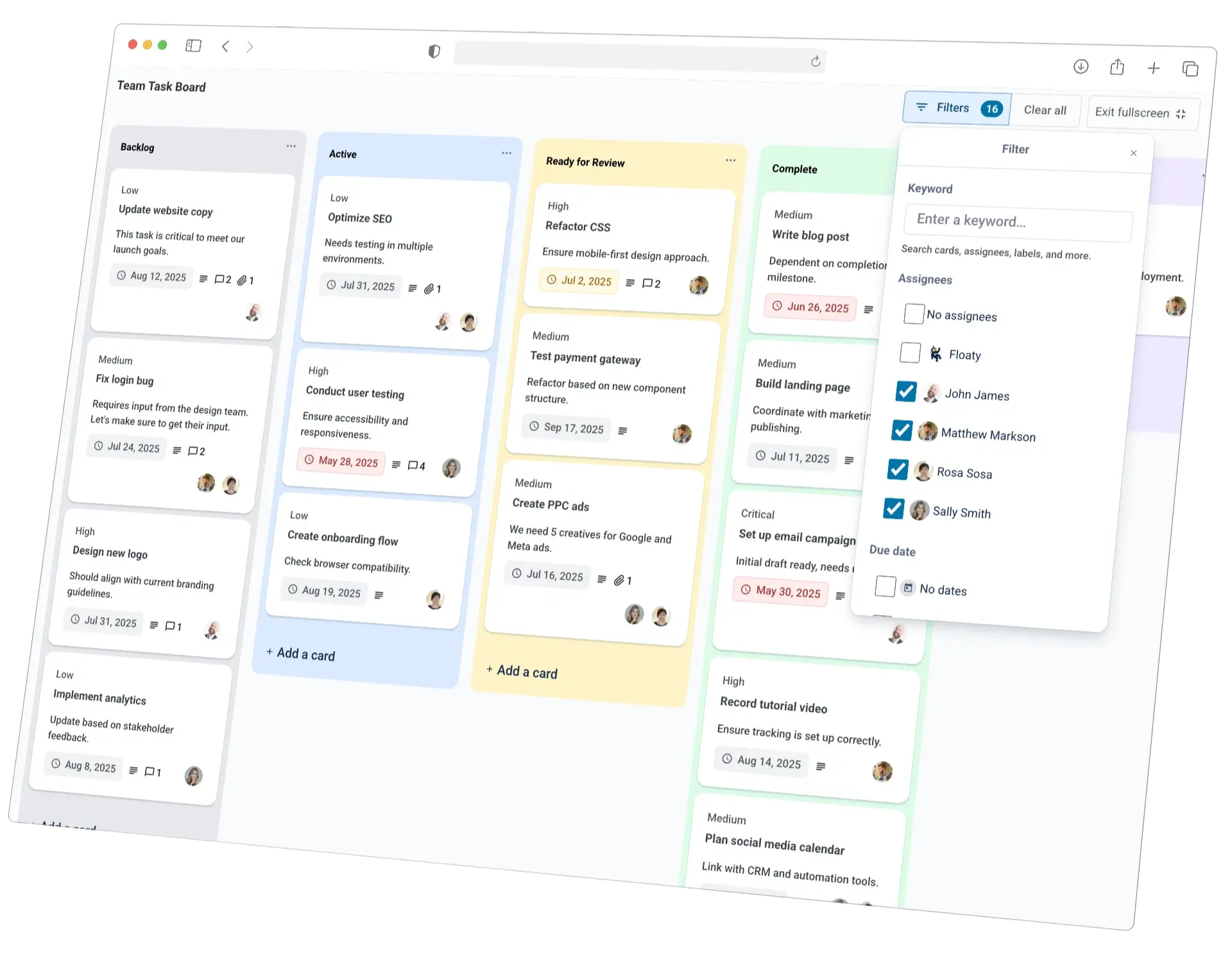
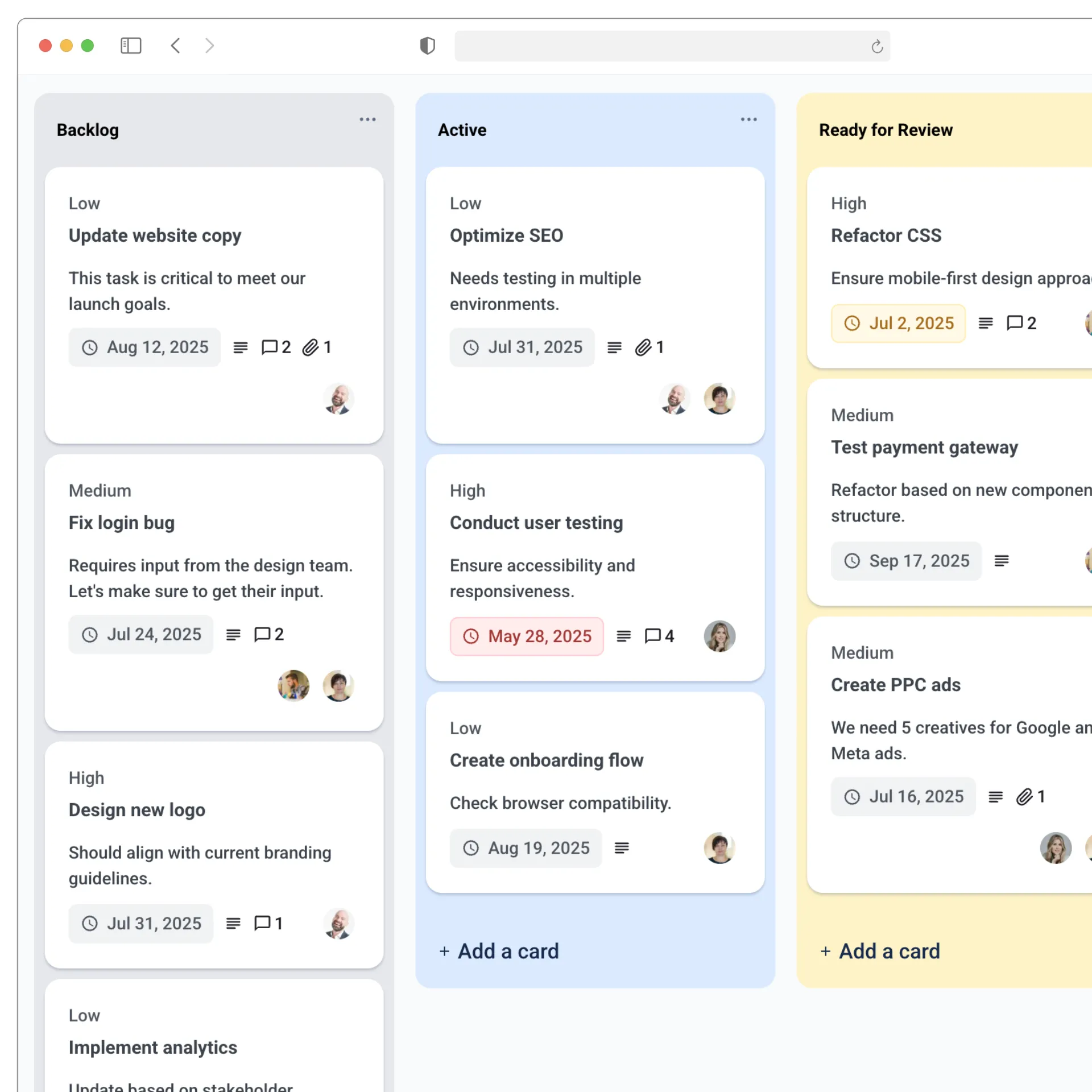
GravityBoard transforms Gravity Forms data into Trello-style boards that bring your processes to life. Manage pipelines, support requests, or internal tasks visually (right inside WordPress) with zero code or third-party apps.
- Build dynamic, kanban-style boards directly from form entries.
- Track work in real time with drag-and-drop cards and custom columns.
- Stay organized with a fully self-hosted, responsive interface.
Collaborate seamlessly, all in one place
Keep your team aligned without switching tools. GravityBoard enables direct collaboration on each card, with notes, mentions, and automatic updates—all synced to your Gravity Forms data.
- Assign users to cards, manage workloads, and ensure accountability.
- Add threaded notes and mentions to centralize communication.
- Trigger smart notifications for card updates, comments, and assignments.
Control access and scale with confidence
Built for teams and businesses that demand flexibility and security, GravityBoard integrates with WordPress roles and Gravity Forms capabilities, giving you full control over who can view, edit, or manage tasks.
- Fine-tune permissions for each user role and workflow.
- Extend functionality with developer-friendly hooks and filters.
- Maintain data ownership with a 100% self-hosted, privacy-safe setup.



Trusted by thousands of businesses and developers



Not only does GravityKit have excellent support with fast response times, they continually add a lot of new features to their products.
See what people are saying.
GravityBoard is trusted by developers, nonprofits, web agencies, entrepreneurs, and experienced WordPress users.
“GravityKit is absolutely an essential plugin for our business. It gives us the ability to quickly and easily deliver effective and efficient web tools to our clients to meet their unique needs.”
“GravityKit has enabled me to get creative across a variety of websites, building powerful features without the need for custom PHP or complex coding. It’s saved me significant development time.”
“When we wanted to implement a certain feature, there was always a GravityKit plugin that did what we needed. It’s been a delightful experience! Instead of needing to write custom code for things we want, we are able to leverage the power of the Gravity Forms ecosystem.”
“I really like what you’re doing with Gravity Forms stuff. Your tools have helped me build better tools and improved functionality for my clients. Big fan!”
“Any apps that require you to create, read, update, or delete data can be built using Gravity Forms and GravityKit—you can literally throw together an MVP within a day!”
“Prior to discovering GravityKit, I had to hire developers, or build solutions that could take months. Then I would have to maintain that custom code for years. GravityKit allows me to focus on getting results today.”
Simple pricing.
Infinite possibilities.
GravityBoard is trusted by agencies, nonprofits, developers, and WordPress users all over the world.
Our complete Kit of essential tools for extending and enhancing Gravity Forms—everything you need to build powerful web apps and workflows.
- All GravityKit Add-Ons
- All GravityView Layouts & Extensions
- Perfect for heavy Gravity Forms users
- Priority support via email
- Save $713 (65%) vs. buying separately
Display Gravity Forms entries on collaborative kanban boards: manage projects, coordinate with your team, and streamline your workflows.
- User assignments and fine-grained permissions
- Support for notes and ‘@’ mentions
- Support for file uploads
- Configure custom board colors
- Advanced conditional logic

We proudly offer a 30-day money-back guarantee
We want you to be 100% happy with your purchase, or we’ll make it right.
Got questions? Ask away!
Got a question about GravityBoard or any other GravityKit plugin? Our AI assistant can help you find answers instantly.

Ready to get started?
Display Gravity Forms entries on collaborative kanban boards.
You will love our other Gravity Forms add-ons, too.

All Access Pass
Our complete Kit of essential tools for extending and enhancing Gravity Forms—everything you need to build powerful web apps and workflows.

GravityView Pro
Take GravityView to the next level with all premium layouts, extensions, and advanced functionality in one package.
GravityView
Display Gravity Forms entries on the front-end of your site and build powerful web applications.

GravityImport
Import entries from CSV files into Gravity Forms to transfer data, create new forms, or update existing entries.

GravityEdit
Quickly edit Gravity Forms entries inline to save time, reduce clicks, and streamline your workflow.

GravityCharts
Turn Gravity Forms entries into interactive charts and graphs to build dashboards, reports, and derive data-driven insights.

GravityActions
Update multiple Gravity Forms entries at once, send bulk emails, and streamline your workflow.

GravityCalendar
Turn Gravity Forms entries into dynamic calendars to showcase events, schedules, appointments, and more.

GravityExport
Export Gravity Forms entries to Excel, CSV, PDF, or Google Sheets, then share them with secure links or deliver them to cloud storage on a schedule.

GravityMath
Perform advanced calculations on Gravity Forms entries to display totals, averages, or build custom calculators.

GravityRevisions
Track, compare, and restore changes made to Gravity Forms forms and entries with a full version history.

GravityMigrate
Migrate all Gravity Forms data between sites, including forms, entries, settings, Views, feeds, and file uploads, and import forms from other form plugins.

GravitySearch
Search Gravity Forms entries across every form from one screen, with advanced filters, instant previews, and bulk actions.
Have more questions?
Here are a few common questions that help explain what is possible with the power of GravityKit.
You must log in to submit a review.