Skip to content
GravityKit
Buy
Sign in
0 items
  • Plugins

    GravityKit All Access

    Our complete Kit of essential tools for extending and enhancing Gravity Forms—everything you need to build powerful web apps and workflows.

    Learn more
    • GravityView

      GravityView

      Bestseller

      Display Gravity Forms entries on the front-end of your site and build powerful web applications.

    • GravityImport

      GravityImport

      Trending

      Import entries from CSV files into Gravity Forms to transfer data, create new forms, or update existing entries.

    • GravityEdit

      GravityEdit

      Quickly edit Gravity Forms entries inline to save time, reduce clicks, and streamline your workflow.

    • GravityCharts

      GravityCharts

      Trending

      Turn Gravity Forms entries into interactive charts and graphs.

    • GravityActions

      GravityActions

      Update multiple Gravity Forms entries at once, send bulk emails, and streamline your workflow.

    • GravityCalendar

      GravityCalendar

      Turn Gravity Forms entries into dynamic calendars to showcase events, schedules, appointments, and more.

    • GravityExport

      GravityExport

      Export Gravity Forms entries to Excel, CSV, PDF, or Google Sheets, then share them with secure links or deliver them to cloud storage on a schedule.

    • GravityMath

      GravityMath

      Perform advanced calculations on Gravity Forms entries to display totals, averages, or build custom calculators.

    • GravityRevisions

      GravityRevisions

      Track, compare, and restore changes made to Gravity Forms forms and entries with a full version history.

    • GravityMigrate

      GravityMigrate

      Migrate all Gravity Forms data between sites, including forms, entries, settings, Views, feeds, and file uploads, and import forms from other form plugins.

    • GravityBoard

      GravityBoard

      Manage projects with collaborative project management. Coordinate with your team and streamline your workflows.

    • GravitySearch

      GravitySearch

      Search Gravity Forms entries across every form from one screen.

  • Ideal For

    • Nonprofits
    • Web Agencies
    • Education
    • Developers
    • Small Businesses
    • Startups
    Explore All Use Cases

    Case studies

    • Be There Local
    • Killer Shorts
    • West Fork Schools
    • Princeton University
    • BrightLeaf Giving
    • Jacksonville Port Authority
    • National Severe Storms Lab
    • Leadpal
    View All Case Studies
  • Resources

    • Blog
    • Case studies
    • Newsletter
    • GravityKit vs competitors
    • Live Demos
    • Documentation
    • Developer docs
    • GravityKit Academy

    Ultimate guides

    • How to use Gravity Forms
    • Editing Gravity Forms entries
    • Importing Gravity Forms entries
    • Exporting Gravity Forms entries
    • Displaying Gravity Forms entries
    • Gravity Forms conditional logic
    • Gravity Forms calculations
    View More Articles
  • Support
  • Pricing
  • Plugins

    • GravityView

      GravityView

      Bestseller

      Display Gravity Forms entries on the front-end of your site and build powerful web applications.

    • GravityImport

      GravityImport

      Trending

      Import entries from CSV files into Gravity Forms to transfer data, create new forms, or update existing entries.

    • GravityEdit

      GravityEdit

      Quickly edit Gravity Forms entries inline to save time, reduce clicks, and streamline your workflow.

    • GravityCharts

      GravityCharts

      Trending

      Turn Gravity Forms entries into interactive charts and graphs.

    • GravityActions

      GravityActions

      Update multiple Gravity Forms entries at once, send bulk emails, and streamline your workflow.

    • GravityCalendar

      GravityCalendar

      Turn Gravity Forms entries into dynamic calendars to showcase events, schedules, appointments, and more.

    • GravityExport

      GravityExport

      Export Gravity Forms entries to Excel, CSV, PDF, or Google Sheets, then share them with secure links or deliver them to cloud storage on a schedule.

    • GravityMath

      GravityMath

      Perform advanced calculations on Gravity Forms entries to display totals, averages, or build custom calculators.

    • GravityRevisions

      GravityRevisions

      Track, compare, and restore changes made to Gravity Forms forms and entries with a full version history.

    • GravityMigrate

      GravityMigrate

      Migrate all Gravity Forms data between sites, including forms, entries, settings, Views, feeds, and file uploads, and import forms from other form plugins.

    • GravityBoard

      GravityBoard

      Manage projects with collaborative project management. Coordinate with your team and streamline your workflows.

    • GravitySearch

      GravitySearch

      Search Gravity Forms entries across every form from one screen.

    View All Products

    GravityKit All Access

    Our complete Kit of essential tools for extending and enhancing Gravity Forms—everything you need to build powerful web apps and workflows.

    Learn more
  • Ideal For

    • Nonprofits
    • Web Agencies
    • Education
    • Developers
    • Small Businesses
    • Startups
    Explore All Use Cases

    Case studies

    • Be There Local
    • Killer Shorts
    • West Fork Schools
    • Princeton University
    • BrightLeaf Giving
    • Jacksonville Port Authority
    • National Severe Storms Lab
    • Leadpal
    View All Case Studies

    How to build...

    • Client Portal
    • AI-Built Directory
    • Conference Website
    • WordPress CRM
    • Admin Dashboard
    • Inventory Management
    • Vendor Portal
    • Document Library
    View All Guides
  • Resources

    • Blog
    • Case studies
    • Newsletter
    • GravityKit vs competitors
    • Live Demos
    • Documentation
    • Developer docs
    • GravityKit Academy

    ultimate guides

    • How to use Gravity Forms
    • Editing Gravity Forms entries
    • Importing Gravity Forms entries
    • Exporting Gravity Forms entries
    • Displaying Gravity Forms entries
    • Gravity Forms conditional logic
    • Gravity Forms calculations
    View More Articles
  • Support
  • Pricing
0 items

Search

Results appear automatically as you type.
Loading results…

results found matching

    Sign in
    Buy

    Docs

    • Docs Home

    Gravity Forms Add-Ons

    • GravityView
    • GravityActions
    • GravityBoard
    • GravityCalendar
    • GravityCharts
    • GravityEdit
    • GravityExport
    • GravityImport
    • GravityMath
    • GravityRevisions
    • GravitySearch
    • GF Widget for Elementor
    • GF Dynamic Lookup
    • GF Entry Tags
    • GF Event Field
    • GravityExport Lite
    • GF Zero Spam
    • GravityMigrate

    GravityView

    • Getting Started
    • View Setup
    • FAQ
    • Pre-Sale
    • Advanced
    • Common Problems
    • Customizing Your Views
    • Edit Entry
    • Entry Approval
    • Filter and Sort Results
    • Gravity Forms
    • Merge Tags
    • Roles and Capabilities
    • Search
    • Shortcodes
    • View Settings
    • WordPress Posts

    General Help

    • Account, Invoices, and Billing
    • License Related
    • Plugins and Settings
    • Agency accounts
    • Contact
    • Docs Home
    • Gravity Forms Add-Ons

      • GravityView
      • GravityActions
      • GravityBoard
      • GravityCalendar
      • GravityCharts
      • GravityEdit
      • GravityExport
      • GravityImport
      • GravityMath
      • GravityRevisions
      • GravitySearch
      • GF Widget for Elementor
      • GF Dynamic Lookup
      • GF Entry Tags
      • GF Event Field
      • GravityExport Lite
      • GF Zero Spam
      • GravityMigrate
    • GravityView

      • Getting Started
      • View Setup
      • FAQ
      • Pre-Sale
      • Advanced
      • Common Problems
      • Customizing Your Views
      • Edit Entry
      • Entry Approval
      • Filter and Sort Results
      • Gravity Forms
      • Merge Tags
      • Roles and Capabilities
      • Search
      • Shortcodes
      • View Settings
      • WordPress Posts
    • General Help

      • Account, Invoices, and Billing
      • License Related
      • Plugins and Settings
      • Agency accounts
    • Contact

    GravityView

      • Embedding a View on a page or post
      • Getting Started: Setting up Your First View
      • Changing the form a View uses
      • Embedding Views in Divi, Beaver Builder, and Elementor
      • Frontend bulk actions in GravityView
      • How to show a single entry without the Multiple Entries page
      • “How To” Guides and Tutorials
      • Activating your license
      • Adding a Print button to the Single Entry page
      • Adding a View to a page using Visual Composer
      • Adding Views to WordPress menus
      • Changing the Single Entry title
      • Comparing GravityView’s View layouts
      • Configuring Delete Entry
      • Configuring the Edit Entry screen
      • Creating an image gallery (displaying images in a grid)
      • Duplicating a Gravity Forms entry from the backend of your site
      • Duplicating a Gravity Forms entry from the frontend of your site
      • Duplicating or copying a View
      • Dynamic Widget Placement
      • Embedding Single Entries in a Post or Page
      • Embedding Views, entries and fields using blocks
      • Enable Enhanced Security: the secret attribute for shortcodes
      • Getting Started: Adding Fields to the Multiple Entries and Single Entry Pages
      • Getting started: choosing a form and a View layout
      • Hiding the Approve/Reject Entry column
      • How to add a Gravity Forms widget to GravityView
      • How to add a PDF download link to your View
      • How to add a PDF download link to your View using Gravity PDF
      • How to embed a View inside another View to show related entries
      • Importing and Exporting configured Views
      • Installing GravityView
      • Linking to a Single Entry
      • Modifying the Default View Settings
      • Opening and editing entry details in a lightbox (modal/popup)
      • Redirecting to the Multiple Entries screen after editing an Entry
      • Removing Theme Navigation Links from Views
      • The Entry Notes field
      • The Layout Builder (how and when to use it)
      • The Recent Entries Widget
      • The View Settings Meta Box
      • The Views list on the dashboard
      • Understanding the “No Entries Behavior” setting in GravityView
      • User Edit: Allowing Users to Edit Their Own Entries
      • Using an Admin Label for Custom Content fields
      • Using the Custom Content Field
      • What are form presets?
      • What are View widgets useful for?
      • Working with Field Labels (column headings)
      • Are Views responsive on mobile devices?
      • Beginner guide: Merge Tags vs shortcodes
      • Can I display multiple Views on the same page?
      • Can I duplicate an entry from a View?
      • Can I update a WordPress user account using GravityView?
      • Can I use GravityView to edit Custom Post Types?
      • Can we display entries from other websites?
      • Difference between using Custom Content as a Widget or as a Field
      • Does GravityView support GP Nested Forms (Gravity Wiz Perk)?
      • Does GravityView support Gutenberg?
      • Does GravityView support the Gravity Forms Dropbox add-on?
      • Does GravityView work with Ajax?
      • Does GravityView work with WooCommerce?
      • Does GravityView work with workflows made by Gravity Flow
      • Does my GravityKit subscription include Gravity Forms?
      • Does the Search Bar support operators like OR or AND?
      • How does GravityView know who can edit the entry?
      • How does GravityView work with Gravity Forms “Save and Continue”?
      • How To Display Full-Width Widgets in the Bottom Widget Area
      • Is Gravity Forms the same thing as GravityView?
      • Is GravityView compatible with WordPress Multisite?
      • Is it possible to display the field description on a View?
      • Is it possible to do date comparison with [gvlogic]?
      • Is it possible to edit Credit Card field data?
      • Is it possible to output the save and continue links from a form that hasn’t been submitted yet?
      • Is it possible to redirect the user to a specific page after deleting an entry?
      • Security false positive: StandalonePHPEnkoder.php
      • What are the existing layout options to create a View?
      • What is this “Grant Support Access” menu on GravityView?
      • Which Post Fields are editable?
      • Will GravityView stop working if I don’t renew?
      • Do I need to create an account before purchasing?
      • Can I create admin pages with GravityView?
      • Can I upgrade my license later?
      • Does GravityView Support Gravity Forms Survey Add-On?
      • Does GravityView support Gutenberg?
      • Is Gravity Forms the same thing as GravityView?
      • Is GravityView compatible with WordPress Multisite?
      • Is there a free trial for GravityView?
      • Which Gravity Forms license do I need?
      • Creating Views with AI using the GravityKit MCP
      • How to change where the Go Back link takes visitors
      • How to redirect members to their own profile entry after login
      • “Encrypt Email Address” is checked, but emails are still readable
      • “Claim Entry” functionality with GravityView and Gravity Flow
      • About GravityView Caching
      • About the gk_parent_entry_id and the gk_parent_form_id entry metas
      • Adding custom CSS classes and HTML IDs to Layout Builder rows
      • Calculating a person’s age based on a date field
      • Can I integrate with Paid Memberships Pro Membership Directory Add On?
      • Change the Delete Entry mode from “Delete” to “Trash”
      • Changing the wording of a GravityKit translation
      • Completely deleting GravityView
      • Customizing View URLs
      • Deprecated and renamed hooks
      • Disable the Custom Content code editor
      • Disable the unfiltered_html capability requirement in GravityView
      • Display a Gravity Forms form when no entry exists with [gventry]
      • Edit Entry: How to disable Gravity Forms User Registration feeds from being updated
      • Editing product and pricing fields in Edit Entry
      • Enable Views to be hierarchical (parent/child)
      • Exporting all fields to CSV
      • Exporting entries as CSV or TSV from GravityView
      • Fine-tuning search results in GravityView with search modifiers
      • GDPR and GravityView
      • GravityView Hooks: Customizing the Output of a Field
      • GravityView: How to trigger feeds after editing an entry
      • Hidden fields and field visibility on Edit Entry
      • How do I filter by a specific entry ID?
      • How Gravity Forms records the user who created an entry
      • How GravityView Security Works
      • How to change what fields are searched by the Search Bar “Created By” text input.
      • How to Connect GravityView With Zapier Using Uncanny Automator
      • How to disable GravityView email encryption
      • How to disable the Support Port from loading
      • How to display all entries by default
      • How to display the true location of file uploads
      • How to enable logging and use WP Debug in GravityKit
      • How to filter entries by cookie value
      • How to get the ID of the entry on Edit Entry page?
      • How to hide the GravityKit menu
      • How to modify fancybox lightbox settings
      • How to navigate to an HTML anchor after search
      • How to override any translation in GravityView
      • How to require whole numbers in Gravity Forms’ Number field
      • How to search for a whole phrase
      • How to show checkbox fields as comma-separated instead of a bullet list
      • How to stop the Go Back link from clearing the search
      • How to track pageviews for entries using the [gv_pageviews] shortcode
      • How to use the gform_pre_render filter in Edit Entry
      • I want to translate GravityView (or another GravityKit add-on)!
      • Listing entries assigned to a specific user
      • Making calculations using the custom content field
      • Marking an entry “Unread” after it is edited
      • Modifying Search Bar inputs
      • Modifying the Default View Settings
      • Modifying the entries displayed in a View
      • Only show choices in the Search Bar that exist in entries
      • Optimizing Gravity Forms with custom indexes
      • Preserve the “sub-step” status in Gravity Flow when one or more assignees are changed in GravityView
      • Prevent GravityView from loading its CSS styles
      • REST API Endpoints
      • Restarting a Gravity Flow workflow after editing an entry in GravityView
      • Retrieve Entry Approval Status in GravityView
      • Setting the browser tab title for single entries
      • The GravityView plugin changelog
      • Uninstalling GravityView and removing its data
      • Using [gvlogic] to show or hide content anywhere on your site
      • Using direct file paths for uploaded media in GravityView
      • Using Gravity Forms gf_apply_filters() and gf_do_action() in Gravity Forms development
      • When to use Advanced Filtering vs Field Conditional Logic vs gvlogic
      • WordPress hooks (actions and filters) available for GravityView
      • ‘Bad Request’ or ‘Request Header Too Large’ Error When Editing Entries in GravityView
      • “Cheatin’ Uh?” message is displayed when editing a View
      • “Date Created” field is inaccurate
      • Add Field or Add Widget buttons aren’t working
      • Deleting and reinstalling GravityView
      • Display issues with the Search Bar
      • During installation: “Warning: No such file or directory”
      • Enabling No-Conflict Mode
      • Exporting forms & Views from your site
      • Getting a 404 error when accessing CSV endpoint
      • GravityView Hooks: Customizing the Output of a Field
      • GravityView updates aren’t displaying
      • How to create a new entry based on existing Gravity Forms entry data
      • How to disable Gravity Forms’ Secure File Download Location
      • I get this error when auto-updating the plugin: “Download failed. SSL peer certificate or SSH remote key was not OK”
      • Images on the View are upside down, rotated or flipped
      • Infinite loop recursion
      • Known issue: When editing entries that have conditional calculations, the result may be incorrect
      • Merge tags aren’t visible in a new View
      • My theme is Divi and I can’t see the Search Bar
      • My View widgets are not showing up on my Divi theme
      • My Yoast Meta Box is blank
      • Only some users are listed in the Change Entry Creator dropdown
      • Pointing the [gv_entry_link] to a specific page
      • Price fields and numbers being sorted alphabetically, not numerically
      • Random sorting not working on WP Engine
      • Reasons for the “You are not allowed to view this content.” message
      • ReferenceError: gvGlobals is not defined
      • Removing Theme Navigation Links from Views
      • Reserved URL query parameters
      • Reserved URL Slugs
      • Sorting by Name isn’t working
      • Strange display issues inside the View editor
      • The “Update” button isn’t showing in Edit Entry
      • The GravityView settings menu isn’t visible
      • The Settings box is hidden
      • There are other plugin boxes on the Edit View screen
      • View widgets conflict with All in One SEO
      • Visual Composer and GravityView
      • What caching plugin do we recommend? WP Rocket.
      • Why can’t I edit my View?
      • Why is my View slow to load?
      • Why View entries may not be showing up
      • WPML and GravityView
      • You don’t have permission to edit this post.
      • Entries show in one column after updating GravityView
      • Making Table Views accessible to screen readers with row headers
      • [Deprecated] Using the FooBox Lightbox plugin instead of the default Thickbox
      • Adding a link to a column
      • Adding a percent sign (%) to a column
      • Adding Custom CSS classes to fields or widgets
      • Adding custom CSS to your Views
      • Adding custom JavaScript to your Views
      • Adding custom PHP code snippets to your website
      • Adding Disqus comments to Entries
      • Adding pagination to the Single Entry page
      • Adding RTL (right-to-left) text support to a field
      • Are Views responsive on mobile devices?
      • Can I disable the Map It link?
      • Changing image size on the Multiple Entries screen
      • Changing the “Entry Updated. Return to Entry” message
      • Changing the display size of images
      • Changing the Edit Entry page title
      • Changing the page size and orientation of DataTables PDF exports
      • Changing the Single Entry title
      • Changing the View custom post type slug
      • Column widths and text wrapping in Table Views
      • Creating a leaderboard with GravityView
      • Custom single View template not displaying
      • Customizing emails sent by the Entry Notes field
      • Customizing View URLs
      • Disable Wrapping Images with a Link
      • Displaying a form if no entries exist on the View
      • Displaying a List View in a grid (two or more columns)
      • Displaying Edit Entry and Delete Entry links as icons
      • Displaying Fields conditionally
      • Displaying video, audio, and media links as a player using the Custom Content field
      • Enabling Custom CSS Classes for GravityView widgets
      • GravityView CSS guide
      • GravityView Hooks: Customizing the Output of a Field
      • Hiding the “No entries match your request” message
      • How to add row numbers to a View
      • How to change the View layout
      • How to Connect GravityView With Zapier Using Uncanny Automator
      • How to disable the sorting control on one table column?
      • How to display GravityView entries in a grid (or columns)
      • How to display uploaded files as links
      • How to rename the Update and Cancel buttons on the Edit Entry page
      • How to show checkbox fields as comma-separated instead of a bullet list
      • How to stop the Go Back link from clearing the search
      • Make “Map It” links open in a new window
      • Making your table scroll horizontally
      • Modifying Date, Time, or Entry Date field formats
      • Modifying Search Bar inputs
      • Modifying the “Map It” address link
      • Modifying the Default View Settings
      • Modifying the output of the Edit Entry form
      • Modifying the text displayed when there are no entries
      • Only show choices in the Search Bar that exist in entries
      • Overriding GravityView templates
      • Placing two fields side-by-side in the same column
      • Prevent GravityView from loading its CSS styles
      • Price fields and numbers being sorted alphabetically, not numerically
      • Redirecting to a newly-created Gravity Forms entry
      • Removing column headings from the bottom of the tables
      • Removing Theme Navigation Links from Views
      • Search: Changing the default option in a select (drop down) field
      • Shortening the displayed URL in a Website field
      • Show name fields as initials
      • Showing the label of a Drop Down or Radio Buttons choice in a View
      • Styling the Buttons on the Edit Entry Page
      • Styling the Search Bar widget
      • Supported Themes
      • The View Container <div>
      • Using Page Templates with GravityView
      • What are the existing layout options to create a View?
      • Editing rich text Paragraph fields with Edit Entry and GravityEdit
      • How to send or skip a notification when an entry is edited
      • Letting a role edit and delete other users’ entries in one View
      • ‘Bad Request’ or ‘Request Header Too Large’ Error When Editing Entries in GravityView
      • Changing an entry’s creator from the GravityView Edit Entry page
      • Changing an entry’s creator on the Gravity Forms entry screen
      • Changing the “Entry Updated. Return to Entry” message
      • Changing the Edit Entry page title
      • Choosing where users go after editing an entry
      • Conditional Logic on the Edit Entry page
      • Configuring Delete Entry
      • Configuring the Edit Entry screen
      • Creating a View Editor role
      • Creating an “Edit Your Profile” link
      • Creating an Entry Moderator role
      • Disabling Conditional Logic on the Edit Entry page
      • Displaying Edit Entry and Delete Entry links as icons
      • Edit Entry: Multi-page form editing
      • Editing product and pricing fields in Edit Entry
      • Embedding the Edit Entry form in a page or post
      • GravityView: How to trigger feeds after editing an entry
      • Hidden fields and field visibility on Edit Entry
      • Hiding the Confirm Email field on the Edit Entry page
      • How does GravityView know who can edit the entry?
      • How does GravityView work with Gravity Forms “Save and Continue”?
      • How to get the ID of the entry on Edit Entry page?
      • How to modify the settings for the Post Content edit field
      • How to prevent an approved entry from being edited
      • How to rename the Update and Cancel buttons on the Edit Entry page
      • How to use the gform_pre_render filter in Edit Entry
      • Known issue: When editing entries that have conditional calculations, the result may be incorrect
      • Marking an entry “Unread” after it is edited
      • Modifying the output of the Edit Entry form
      • Redirecting to the Multiple Entries screen after editing an Entry
      • Styling the Buttons on the Edit Entry Page
      • The “Update” button isn’t showing in Edit Entry
      • The Update button on the Edit Entry page is missing
      • Unapproving entries automatically after they’re edited
      • User Edit: Allowing Users to Edit Their Own Entries
      • View Settings: Enable Edit Locking in GravityView
      • Which Post Fields are editable?
      • (Advanced) How to update entry approval status using PHP
      • Can I add an additional status to the approval system?
      • Changing the “You are not allowed to view this content” text when an entry is pending approval
      • Changing the labels of the approval statuses
      • Entry Approval Merge Tags or how to approve an entry via email
      • Front-end entry approval
      • Getting Started: GravityView Entry Approval
      • Hiding the Approve/Reject Entry column
      • How to automatically approve an entry when submitting the form
      • How to prevent an approved entry from being edited
      • How to send email notifications when an entry is approved, disapproved, or the approval status has changed
      • Managing entry approval in the Gravity Forms Entries screen
      • Modifying the CSS of Front-end approval
      • The {approval_status} Merge Tag
      • Unapproving entries automatically after they’re edited
      • Creating an “Edit Your Profile” link
      • Enabling the table column sorting feature
      • Filtering entries by WordPress User Roles
      • Forcing numbers to sort properly
      • How do I filter by a specific entry ID?
      • How to display only entries created today
      • How to display the last submitted entry only
      • Listing entries assigned to a specific user
      • Making entries expire after a certain amount of time
      • Pre-filtering results on a View
      • Random sorting not working on WP Engine
      • Restricting a View to logged-in users or user roles
      • Sort doesn’t work when using Gravity Forms encryption plugins
      • Sorting by multiple columns
      • Sorting results by field value
      • Using relative Start Dates and End Dates
      • View sorting isn’t working
      • Changing or deleting choices in a form that already has entries
      • Adding a Link to the Stripe Customer Portal in GravityView
      • Changing an entry’s creator on the Gravity Forms entry screen
      • Creating a review/voting system by embedding a form into a single entry
      • Disabling the Create a View menu
      • Displaying incomplete or partial entries
      • Duplicating a Gravity Forms entry from the backend of your site
      • File Uploads can’t be included in partial entries
      • How does GravityView work with Gravity Forms “Save and Continue”?
      • How to embed a form for each entry in a View
      • How to require whole numbers in Gravity Forms’ Number field
      • Known issue: When editing entries that have conditional calculations, the result may be incorrect
      • Passing a field value from the View to a form on another page
      • Showing inactive Entries
      • Sort doesn’t work when using Gravity Forms encryption plugins
      • Styling Gravity Forms
      • Using GFChart with GravityView
      • Using shortcodes inside Gravity Forms notifications
      • Why is my form creating WordPress posts?
      • Why you should avoid using List fields in your form
      • Displaying Fields conditionally
      • Entry Approval Merge Tags or how to approve an entry via email
      • GravityView merge tag modifiers
      • Merge Tags
      • Merge tags aren’t visible in a new View
      • Removing the custom content when the merge tag is empty
      • Showing user details with the {created_by} and {user} merge tags
      • The {approval_status} Merge Tag
      • The {current_post} Merge Tag
      • The {date_created} merge tag
      • The {get} merge tag
      • The {gv_entry_link} Merge Tag
      • The {is_starred} Merge Tag
      • The {sequence} Merge Tag
      • Using the {get} Merge Tags with [gvlogic] to display a person's name in a Custom Content widget
      • Letting a role edit and delete other users’ entries in one View
      • Creating a View Editor role
      • Creating an Entry Moderator role
      • Filtering entries by WordPress User Roles
      • GravityView capabilities
      • How to hide the GravityKit menu
      • Modifying capabilities shown in the field “Only visible to…” dropdown
      • Why can’t I edit my View?
      • How to add a multi-select search input for drop-down fields
      • Adding pagination for results (next/previous page links)
      • Changing search form style from horizontal to vertical
      • Changing the format of the search widget’s date picker
      • Configuring the (WordPress) Search Widget
      • Configuring the Search Bar widget
      • Display issues with the Search Bar
      • Does the Search Bar support operators like OR or AND?
      • Fine-tuning search results in GravityView with search modifiers
      • How to hide results and only display them if a search is performed
      • How to search for a whole phrase
      • How to search for an exact match
      • How to stop the Go Back link from clearing the search
      • Linking to search results
      • Only show choices in the Search Bar that exist in entries
      • Search Bar: Why is the state input is showing as a text field?
      • Search: Changing the default option in a select (drop down) field
      • Turning off the Show Search Bar default search field
      • Using a range to search numeric fields
      • Using the Search Bar “Clear” button
      • An Overview of Shortcodes Added by GravityView
      • Displaying Fields conditionally
      • Embedding two shortcodes on the same post or page
      • Highlighting entries about to expire “today”
      • How can I display a list of my Views on my site?
      • How to conditionally display an image or a placeholder
      • How to highlight an entry from a specific date
      • How to prevent an approved entry from being edited
      • How to track pageviews for entries using the [gv_pageviews] shortcode
      • Pointing the [gv_entry_link] to a specific page
      • The [gv_entry_link] shortcode
      • Using [gvlogic] and [gvlogic2] to create "AND" logic
      • Using [gvlogic] to show or hide content anywhere on your site
      • Using shortcodes inside Gravity Forms notifications
      • Using the [gravityview] shortcode
      • Using the [gventry] Shortcode
      • Using the [gvfield] shortcode to embed single field values
      • Using the [gvlogic] shortcode
      • Using the {get} Merge Tags with [gvlogic] to display a person's name in a Custom Content widget
      • Widget shortcodes
      • Themes: styling your Views with Legacy or Vantage
      • Automatically marking Gravity Forms entries as “Read”
      • Choosing where users go after editing an entry
      • Exporting entries as CSV or TSV from GravityView
      • Keeping Views and entries out of search engines
      • Modifying the Default View Settings
      • The Prevent Direct Access setting
      • View Setting: Number of entries per page
      • View Settings: Custom Code
      • View Settings: Enable Edit Locking in GravityView
      • View Settings: Enable Lightbox for Images
      • Can I use GravityView to edit Custom Post Types?
      • How to modify the settings for the Post Content edit field
      • Post Image Meta information: Title, Caption and Description for the Post Image field
      • Removing Theme Navigation Links from Views
      • Which Post Fields are editable?
    • Home
    • Docs
    • GravityView
    • Edit Entry
    • How to send or skip a notification when an entry is edited

    How to send or skip a notification when an entry is edited

    Estimated reading: 11 minutes

    Updated on November 3, 2026

    To send a Gravity Forms notification when someone edits an entry in GravityView, set the notification’s Event to GravityView - Entry is updated. The notification goes out every time someone saves the Edit Entry screen, whoever saves it and whether or not a value changed. To limit it to people editing their own entries, or to edits that change a certain field, add one of the code snippets below.
    Choose the event #

    The event you pick decides which edits send the notification.

    GravityView - Entry is updatedGravityView - Entry approval is resetGravityRevisions - Entry is updated, revision is saved
    Someone saves the Edit Entry screen in a ViewYes, on every saveOnly when the save changes the status to UnapprovedYes, if the form saves revisions
    An administrator saves the entry on its page in Gravity FormsNoNoYes, if the form saves revisions
    A user edits a field inline with GravityEditNoNoOnly if the form saves revisions for inline edits
    A visitor submits the form for the first timeNoYesNo
    A moderator changes the status in the Entries listNoOnly for a resetNo
    Code updates the entry with GFAPI::update_entry()NoNoNo

    GravityView - Entry approval is reset fires after an edit only when Unapprove Entries After Edit is on for the View and the person saving can’t moderate entries. The entry must also have been Approved or Disapproved before the save. Administrators and Editors can moderate entries by default.

    A save that also changes the status, through the Approve Entries field or the Approve/Reject field on the Edit Entry screen, sends GravityView - Entry is updated and the approval notifications. How to send email notifications when an entry is approved covers those.

    With multi-page editing turned on, each click on Next or Previous saves the entry, so each click sends these notifications.

    To send a notification after an inline edit, follow How to trigger form notifications when editing with GravityEdit. To show the old and new values in the email, follow How to send form notifications after an entry has been updated, which uses GravityRevisions.

    Add the notification #

    1. Go to Forms, open your form, then click Settings and Notifications.
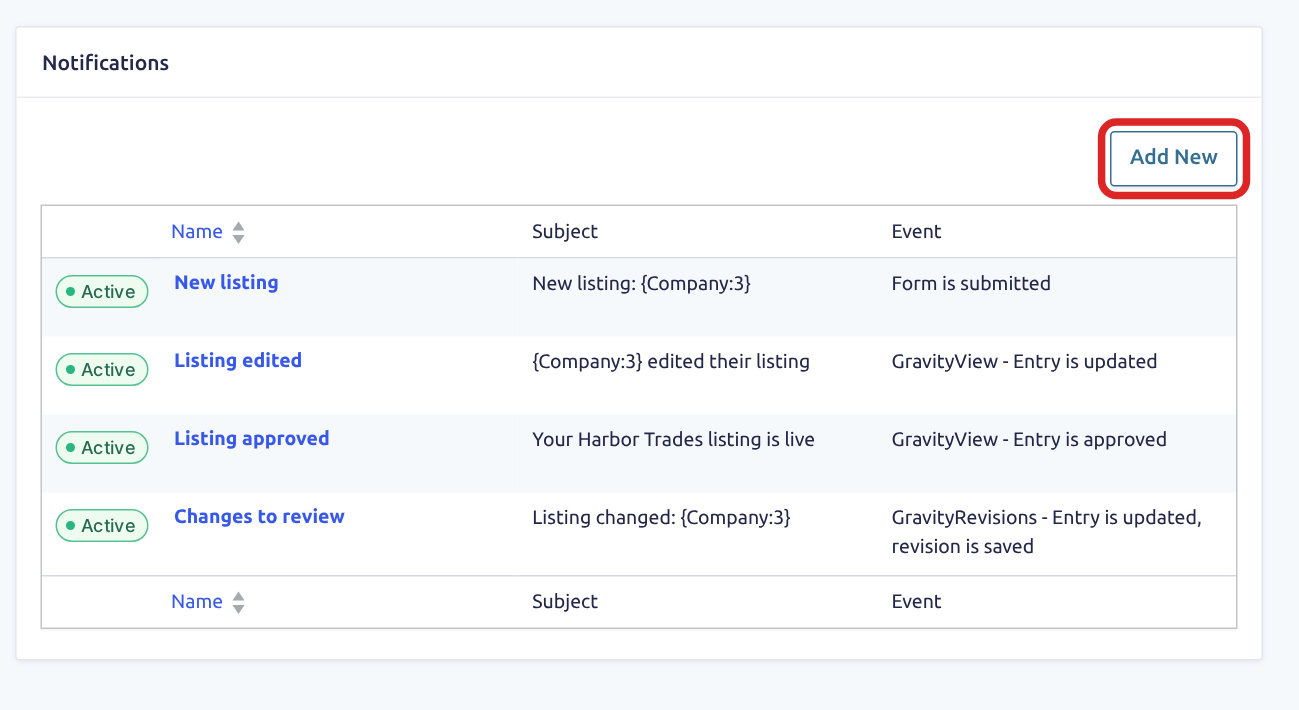
    2. Click Add New.
    The Notifications page of a form, with the Add New button outlined above a list of notifications and their events
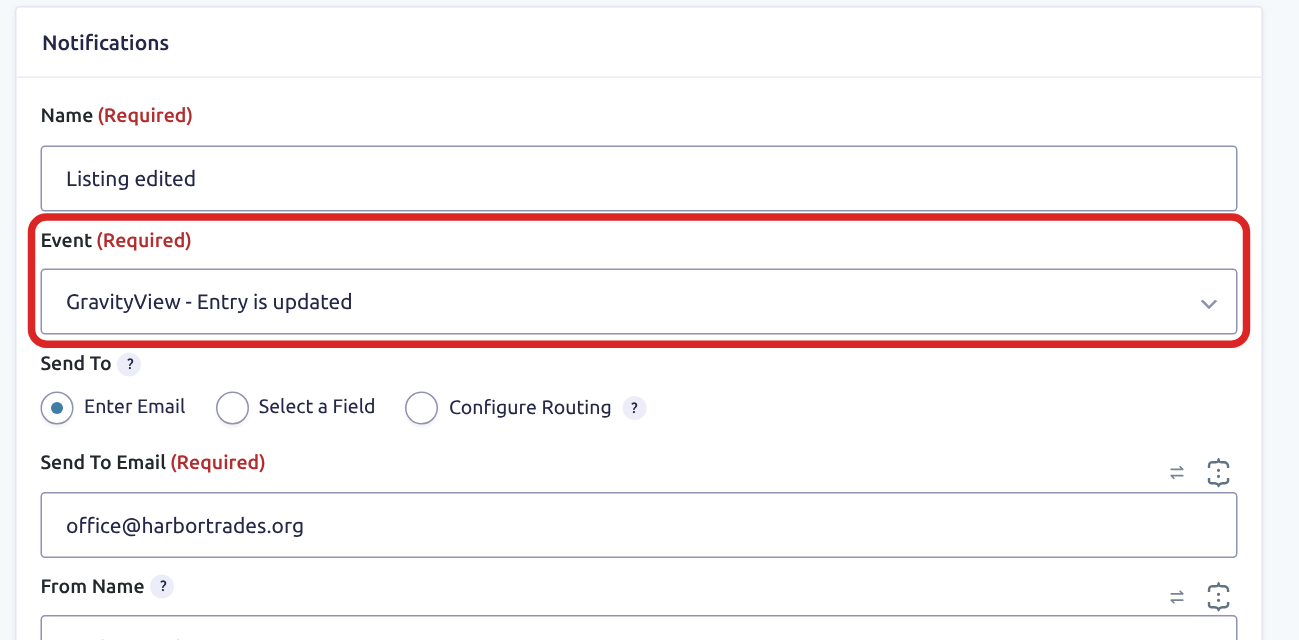
    1. Enter a Name and set Event to GravityView - Entry is updated.
    A notification named Listing edited, with its Event setting outlined and set to GravityView - Entry is updated
    1. Under Send To, enter an address, or choose Select a Field to use the form’s email field. Fill in the Subject and Message.
    2. Click Update Notification.

    To send only when a field holds a certain value, turn on Conditional Logic at the bottom of the notification. A rule such as Availability is Fully booked reads the values after the save, so it can’t tell whether the value changed. The last snippet on this page compares the two.

    Find the notification’s ID #

    Each snippet below names one notification, so your other notifications keep sending. On the Notifications page, click the notification’s name and look at the address in your browser. The ID is the value after nid=, which is 6a4f1c2d9e3c8 in this address:

    https://example.com/wp-admin/admin.php?page=gf_edit_forms&view=settings&subview=notification&id=12&nid=6a4f1c2d9e3c8

    Send the notification only when people edit their own entries #

    This snippet compares the logged-in user with the person who created the entry. An administrator or Editor who saves someone else’s entry sends nothing, and an administrator who saves an entry they created does send the notification.

    Someone who edits through a Magic Links link without logging in isn’t a logged-in user, so the snippet skips the notification for that edit, whether or not the entry has a creator.

    /**
     * Sends a notification only when a logged-in person edits an entry they created.
     *
     * @param bool  $is_disabled  Whether the notification is already disabled.
     * @param array $notification The notification being sent.
     * @param array $form         The form the notification belongs to.
     * @param array $entry        The entry that was edited.
     *
     * @return bool True to skip the notification.
     */
    add_filter( 'gform_disable_notification', function ( $is_disabled, $notification, $form, $entry ) {
        // Change this to your notification's ID.
        if ( 'abc123def456' !== rgar( $notification, 'id' ) ) {
            return $is_disabled;
        }
    
        $user_id = get_current_user_id();
    
        // Nobody is logged in, or the person saving the edit did not create this entry.
        if ( ! $user_id || (int) rgar( $entry, 'created_by' ) !== $user_id ) {
            return true;
        }
    
        return $is_disabled;
    }, 10, 4 );

    Note: To add this code to your site, follow Adding custom PHP code snippets to your website.

    To skip the notification for everyone who can moderate entries, use this version instead. It also skips an administrator’s edits to their own entries, and it still sends when someone with a custom role edits another person’s entry without being able to moderate it.

    /**
     * Skips a notification when the person saving the edit can moderate entries.
     *
     * @param bool  $is_disabled  Whether the notification is already disabled.
     * @param array $notification The notification being sent.
     *
     * @return bool True to skip the notification.
     */
    add_filter( 'gform_disable_notification', function ( $is_disabled, $notification ) {
        // Change this to your notification's ID.
        if ( 'abc123def456' !== rgar( $notification, 'id' ) ) {
            return $is_disabled;
        }
    
        return GVCommon::has_cap( 'gravityview_moderate_entries' ) ? true : $is_disabled;
    }, 10, 2 );

    Note: To add this code to your site, follow Adding custom PHP code snippets to your website.

    Skip the notification on a first submission #

    GravityView - Entry approval is reset fires on every new entry, because GravityView gives a new entry the Unapproved status when the form is submitted. On a form with the Approve/Reject field, GravityView - Entry is approved or GravityView - Entry is disapproved fires on submission too. The notification’s settings can’t tell a first submission from a later change, so this snippet checks whether the entry was created during the same page request.

    If someone edits an entry twice with no approval in between, the second edit doesn’t send GravityView - Entry approval is reset, because the status is already Unapproved.

    /**
     * Skips a notification when the entry was created during this request, which means it's a first submission.
     *
     * @param bool  $is_disabled  Whether the notification is already disabled.
     * @param array $notification The notification being sent.
     *
     * @return bool True to skip the notification.
     */
    add_filter( 'gform_disable_notification', function ( $is_disabled, $notification ) {
        // Change this to your notification's ID.
        if ( 'abc123def456' !== rgar( $notification, 'id' ) ) {
            return $is_disabled;
        }
    
        return did_action( 'gform_entry_created' ) ? true : $is_disabled;
    }, 10, 2 );

    Note: To add this code to your site, follow Adding custom PHP code snippets to your website.

    Skip the notification when a field didn’t change #

    Gravity Forms passes the entry as it was before the edit to its gform_after_update_entry action. This snippet compares the field you choose in that copy with the saved entry. If they match, it skips the notification with gform_disable_notification.

    Set $form_id to your form’s ID, and $field_id to the ID that the form editor shows at the top of Field Settings when you click the field.
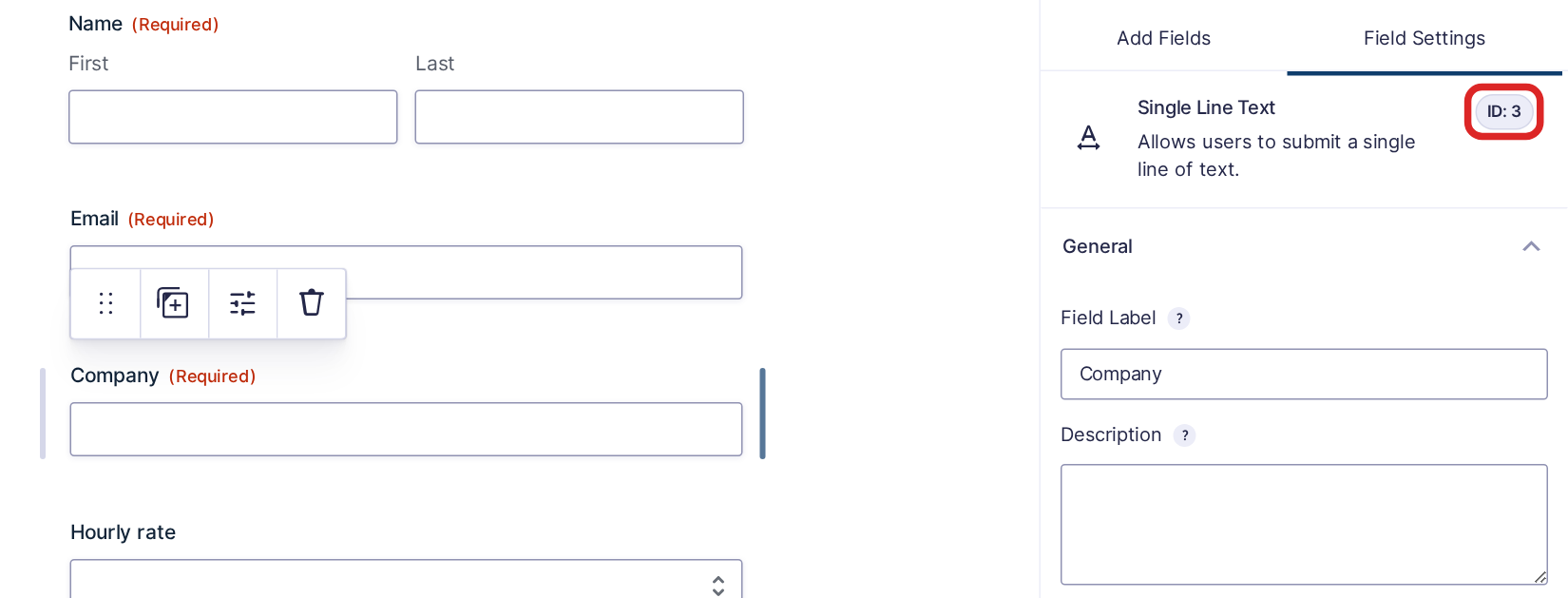
    The form editor with the Company field selected and its ID, 3, outlined at the top of Field Settings

    Name, Address, and Checkboxes fields store one value per input. Use the main ID, such as 3, and the snippet compares them all. In a File Upload field, removing a file is a change too, and so is adding or replacing one.

    These cases affect the result:

    • A field that isn’t on the View’s Edit Entry layout can’t change, so the notification never goes out.
    • If conditional logic hides the field during the edit, GravityView clears its value. That counts as a change, and the notification goes out.
    • An entry created through the Gravity Forms API can have values rewritten the first time someone saves it. A Phone field’s 5035550134 becomes (503) 555-0134, a Number field’s 1,200.50 becomes 1200.50, and an Address field’s United States becomes US. Line breaks and rich text can change too. The snippet treats each of these as a change once, even if nobody touched the field.
    /**
     * Skips a notification when an edit leaves the watched field as it was.
     *
     * Name, Address, and Checkboxes fields store one value per input (3.1, 3.2), so the code compares them all.
     *
     * @param array $form           The form the entry belongs to.
     * @param int   $entry_id       The ID of the entry that was edited.
     * @param array $original_entry The entry as it was before the edit.
     */
    add_action( 'gform_after_update_entry', function ( $form, $entry_id, $original_entry ) {
        // Change these to your form's ID, your field's ID, and your notification's ID.
        $form_id         = 100;
        $field_id        = '3';
        $notification_id = 'abc123def456';
    
        if ( $form_id !== (int) rgar( $form, 'id' ) ) {
            return;
        }
    
        $get_values = function ( $entry ) use ( $field_id ) {
            $values = array();
    
            foreach ( $entry as $key => $value ) {
                if ( (string) $key === $field_id || 0 === strpos( (string) $key, $field_id . '.' ) ) {
                    $values[ (string) $key ] = (string) $value;
                }
            }
    
            ksort( $values );
    
            return $values;
        };
    
        // The watched field changed, so the notification goes out as usual.
        if ( $get_values( $original_entry ) !== $get_values( GFAPI::get_entry( $entry_id ) ) ) {
            return;
        }
    
        // Skip the notification for this entry only.
        add_filter( 'gform_disable_notification', function ( $is_disabled, $notification, $notification_form, $entry ) use ( $entry_id, $notification_id ) {
            if ( $notification_id === rgar( $notification, 'id' ) && (int) $entry_id === (int) rgar( $entry, 'id' ) ) {
                return true;
            }
    
            return $is_disabled;
        }, 10, 4 );
    }, 10, 3 );

    Note: To add this code to your site, follow Adding custom PHP code snippets to your website.

    The snippet also works on a notification that uses GravityRevisions - Entry is updated, revision is saved.

    If you adapt this code, keep using the action’s copy of the entry. A GFAPI::get_entry() call in gravityview/edit_entry/before_update runs after GravityView has removed any deleted file, so a removed file would compare as unchanged.

    Still stuck? How can we help?

    How can we help?

    "*" indicates required fields

    This field is for validation purposes and should be left unchanged.
    Replies will go to this email.
    How can we help?*
    My pre-sale question is related to...*
    My WordPress skills are....*
    My Gravity Forms skills are...*
    You will be shown articles from our documentation.
    Vous pouvez nous écrire dans votre langue maternelle si c’est plus facile pour vous—nous nous occuperons de la traduction!
    Puedes escribirnos en tu idioma nativo si te resulta más fácil; ¡nosotros nos encargamos de la traducción!
    Sie können uns in Ihrer Muttersprache schreiben, wenn das für Sie einfacher ist – wir kümmern uns um die Übersetzung!
    U kunt ons in uw moedertaal schrijven als dat gemakkelijker voor u is — wij zorgen voor de vertaling!
    Du kan skrive til oss på ditt morsmål hvis det er enklere for deg — vi tar oss av oversettelsen!
    Du kan skriva till oss på ditt modersmål om det är lättare för dig — vi tar hand om översättningen!
    Você pode nos escrever em seu idioma nativo se for mais fácil para você — nós cuidaremos da tradução!
    Puoi scriverci nella tua lingua madre se ti è più facile — penseremo noi alla traduzione!
    Please provide as much detail as you're able; this helps us provide you with faster support.
    Drop files here or
    Accepted file types: jpg, jpeg, gif, png, tiff, pdf, bmp, zip, json, csv, xls, xlsx, Max. file size: 256 MB.
      Get better at Gravity Forms every Friday

      Was this page helpful?

      Table Of Contents
      • Choose the event
      • Add the notification
      • Find the notification’s ID
      • Send the notification only when people edit their own entries
      • Skip the notification on a first submission
      • Skip the notification when a field didn’t change
      GravityKit
      • How to Build It
      • GravityKit vs competitors
      • Pricing
      • Products
      • Our Team
      • Our Values
      • Work With Us
      • Partner Directory
      • Coupons
      Support
      • Support
      • Contact
      • Documentation
      • Scope of Support
      • Brand Guidelines
      • Brand Kit
      • Privacy Policy
      • Terms of Service (“Terms”)
      I am a...
      • Nonprofit
      • Web agency
      • Small business owner
      • Web developer
      • Educational institution
      • WordPress freelancer
      • Startup founder
      • One-person agency
      Get notified of updates.

      We’re constantly improving GravityKit. Fill out your email below and we’ll notify you anytime major updates drop.

      See past editions
      • Facebook
      • Twitter
      • Mastodon
      GravityKit is a Gravity Forms Certified Developer.

      Copyright © 2026, Katz Web Services, Inc.

      GravityKit and GravityView are registered trademarks of Katz Web Services, Inc.