

Published
•
Updated
Launch Log: Lookup fields that filter each other, a Clear link for each Live Filter, and more
Dynamic Lookup fields that filter each other, a Clear link for each Live Filter, Edit Window closed text, and security fixes across GravityView and more.


This week, Dynamic Lookup fields can now narrow each other’s choices, and GravityView Pro sees a Clear link on each Live Filters filter, a closed-editing text for Edit Window, and Vantage styling for Ratings & Reviews. GravityView, GravityBoard, GravityCalendar, GravityExport, Entry Tags, the Maps feature, and the Gravity Forms Widget for Elementor also get security and privacy fixes, so we recommend updating.
Gravity Forms Dynamic Lookup v1.13.0
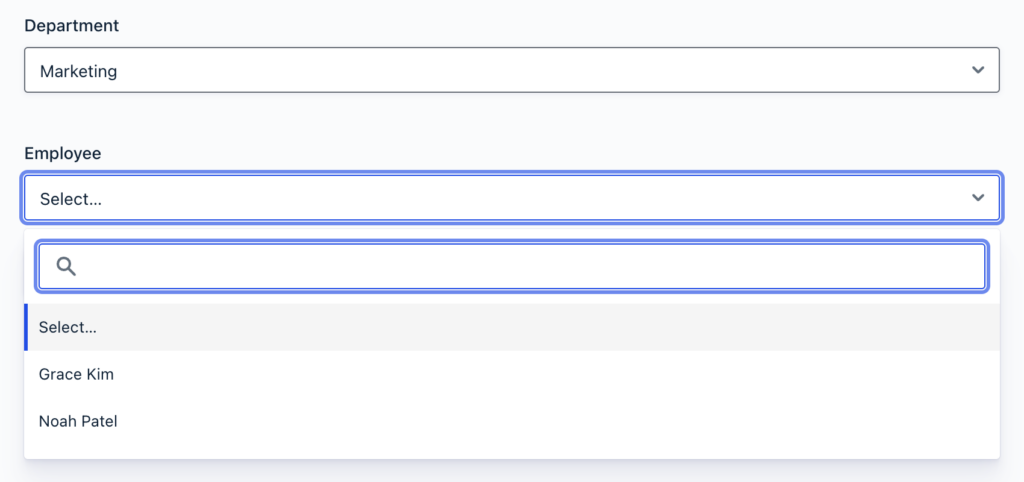
This update to Gravity Forms Dynamic Lookup lets one Lookup field narrow another’s choices. Filter by Field can now match a Lookup field on the same form, so a Department Lookup field can limit an Employee Lookup field to the people in that department. Only Lookup fields that allow a single selection are offered under “Value from This Form’s Field”.
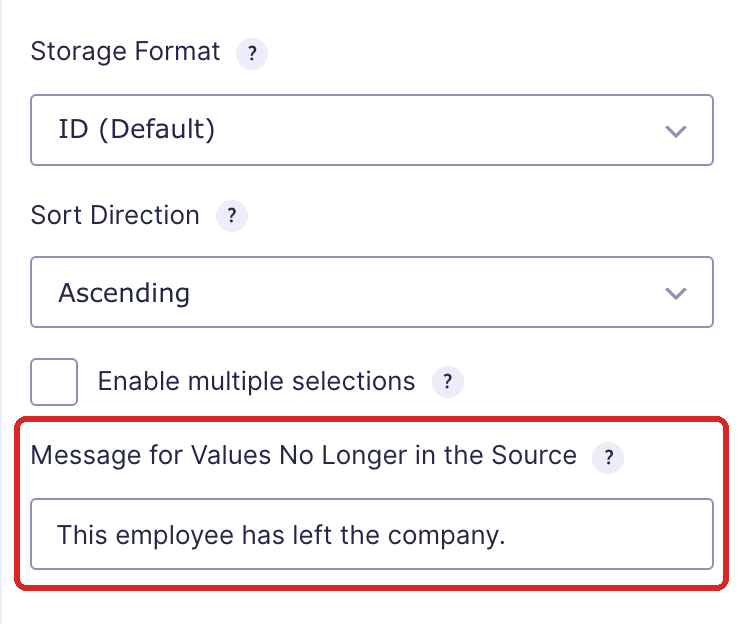
Lookup fields also have a new “Message for Values No Longer in the Source” setting. While an entry is edited, it shows your message when the saved value is gone from the source, such as a source entry moved to the trash.
More fixes in v1.13.0
Dropdown Lookup fields that allow multiple selections and use the enhanced user interface show the field’s “Placeholder” text instead of “Select Some Options”, and no longer show the Filter by Field hint as a selected choice. While an entry is edited, a Lookup field that stores text no longer lists a saved value with a character such as & twice in its choices.
Gravity Forms Entry Tags v1.5.2
This update to Gravity Forms Entry Tags improves security when Entry Tags processes merge tags, so we recommend updating. The form editor also keeps Entry Tags fields out of Repeater fields, where they couldn’t save new tags, apply default tags, or show in merge tags.
Gravity Forms Widget for Elementor v1.2.1
This update to the Gravity Forms Widget for Elementor fixes a privacy issue, so we recommend updating. Saving a page with the Gravity Forms widget in Elementor stored a copy of the form with the page, including default values filled in for the person saving it, such as their email address. After you update, open those pages in Elementor and save them again to replace the stored copy.
GravityBoard v1.8.0
This update to GravityBoard includes a security fix that changes how conditions with a user merge tag treat visitors who aren’t logged in, so we recommend updating. A condition such as Assigned to is {user:ID} treated those visitors as having an empty value and showed them cards they shouldn’t see. They now see no cards, whatever the operator. To show them cards again, add an OR condition that matches an empty Assigned to field.
When a caching or optimization plugin stops a WordPress script a board needs, the board now explains what went wrong and how to fix it, instead of showing “Unable to load board data” and a technical error. Boards also load again for logged-out visitors on sites running WordPress 7 or newer with WP Rocket’s “Load JavaScript deferred” or “Delay JavaScript execution” turned on.
More fixes in v1.8.0
Conditions on an Event field’s dates now offer a custom value and relative dates such as Today and Tomorrow alongside the calendar. Conditions on the value 0, such as Amount is 0, no longer treat 0 as empty, so they stop matching entries where the field is empty.
Other fixes:
- The board settings page no longer shows an error when the form has a Dynamic Lookup field on Dynamic Lookup older than 1.2.0, or a Drop Down, Radio Buttons, Checkboxes, or Multi Select field with no choices
- In the card window, the Delete button, the “View in Gravity Forms” link, and error messages, including checklist errors, are easier to read
- Pages with a form but no board no longer load GravityBoard stylesheets and an admin-only script
GravityCalendar v2.27.0
This update to GravityCalendar includes a security fix for calendar conditions that use a user merge tag, so we recommend updating. A condition such as Assigned to is {user:ID} treated visitors who aren’t logged in as having an empty value and showed them events they shouldn’t see. They now see no events, whatever the operator, unless you add an OR condition that matches an empty Assigned to field.
Event text is easier to read on the default blue and other event colors, and pale event dots stand out more against the calendar. Calendar apps such as Google Calendar that subscribe to a calendar now pick up an event moved to an earlier date, instead of keeping it at its old date.
More fixes in v2.27.0
Conditional logic sees several improvements. Conditions on an Event field’s dates offer a custom value and relative dates such as Today and Tomorrow, and conditions on the value 0 no longer treat 0 as empty. The has any of, has all of, and has none of conditions work with Dynamic Lookup fields that allow multiple selections without the enhanced user interface, and with Multi Select choices that contain a comma, such as “Paris, France”.
The calendar settings page no longer shows an error when the form has a Name field saved without its sub-fields, a Dynamic Lookup field on Dynamic Lookup older than 1.2.0, or a Drop Down, Radio Buttons, Checkboxes, or Multi Select field with no choices. Moving or resizing an event on the calendar also updates the entry’s last updated date.
GravityEdit v2.13.4
This update to GravityEdit fixes wrong totals after inline edits. Inline edits left values in Number fields with a calculation that conditional logic hid for the entry, so totals that included those fields were off.
GravityExport v1.20.0
This update to GravityExport fixes a critical error on every page of sites running Elementor, or another plugin with its own private class loader, while GravityExport Lite was inactive or older than 2.1.0.
Conditional logic in export filters also changes for visitors who aren’t logged in. A condition with a user merge tag, such as Manager email is {user:user_email}, now exports no entries for them, whatever the operator. Before, the export included the entries where that field was empty. To export those entries again, add an OR condition that matches the empty field.
More fixes in v1.20.0
Conditions on an Event field’s dates offer Today, Tomorrow, and the other relative dates, or a custom value. Conditions on the value 0 no longer treat 0 as empty, and greater than and less than conditions no longer match entries where the field is empty. The export filter settings open again when the form has a Dynamic Lookup field on Dynamic Lookup older than 1.2.0, or a Drop Down, Radio, Checkboxes, or Multi Select field with no choices.
Saving GravityKit settings no longer adds a stray entry to the saved settings in the database.
GravityMath v2.14.2
This update to GravityMath fixes three calculation issues. In a GravityView Custom Content field, an entry calculation with an id shows its result again when the formula uses a merge tag that Gravity Forms or an add-on fills, such as the Quiz Add-On’s {quiz_score} or {entry_id}.
Totals with a filter on a Dynamic Lookup field that allows multiple selections and stores IDs are correct now (this needs Dynamic Lookup 1.11.0 or newer). scope="visible" totals with a filter also count the right entries when the shortcode’s & was saved as &.
GravityRevisions v1.9.1
This update to GravityRevisions raises the requirements: GravityRevisions now needs PHP 7.4 and WordPress 6.5 or newer. It also fixes missing revisions for GravityEdit inline edits. Until the “Save Revisions” setting had been saved once, inline edits created no revisions and sent no revision notifications, even though the setting showed as on.
More fixes in v1.9.1
A form’s “Inline Edit Behavior” setting now shows its choice before “Save Revisions” has been saved. While GravityEdit is inactive, a form’s settings show “Enable Entry Revisions” and leave out “Inline Edit Behavior” as they should. On sites updated from GravityRevisions 1.2.10 or earlier, the old “Default Inline Edit Behavior” choice is copied to “Save Revisions” even when other GravityEdit settings were already saved.
Restoring an entry revision now sets the entry’s last updated date to the time of the restore.
GravityView v3.13.0 and v3.14.0
These updates to GravityView shipped on November 16 and November 19. Version 3.14.0 improves security when merge tag modifiers process field values, so we recommend updating.
Links in a View’s error messages and notices, such as “Change this setting”, “Enable REST API access”, and “Enable CSV export”, now open the View editor at the setting they name, ready to change. The “Build your first View” guided tour has a new step that explains the “Show only approved entries” setting.
With Gravity Forms 3.2.3 or newer, merge tags in Views work as before again: :urlencode encodes values once, and entry merge tags such as {entry_id} fill in Layout Builder row CSS classes and IDs.
More fixes and developer updates in v3.13.0 and v3.14.0
With Gravity Forms 3.2.3 or newer, links built from :urlencode merge tags carried %2526 instead of %26, and a modifier written before it, such as :ucwords, did nothing. The :formatted modifier on an international Phone field shows the phone number instead of the stored data, in Views and in Gravity Forms notifications.
On Views with Prevent Direct Access turned on, Edit Entry saves again when the form has a User Registration feed and uses GP Multi-Page Navigation (Gravity Wiz), instead of showing “This email address is already registered”.
Entry links and the lightbox see three fixes. On a block theme with Yoast SEO active, lightbox links on a View’s own page open in the lightbox instead of the whole tab. A Link to Edit Entry or Link to Single Entry field saved without link text shows “Edit Entry” or “View Details” in the lightbox instead of an empty link. On a View that joins forms, Link to Edit Entry, Delete Entry, and Duplicate Entry fields for a joined form show for people who can change only that form’s entries.
The Vantage theme sees several layout fixes. On phones, Layout Builder Views stack their columns instead of pushing them past the edge of each entry. On a Table or DataTables Single Entry page, a Section field shows as a heading for the fields below it, and a Section field at the top no longer squeezes the other values into a narrow column. In a narrow Table column, the sort icon sits beside the column label, and rows on a Table Single Entry page line up on phones.
On embedded Views, the Search Operator setting works with several values: In lists matching entries on Number and Multi Select fields, and Not In and Is Not on a Multi Select field leave out entries holding the value.
Other fixes:
- The Gravity Forms widget‘s “Field value parameters” setting fills form fields
- On a page that shows a View, the Recent Entries widget includes the last entry the View lists
- A View in GravityView’s Elementor widget or Beaver Builder module loads its scripts and styles once, so a DataTables View no longer shows its search box, length menu, and pager twice
- Pages with GravityView’s Elementor widgets no longer load more slowly the more Views the site has
- On WordPress 6.9 or newer with a classic theme, front-end pages load styles only for the blocks on the page
- Opening a page or post in the editor no longer logs “Cannot read properties of undefined (reading ‘some’)” on sites with at least one View
- Field settings in the View editor show the “Field Details” toggle (field ID, type, and form) again
- The “Build your first View” and “See how it works” tours name the View editor’s buttons as they appear, no longer cover the Publish box, and handle forms with no approved entries
- Screen readers read the label of the search box in the Add Field and Add Filter pickers
- PHP 8.5 no longer logs a deprecation notice when the View editor shows widgets, and GravityView logging no longer warns when another plugin passes data that refers back to itself
Developer updates
- Added the
gk/gravityview/onboarding/pro-news/itemsfilter to change GravityView Pro’s cards in “What’s new in GravityView Pro” on GravityKit, then Welcome. - Added the
gk/gravityview/view/embed-state/denialfilter, so an integration such as Dashboard Views can open a View with “Prevent Direct Access” on for lightbox, DataTables, and map info window requests from its own screen. - Added the
gk/gravityview/admin-views/area/clear-all-labelfilter to change the label of an area’s “Clear all fields” link in the View editor. - The
gk/gravityview/compatibility/block-assets-on-demandfilter now defaults tofalse, so WordPress’s on-demand block style loading stays on. Returntrueto turn it off on WordPress 6.9 or newer, as before. - An embedded View’s
Insearch with several values on a Number or Multi Select field, and itsNot In,Is Not, and<>searches on a Multi Select field, are now added to the View’s query as their own condition. They no longer appear in thefield_filterspassed to thegravityview_search_criteria,gravityview_get_entries, andgravityview_search_operatorfilters or the deprecatedgravityview_before_get_entriesfilter.
GravityView Pro v3.13.0 and v3.14.0
These updates to GravityView Pro make the plugin about 12 MB smaller to download, and it uses about 44 MB less disk space. They also fix slower page loads on sites running GravityView Pro alongside many other GravityKit products. On the GravityView Pro Features page, screen readers say which feature each “Turn on” and “Turn off” button changes, and the page no longer scrolls sideways on phones.
If you still use the separate extension plugins, these changes are in A-Z Filters 1.4.4, Advanced Elementor Widget 1.2.1, Dashboard Views 2.1.0, Featured Entries 3.2.0, Magic Links 1.3.1, Maps 3.14.0, Ratings & Reviews 2.6.3, and Social Sharing & SEO 3.5.2.
A-Z Filters
The A-Z Filters feature loads its stylesheet only on pages that show the A-Z Entry Filter widget, instead of on every page of the site.
Advanced Elementor Widget
The Advanced Elementor Widget feature fixes pages with the GravityView widget loading more slowly the more Views the site has.
Connected Views
The Connected Views feature can now be translated into other languages. Opening a View in the View editor no longer runs out of memory when an SEO plugin, such as All in One SEO Pro, makes that View the current post. The Connect to another View dialog also stops saying “View View” when a View’s title ends in “View”.
Dashboard Views
The Dashboard Views feature speeds up front-end pages, REST requests, and scheduled tasks on sites with many Views. In the Dashboard, users with roles such as Author can open entries in the lightbox, and DataTables Views list their entries, when the View has Prevent Direct Access turned on. That fix needs GravityView 3.14.0 or newer.
Edit Window
The Edit Window feature adds a “Text when editing has closed” setting to the Link to Edit Entry field. Once the Edit Window has closed for a person, they see your short text, such as “Editing closed”, in place of the link. Adding Edit Window to a View covers the setting.
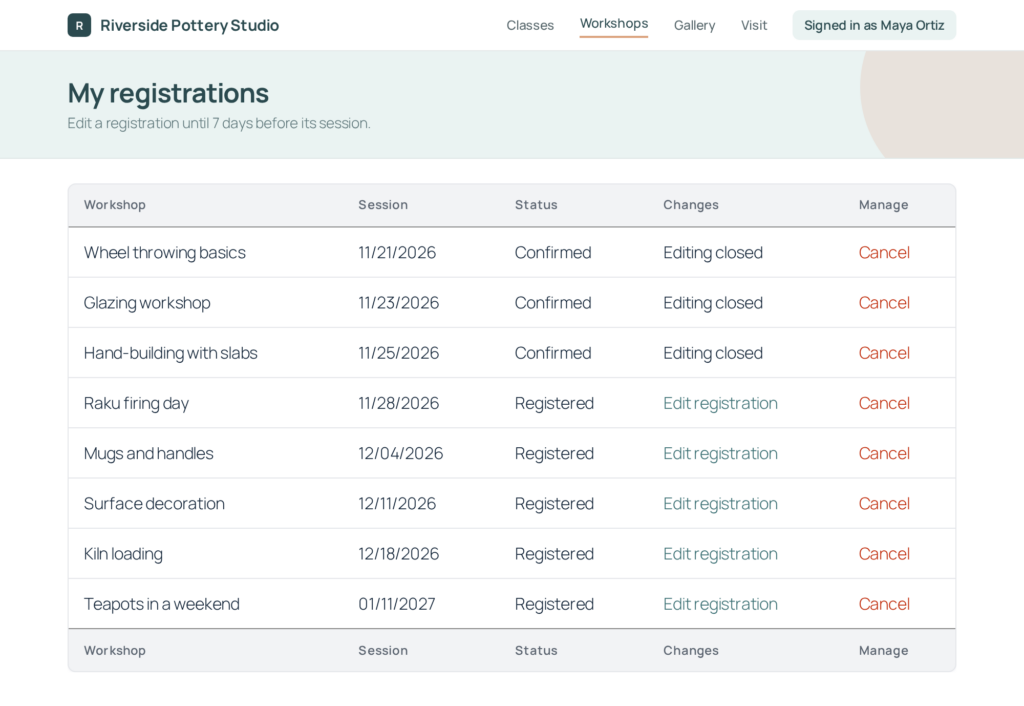
After a deadline passes, the Edit Entry page and Delete links also show a notice that the deadline has passed, instead of an error.
Featured Entries
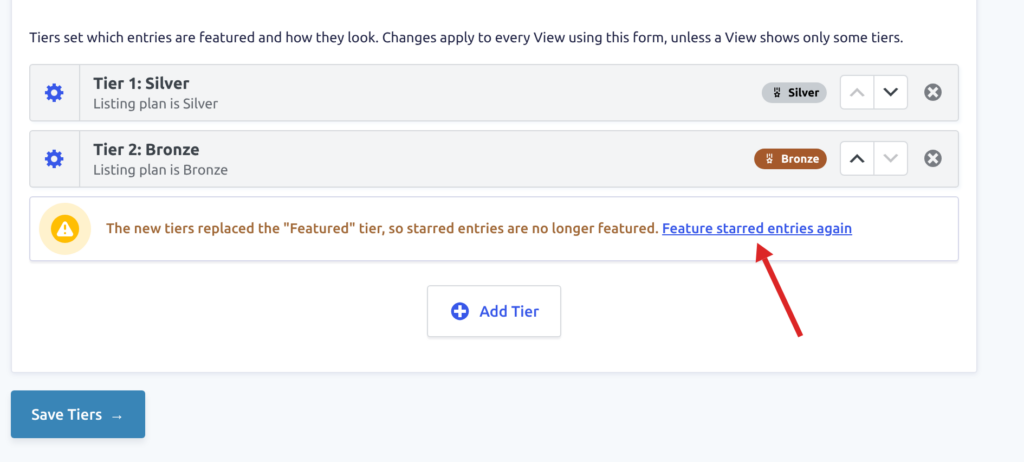
The Featured Entries feature makes Featured Tiers easier to set up. A View’s Featured Entries tab shows the form’s tiers as soon as you choose the View’s form, before the View is saved, and the Featured Tiers page links to creating a View when no View uses the form. Creating tiers from a field’s choices now asks whether to keep featuring starred entries, with a way to bring the starred-entries tier back if the new tiers replace it.
For paid featured spots, “Tiers from an order form” explains what the order form needs. A paid tier’s settings warn you when buyers can choose any entry on the order form, or when the order form has no active payment feed to mark its orders Paid. New tiers also start with different row or card colors, instead of pale yellow for all of them.
More Featured Entries fixes
The badge icon picker’s “All icons” list shows its icons again, suggested icons show their pictures, and “Color”, “Current choice”, and “Remove” are translated on sites in other languages. The icon list also opens faster.
Other fixes:
- On Views that combine forms, “Only show featured entries” on the Recent Entries widget includes entries featured by the other forms’ tiers
- After you choose another form for a View, the Featured Entries tab shows that form’s tiers
- With “Only these tiers” chosen, the help text no longer says tiers added later are included
- Clicking “Add the Featured Badge field” no longer opens GravityView’s Add Field menu or makes the page jump
- Saving tiers warns you when HTML tags were removed from a tier name or badge text
- Badge text no longer breaks mid-word in narrow table columns, and a tier’s conditions stay inside the dialog on phones
Live Filters
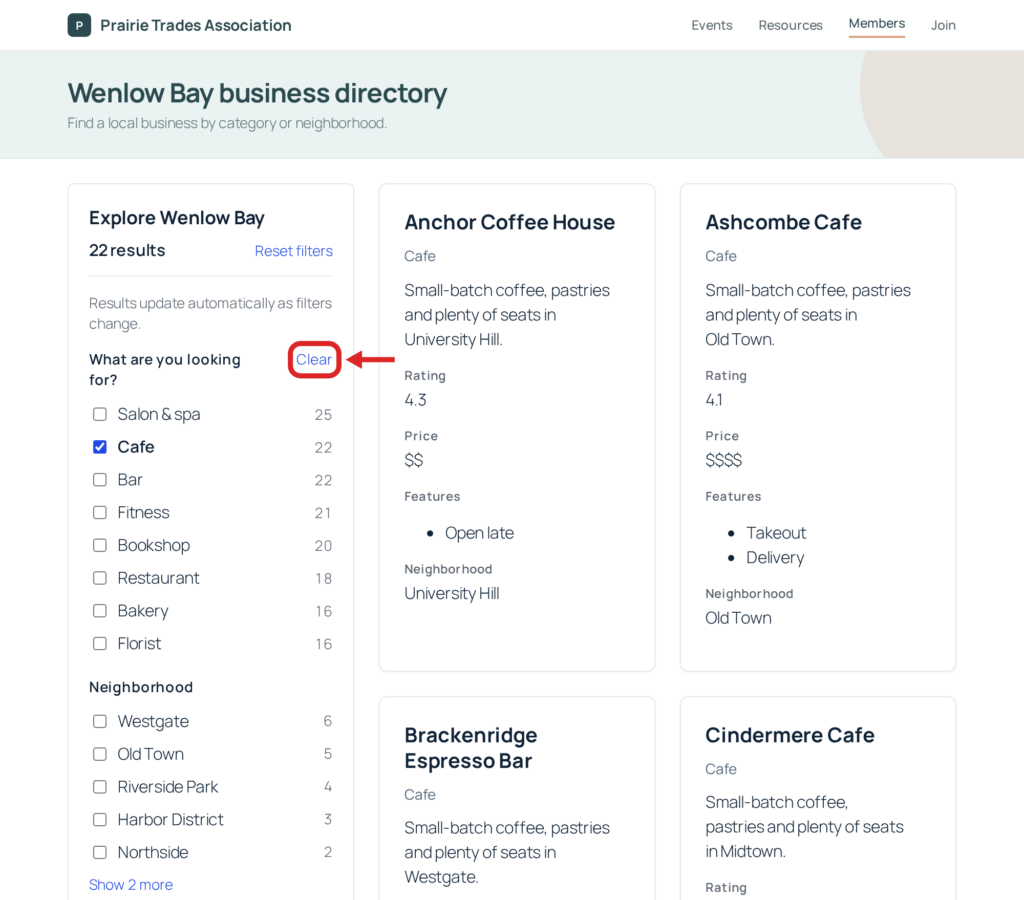
The Live Filters feature adds a Clear link next to each filter’s heading while that filter has a selection. Clear empties that one filter and keeps the others. It’s on for new filters, and you can turn it off with the “Show a link to clear this filter” setting, as adding Live Filters to a View explains.
More Live Filters fixes
A filter for an Entry Tags field lists its tags instead of “No matching options”, and a filter’s settings no longer show a “Default Value” setting that had no effect. In the View editor, the Live Filters area’s link to remove every filter reads “Clear all filters”.
The Searchable dropdown is translated on sites in other languages, including its “Show choices” button. Screen readers announce it by the filter’s name instead of its placeholder, announce values as they are picked or removed, and include Searchable dropdown, Date, and Date range filters in their list of headings.
Magic Links
The Magic Links feature no longer logs a deprecation notice on every page load on PHP 8.4 and newer.
Maps
The Maps feature improves access checks on map markers and info windows, so they include only entries that visitors can see in the View on the page that shows it. We recommend updating.
Places on the map, such as businesses, open their details when clicked inside the circle a radius search draws. Pages that show no map also load faster with Maps turned on.
Ratings & Reviews
The Ratings & Reviews feature now matches the Vantage theme. Stars take the theme’s color, reviews show as a card with the review count and average rating in its header, and the review form uses the theme’s fields and button.
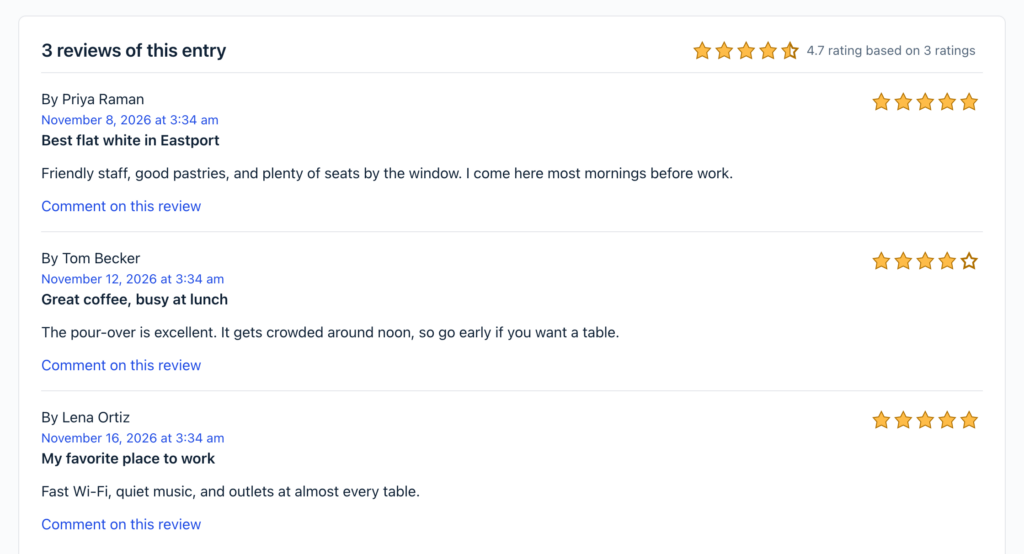
The {gv_entry_ratings:review_count}, {gv_entry_ratings:empty_star}, and {gv_entry_ratings:neutral_votes} rating merge tags no longer count comments on reviews, such as an admin’s reply, as reviews without a rating. Rating totals saved on affected entries are recalculated automatically after you update.
More Ratings & Reviews fixes
PHP warnings and notices are no longer logged on PHP 8.3 and newer for an entry with a review that has no rating, on every page load on PHP 8.5, when adding a GravityView widget to a page in the Elementor editor, or when opening the Edit Comment screen for a deleted comment.
Social Sharing & SEO
The Social Sharing & SEO feature no longer adds a PHP warning to the debug log when you open the View editor with Yoast SEO 28.8.
How to update
We recommend keeping all your GravityKit products up to date, so they stay compatible with each other and you get every new feature and fix, security patches included. You can update them from your WordPress dashboard:
- In your WordPress dashboard, hover over the GravityKit menu and click Manage Your Kit.
- Scroll past your licenses to the list of products, then click the Update Available filter to see the products with a new version. Their version numbers show in red.
- Click Update on each product.
Updates need an active license on the site.
For the full guide, read installing, activating, and updating GravityKit plugins.

Get better at Gravity Forms, one email a week
New GravityKit releases, practical Gravity Forms tutorials, and subscriber-only discounts. One short email every week, unsubscribe anytime.
More articles

Launch Log: Lookup fields that filter each other, a Clear link for each Live Filter, and more
Dynamic Lookup fields that filter each other, a Clear link for each Live Filter, Edit Window closed text, and security fixes across GravityView and more.

Black Friday is coming: 25% off GravityView Pro, All Access and Lifetime
Our Black Friday sale runs November 23 to December 1, with 25% off GravityView Pro, the All Access Pass, and Lifetime. Join the list to get in four days early.

Launch Log: GravityView Pro, paid featured tiers, and a “Pages with this View” menu
GravityView Pro arrives with paid and ranked Featured Tiers, GravityView adds a Pages with this View menu and Welcome page, plus several security fixes.