
Published
•
Updated
Launch Log: GravityView Pro, paid featured tiers, and a “Pages with this View” menu
GravityView Pro arrives with paid and ranked Featured Tiers, GravityView adds a Pages with this View menu and Welcome page, plus several security fixes.


This week’s releases include the new GravityView Pro with Live Filters, Connected Views, Edit Window, and ranked and paid Featured Tiers, plus a “Pages with this View” menu and Welcome page for every GravityView user. GravityView and the Advanced Filtering and Ratings & Reviews features in GravityView Pro also get security fixes, so we recommend updating.
Gravity Forms Dynamic Lookup v1.12.0
This update to Gravity Forms Dynamic Lookup lets a Lookup field use its own form as the Source Form. In a staff directory, for example, each employee can pick their manager from the same form they fill in. The Dynamic Lookup getting started guide covers choosing a Source Form and Source Field.
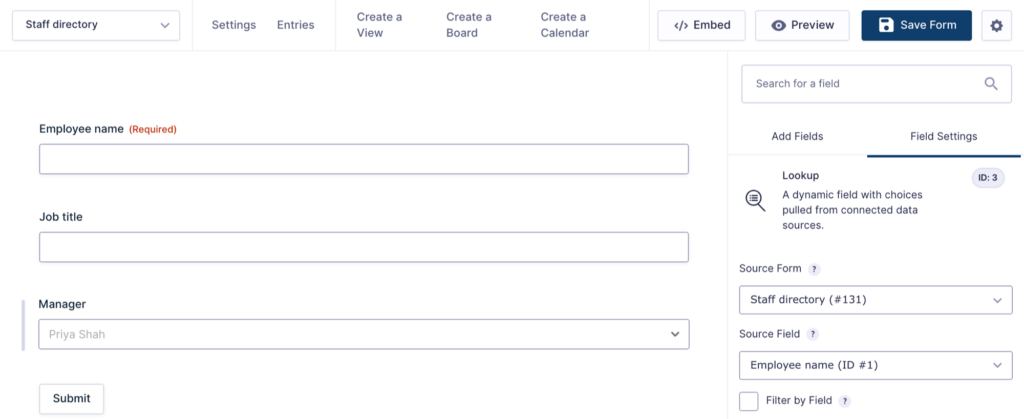
It also fixes a critical error on forms whose checkbox Lookup field pointed at a form with a checkbox Lookup field pointing back.
More fixes and developer updates in v1.12.0
Lookup fields using Filter by Field show their choices again when the source form’s matching field holds several values, such as a Multi Select field or a Lookup field that allows multiple selections. The Source Field list no longer offers fields inside a Repeater, which left the Lookup field with no choices, and adding an entry through the Gravity Forms API no longer logs a PHP warning when a checkbox Lookup field’s source form has no entries yet.
Developer updates
- Added the
Field::stores_list()method to check whether a field stores multiple values as a single comma-separated string.
GravityMigrate v2.2.1
This update to GravityMigrate turns away a GravityMigrate file that’s larger than the site accepts for upload as soon as you add it, with a message that gives the limit. Before, the upload ended with only “Error during upload”. Migrating a large site covers the other limits a big migration can run into.
The password prompt for a password-protected GravityMigrate file also no longer stays on “Checking…” when the file is damaged. It now says the file could not be read, and checking the password of a large file is faster.
GravityView v3.12.0
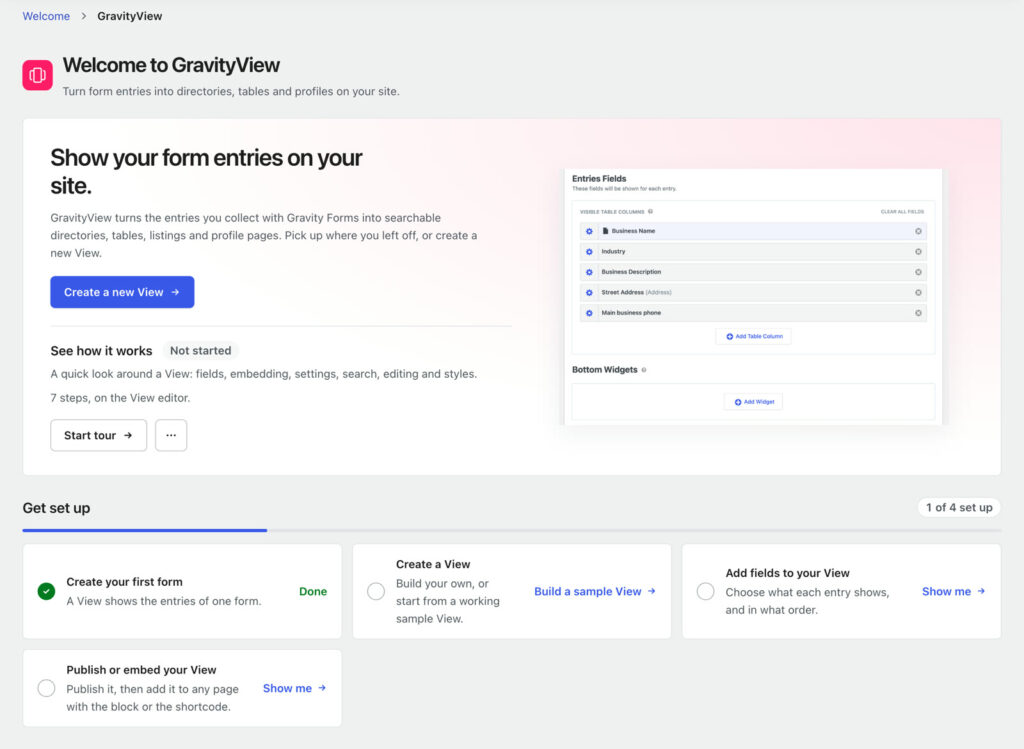
This update to GravityView adds a Welcome page under GravityKit, then Welcome, for every GravityView user, with or without Pro. It replaces the Getting Started page and opens after activation, with a “Get set up” checklist, courses and guides, and a one-click sample View for sites with no Views yet. The View editor also has two guided tours: “Build your first View”, offered on the New View screen, and “See how it works”, a tour of a finished View with a short clip for each step.
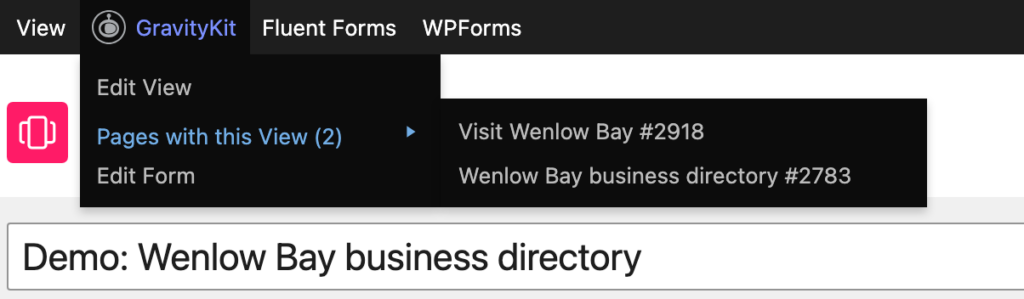
To see where a View is used, open the new “Pages with this View” submenu in the GravityKit toolbar menu, from the View editor or from any page that shows the View. It links to every published page that shows the View, page builder pages included, and needs WordPress 6.9 or newer.
New Views now start with Enhanced Security turned on, so they display only through a block or shortcode that includes the View’s secret. The block picker and the shortcode in the Publish box add the secret for you, and existing Views keep their current setting.
This release has two security fixes, so we recommend updating. Saving a page with a GravityView widget in Elementor or Beaver Builder stored a copy of the View with the page, as the person saving it saw the View. After you update, save those pages again in the builder to replace the stored copy. The [gvlogic] shortcode with logged_in and no if also showed its [else] content to everyone when Entry Tags 1.5.1 or GravityCharts 1.2 to 1.23.1 was active. Edit Entry saves new files in Multi-File Upload fields again on Views with Prevent Direct Access turned on.
More fixes and developer updates in v3.12.0 (includes a breaking change)
On the Edit Entry page of Views with Prevent Direct Access turned on, for users who can't see private Views (such as Subscribers), a file added to an empty Multi-File Upload field was not saved even though "Entry Updated." appeared. A required field also showed "This field is required." and blocked the save. Multi-page forms on the same screen no longer move to the next page when a field on the current page has an error.
Since GravityView 2.29, pages loaded more slowly on sites with a permalink base such as /blog/%postname%/, Plain permalinks, Polylang showing the language code in every URL, an Entry Endpoint with capital letters, or Gravity Forms deactivated, because permalink rules were rebuilt on every page load. That no longer happens.
In Views that combine forms with Multiple Forms, entries are sorted in the right order when one form lacks the field the View sorts by and another plugin adds its own sort, and Views sorted by a Time field show their entries again.
Views built or edited by AI agents through the GravityKit MCP server keep their field settings, such as a Custom Content field's text, including when several fields or widgets change at once. Setting "Sort by field" to a form field is no longer rejected.
Other fixes:
- Single Entry and Edit Entry pages no longer show an error on sites with a View in an Elementor widget and a theme that adds custom fonts to Elementor, such as BuddyBoss Theme (since GravityView 3.8.0)
- Saving a View whose layout is inactive, such as a Map View while Maps is deactivated, no longer erases its layout, fields, and widgets
- Shortcodes in the "No Entries Message" and "No Search Results Text" settings run instead of showing as typed when the View is embedded with its shortcode, in a block theme's template part, or when results update without reloading the page
- Activating GravityView opens its page in GravityKit, then Welcome, instead of sometimes staying on the Plugins screen
- In the View editor, a field's gear button and settings window are named after the field's Label instead of the form field
- Screen readers announce the button that expands a field's settings in the View editor by name instead of "undefined"
Developer updates
- Breaking change: the
gk-gravityview/view-settings-patchandgk-gravityview/view-config-applyabilities now save nothing when any setting is rejected, and list every rejected template setting underdata.errors. A dotted setting for an inactive add-on (such asdatatables.responsivewithout DataTables), an add-on name whose value is not an object (such as"maps": null), a setting name that is empty once sanitized, or an empty or nested item in a list of choices (such as"sort_direction": ["ASC", null]) returns a 400 error instead of being skipped while the rest was saved. - An add-on setting sent to those abilities as the dotted slug the schema returns, such as
maps.map_type, is now saved to that add-on's settings, and settings are validated when the abilities run from WP-CLI or cron. - Added the
GravityKit\GravityView\View\ViewPagesclass, whoseget()method returns the published pages that show a View and whether the search stopped at its limit, and thegk-gravityview/view-pages-getability. - Added the
gk/gravityview/view/pages/max-pages(default 500),gk/gravityview/view/pages/post-types, andgk/gravityview/view/pages/content-meta-markersfilters to control how pages that show a View are found. - Added
View::shows_on(), which checks whether an embed read from a post shows the View rather than a count. - Added the
gk/gravityview/view/secure-embed-defaultfilter; returnfalseto start new Views with "Enable Enhanced Security" off, without affecting saved Views. - Added the
gk/gravityview/rest/template-settings/view-schemafilter to modify a template setting's schema for the View being written to on the Abilities and REST write path. - Added the
gk/gravityview/features/field-typesfilter to change the form field types a GravityView Pro feature adds. - Added the
gk/gravityview/deactivation/warningfilter to add plain text to the GravityView deactivation dialog. - GravityView Pro: added the
gk/gravityview/edit-entry/window-closedfilter to reopen or close a View's Edit Window for one entry and action, without granting permission or overriding a Magic Link's expiry. ViewCollection::from_content()skips[gravityview]shortcodes inside HTML comments and reads theview_idattribute whenidis empty.ViewCollection::from_post()no longer finds Beaver Builder modules set to never show, disabled Divi modules, or shortcodes in Elementor data on a page taken out of Elementor.- On combined Views, the query that
gravityview/view/queryreceives for each added form includes aGravityKit\GravityView\View\UnionMissingOrdersort for every View sort the form has no field for; keep it in place when changing the sorts. - Re-enabling the
gravityview/post_type/with_frontfilter after turning it off moves View URLs on the next page load instead of showing "Page not found" until Settings, then Permalinks, is saved. GravityView_Entry_Approval::update_approved()called without a form ID clears the View cache for the entry's form instead of form 0.- Fixed PHP notices: "Array to string conversion" when searching Payment Amount with a Slider in the Search Bar widget; database errors from "Remove all data" on multisite sites that never used Gravity Forms; and "Trying to access array offset on null" from a View sorted by a field its form no longer has.
GravityView Pro v3.12.0
This is the first release of the new GravityView Pro, which brings every GravityView extension and layout into one plugin and adds Live Filters, Connected Views, and Edit Window. Dynamic Lookup, Entry Tags, and Event Field are built in too. Read the GravityView Pro announcement for a closer look at each new feature. The updates below are to features that were separate extensions until this week.
If you still use the separate extension plugins, these changes are in Advanced Filter 4.10.2, Dashboard Views 2.0.8, DataTables 3.15.2, Featured Entries 3.0.0, Maps 3.13.0, and Ratings & Reviews 2.6.1. They keep working until you switch, and moving from separate extensions to GravityView Pro explains how.
Advanced Filtering
The Advanced Filtering feature gets security fixes for Views filtered by user merge tags, and we recommend updating. Views that show each user only their own entries, with a filter such as "Manager email is {user:user_email}", showed entries where that field is empty to visitors who are not logged in, and to users whose value for the tag was 0.
Filters on a user merge tag, such as "Assigned to is not {user:ID}", now show visitors who are not logged in no entries, whatever the operator or the rest of the value. To show these visitors entries again, add an OR condition such as "Assigned to is empty".
More Advanced Filtering fixes
Conditions on an Event field's dates, or on a date field from a joined form, offered only a calendar. They now accept a custom value and relative dates such as Today and Tomorrow.
Filters on the value 0, such as "Amount is 0", treated 0 as empty, so is 0 also matched entries where the field is empty and is not 0 left them out. Filters using greater than or less than no longer match entries where the field is empty.
The View editor no longer shows a critical error when the View's form has a Dynamic Lookup field on Dynamic Lookup older than 1.2.0, or a Drop Down, Radio, Checkboxes, or Multi Select field with no choices, such as a Populate Anything (Gravity Wiz) field while Populate Anything is inactive.
Dashboard Views
The Dashboard Views feature no longer loads the site theme's styles on pages in the WordPress dashboard that show a View. They changed the fonts, text size, and background colors of the admin menu and page, and made some text unreadable with dark style variations. GravityView CSS overrides placed in the theme still apply.
DataTables
The DataTables feature gets a fix for the Copy, CSV, Excel, PDF, and Print export buttons for Email fields with "Encrypt Email Address" turned on. They exported "Email hidden; Javascript is required." and script code instead of the email address in Preloaded (Client-side) tables, and in Ajax (Server-side) tables since version 3.14.0.
More DataTables fixes and developer updates (includes a breaking change)
Preloaded (Client-side) tables without Field Filters sort encrypted email addresses in the right order.
Tables with no entries or search results also work as expected again:
- Preloaded (Client-side) tables with no entries show the No Entries Message instead of the No Search Results Text, and display the form or redirect when No Entries Behavior is set to "Display a Form" or "Redirect to URL"
- HTML in the No Entries Message and No Search Results Text displays as HTML instead of tags
- Shortcodes in these messages run on pages that embed the View with its shortcode, and run in full on the View's own page and in a View block
Developer updates
- Breaking change: the
zeroRecordsandemptyTabletexts in thegravityview/datatables/config/languagefilter are now rendered as HTML, so a filter that returns plain text containing<or&must escape it (for example, withesc_html()).
Featured Entries
The Featured Entries feature adds Featured Tiers, so you can rank featured listings and charge for the top spots. Set tiers up once on the new Featured Tiers page in each form's settings. An entry joins a tier when it matches conditions on the form (any field, payment status, payment date, or the Gravity Forms star), when someone paid to feature it, or both. You can also turn a field's choices, such as Platinum, Gold, and Silver from a "Listing level" field, into tiers in that order, and higher tiers show above lower ones.
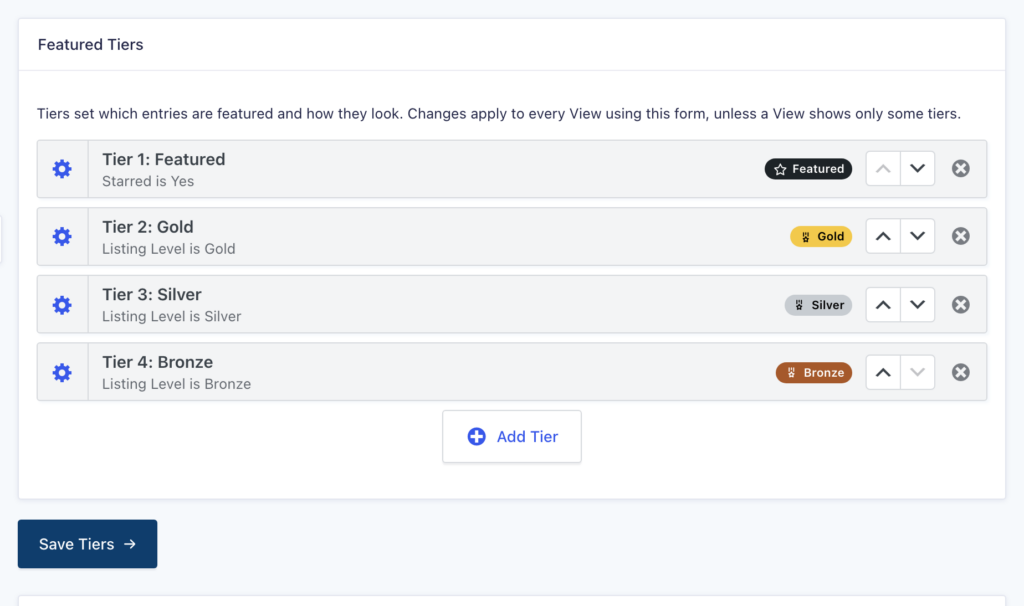
To sell featured spots, a listing's owner pays on a separate order form. The listing is featured for a set number of days after payment, while a subscription stays active, or for one product only, and stops being featured when the time runs out or the subscription ends.
Each tier gets its own label, color, icon or image, and an optional row or card color, shown in your View with the new Featured Badge field or the {featured_tier} merge tag. A Featured Entries tab in each View's settings chooses which of the form's tiers that View features, and you can set up tiers with AI assistants through the GravityKit MCP server. Forms without tiers keep featuring their starred entries, as before. Getting started with Featured Entries walks through setup.
The separate Featured Entries plugin now requires GravityView 3.1.0 or newer and Gravity Forms 2.9.4 or newer, and its badge icons need GravityView 3.12.0 or newer.
More Featured Entries fixes and developer updates
Views combining several forms show their entries again when "Move Featured Entries to Top" is on. How Move Featured Entries to Top works explains the setting.
The {featured_tier} merge tag takes these modifiers:
:badgefor the badge:untilfor the date a paid spot ends:rankfor the tier's rank (1 for the top tier):colorfor the badge color:classfor the tier's CSS class:idfor the tier ID
Developer updates
- Each featured entry gets a
gv-featured-tier-{tier ID}CSS class, which stays the same when the tier is renamed. - Added the
gk/featured-entries/tiersfilter to change a View's tiers. - Added the
gk/featured-entries/order/paid-statusesandgk/featured-entries/order/subscription-statusesfilters to change which payment statuses count as paid.
Maps
The Maps feature makes the View editor load faster on Views with a map. It also fixes conflicts with plugins that load the Google Maps script asynchronously: address suggestions appear again in the Geolocation Radius search field and in Address fields with geolocation autocomplete, and the coordinate map on the Edit Entry screen shows again.
Map Views created by AI agents or GravityMigrate through the GravityKit Abilities API show their markers without selecting the "Address Fields" setting by hand. Sites with no Google Maps API key no longer log "enqueued with dependencies that are not registered: gv-google-maps" notices.
Ratings & Reviews
The Ratings & Reviews feature gets security fixes, and we recommend updating:
- Links in the "New comment" email could open any website chosen by the person who posted the review or comment; they now always open the entry page
- Visitors who were not logged in could change the rating of a review they did not write
- A request to change a rating the visitor did not leave saved a new rating instead of being refused
- Visitors who were not logged in could save ratings on any entry, including entries no View shows and Views with entry reviews turned off
It also fixes several issues with commenting on reviews and with the "Rate" field in DataTables Views, Views that join forms, and on phones. Setting up Ratings & Reviews covers each of these settings.
More Ratings & Reviews fixes
With GravityView 3.10.0 and later, the Single Entry page of an embedded View with "Prevent Direct Access" turned on shows its reviews and review form again.
Commenting on reviews works in more cases. "Comment on this review" no longer opens a "Page not found" page for a user who already reviewed the entry, on Views with the "Rate" field hidden, or when the link opens in a new tab, and "Log in to comment" returns to the entry after login. Users limited to one review can now comment on reviews. Comments are no longer refused when "Require ratings" is on, and the comment form has a text box when "Hide 'Title' and 'Review' fields from the form" is on. The first link in the "Please moderate" email now opens the entry page.
Rating fixes:
- Clicking new stars when editing a review changes the rating, without clearing it with the trash icon first (since 2.4)
- The review form no longer starts with the stars of the user's existing review picked, which let a review without stars past "Require ratings" (since 2.4)
- A user who rated an entry and then commented on a review sees their stars in the "Rate" field (since 2.4)
- In DataTables Views, paging, sorting, or searching no longer makes the next click in the "Rate" field save the rating again, and the "Rate" field works on the first page of Preloaded tables
- On phones and tablets, one tap saves a rating once, and scrolling with a finger that starts on a star or vote no longer saves a rating
- In Views that join forms, clicking a star or vote in the "Rate" field saves the rating
How to update
We recommend keeping all your GravityKit products up to date, so they stay compatible with each other and you get every new feature and fix, security patches included. You can update them from your WordPress dashboard:
- In your WordPress dashboard, hover over the GravityKit menu and click Manage Your Kit.
- Scroll past your licenses to the list of products, then click the Update Available filter to see the products with a new version. Their version numbers show in red.
- Click Update on each product.
Updates need an active license on the site.
For the full guide, read installing, activating, and updating GravityKit plugins.
Get better at Gravity Forms, one email a week
New GravityKit releases, practical Gravity Forms tutorials, and subscriber-only discounts. One short email every week, unsubscribe anytime.
More articles

Launch Log: GravityView Pro, paid featured tiers, and a “Pages with this View” menu
GravityView Pro arrives with paid and ranked Featured Tiers, GravityView adds a Pages with this View menu and Welcome page, plus several security fixes.

New in GravityView Pro: Live Filters, Connected Views, Edit Window, and more
Live Filters, Connected Views, Edit Window and Featured Tiers are new in GravityView Pro, and every extension and layout is now built into one plugin.

Launch Log: Parent Entry ID fields, User Registration fixes, and security updates
Security fixes in Entry Tags, GravityEdit, GravityExport Lite, and GravityView, plus new Parent Entry ID fields and User Registration fixes in Edit Entry.