
Pro feature
Turn separate Views into one connected app
Connected Views links your Views, so visitors click from an entry to the entries related to it, and back. You set each connection in the View editor, with no custom links or merge tags to maintain.
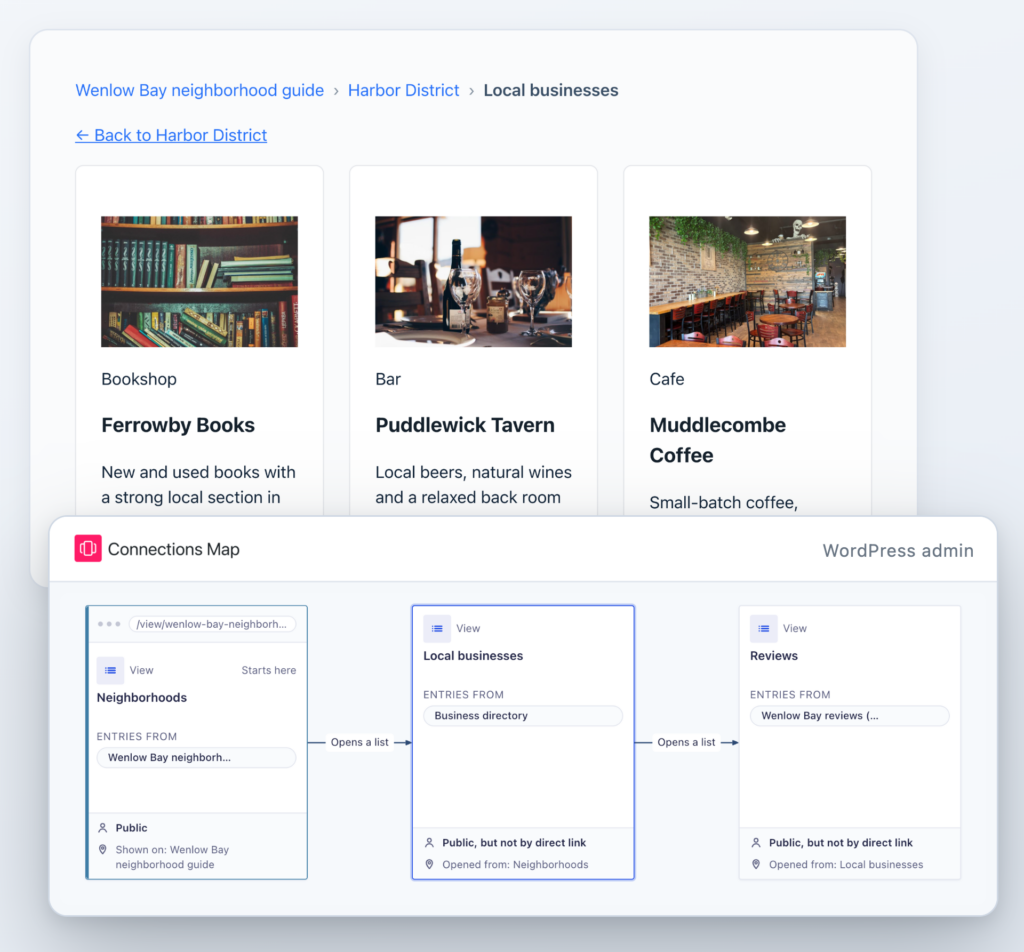
Related entries, one click away
Related data usually lives in several forms. Connected Views lets you link their Views in the View editor, so each entry leads to the entries that belong to it, and you aren’t maintaining links by hand.
Without Connected Views
- Linking related entries means custom links and merge tags on every View.
- Each link sends visitors to another page.
- Nothing shows visitors the path back.
With Connected Views
- You connect your Views in the View editor.
- Each level loads in place, without reloading the page.
- Breadcrumbs and a Back link show the way back.
Visitors never lose their place
Every level shows the path back to where visitors started. Click any breadcrumb to go straight back to that level. The path is also saved in the page address, so a shared or bookmarked link opens the same level.
- The Back link names the entry it returns to.
- Going back keeps the list’s search, sort order and page number.
- After editing an entry, people land back on the same level.
See every connection on one map
The Connections Map shows how your Views link together. Each box is a View, and each arrow is a link visitors click to get from one View to the next. Open it from See connections in the form’s toolbar.
- Click a View to see who can open it, which pages show it and which Views it links to.
- Change where a link opens, or the words visitors click, right from the map.
- Links that need fixing are flagged, such as a drill-down with no View to open.
Each level keeps its own layout
Every level is a View with the layout that suits it.
- Mix layouts across levels, like cards for agents and a map for their listings.
- Each level is its own View, so it keeps its own fields and settings.
Replace hand-built links in three steps
It all happens in the View editor. The form at each level needs to store the ID of the entry above it. If yours don’t yet, a free Gravity Forms Dynamic Lookup field can store it.
Step 1
Add a drill-down field
Open the View visitors start from and add a Drill-down to another View field to its Single Entry layout.
Step 2
Choose the View to open
Pick the View for the next level and the field that connects it to this one. The editor suggests a field when it finds one.
Step 3
Update the View
Visitors can now click from an entry to the entries related to it.
What you can build
Each of these is three Views, linked in the View editor.
Directory
Areas › Businesses › Reviews
Pick a neighborhood, browse its businesses, then read what locals said about one.
Courses
Instructors › Courses › Students
Go from a teacher to the courses they run, then to each class list.
Real estate
Agents › Listings › Home
Open an agent, see their listings on a map, then one home’s details.
Client portal
Clients › Projects › Tasks
Show each client’s projects, and every task inside a project.
Membership
Chapters › Members › Events
List your chapters, the members in each, and the events they run.
Jobs
Companies › Jobs › Applications
Browse employers, their open roles, and the applications for each role.
Breadcrumbs, a Back link and a link to every level come with each connection.
Simple pricing.
Infinite possibilities.
GravityKit is trusted by agencies, nonprofits, developers, and WordPress users all over the world.
Our complete Kit of essential tools for extending and enhancing Gravity Forms: everything you need to build powerful web apps and workflows.
- All GravityKit Add-Ons
- Every GravityView Pro feature
- Perfect for heavy Gravity Forms users
- Priority support via email
- Save $912 (70%) vs. buying separately
Get Maps, DataTables, the Advanced Elementor Widget and every other Pro feature to build the app your process needs.
- Every GravityView Pro feature
- Integrations with DataTables & Google Maps
- Advanced Elementor integration
- Perfect for advanced web applications
- Expert email support

We proudly offer a 30-day money-back guarantee
We want you to be 100% happy with your purchase, or we’ll make it right.

Try Connected Views
Connected Views links your Views into one app, so visitors click from an entry to everything related to it, and back.
Have any questions?
Here are a few common questions about Connected Views.