
Published
•
Updated
Launch Log: A range slider for search, AI-managed calendars, and security updates in ten products
GravityView adds a Slider search input, GravityCalendar lets AI assistants manage calendars, and ten GravityKit products get security fixes. Here's what shipped.


This week’s releases add a Slider search input to GravityView, let AI assistants manage calendars in GravityCalendar, and bring security improvements to ten products. Translated sites also see a long run of fixes, as date pickers, condition builders and tooltips that stayed in English now follow the site’s language.
GravityActions v1.7.0
This update to GravityActions raises the minimum requirements to PHP 7.4, WordPress 6.5 and Gravity Forms 2.9.4. It also fixes screen readers announcing the close button in the Bulk Edit and Bulk Email windows, and the help icon on the first Bulk Edit step, in English on sites set to another language.
GravityCalendar v2.26.0
This update to GravityCalendar lets AI assistants connected through the GravityKit MCP list, create, change and delete calendars, list a calendar’s events, and move or resize events. An assistant can only do what the account it signs in with is allowed to do on the calendar settings screen or with drag-and-drop editing. Getting started with the GravityKit MCP covers connecting an assistant.
Calendars on the same page as their form now show a new entry as soon as the form is submitted with AJAX, without reloading the page or leaving the month being viewed. Entries the calendar wouldn’t otherwise show, such as those awaiting approval, stay hidden.
This release also improves security for secured calendars, calendar feeds and event links, and we recommend updating. After updating, clear your site’s page cache so secured calendars keep showing events from other calendar feeds. A few of the changes may need action from you:
- Calendars with “Enable security for this calendar” turned on now use a secret unique to your site. Existing shortcodes and blocks keep working, but posts created or changed by users who can’t edit calendars need the new secret, so insert the calendar again or have someone who can edit calendars re-save the post. The secret shortcode attribute doc explains how secrets work.
- Events from another calendar feed are refused when the feed address is on a local or private network. Saved feeds that are now refused, such as those on port 8443 or with a username and password in the address, are listed in a notice on the calendar’s settings screen.
- Turning on “Allow HTML Content” now requires a user who can post unfiltered HTML, such as an administrator on a single site. Event titles, descriptions and locations keep links and formatting, but drop anything that could run a script.
- Event links open only web addresses, or
mailto:,tel:andsms:links typed into the Event URL setting. Custom links withouthttp://are now treated as web addresses, so start links to your own site with/, such as/page/{entry_id}.
More fixes and developer updates in v2.26.0
Conditional logic sees the same improvements as the other products using it this week. Condition dropdowns that search users, entries or posts load their choices as soon as they’re opened, conditions on GP Nested Forms fields and other fields that store several users, posts or entries are no longer slow on forms with a few hundred entries, and conditions using the {get} merge tag work when the value in the page address contains &, + or %. “Has any of”, “has all of” and “has none of” conditions on Multi Select fields now check every selected value, and date conditions show month names and weekdays in the site’s language.
The Calendar widget shows events again on Views that join forms with Multiple Forms, and after a search that sends more than one value for a field with Dynamically Load Events turned on. Calendars added to a View’s Single Entry layout with the [gravitycalendar] shortcode now appear when the entry opens in a lightbox.
Event links on sites with “Plain” permalinks open the right entry, and links built with merge tags keep all their query parameters. Dragging an event saves times in the format of the form’s Time field, and on calendars that date events by when entries were created or updated, a dragged event now returns to its original date instead of appearing to move without saving.
Other fixes:
- Calendars linking to a Single Entry page no longer cause a fatal error when that View has been permanently deleted
- Feed events show on sites that display PHP warnings
- The Calendar block no longer lists calendars from forms in the trash
- Events with a tooltip no longer trigger an error in accessibility checkers such as axe, and screen readers name the previous and next arrows
- The “Click to copy” and “Copied!” text and the “Invalid URL” error for the Calendar Feed URL setting follow the site’s language
Developer updates
- Added eight abilities to the WordPress Abilities API under
gk-gravitycalendar/(calendars-list,calendar-get,calendar-settings-schema,events-list,calendar-create,calendar-update,calendar-deleteandevent-reschedule), which GravityKit Foundation exposes asgc_*MCP tools. - Added the
gk/gravitycalendar/secret/allow-legacyfilter to control whether calendars accept their secret from before this update. - Added the
gk/gravitycalendar/events/form-submit/reloadfilter to turn off reloading a calendar’s events after its form is submitted on the same page. - Added
gvFullCalendar.reloadEntryEvents( calendar_id )and thegk/gravitycalendar/events/reloadedevent, which fires when a reload finishes. - Secrets are now stored in the
gk_gravitycalendar_secret_keyoption, alongsidegk_gravitycalendar_secret_legacy_feedsandgk_gravitycalendar_secret_legacy_since. Copy all three when migrating a site, or shortcodes added after this update show nothing on the new site. - To show a calendar feed from a server on a private network, allow its host with WordPress’s
http_request_host_is_externalfilter, and a port other than 80, 443 or 8080 withhttp_allowed_safe_ports.
GravityCharts v1.23.0
This update to GravityCharts improves security for charts with “Enable security for this chart” turned on. Existing embeds keep working in most places, but if a secured chart stops showing, copy its new secret from the chart list and update the shortcode, block or merge tag. Embedding charts on your website covers each embed method.
Conditions on fields that store a user, post or entry ID, such as Dynamic Lookup, Populate Anything or Nested Forms fields, now match the name the field displays, and only records the visitor is allowed to see. Conditions using is and is not with a number still compare the stored ID.
Charts also count entries correctly again in two common cases: Radio Buttons or Checkboxes choices containing “&” on Gravity Forms 3.1.3 or newer, and Multi Select fields that store a comma-separated list.
More fixes and developer updates in v1.23.0
Other conditional logic fixes:
- Conditions on Entry Date, Date Updated or Payment Date with a non-date value, such as a merge tag for a text field, no longer cause a fatal error on PHP 8
is,is not,inandnot inconditions on Product, Option or Shipping field choices now match entries- Conditions using the
{get}merge tag work when the value in the page address contains&,+or% - “Has any of”, “has all of” and “has none of” conditions on Dynamic Lookup fields with “Allow multiple selections” work for entries with more than one selection
- Several fixes to “Any form field” conditions, such as
does not containkeeping entries that contained the value, plus fixes to the condition builder, date pickers and condition dropdowns, including on translated sites
Charts of Dynamic Lookup fields that allow multiple selections now count entries. Pages with a chart no longer show an error when another plugin processes merge tags without a form, and the message shown when a form has no charts yet is no longer squeezed into a narrow column.
Developer updates
- Added the
gk/gravitycharts/secret/allow-legacyfilter to choose whether a chart still accepts its secret from before this update. Returntrueto accept it everywhere, orfalseto require the new secret everywhere.
GravityEdit v2.13.1
This update to GravityEdit improves security when inline editing List fields, and we recommend updating. It also fixes a “You are not allowed to edit this entry” error for users who can edit only their own entries, on Views whose Advanced Filtering uses a value from the page, such as {get:...}, {current_post}, {embed_post} or {custom_field}.
GravityExport v1.18.0
This update to GravityExport changes how export filters and conditional logic treat fields that store the ID of a user, post or entry, such as Dynamic Lookup, Populate Anything or Nested Forms fields. Conditions now match the name the field shows, and only the records the visitor may see. Conditions using is and is not with a number still compare the stored ID.
On translated sites, the condition builders for export filters and for a saved export’s conditional logic now show their buttons and labels, such as “Add Condition”, in the site’s language.
More fixes in v1.18.0
Other conditional logic fixes:
is,is not,inandnot inconditions on a choice of a Product, Option or Shipping field now find entries- A condition on Entry Date, Date Updated or Payment Date whose value is not a date no longer causes a fatal error on PHP 8
- Conditions using the
{get}merge tag find entries when the value in the page address has&,+or% - “Has any of”, “has all of” and “has none of” conditions on a Dynamic Lookup field with “Allow multiple selections” work for entries with more than one selection
- Several fixes to “Any form field” conditions, the condition builder, date pickers and condition dropdowns
It also fixes an error on some pages when another plugin filled merge tags without a form.
GravityExport Lite v2.7.5
This update to GravityExport Lite fixes the global and form export settings reverting to their pre-2.0 values on sites upgraded from a version before 2.0.
In the field settings, “Enable all” and “Disable all” no longer move the items of a field label that contains a list, and searching for a field no longer hides them. Counts of matching and moved fields use the right plural form in languages such as Arabic, Russian and Polish, and new installs on PHP 8.1 or newer no longer log a PHP “deprecated” notice.
GravityImport v2.12.5
This update to GravityImport improves security when displaying CSV values, file names and form titles during an import.
GravityMath v2.13.0
This update to GravityMath fixes several fatal errors and incorrect totals, and keeps personal information out of the GravityKit log, so we recommend updating. Calculation messages written to the log now identify entries, forms and fields by ID only, instead of including entry values, visitor details such as IP addresses, or filled-in formulas.
Sites in languages that use a comma for decimals or a dot for thousands, such as German or French, get correct numbers again. Calculation results and Math Summary values kept their decimals only in English (1234.5 showed as 1.235), and scope="entry" read 1000.25 as 100025.
:timestamp merge tags in calculations now return the actual time regardless of the site’s time zone, so date differences stay correct across daylight saving changes and against {today:timestamp} or {now:timestamp}.
More fixes in v2.13.0
On PHP 8, [gravitymath scope="entry"] no longer causes a fatal error when the formula uses a merge tag with a modifier, such as {date_updated:timestamp}, or when its id points to an entry that doesn’t exist. The bundled math library no longer includes command-line tools that failed PHP 8 compatibility checks.
Form totals (scope="form") see several fixes:
- With GravityView active, totals with a relative date or merge tag in their
filter, such asfilter_date_created=today, no longer show a cached result for up to a day - Without a
filter, totals of a Checkbox field, of one row of a multi-row Likert field, or of an entry meta key with an underscore, such as{Approved:is_approved:count}, no longer show 0 - Totals of a Product field without an input ID, such as
{Product:5}, total the price as Gravity Forms calculations do - Two totals for different inputs of the same field on one page, such as a Product’s price and quantity, each show their own total
A numeric default_value now gives the right numbers in form totals and with a filter, {Number:1:min} compares the default with the smallest value, values before an entry without a value are no longer dropped in scope="view" and scope="visible", and averages count entries without a value as the default in every scope.
With GravityView active on multilingual sites, form totals appear in the visitor’s number format. In GravityView Custom Content fields, totals with a merge tag in their attributes show the total instead of the row’s own value, and filter values containing & or +, such as R&D, find entries. GravityMath no longer displays raw code in PDFs from PDF for GravityView, and calculations no longer show “Deprecated” notices on PHP 8.4 with WordPress debugging on.
GravityMigrate v2.2.0
This update to GravityMigrate explains what went wrong when a migration’s progress can’t be followed or its requests are redirected, with the likely causes and what to do next. Sites behind a single sign-on service or a firewall that redirects background requests (admin-ajax.php) previously saw only “Failed to fetch” when starting, cancelling or loading a migration.
More fixes in v2.2.0
While the progress of a background migration can’t be followed, the migration screen no longer points to the hidden Background Jobs page or blames WP-Cron when it is running, and paused migrations show as paused. When moving forms between plugins, forms whose request got no answer are marked “Not confirmed” instead of “Could not be added”, since they may have been added.
On WordPress 6.9 and 7.0, AI assistants calling a GravityMigrate ability without input, such as “list bundles”, no longer get an error. On translated sites, the entry date range picker shows its buttons and labels, such as “Today” and “Clear date range”, in the site’s language.
GravitySearch v1.3.0
This update to GravitySearch changes how advanced search filters treat fields that store a user, post or entry ID, such as Dynamic Lookup, Populate Anything or Nested Forms fields. Conditions now match the name the field displays, and only records the visitor is allowed to see. Conditions using is and is not with a number still compare the stored ID.
On translated sites, the search filters and their date range picker now show buttons and labels, such as “Add Condition” and “Today”, in the site’s language.
More fixes in v1.3.0
Other advanced search filter fixes:
- Date pickers appear on sites in Portuguese (Portugal, AO90), and show the right months and years on sites in Persian, Pashto or Thai
- Screen readers announce the day, month and year of date conditions in the site’s language
- Condition dropdowns that search users, entries or posts load their choices only when opened
- Conditions on Entry Date, Date Updated or Payment Date with a non-date value no longer cause a fatal error on PHP 8
is,is not,inandnot inconditions on Product, Option or Shipping field choices now match entries- Conditions using the
{get}merge tag work when the value in the page address contains&,+or% - “Has any of”, “has all of” and “has none of” conditions on Dynamic Lookup fields with “Allow multiple selections” work for entries with more than one selection
- Several fixes to “Any form field” conditions, the condition builder, date pickers and condition dropdowns
Pages no longer show an error when another plugin processes merge tags without a form.
GravityView v3.9.0
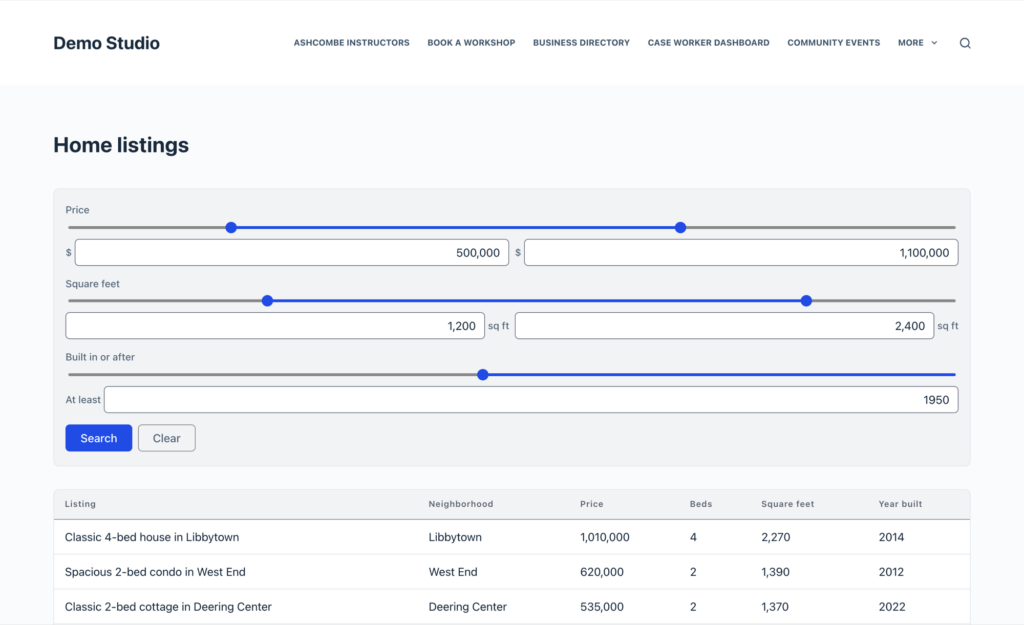
This update to GravityView adds a Slider input type to the Search Bar for Number, Quantity and Total fields. Visitors drag a handle, or type a value, to search by a minimum, a maximum or both, using the same search as the number range input.
The {get} merge tag gains four modifiers, mostly for use inside links. :urlencode and :rawurlencode keep a value whole in a link: without them, a search for “Research & Development” passed on with ?gv_search={get:gv_search} is cut off at the “&”. :esc_url and :esc_url_raw make a web address safe to link to, such as <a href="{get:return:esc_url}">Go back</a>, and an unsafe address shows nothing.
The “Number of Columns” setting in the Search Bar now works: it sets how many fields share a row when “Arrange Fields” is “Side by side”.
This release also includes several security fixes, and we recommend updating:
- DataTables Views, and Views that update their results without reloading the page, could expose entries when embedded outside the main page content, such as in a theme template. After updating, clear your page cache and update DataTables to 3.14.2.
- Entries from an “Embed only” View open in the lightbox only from a page that shows the View, in line with the Direct Access setting.
- Visitors can change a View’s sort order through the page address only when column sorting is on (“Enable sorting by column” in a Table View, or
sort_columns="1"in the shortcode). - Views with Enhanced Security created before GravityView 3.1.0 show in a post only if someone who can edit the View saved the post last, or the post hasn’t changed since the update.
- Edit Entry no longer opens entries from forms the View doesn’t show.
- List field values in Views, CSV exports and the REST API, and outside links opened from the entry lightbox, are handled more securely.
Searching is fast again on forms with a GP Nested Forms field, which had slowed to several seconds since 3.7.0, and Views embedded with a shortcode or block follow their sort settings again.
More fixes and developer updates in v3.9.0 (includes a breaking change)
In Edit Entry, deleting the file from a single-file File Upload field now removes it instead of showing “Entry Updated” and keeping the file. With multi-page forms on Gravity Forms 3.1.3.4 or newer, reloading or bookmarking a later page shows that page’s buttons, including Update on the last page. A form placed below Edit Entry on the same page is no longer filled in with the values of the entry being edited.
Number range search no longer shows every entry when only “From” or only “To” is filled in, and the GravityView Search widget in Appearance > Widgets names each field again and offers input types for text and number fields. Search values containing &, #, + or % stay intact when opening an entry, deleting an entry, running a new search or following a [gv_entry_link] link. Embedded Views also respect the shortcode’s no_entries_form setting again.
In the entry lightbox, links such as [gv_entry_link] and the Other Entries field open without a “No route was found” error. Pressing Escape closes the lightbox, screen readers say what it shows, and closing it with unsaved Edit Entry changes asks first.
Other fixes:
- On sites with plain permalinks,
[gv_entry_link]links to another View’s entries open instead of showing “You are not allowed to view this content.” - Views with caching on show changes made by other plugins right away, instead of old values for up to a day
- Custom Content fields show content of
0, such as a GravityMath result of0 - Merge tags in the “Back Link Label” setting are replaced
- On translated sites, the date picker calendar and the lightbox buttons follow the site’s language
- GravityView blocks load in the block editor on sites hosted on Windows servers
- Page caching, minifying and CDN plugins no longer skip part of the page
- PDFs from PDF for GravityView 1.x no longer include hidden screen-reader text
- Some unusual search links no longer make the View page show an error
Developer updates
- Breaking change: the
sortURL parameter (?sort[<field>]=ascand?sort=<field>&dir=asc) is ignored on Views with column sorting off, including inGravityView_frontend::updateViewSorting()andget_view_entries_parameters(). To allow URL sorting on a View without turning on column sorting, returntruefrom thegk/gravityview/view/sorting/forcedfilter. - Added
GravityKit\GravityView\View\EmbedState, which signs the settings an embed rendered with. Add-ons that load a View’s results in their own request can apply them withEmbedState::apply(). - The View refresh REST route returns a
403with thegravityview/embed_unverifiedcode when a page sends embed settings that no longer verify, such as a page cached before the visitor logged out. - The
gravityview/view/links/directoryfilter passes a third$add_query_argsparameter,falsefor the base of an entry link.
GravityView – Advanced Elementor Widget v1.2.0
This update to the Advanced Elementor Widget improves security, and we recommend updating. Users who can edit a page in Elementor can no longer turn on Edit Entry, Delete Entry or Duplicate Entry for a View that doesn’t allow them. Search settings from the core GravityView Elementor widget are now kept when this add-on is active, and DataTables Views in the widget keep their search settings when the table loads.
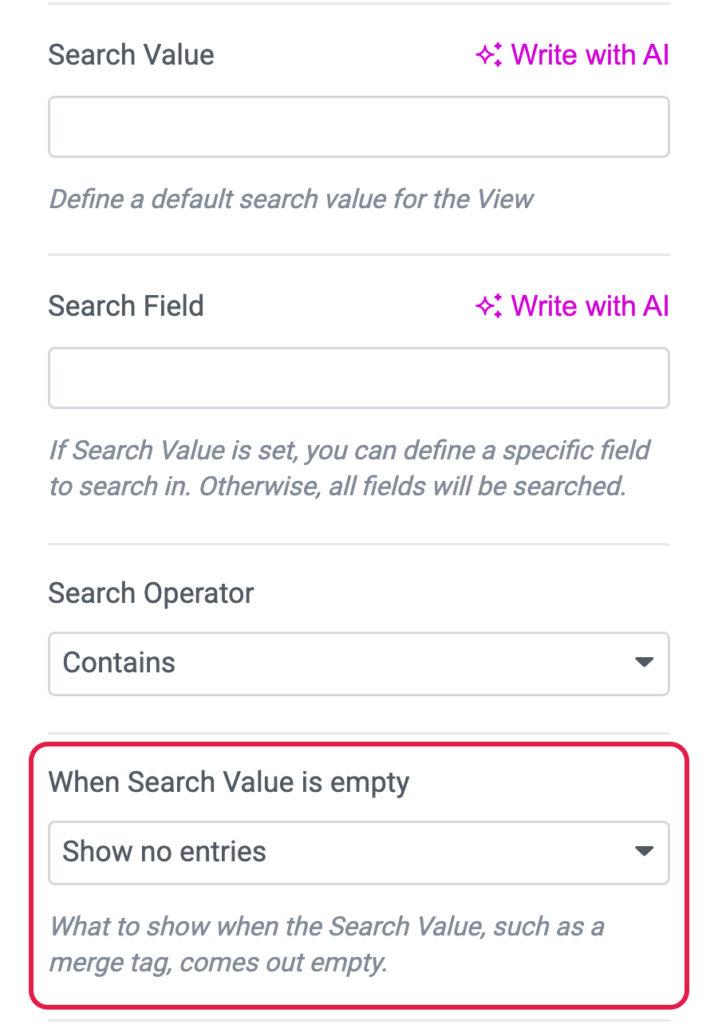
The widget’s Customize View Settings now include GravityView’s “When Search Value is empty” setting, and new widgets start at “Show no entries”. This and the DataTables change need GravityView 3.8.0 or newer, and the widget now requires WordPress 6.5 or newer.
The Layout Builder “Row Background Color” setting now colors the row background instead of the text.
More fixes in v1.2.0
Widgets placed inside a column, an inner container or any section after the first no longer log an Undefined array key "widgetType" PHP warning on every page load. With two widgets on one page, clicking an entry opens it in one View only, and Edit Entry locks the entry so two people can’t edit it at once.
Style settings fixes:
- Single Entry style settings apply to Field Values and Value Border in List and DIY layouts, and to the Layout Builder container
- DIY layout Multiple Entries style settings no longer change Single Entry pages
- The Field Links “Typography” setting styles only links inside the widget
GravityView – Advanced Filter Extension v4.10.0
This update to the Advanced Filter Extension speeds up filters on GP Nested Forms fields and other fields that store several users, posts or entries, such as Dynamic Lookup and Populate Anything fields, which were slow on forms with a few hundred entries. Filter dropdowns that search users, entries or posts now load their choices as soon as they’re opened.
Filters using the {get} merge tag also find the right entries again when the value in the page address contains &, + or %, such as “Research & Development”.
More fixes in v4.10.0
Other fixes:
- “Has any of”, “has all of” and “has none of” filters on Dynamic Lookup fields with “Allow multiple selections” and the enhanced user interface work for entries with more than one selection
- “Any form field” filters, and filters on fields that store a user, post or entry ID, match user names or post titles containing “&”, such as “Smith & Jones”
- Merge tags with the
form:modifier no longer cause an error when another plugin processes them without a form, and no longer compare against the wrong value when the joined form’s value looks like a merge tag - Filter dropdowns no longer open behind the WordPress admin bar, and pressing Enter on a selected choice or the clear button works as expected
- On translated sites, operators with an apostrophe no longer show
', and date filters show month names, weekdays and labels in the site’s language - Weekday names in a date filter’s calendar are no longer off by one day in time zones west of UTC, such as the US, and screen readers no longer announce the calendar as “Event”
GravityView – Dashboard Views v2.0.7
This update to Dashboard Views gives each View one permanent link. Bookmarked or shared links could stop working for users with a different language setting or after the menu was renamed, and older links still work.
GravityView – DataTables Layout v3.14.2
This update to the DataTables Layout improves security, and we recommend updating it alongside GravityView 3.9.0. Tables could show entries outside their search settings, or load “Embed only” Views outside the pages that embed them. With logging turned on, messages written while a table loads now record only the amount of stray output and the file and line of any error, instead of text that could contain entry values.
Tables placed outside the page content, such as by the theme or in another View’s Single Entry layout, no longer show every entry, and “Embed only” tables there load instead of showing “This table could not load”. In PDFs from PDF for GravityView, DataTables Views shown through the View field now include their entries, hide the Entry ID column and no longer display raw code.
GravityView – DIY Layout v2.6.1
This update to the DIY Layout fixes the Multiple Entries page on Views that union forms with Multiple Forms. Entries from the added form now follow the union’s field mapping, instead of leaving mapped fields empty or showing fields the View wasn’t set to display.
GravityView – Maps Layout v3.12.0
This update to the Maps Layout improves security when an address can’t be geocoded. The GravityKit log, entry note and error message now identify only the entry, field and reason, instead of including the address and the geocoding API key.
On translated sites, the help text in the Map layout’s Single Entry screen, the Default Radius, Radius Unit Display and Maximum Zoom tooltips, the notice about a form with more than one source of location data, and the Latitude and Longitude entry fields follow the site’s language. Pages with a map also no longer show PHP deprecation notices on PHP 8.4 or newer.
GravityView – Multiple Forms v1.0.1
This update to Multiple Forms fixes the View editor on translated sites, where the merge editor’s text appeared in English and the tooltips on the Add Field, Add Facet and Add Search Field buttons could show ' instead of an apostrophe.
GravityView – Ratings & Reviews v2.6.0
This update to Ratings & Reviews now requires PHP 7.4 and WordPress 6.5 or newer. Errors written to the GravityKit log now include only the related review, entry and post IDs, instead of reviewers’ names, email addresses, IP addresses, review text or full post data. For developers, GravityView hooks deprecated in GravityView 2.55 and later are replaced with their current equivalents.
How to update
We recommend keeping all your GravityKit products up to date, so they stay compatible with each other and you get every new feature and fix, security patches included. You can update them from your WordPress dashboard:
- In your WordPress dashboard, hover over the GravityKit menu and click Manage Your Kit.
- Scroll past your licenses to the list of products, then click the Update Available filter to see the products with a new version. Their version numbers show in red.
- Click Update on each product.
Updates need an active license on the site.
For the full guide, read installing, activating, and updating GravityKit plugins.

Get better at Gravity Forms, one email a week
New GravityKit releases, practical Gravity Forms tutorials, and subscriber-only discounts. One short email every week, unsubscribe anytime.
More articles

Launch Log: A range slider for search, AI-managed calendars, and security updates in ten products
GravityView adds a Slider search input, GravityCalendar lets AI assistants manage calendars, and ten GravityKit products get security fixes. Here’s what shipped.

9 nonprofit apps you can build with Gravity Forms and GravityKit
Nine apps nonprofits build on WordPress from Gravity Forms data: volunteer databases, member directories, client portals, donation pages, grant review and more.
How to migrate from Fluent Forms to Gravity Forms without rebuilding your forms
Move your Fluent Forms forms into Gravity Forms with GravityMigrate, then bring your entries across with GravityImport. Every step was tested on the free version of Fluent Forms.