

Published
•
Updated
Launch Log: Email alerts for failed exports, even spacing for timeline charts, and faster Views with inline editing
Email alerts for failed scheduled exports, even spacing for timeline charts, faster Views with inline editing, and security fixes in GravityView.


This week’s releases add email alerts for scheduled exports that fail in GravityExport, a Timeline Spacing setting in GravityCharts, and Views with inline editing now load faster. Many products also see fixes for the Gravity Forms Repeater field. GravityActions, GravityView, and the DataTables and Ratings & Reviews features in GravityView Pro get security fixes, so we recommend updating.
Gravity Forms Dynamic Lookup v1.13.1
This update to Gravity Forms Dynamic Lookup speeds up the form editor on sites with many forms. The Lookup field’s “Source Form” setting loaded every form on the site, so the editor got slower with every form added.
It also fixes Lookup fields set up before version 1.12.0 with a source field inside a Repeater field, which showed visitors an empty dropdown that could block a required field. Form editors now see a note to choose another field, and entries that already hold a value keep it.
GravityActions v1.7.1
This update to GravityActions improves access checks on bulk actions, so we recommend updating.
Bulk Edit no longer empties fields it shows no box for. Before, it emptied the hidden inputs of Name and Address fields (such as Prefix or Address Line 2), Name fields in the simple format, and Multi Select fields. The “Send To Field” setting in Bulk Email also stops listing Email fields inside a Repeater field, which received no email.
GravityCalendar v2.28.0
This update to GravityCalendar keeps event titles readable in the Week and Day agenda views. The event popup now starts with the event’s full title, so you can still read a title that is cut off in a short event or covered by another event at the same time.
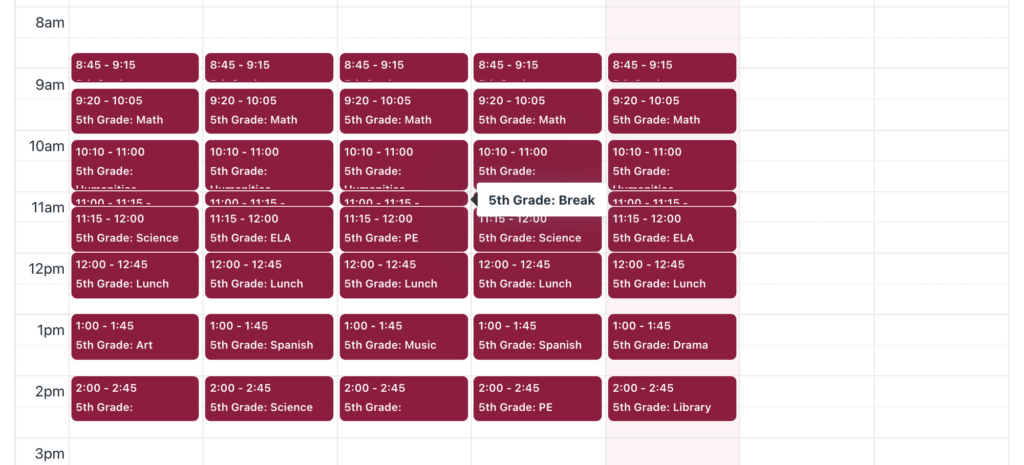
Titles no longer run past the bottom of short events in those views, and events on the next day no longer cover part of a popup.
Calendar conditions with a merge tag from another plugin written like {my_tag:2}, such as {gwp_eeid:2} from GravityWP Advanced Merge Tags, are now filled by that plugin. Before, the value was compared to field 2 of the same entry.
GravityCharts v1.26.0
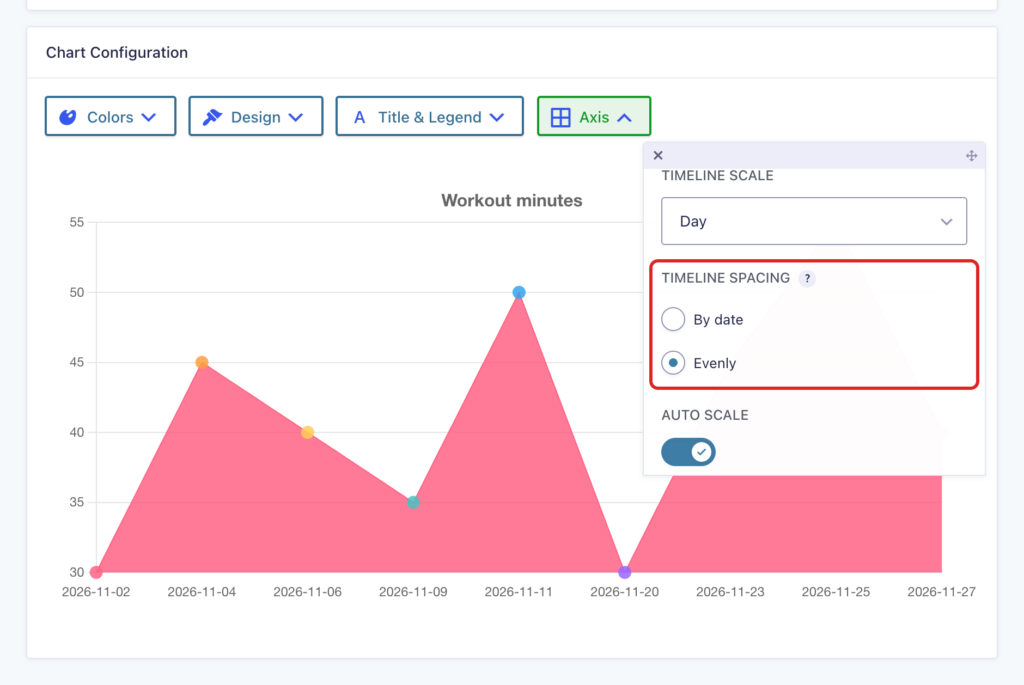
This update to GravityCharts adds a “Timeline Spacing” setting for timeline charts. A timeline places each point by its date, so data recorded on an irregular schedule, such as workouts on Monday, Wednesday, and Friday, bunches up with uneven gaps. In the chart’s Axis menu, choose “Evenly” to give every data point the same space and keep its date label. “By date” stays the default.
More fixes in v1.26.0
Timeline charts see three fixes. A bar chart switched to “Show on Timeline” after using horizontal bars no longer shows an empty chart when Auto Scale is off. Clicking the legend of a timeline bar chart hides every bar in the series, where it hid only the first. A timeline chart created through the Gravity Forms API without an axis type uses the same timeline axis as charts saved in the editor.
Turning off “Show X Axis Grid Lines” on a vertical bar or line chart, or “Show Y Axis Grid Lines” on a horizontal bar chart, now removes the grid lines from the published chart. A chart created through the Gravity Forms API without a Label Text setting shows as a static image instead of an error.
Chart conditions with a merge tag from another plugin written like {my_tag:2} are filled by that plugin, and are no longer compared to field 2 of the same entry.
GravityEdit v2.14.0
This update to GravityEdit speeds up Views with inline editing turned on, for logged-in users who can’t edit every entry. Before, each cell loaded the entry again, so Views with many columns were slow for people editing their own entries.
Repeater fields, and the fields inside them, now show their values read-only during inline editing. Editing one used to show an error, or report the change as saved without saving it. The full list is in supported field types.
Developer updates in v2.14.0
Developer updates
- The
gravityview-inline-edit/user-can-edit-entryfilter runs at most once for each entry while a View is shown, instead of once for each field.
GravityExport v1.21.0
This update to GravityExport adds email alerts for scheduled exports that fail. In the export’s settings, turn on the email under “Failure Alerts” and enter one or more addresses under “Alert Email”, or leave it empty to use the site admin email.
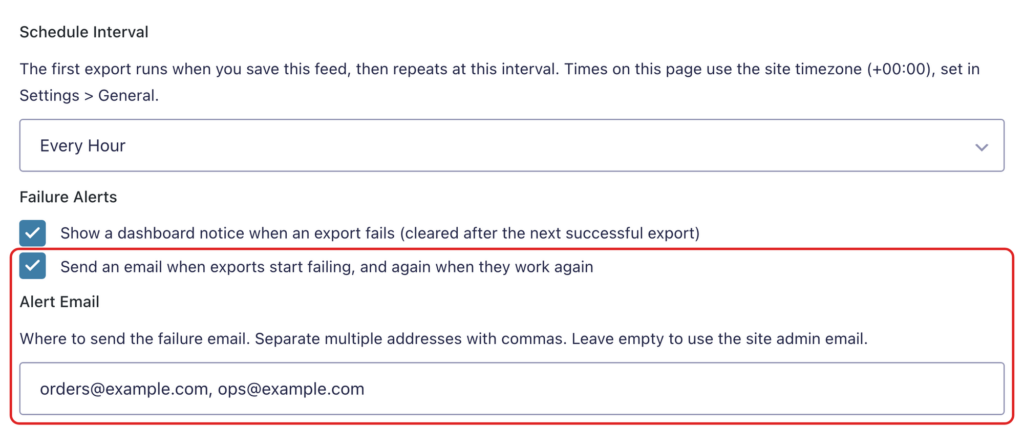
You get one email when the export starts failing, with the error, and another when it works again. An hourly export that stays broken sends one email, not one every hour. The alert is sent again if the export is saved or turned back on while it still fails. Get an email when a scheduled export fails has the steps.
Export filter conditions with a merge tag from another plugin written like {my_tag:2}, such as {gwp_eeid:2} from GravityWP Advanced Merge Tags, are now filled by that plugin. Before, the value was compared to field 2 of the same entry.
GravityExport Lite v2.7.8
This update to GravityExport Lite leaves HTML and Password fields inside a Repeater field out of exports, the same as outside a Repeater field. Before, they exported as empty columns.
GravityImport v2.12.8
This update to GravityImport fixes a case where retrying failed rows replaced existing entries. When an Entry Id column was left out of the first import, “Remap & Retry” mapped it back to Entry ID without the overwrite warning. The retry now keeps the first import’s mapping, and every mapping to Entry ID asks first, Auto-map included. Updating existing entries explains how Entry ID mapping works.
Imports no longer drop a column mapped to a Repeater field while reporting success. The mapping screen leaves out Repeater fields, and a row with a value for one fails with an error that names the column. A time out of range, such as 25:10, also fails the row, where it used to be saved as a different time.
More fixes and developer updates in v2.12.8 (includes a breaking change)
Retrying failed rows with “Remap & Retry” keeps the date and time formats chosen on the Map Fields step, and no longer stops with “We were unable to process your import data” after an import into a new form with a Time column. “Remap & Retry” and loading an import profile also bring back every CSV column mapped into one List field, where they brought back only the first.
On the Map Fields step, the field menus and Auto-map keep responding after you choose the same form again with “Change Form”. When you create a new form from a CSV, choosing a date or time format for one column no longer changes it for every other column of the same type. The Entry ID overwrite warning includes its last sentence, “Click Cancel to create new entries during import”.
Time and List columns see several fixes. A Time column saves its time when the import creates a new form, and a custom time format accepts afternoon times such as 14.30. Plain text mapped to a List field is no longer flagged as “Invalid List Format”, so the import doesn’t have to be forced through with “Continue with errors”. A List field with columns saves a column’s values even when its columns aren’t chosen in the field’s settings.
When an import stops at a row that failed, the error now says why the row failed.
Developer updates
- Breaking change: an import batch with the
patchflag stops with an error instead of importing. The flag was accepted but never kept existing values, because an update by Entry ID always replaced them all. - An import batch with the
flushflag deletes every existing entry of the form before importing, where it deleted only 20, and stops with an error before importing anything if an entry can’t be deleted.
GravityMath v2.14.3
This update to GravityMath shows 0 for scope="view" and scope="visible" totals when no entries match, such as when the View has no entries or the filter matches none. Before, the [gravitymath] shortcode showed nothing, and a nested formula that used such a total showed nothing too.
GravityRevisions v1.9.2
This update to GravityRevisions makes revision comparisons easier to read. A Repeater field’s rows show as “Label: value” lines, where they showed as code, on the comparison screen and in the {entry_revision_diff} merge tag. Values with more than one line, such as a Paragraph field, keep their line breaks and no longer show <br />.
GravitySearch v1.5.1
This update to GravitySearch shows the Matching Field and Field Value for Global Search matches in a Name or Address field inside a Repeater field.
GravityView v3.14.1
This update to GravityView improves security when Views display their content and when View settings are saved, so we recommend updating.
Saving a View in the View editor no longer deletes its Custom CSS and Custom JavaScript when the person saving can’t post unfiltered HTML, such as a Site Administrator on multisite. Custom code saved by an AI assistant through GravityKit MCP also keeps its line breaks and characters such as < and ', and switching a View’s layout there no longer removes backslashes.
More fixes and developer updates in v3.14.1
A View’s own [gravityview detail="total_entries"] shortcode in its No Entries Message shows the count, where it showed as text. A View that draws itself again through another shortcode, such as a [gvlogic] shortcode in its No Entries Message, is drawn inside itself at most once with the same settings. Before, it repeated itself until the page timed out.
Other fixes:
- Turning off "Show only approved entries" from the notice on a page with an embedded View no longer saves that embed's shortcode settings, such as the page size, to the View
- With the Vantage theme, the DataTables "Columns" menu no longer shows visible columns as white text on light gray
- With the Vantage theme in Windows High Contrast mode, the DataTables "Columns" menu tells hidden columns apart from visible ones, and buttons and other controls show keyboard focus
- Duplicating a field, widget, or Live Filters filter in the View editor keeps unticked boxes unticked and radio settings on their chosen option, and a Live Filters filter's copy keeps its other settings
- The form lists on the Views screen and in the View editor leave out forms that other plugins hide, such as the notification form that PDF for GravityView adds
Developer updates
- Added the
gk/gravityview/shortcode/self-nesting-limitfilter, which sets how many copies of a View can be drawn inside one another (default 5). - The
gk/gravityview/common/get_formsfilter also runs onGVCommon::get_forms_columns(), which GravityView's form lists use, where each form holds only the requested columns, such asidandtitle.
GravityView Pro v3.14.1
This update to GravityView Pro includes every change in GravityView 3.14.1 above, security fixes included. On sites with many forms, the View editor no longer gets slower with every form added, because the Connected Views, Featured Entries, and Multiple Forms features have stopped loading every form on the site.
If you still use the separate extension plugins, these changes are in A-Z Filters 1.4.5, Advanced Filter 4.10.3, Dashboard Views 2.2.0, DataTables 3.16.0, Featured Entries 3.2.1, Magic Links 1.3.2, Multiple Forms 1.0.4, and Ratings & Reviews 2.7.0.
A-Z Filters
The A-Z Filters feature no longer offers Repeater fields in the "Use this field to filter entries" setting, since they matched no letter. A widget already set to a Repeater field shows a note to choose another field.
Advanced Filters
The Advanced Filters feature fixes View filters that use a merge tag from another plugin written like {my_tag:2}, such as {gwp_eeid:2} from GravityWP Advanced Merge Tags. That plugin fills the value again, as it did before Advanced Filter 4.7.0. Since then, the value was compared to field 2 of the same entry whenever the form had a field 2.
Connected Views
The Connected Views feature no longer slows down the View editor on sites with many forms. It loaded every form for form names, field names, and connections.
Two fixes apply to PDF for GravityView on levels opened through a connection: a connected list, a connected entry, or a list shown inside an entry. "Link to Single Entry PDF" opens the right entry's PDF, where it showed an error page or a PDF of the wrong entry. The "Multiple Entry PDF" widget no longer shows on those levels, because its PDF listed the entries of every parent.
Dashboard Views
The Dashboard Views feature loads Views with many fields faster, especially with GravityEdit's inline editing turned on.
DataTables
The DataTables feature improves security when tables display entries and their sort values, so we recommend updating. Table columns whose field label is hidden ("Show Label" off) now have names for screen readers, read as "Column 1", "Column 2", and so on in the table header and footer.
Tables also work again on hosts whose firewall blocks web addresses containing 2147483647. Since version 3.14.0, "All" in the Show entries menu and the Copy, CSV, Excel, PDF, and Print buttons failed there in Ajax (Server-side) tables, and Search Bar searches failed in Preloaded (Client-side) tables.
More DataTables fixes
When a View is sorted by a field the table doesn't show, shift-clicking a column header sorts by the clicked column first. Before, it only reordered rows with the same value in the hidden field. Single Entry pages with the Vantage theme keep their normal label column width when a Section field is at the top.
Edit Window
The Edit Window feature fixes slow Views on sites with GravityEdit's inline editing on. Views loaded each entry from the database again for every cell they showed, even with Edit Window off, so Views with many columns loaded slowly.
Featured Entries
The Featured Entries feature speeds up the View editor and the Featured Tiers settings on sites with many forms. Finding order forms and forms with tiers loaded every form on the site.
Live Filters
The Live Filters feature keeps a filter's settings as you saved them. "Show a link to clear this filter", "Collapse long lists behind a toggle", and "Format numbers with thousands separators" no longer turn back on when the View is updated again. Radio buttons and Star Rating filters also stop showing settings that had no effect.
Magic Links
The Magic Links feature no longer lists Email fields inside a Repeater field in the Email Field setting, since they couldn't receive a magic link. A View already set to one says so in its Magic Links settings.
Multiple Forms
The Multiple Forms feature no longer slows down the View editor on sites with many forms, where it loaded every form for its join and union settings. The join field picker also stops offering Repeater fields, which have no single value to join on. A join already set to one shows a note in Merge Source explaining why.
Ratings & Reviews
The Ratings & Reviews feature improves security when reviews are moderated and review emails are sent, so we recommend updating. Emails about new reviews now go to the site's administration email address, which already receives the "Please moderate" emails.
How to update
We recommend keeping all your GravityKit products up to date, so they stay compatible with each other and you get every new feature and fix, security patches included. You can update them from your WordPress dashboard:
- In your WordPress dashboard, hover over the GravityKit menu and click Manage Your Kit.
- Scroll past your licenses to the list of products, then click the Update Available filter to see the products with a new version. Their version numbers show in red.
- Click Update on each product.
Updates need an active license on the site.
For the full guide, read installing, activating, and updating GravityKit plugins.

Get better at Gravity Forms, one email a week
New GravityKit releases, practical Gravity Forms tutorials, and subscriber-only discounts. One short email every week, unsubscribe anytime.
More articles

Launch Log: Email alerts for failed exports, even spacing for timeline charts, and faster Views with inline editing
Email alerts for failed scheduled exports, even spacing for timeline charts, faster Views with inline editing, and security fixes in GravityView.

We have liftoff: 25% off GravityView Pro, All Access and Lifetime
Our Black Friday sale is live until December 1, with 25% off GravityView Pro, the All Access Pass, and Lifetime.

Launch Log: Lookup fields that filter each other, a Clear link for each Live Filter, and more
Dynamic Lookup fields that filter each other, a Clear link for each Live Filter, Edit Window closed text, and security fixes across GravityView and more.