
Published
•
Updated
Launch Log: Search Everything matches what fields show, steadier map searches, and security updates
GravityView's Search Everything now matches the names fields display, and GravityView, Maps, GravityCalendar, and Dynamic Lookup get important security fixes.


This week’s releases change how GravityView searches and sorts fields that store IDs, so “Search Everything” and column sorting use the names visitors see. GravityView, the Maps Layout, GravityCalendar, and Dynamic Lookup get security fixes we recommend installing soon. The Maps Layout also sees a long list of zoom, radius search, and “Search as map moves” fixes, and GravityMath’s filters now handle dates, numbers, and checkboxes correctly.
Gravity Forms Dynamic Lookup v1.10.0
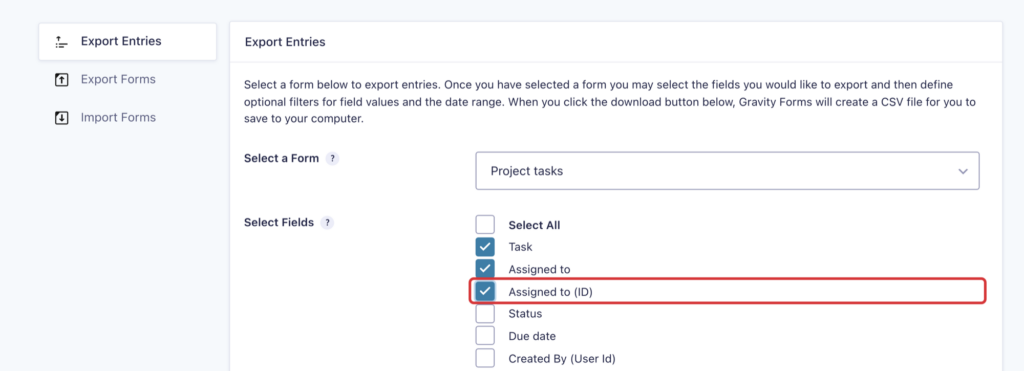
This update to Gravity Forms Dynamic Lookup changes how Lookup fields that store IDs are exported. Gravity Forms’ Export Entries page and GravityExport now write the name the field shows, where they used to write the stored ID. An optional “(ID)” column per field still exports the IDs, so you can import the entries back into a Lookup field.
The update includes security fixes, and we recommend updating. The “Show only entries created by current user” setting is now enforced when a form is submitted, :value and {all_fields:value} escape HTML in HTML notifications, and names output through a merge tag modifier such as :display_name appear as plain text. Lookup fields that store IDs also reject submitted values that match no record, with an error naming the value.
Lookup merge tags show names correctly in text notifications, confirmation redirects, and {all_fields:admin}, and the :label and :urlencode modifiers no longer return the stored ID. When a selected record stops being one of the field’s choices, such as an entry moved to the trash, its merge tag still shows the name, and saving the entry keeps the selection.
Developer updates
- Added the
gk/lookup/export/field/use-display-valuefilter to export stored IDs in a Lookup field’s column, as earlier versions did. - Added the
gk/lookup/validation/bypass-user-limitfilter to control whether a submission can link records outside the “Show only entries created by current user” restriction. - Post titles in Lookup fields now use the title as written, without the “Protected:” prefix or changes from
the_titlefilters.
GravityCalendar v2.24.0
This update to GravityCalendar includes a security fix, and we recommend updating. The Calendar widget in a View could show entries the View itself didn’t display, including every entry when “Show only approved entries”, a search, or a View filter left the View empty.
Calendars that use an Event field now show each event at the time that was entered. They used to convert events to each visitor’s local time, so the time, and sometimes the day, changed from one visitor to the next. The timezones guide explains how GravityCalendar handles time zones.
The Calendar widget now works with Views that refresh without reloading the page, such as a Map View after the map moves, and a second calendar on the same page shows its own events. Conditional logic gets the same improvements as the Advanced Filter Extension: conditions on Dynamic Lookup, GP Populate Anything (Gravity Wiz), and GP Nested Forms (Gravity Wiz) fields match the name the field shows, and conditions on Product, Option, or Shipping choices find entries.
GravityImport v2.12.4
This update to GravityImport fixes imports into Dynamic Lookup fields set to “Multiple Choice” with multiple selections allowed. These columns imported nothing while the import reported success, and cells that list stored values, such as record IDs (3, 1), now select those choices.
Imports no longer sit on “Preparing to import…” when GravityKit’s “Enable Background Processing” setting is off and GravityImport’s is on, because those imports now run in the browser. Entries imported in the background now belong to the user who started the import (see assigning entries to users during import to choose someone else). With Gravity Forms 3.0.3 or newer, rows rejected for the form as a whole show Gravity Forms’ reason, where they used to be blamed on an anti-spam or CAPTCHA plugin.
GravityMath v2.12.3
This update to GravityMath fixes a fatal error when scope="view" was used on a View that joins forms with Multiple Forms, along with a long list of filter problems.
Filters using lt or gt now compare numbers as numbers, so 5 no longer counts as greater than 10, and filters with a form ID before the field, such as filter_4:date_created, now apply. Date and Time filters read dates correctly when no date format is saved, match partial values such as 2026 and dates without leading zeros, and work on Time fields and on Date fields displayed as drop downs or text boxes.
Filters on Checkbox, Name, and other multi-input fields work again, including isnot and notcontains and the Math Summary. In the visible scope, lt, gt, and notcontains no longer exclude every entry. On Views that merge forms with a union, scope="view", scope="visible", Checkbox filters, and the Math Summary now include the merged form’s entries.
GravityMigrate v2.1.1
This update to GravityMigrate makes migrating with an AI assistant through the GravityKit MCP more reliable. A retry can skip forms that were already migrated, so they aren’t created a second time. An import or export that can’t run in the background is refused, where it used to stall, and a bundle someone put in the imports folder is never overwritten. The assistant also explains how to turn on bundle import or reset, and points you to the GravityMigrate screen for password-protected bundles.
Developer updates
- Added a
skip_already_migratedinput to thegk-gravitymigrate/migration-analyzeandgk-gravitymigrate/migration-runabilities. Both now return askippedlist of the forms left out, each withformandexisting_form_id.
GravityView v3.7.0
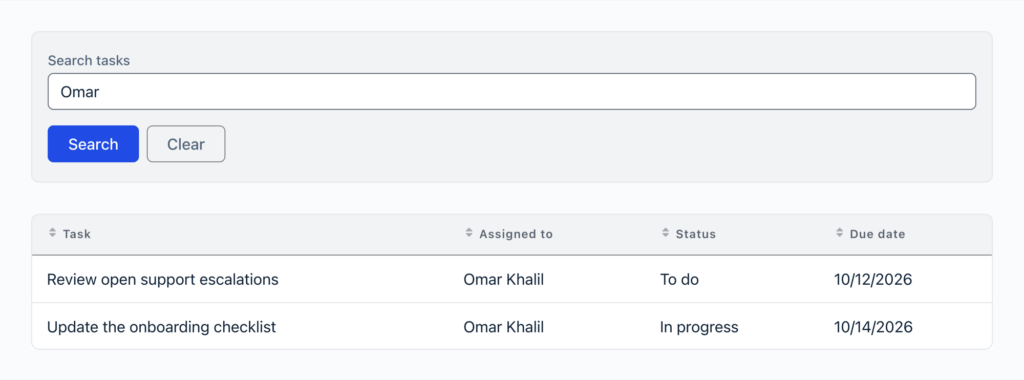
This update to GravityView changes what “Search Everything” in the Search Bar can find. It now matches what fields display as well as what they store: the names behind Dynamic Lookup, GP Populate Anything, and GP Nested Forms fields that store IDs, the labels of choice fields, and fields inside Repeater fields. Sorting by a field that stores an ID also orders entries by the displayed name, including in Views that combine forms with Multiple Forms.
The release also fixes several security issues, and we recommend updating soon:
- Views embedded with a
{user:...}merge tag in their search, such assearch_value="{user:ID}", showed every entry to logged-out visitors - The Entry and Entry Field blocks, the
[gventry]and[gvfield]shortcodes, entry embeds, and the REST API’s single entry route could show entries the View’s filters exclude - A page’s lightbox could open entries the page didn’t list when it also had an escaped
[[gravityview]]shortcode or a secured View embedded without its secret - Search Bar fields limited to logged-in users still filtered results for logged-out visitors, and a Search widget left in WordPress’s Inactive Widgets still let visitors search
- Some values in CSV and TSV exports could run as spreadsheet formulas when opened in a spreadsheet application
This release also fixes slowdowns and broken layouts from the 3.5.0 update. Pages with a Search Bar widget loaded more slowly with each search field, form field, and user on the site, and custom CSS that arranges List or Layout Builder entries into columns with the Legacy theme showed a single column. Entry links set to open in a lightbox open there again in DataTables 3.14.0 and newer.
Pages with more than one View or entry embed get a set of fixes. A View embedded twice on one page keeps its own search, settings, and widgets, and shows each Single Entry page once. A View nested in another View’s field no longer pushes the parent’s remaining entries outside the View, and the First and Last options on the Entry blocks and shortcodes now pick the right entry. When the Single Entry Title is empty, which is the default, Single Entry pages now fall back to the page’s title.
Other fixes in this release:
- With entry caching on, Views that join or union many forms no longer show each other’s entries or ignore searches
- Search Bar fields for Chained Selects appear and filter results, and dropdowns show the Drop Down field’s Placeholder
- Required (
+) and excluded (-) words in “Search Everything” work across fields and in Views with combined forms, and%and_match only themselves - Picking a Dynamic Lookup value in the Search Bar matches it exactly, so
7no longer matches78 - Edit Entry for multi-page forms validates every page, opens the page with an error, and moves to the right page with Next, Previous, or page links in any language
- Edit Entry accepts an unchanged Date or Time field with No Duplicates enabled
- Merge tag modifiers added by GravityView work on a field’s displayed value, so
:strtoupperon a “By Phone” choice showsBY PHONE
Developer updates
- First and Last lookups in
[gventry],[gvfield],[gv_entry_link], and the Entry blocks now run thegravityview/view/entriesfilter, which receives the looked-up position as a new fourth argument. The newgk/gravityview/view/boundary-entry/run-entries-filterfilter turns this off. - Added the
gk/gravityview/edit-entry/redirect,gk/gravityview/fields/gravityview-view/pre-render, andgk/gravityview/shortcode/is-reembeddedfilters. - Added
View::get_entry()andView::lists_entry(), which check an entry against the View’s filters.GVCommon::check_entry_display()now uses them. - Items added through
gk/gravityview/search/searchable-fields/allowedcan setis_search_keytotrueto stay searchable when “Search Everything” is limited to visible fields. - The REST API’s single entry route now returns 404 for every entry the View doesn’t show, which previously returned 403.
GravityView – Advanced Filter Extension v4.9.0
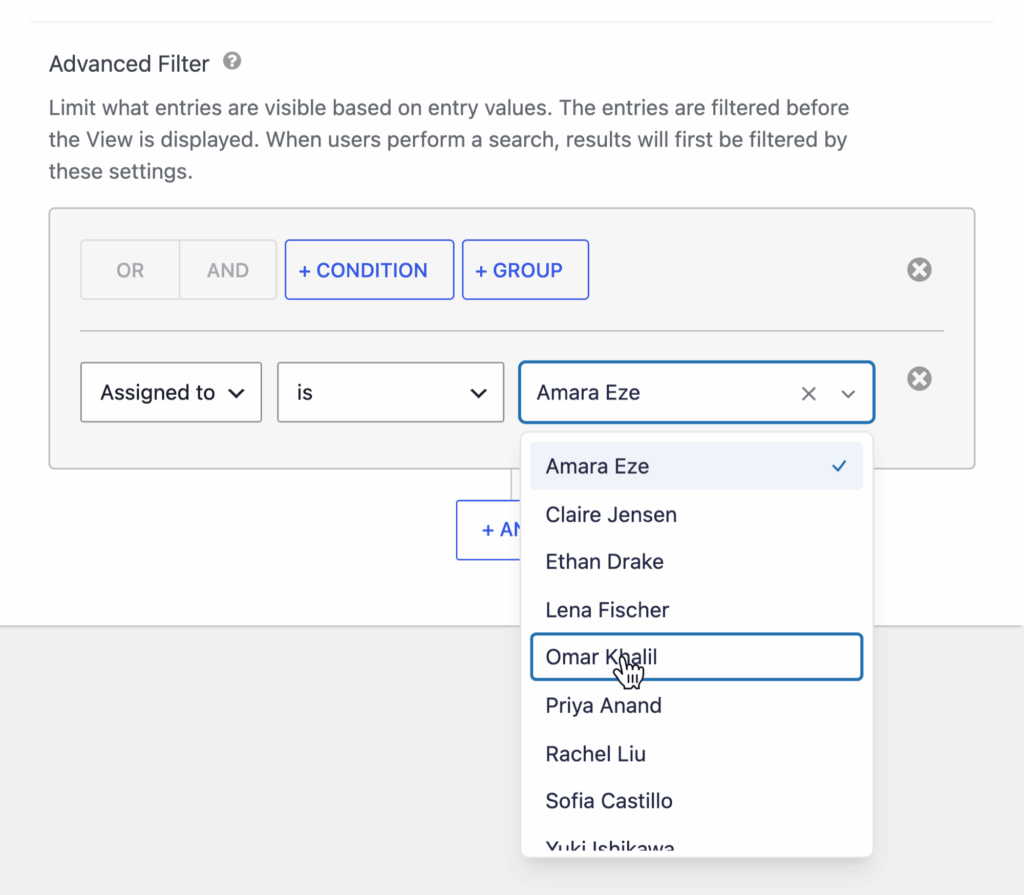
This update to the Advanced Filter Extension makes filters on fields that store the ID of a user, post, or entry, such as Dynamic Lookup, GP Populate Anything, and GP Nested Forms fields, match the name the field shows, limited to the records the visitor may see. “Is” and “is not” with a number still compare the stored ID.
“Is”, “is not”, “in”, and “not in” filters on a Product, Option, or Shipping choice now find entries, and a date filter whose value isn’t a date no longer causes a fatal error on PHP 8. Screen readers now announce the Advanced Filter section as a named group, and read date filters in the site’s language.
GravityView – DataTables Layout v3.14.0
This update to the DataTables Layout fixes the “Hide View data until search is performed” setting, which still showed entries before a search. A table also no longer shows another table’s results when the same View is embedded twice on a page, which needs the latest GravityView as well.
The Search Bar’s Clear button now works as it does in GravityView’s other layouts: Reset restores the values the page loaded with, and clearing restores default values and sets Radio fields back to “All”. Screen readers also identify the table’s entries as a named region.
Developer updates
- DataTables templates now fire the
gk/gravityview/template/entries/beforeandgk/gravityview/template/entries/afteractions around the table. - On GravityView versions that provide the
/refreshendpoint, tables load their rows through it, and thegravityview/datatables/outputfilter applies to those rows as well.
GravityView – DIY Layout v2.6.0
This update to the DIY Layout fixes the “No Entries Message”, which could appear as plain text where a heading belonged when the “No Entries Form” setting was configured. Screen readers now identify a View’s entries as a labeled region, as in GravityView’s other layouts.
Developer updates
- The Multiple Entries template now fires the
gk/gravityview/template/entries/beforeandgk/gravityview/template/entries/afteractions around the entries output. - The no-results output now uses the
.gv-no-results.gv-no-results-textor.gv-no-results.gv-no-results-formclasses in place of.gv-diy-view.gv-no-results. Update any custom CSS that targets the old selector.
GravityView – Maps Layout v3.11.0
This update to the Maps Layout includes a security fix, and we recommend updating. Users who could edit one View could overwrite the saved map positions of a form used by another View they weren’t allowed to edit.
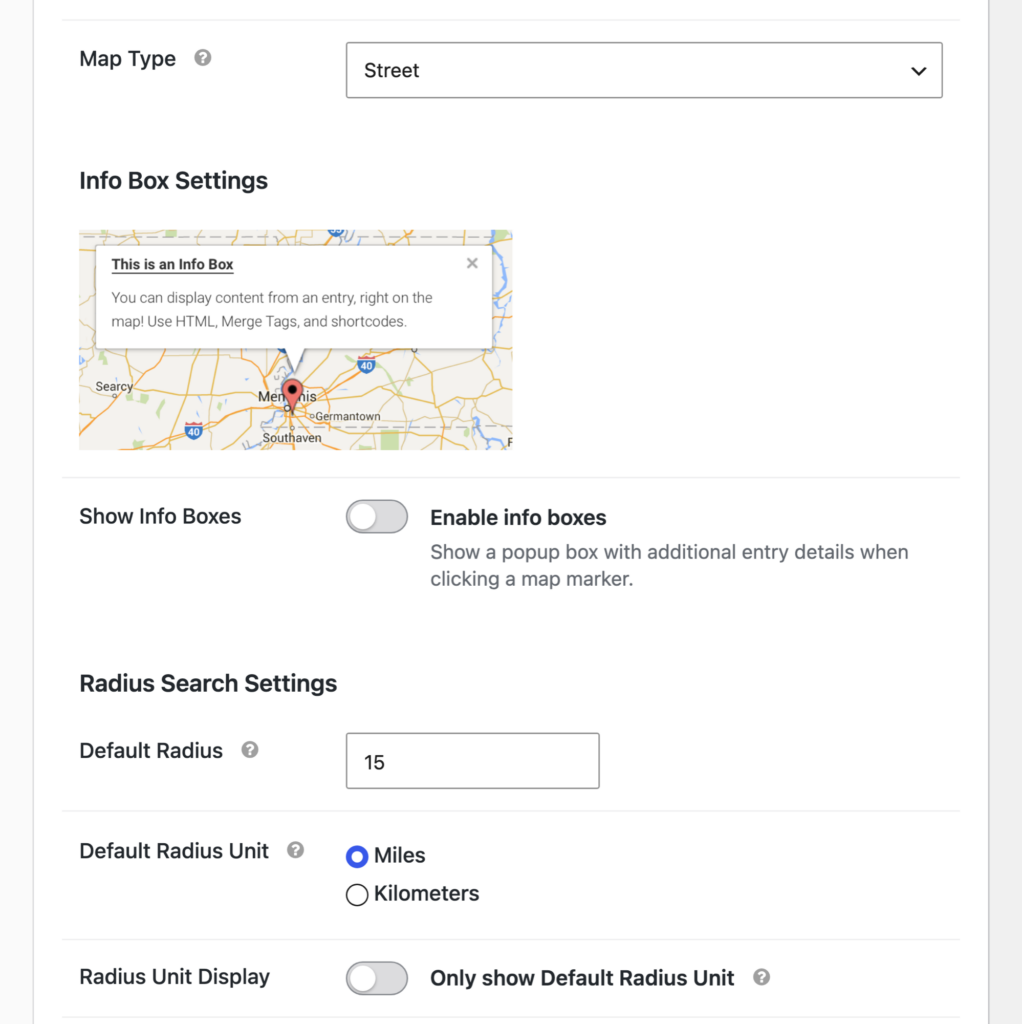
“Search as map moves” now narrows the results on Views without a Search Bar widget, and it reacts only when a visitor moves the map. It used to fire when the map moved on its own, after the page loaded, after a marker was clicked, or after a search fitted the map to its results. During a radius search, a map area search returns only entries that are inside the radius and visible on the map.
Maps now open at the right zoom and position, including from a bookmark, a reload, or an entry link, and when Maximum Zoom is set to “No Maximum”. Pagination and sorting keep the map in place while its markers update, and the Map settings in the View editor are grouped into titled sections.
Other fixes in this release:
- The map and the Geolocation Radius search field appear when “Allow REST access” is turned off
- Markers and the map’s starting view follow the “Hide View data until search is performed” setting
- Radius searches include entries at the exact searched location and measure distance from an address inside the radius
- Markers at a latitude or longitude of exactly 0 appear, and invalid coordinates no longer turn the whole map gray
- Entries saved before Gravity Forms 3.0.3 no longer get a pin near the center of the country for an empty Address field
- The Distance field shows a value in Views that join forms with Multiple Forms
- Keyboard visitors can Tab out of the location input and use the icon picker
Developer updates
- The Map layout templates now fire the
gk/gravityview/template/entries/beforeandgk/gravityview/template/entries/afteractions around the map and entry list. - The Map layout declares itself live-refreshing through the
gk/gravityview/view/refresh/livefilter, so GravityView serves its refresh endpoint.
In summary
GravityView’s “Search Everything” and sorting now work with the names fields display, and Dynamic Lookup fields export by name. GravityView, the Maps Layout, GravityCalendar, and Dynamic Lookup get security fixes worth installing soon, and the Maps Layout gets steadier zoom and map-move searches.
GravityMath’s filters handle dates, numbers, and checkboxes correctly, and the Advanced Filter Extension and GravityCalendar’s conditional logic match the names fields display. GravityImport and GravityMigrate get more reliable imports and AI-assisted migrations, and the DataTables and DIY layouts are easier to navigate with a screen reader.
As always, we recommend updating to the latest versions to ensure compatibility across the GravityKit suite.

Get better at Gravity Forms, one email a week
New GravityKit releases, practical Gravity Forms tutorials, and subscriber-only discounts. One short email every week, unsubscribe anytime.
More articles

Launch Log: Search Everything matches what fields show, steadier map searches, and security updates
GravityView’s Search Everything now matches the names fields display, and GravityView, Maps, GravityCalendar, and Dynamic Lookup get important security fixes.
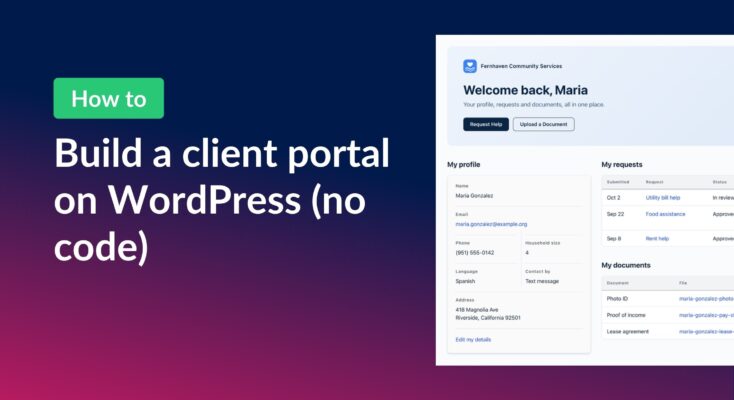
How to build a WordPress client portal with Gravity Forms
Build a client portal on WordPress where each client logs in to see their profile, their requests, and the documents they’ve shared, using Gravity Forms and GravityView.
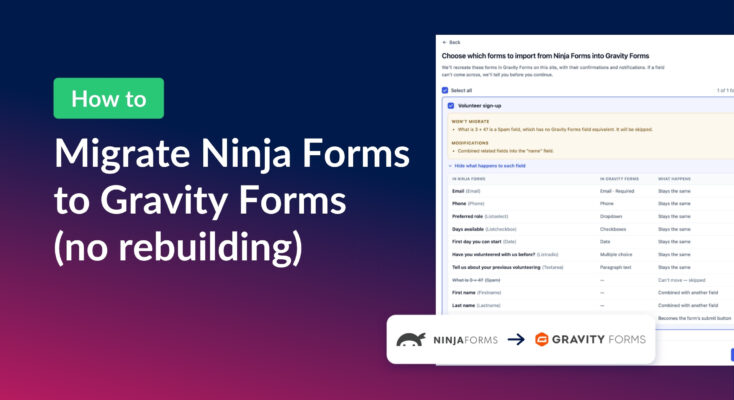
How to migrate from Ninja Forms to Gravity Forms without rebuilding your forms
Move your Ninja Forms forms into Gravity Forms with their fields, conditional logic, and notifications using GravityMigrate, then bring your submissions across with GravityImport.