
Published
•
Updated
Launch Log: Parent Entry ID fields, User Registration fixes, and security updates
Security fixes in Entry Tags, GravityEdit, GravityExport Lite, and GravityView, plus new Parent Entry ID fields and User Registration fixes in Edit Entry.


This week’s releases include security fixes for Gravity Forms Entry Tags, GravityEdit, GravityExport Lite, and GravityView, so we recommend updating. GravityView also gets new Parent Entry ID and Parent Form ID fields, and Edit Entry and inline editing now keep user accounts in step with User Registration feeds. Most of the other updates fix sorting, conditional logic, and calculation issues across the GravityView extensions.
Gravity Forms Entry Tags v1.5.1
This update to Gravity Forms Entry Tags improves security when tags show in notifications, confirmations, and GravityView. We recommend updating.
Tags now show their names wherever they appear. The Gravity Forms entry screen, the print page, and add-ons that use the same display, such as Gravity Flow and Gravity PDF, used to show a tag’s saved value (“Ops”) instead of its name (“Operations”). The {Tags:2} merge tag now lists tag names in notifications, confirmations, and GravityView Custom Content, and {Tags:2:value} gives you the saved values when you need them. The same applies to the gvlogic shortcode: [gvlogic if="{Tags:2}"] now compares tag names.
When you type or paste a tag’s name into the Tags field, it now picks the form’s existing tag instead of adding a new one with a random color.
More fixes in v1.5.1
Editing an entry works better when its tags were added outside the form, for example through the API. The Tags field no longer shows (and saves) a tag the entry never had, an issue since version 1.1.2, and it shows each tag’s name instead of its saved value. A tag with no saved color keeps the color it has in Views instead of getting a new random one. In a GravityView lightbox, Edit Entry’s Tags field now shows the entry’s tags and lets you add and remove them.
Merge tags and notifications handle tags more reliably too. Add-ons that read {Tags:2}, such as Webhooks, get tag names instead of HTML code, and confirmations no longer show HTML code for {Tags:2} or include it in links built with {Tags:2} or {entry:2}. In plain-text notifications, {all_fields} shows tag names, and in HTML notifications it no longer splits a tag that contains a comma into two. Outside GravityView Custom Content, {entry:2} lists saved values.
Other fixes:
- In GravityView Custom Content, tags no longer show as HTML code when another entry on the page shares some of the same tags or when a tag contains square brackets
- Tag links in DataTables Views set to Ajax (Server-side) processing no longer open a page of raw data
- A tag saved with a blank label no longer shows as an empty tag in the Entries list and in Views
{all_fields}and{Tags:2}no longer show the saved value of a tag that is no longer a form choice- In GravityView Table Views, tags keep their spacing without GravityEdit active
- With GravityView active, tags no longer briefly show twice when editing an entry
- The list of tags searches tag names instead of saved values, picking one of two tags with the same name adds the right one, and a tag can contain the word “null”
- On narrow screens, the list of tags no longer opens over the bottom of the Tags field for logged-in users
GravityBoard v1.7.1
This update to GravityBoard fixes the Boards menu on the Forms list and the form toolbar, which listed no Boards for users without full Gravity Forms access, such as administrators on sites that use the Members plugin.
It also fixes an error on the board settings page when the form has a Name field saved without its sub-fields. In conditional logic, has ANY of, has ALL of, and has NONE of now work on Dynamic Lookup fields that allow multiple selections, and on Multi Select choices that contain a comma, such as “Paris, France”.
GravityCharts v1.24.0
This update to GravityCharts fixes charts set to show a single entry, such as a chart added to a form confirmation or notification with entry=true in the [gravitycharts] shortcode. These charts showed the totals of every entry, with other people’s answers as labels. They now show only that entry’s answers.
Chart merge tags such as {gravitycharts:1} now show the chart in confirmations, notifications, and GravityView Custom Content, including tags added from the merge tag picker. Pages that show a form, including forms embedded in GravityView, no longer fail with a critical error when a Name, Address, or other multi-part field gets a list as its default value, for example from GP Populate Anything (Gravity Wiz).
More fixes in v1.24.0
Image charts in confirmations, notifications, and shortcodes show their legend text again, and an answer containing the word “async” or “await” no longer breaks the chart. Charts grouped by a Multi Select field that stores a comma-separated list count a choice such as “Paris, France” as one value.
Other fixes:
has ANY of,has ALL of, andhas NONE ofconditions work on Dynamic Lookup fields that allow multiple selections, and on Multi Select choices that contain a comma- The chart settings page no longer shows an error when the form has a Name field saved without its sub-fields
- On PHP 8.4 and newer, timeline charts no longer log a deprecation notice on every page that shows them
GravityEdit v2.13.3
This update to GravityEdit improves security when users who can edit only their own entries use inline editing. We recommend updating.
Two changes affect how inline edits are saved. Ticking or unticking GravityView’s Approve/Reject field now changes the entry’s approval status when the person editing can approve entries. Inline edits to fields that the Gravity Forms User Registration Add-On copies to a user’s profile now update that profile when the person editing can edit the user, and they send the add-on’s “User is updated” notifications. When someone else changes a user’s email address, WordPress also emails that user. To run other feeds, such as Zapier or Slack, after an inline edit, use the feed snippets for GravityEdit.
More fixes and developer updates in v2.13.3 (includes a breaking change)
With GravitySearch active, inline editing keeps working on the Gravity Forms Entries screen after you change pages, sort, switch status tabs, or search. When editing a whole column at once, clicking a choice’s label no longer changes another entry’s row.
Entry Tags fields work better with inline editing. On sites with a classic theme, GravityView’s Edit Entry no longer shows an empty Tags field (and erases its tags) for entries whose tags have no saved colors. In DataTables Views set to Ajax (Server-side) processing, the inline editor shows the entry’s tags. The list of tags now opens in front of the editor and closes after you pick a tag, and the Entry Tags scripts and styles load only where inline editing is on.
Other fixes:
- In Views with inline editing, Dynamic Lookup fields that save the chosen text show the right value on every row
- With Gravity Forms 3.0.3 or newer, the Toggle Inline Edit button works on an Entries screen with no entries
- Saving the “Other” choice of a Radio Buttons field saves the text typed for it
Developer updates
- Added the
gk/gravityedit/user-registration/can-edit-userfilter, to let roles that cannot edit users in WordPress, such as Editors, update a user’s account with inline editing. - The role in a User Registration feed now applies only when the person saving the entry can change roles, even with the
gk/gravityedit/user_registration/preserve_rolefilter set to false. - Breaking change: the Entry Tags scripts and styles now load under Entry Tags’ own handles (
gk-entry-tags-public,gk-entry-tags-tagify, andgk-entry-tags-random-color) instead ofgktag_public,tagify, andrandom_color, andgktag_previewno longer loads. Code that dequeues the old handles has no effect and should use the new ones. - The
gravityview-inline-edit/edit-stylefilter now accepts onlybootstrap3-editable, because thejquery-editableandjqueryui-editablestyles stopped inline editing from starting. Sites that ask for them get the default style, and the GravityEdit log notes it. - The
gravityview-inline-edit/jquery-ui-themeandgravityview-inline-edit/poshytip-themefilters no longer have any effect.
GravityExport v1.19.0
This update to GravityExport fixes saved exports set to “Single Entry”, which could write every entry to the same file, so each new entry replaced the previous one. Each entry now gets its own file, including on exports saved before this update.
Export filters also handle has ANY of, has ALL of, and has NONE of conditions on Dynamic Lookup fields that allow multiple selections and on Multi Select choices that contain a comma. The filter settings open again for forms with a Name field saved without its sub-fields.
Developer updates in v1.19.0
Developer updates
- On PHP 8.4 and newer, page loads no longer log four “Implicitly marking parameter as nullable is deprecated” notices.
- Rows hidden with the
gfexcel_renderer_hide_rowfilter no longer show in PDF exports (requires GravityExport Lite 2.7.7 or newer).
GravityExport Lite v2.7.7
This update to GravityExport Lite updates the bundled PhpSpreadsheet library from 1.19.0 to 1.30.7. That clears CVE-2026-34084, CVE-2026-45034, and other Common Vulnerabilities and Exposures (CVE) reports that security scanners flag, none of which affected GravityExport Lite. We recommend updating so your scanner reports stay clean.
It also fixes exports that failed with a critical error on PHP 8 or newer when an entry created through the Gravity Forms REST API had an empty List field with columns.
GravityImport v2.12.7
This update to GravityImport changes how you import into Date fields set to “Date Field” or “Date Drop Down”. When you map CSV columns to form fields, the field is now offered as a single mapping target, with its date format setting. Before, columns mapped to the field’s Month, Day, or Year were dropped while the import reported success. The import wizard now flags those columns until you combine them into one date column or untick them. If your dates come from a spreadsheet, see formatting dates for Gravity Forms in Microsoft Excel.
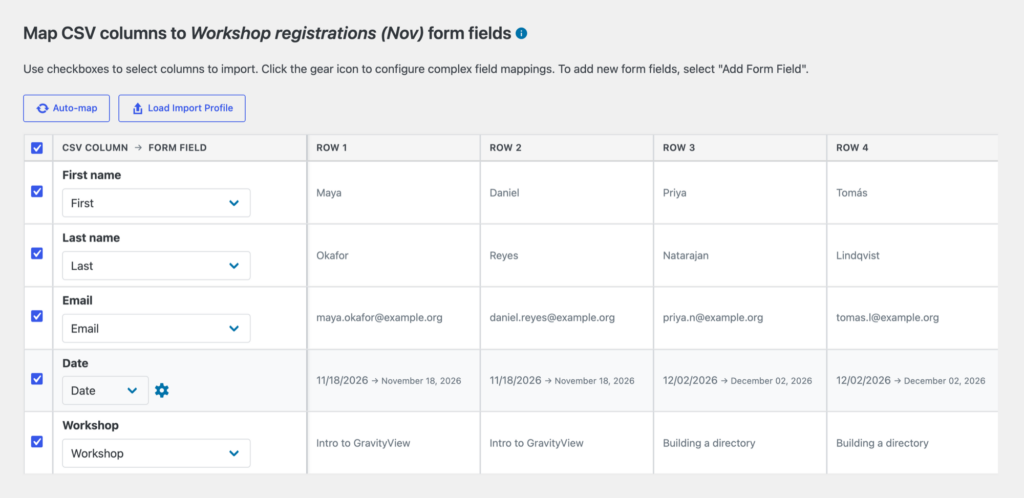
Import profiles saved before this update for a form with one of these Date fields show “Form fields have changed since this profile was saved” in the import wizard, so you’ll need to map the date again. The WP-CLI gk import run command also stops rejecting profiles saved in the import wizard for unchanged forms with Checkbox, Multiple Choice, Time, or Date fields.
More fixes in v2.12.7
Import profiles that map a column to a Date field’s Month, Day, or Year now stop with a message naming the column and the field to map instead when run from the command line, and they load with those columns unmapped in the import wizard.
Other fixes:
- Messages about a column mapped to one part of a field, or to a field whose type changed, name the column by its header and its position in the CSV file, instead of an internal rule number
- When an import stops with an error, the import screen shows the reason instead of “Batch is in stop state. Running no longer possible.”
- On PHP 8.1 and newer, imports no longer write “Passing null to parameter” deprecation notices to the debug log
GravityMath v2.14.1
This update to GravityMath fixes Math Summary widgets set to “Entries shown on the page”. The Minimum or Maximum of a Checkbox field with more than one choice checked, an Option field, or a field with text choices could stop the page from loading, and other results came out wrong.
In View calculations, averages, minimums, and maximums of fields other than Number fields, such as Radio Buttons, Option, and scored Survey fields, no longer count entries without a value as 0. They also use a numeric default_value, so results now match the [gravitymath] shortcode with scope="form".
More fixes and developer updates in v2.14.1
Math Summary widgets set to “Entries shown on the page” count every checked choice of a Checkbox field, show Option field sums and minimums correctly, and leave entries without a value out of averages while keeping values of 0. Groups without any value no longer show 0, or 9,223,372,036,854,775,808 for a Minimum.
Other fixes:
- On PHP 8.3 and newer, View totals and footer calculations no longer print an “array_sum(): Addition is not supported on type string” warning for each empty value, and Math Summary widgets no longer print warnings for values that are not numbers
- Math Summary widgets set to “All View entries” and GravityMath Summary blocks with a Top display, such as Top 3, show every group, even when a group has no value in the field
- A Math Summary widget or block whose Group By field no longer exists no longer prints a PHP notice or warning
- In Preloaded (Client-side) DataTables Views, View (Visible) footer averages of price fields no longer count entries without a price as 0 (requires DataTables 3.15.0 or newer)
Developer updates
- The
gravityview/math/aggregate_data/modify_field_valuefilter now receives an empty string instead of 0 for entries without a value in fields other than Number fields, such as Radio Buttons, Option, and scored Survey fields.
GravitySearch v1.4.0
This update to GravitySearch stops a form’s Entries screen from adding the site’s address to the browser’s address bar when you change pages, sort, or search.
Advanced search filters now handle has ANY of, has ALL of, and has NONE of conditions on Dynamic Lookup fields that allow multiple selections and on Multi Select choices that contain a comma. The Entries screen also opens again for forms with a Name field saved without its sub-fields.
GravityView v3.11.0
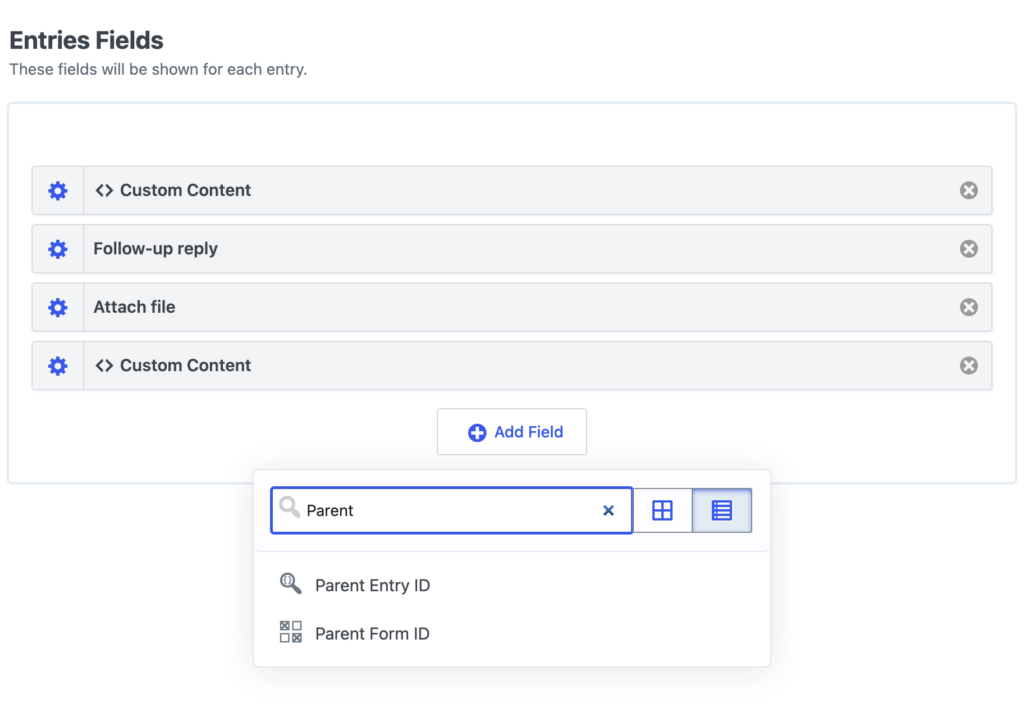
This update to GravityView adds Parent Entry ID and Parent Form ID fields to the View editor. When you embed a form in a View, these fields hold the entry and form each submission came from, and you can search and sort by them. Read more about how parent entries are stored.
This release also improves security when updating entries in Edit Entry on forms with a User Registration feed. We recommend updating. Edit Entry now runs the form’s Update User feed, so the user’s WordPress account gets the new values when the person saving the entry can edit that user. A Create User feed updates the user it registered, empty fields are no longer filled with the logged-in person’s profile data, and when an account can’t be updated, Edit Entry says why next to the “Entry Updated” message. If you don’t want Edit Entry to touch user accounts at all, you can turn off User Registration updates in Edit Entry.
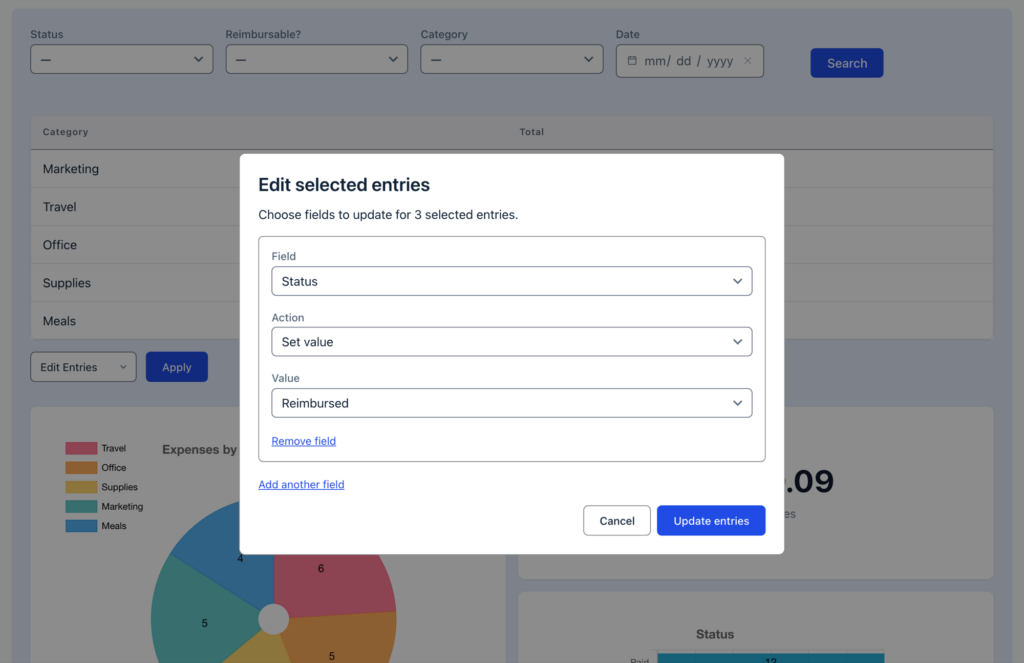
In Views that use the Vantage theme, the Bulk Actions dialogs (Edit Entries, Delete Entries, and Resend Notifications) now match the View’s theme, colors, and Custom CSS.
Views created with a form preset now keep the preset’s settings, so entries no longer stay hidden until approved. Views with an Edit Entry, Delete Entry, or Duplicate Entry link also stop running their entries query many extra times on every page load, and the View editor no longer shows WordPress’s “Please update now” notice at the top of the screen.
More fixes and developer updates in v3.11.0
More User Registration fixes in Edit Entry: with a Create User feed, saving no longer ends on an error page when the email field is left empty or when the new email address belongs to another user, and WordPress tells the registered user when someone else changes their email address. When an account can’t be updated, Edit Entry shows a link to continue instead of redirecting on its own. A feed with no Display Name saved no longer triggers a PHP notice or warning.
Edit Entry no longer shows a critical error for forms with a Repeater field and conditional logic when a plugin such as GravityBoard, Gravity PDF, or GravityCharts is active. Updating an entry also no longer erases its Repeater field’s rows: a Repeater field that has rows is left out of the Edit Entry form.
Form presets work as intended again. Views made from a preset are saved with a View type and show their field values, and they include the preset’s widgets, such as page links and the Search Bar with its search fields. Changing the View type before publishing moves the preset’s fields to the new layout, and forms created from the Job Board and Resume Board presets keep an Employment Type choice such as “Contract, Remote” in one piece.
Sorting by a field works for more field types. A Single Product, Hidden Product, or Calculation field now sorts by price, then quantity, including in DataTables tables in Ajax (Server-side) mode. Sorting by a Checkbox field now compares every checked choice.
Redirects after updating or deleting an entry work with & and merge tags in the lightbox, and users who cannot see private Views, such as Subscribers, are redirected and see the “Entry Updated” message on Views embedded with Prevent Direct Access on. Redirect After Editing set to Multiple Entries now sends users to the page with the GravityView block.
Other fixes:
- With GravitySearch active, the Approve, Disapprove, and Reset Approval bulk actions stay on the Gravity Forms Entries screen after changing pages, sorting, or searching
- The Connected Views menu on the Forms list and the form toolbar lists Views for users without full Gravity Forms access, such as administrators on sites using the Members plugin
- Cached Views show the new Workflow Step and Workflow Status right after a Gravity Flow workflow is cancelled
- The Gravity Forms merge tag menu in the View editor lists the fields of a new View’s form before the View is saved
- In a View that joins forms, Custom Content merge tags that read another form’s field, such as
{Favorite Color:2:form:5}, show the joined form’s value - In DataTables tables that load their rows through admin-ajax, sorting by a joined form’s Checkbox column works
- Link text and label settings in a View’s field settings, such as Edit Link Text, use the full width of the dialog
- In Vantage-themed Views, buttons, inputs, and drop-downs show a keyboard focus outline in Windows High Contrast mode
- On PHP 8.5, Views with an Edit Entry, Delete Entry, or Duplicate Entry link, the Edit Entry screen, and embeds with an invalid
secretno longer log a deprecation notice
Developer updates
- Added the
gk/gravityview/edit-entry/user-registration/can-edit-userfilter, to let roles that cannot edit users in WordPress, such as Editors, update a user’s account from Edit Entry. - The role in a User Registration feed, and on multisite the new site and its roles, now apply only when the person saving the entry can change roles, also with the
gravityview/edit_entry/user_registration/preserve_rolefilter set to false. - The
gravityview/edit_entry/successfilter now gets the problems shown above the message as a sixth argument, and the View’s redirect choice as a seventh.
GravityView – Advanced Filter Extension v4.10.1
This update to the Advanced Filter Extension fixes the View editor, which could not be opened when the View’s form had a Name field saved without its sub-fields.
Advanced filter conditions on a new View now follow its form before the first save. If you change a new View’s form, conditions on the old form’s fields are removed, and conditions on entry details such as Entry ID move to the new form.
More fixes in v4.10.1
On a new View that joins forms with Multiple Forms, conditions can use the joined form’s fields before the View is saved, and on a View saved as a draft before a form was chosen, you can add conditions right after choosing one.
has ANY of, has ALL of, and has NONE of conditions now check every selection on Dynamic Lookup fields that allow multiple selections, and in field conditional logic they check every selection on Multi Select fields too. On Multi Select fields that store a comma-separated list, they find a choice with a comma, such as “Paris, France”, and a condition for “Paris” or “France” no longer matches it.
GravityView – DataTables Layout v3.15.1
This update to the DataTables Layout fixes tables that never loaded, showing “Loading data…” with no entries. It happened with Responsive on, a GravityMath footer calculation set to “Above the table footer”, and the table sorted by a field it does not show.
Sorting in Preloaded (Client-side) tables now handles numbers, dates, prices, and accented letters the way you’d expect, so entry 10 no longer comes before entry 2. In Views that join forms with Multiple Forms, Ajax (Server-side) tables sort and filter a joined form’s column by that form’s field again, which had often left filters showing no results since 3.14.0.
More fixes in v3.15.1
Preloaded (Client-side) tables sort these columns correctly:
- Entry ID, Total, Payment Amount, Post ID, and Quantity columns, which sorted as text
- Number columns in the “9,999.99” format with “Format number” on, where a value such as 1,000.125 sorted as if it were one million
- Number columns that show fewer decimals than were entered, such as 1.11 and 1.14 both shown as 1.1
- Date Created, Date Updated, and Payment Date columns, which ignored the time for entries from the same day
- Accented letters, which sorted after Z
- Single Product, Hidden Product, and Calculation columns, which now sort by price, then quantity
Tables sorted by a field they do not show now open in the right order when that field is a day-first date (such as 15/01/2024), Total, Created By, Read Status, or Approval Status with translated or renamed labels.
In Views that join or combine forms, Preloaded (Client-side) tables sort and filter a joined or combined form’s date columns by the right value. Views set to sort by a joined form’s field, including its Date Created, open sorted by that field instead of the first column, and a sort_field shortcode attribute naming a joined field works.
With Responsive on, GravityMath footer calculations and the names of hidden columns no longer stay on screen past the edge of the table.
GravityView – Maps Layout v3.12.1
This update to the Maps Layout fixes field values of 0. While the Maps Layout was active, any field whose value was 0, such as a Number or text field, showed as empty in every View and layout, including Views without a map.
GravityView – Multiple Forms v1.0.3
This update to Multiple Forms fixes a sorting issue in Views that join forms. Changing a View’s sort from one joined Checkbox field to another in the same direction could keep showing the old order until the cache cleared.
For developers, Views with joined forms no longer log a deprecation notice on PHP 8.5 when an entry has no match in a joined form.
GravityView – Social Sharing & SEO v3.5.1
This update to Social Sharing & SEO restores the Yoast SEO box in the View editor. With Yoast SEO 28.7 or newer, the box showed a critical error instead of its settings, and with Yoast SEO 23.5 or newer, the Facebook Image and X (Twitter) Image settings for Single Entry pages were missing.
How to update
We recommend keeping all your GravityKit products up to date, so they stay compatible with each other and you get every new feature and fix, security patches included. You can update them from your WordPress dashboard:
- In your WordPress dashboard, hover over the GravityKit menu and click Manage Your Kit.
- Scroll past your licenses to the list of products, then click the Update Available filter to see the products with a new version. Their version numbers show in red.
- Click Update on each product.
Updates need an active license on the site.
For the full guide, read installing, activating, and updating GravityKit plugins.

Get better at Gravity Forms, one email a week
New GravityKit releases, practical Gravity Forms tutorials, and subscriber-only discounts. One short email every week, unsubscribe anytime.
More articles

Launch Log: Parent Entry ID fields, User Registration fixes, and security updates
Security fixes in Entry Tags, GravityEdit, GravityExport Lite, and GravityView, plus new Parent Entry ID fields and User Registration fixes in Edit Entry.

9 business apps you can build with Gravity Forms and GravityKit
Nine apps small businesses build from the Gravity Forms data they already collect, from a contact list and sales board to customer logins, invoices, and stock counts.

How we’re making gravitykit.com agent-ready
How we made gravitykit.com agent-ready: two MCP servers, Markdown endpoints, llms.txt, and what 149 test questions taught us about answers on your pages.