
What currency are GravityKit prices in?
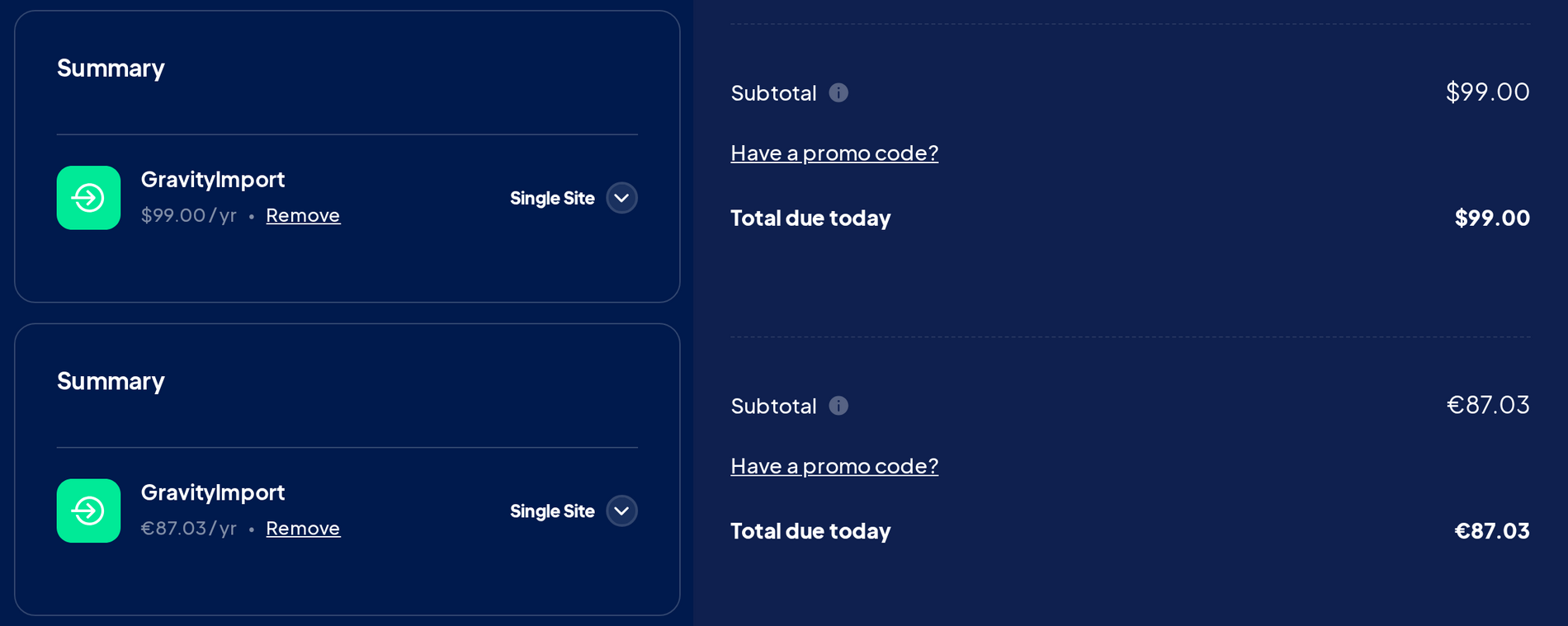
GravityKit prices are in US dollars (USD). In most countries that use the euro, the British pound, or the Swiss franc, checkout converts the price to that currency and charges you in it. Everyone else pays in US dollars. The total at checkout is the amount and currency you pay, by card or with PayPal.
The $ sign means US dollars #
On the pricing page, product pages, and checkout, a price with a $ is in US dollars, wherever you are. If you’re in Canada, Mexico, or Australia, $199 means 199 US dollars.
The pricing page and product pages usually show US dollars even when checkout will convert the price, so go by the total at checkout.
Currency by country #
Checkout picks the currency from the country you’re connecting from, so a VPN can change it.
- Euros (EUR): most countries that use the euro
- British pounds (GBP): the United Kingdom, Guernsey, Jersey, and the Isle of Man
- Swiss francs (CHF): Switzerland and Liechtenstein
- US dollars (USD): everywhere else
This is the same license at checkout, from the United States and from Germany:
Changing the currency at checkout #
The site has no currency menu, so use one of these links:
You can open a link before or after adding a product. Your cart is kept, with its prices in the new currency, and checkout stays in that currency for the rest of your visit.
These links don’t work on a payment link from an agency, because opening them empties that checkout. Ask the agency for a link in your currency.
Exchange rates, discounts, and refunds #
Converted prices use an exchange rate that updates every day, with no markup, so a converted price can change slightly from one day to the next. A discount code is converted too: a fixed amount in dollars comes off at the same rate, and a percentage stays the same percentage.
We don’t sell in other currencies. If your card or PayPal account uses one, your bank or PayPal converts the charge at its own rate and may add a fee, so your statement can show a different amount.
A refund goes back in the currency you paid. If your bank converted the original charge, the amount that reaches your account can differ, because exchange rates move.
Renewals and upgrades #
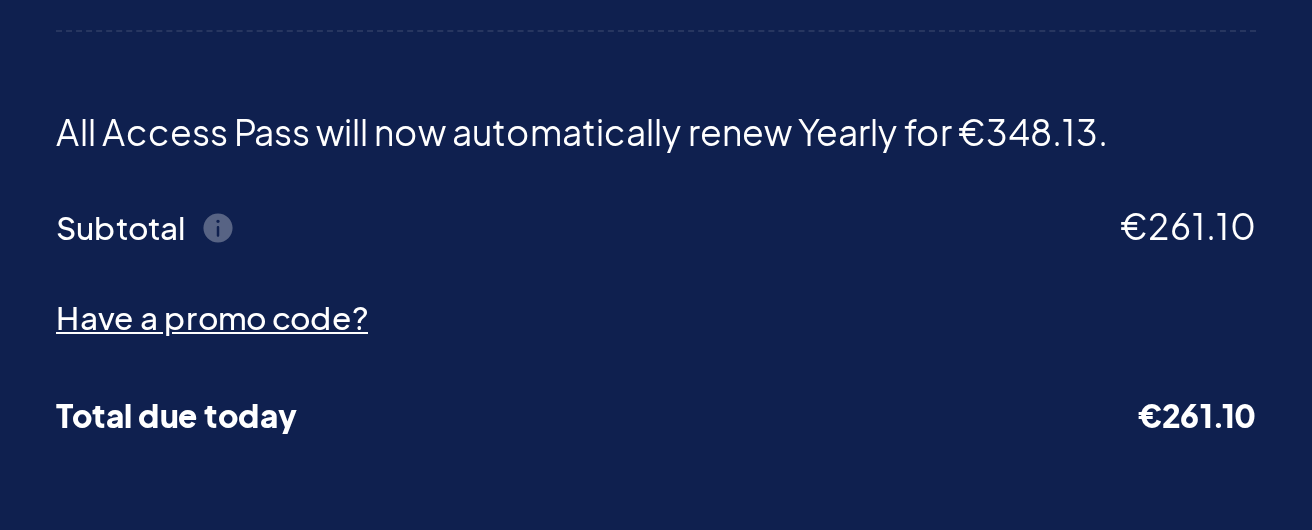
An auto-renewing subscription is charged in the currency you bought it in. Its yearly amount is fixed in that currency when you buy, so a change in the exchange rate doesn’t change what you’re charged. Your renewal reminder email shows that amount, and changing your card doesn’t change it.
Renewing a license by hand, before or after it expires, and upgrading a license both happen at checkout, so the price is converted at that day’s exchange rate into the currency checkout shows. The new subscription’s yearly amount is set the same way and stays fixed after that. When you upgrade, checkout shows that yearly amount above the total:
The pricing updates FAQ explains what happens to your rate if a subscription ends.
Checkout says orders must be completed in another currency #
Each account keeps its card subscriptions in one currency. After you’ve bought a subscription by card, checkout refuses a card payment in any other currency for a new subscription, a renewal, or an upgrade, even if the first subscription has since been canceled:
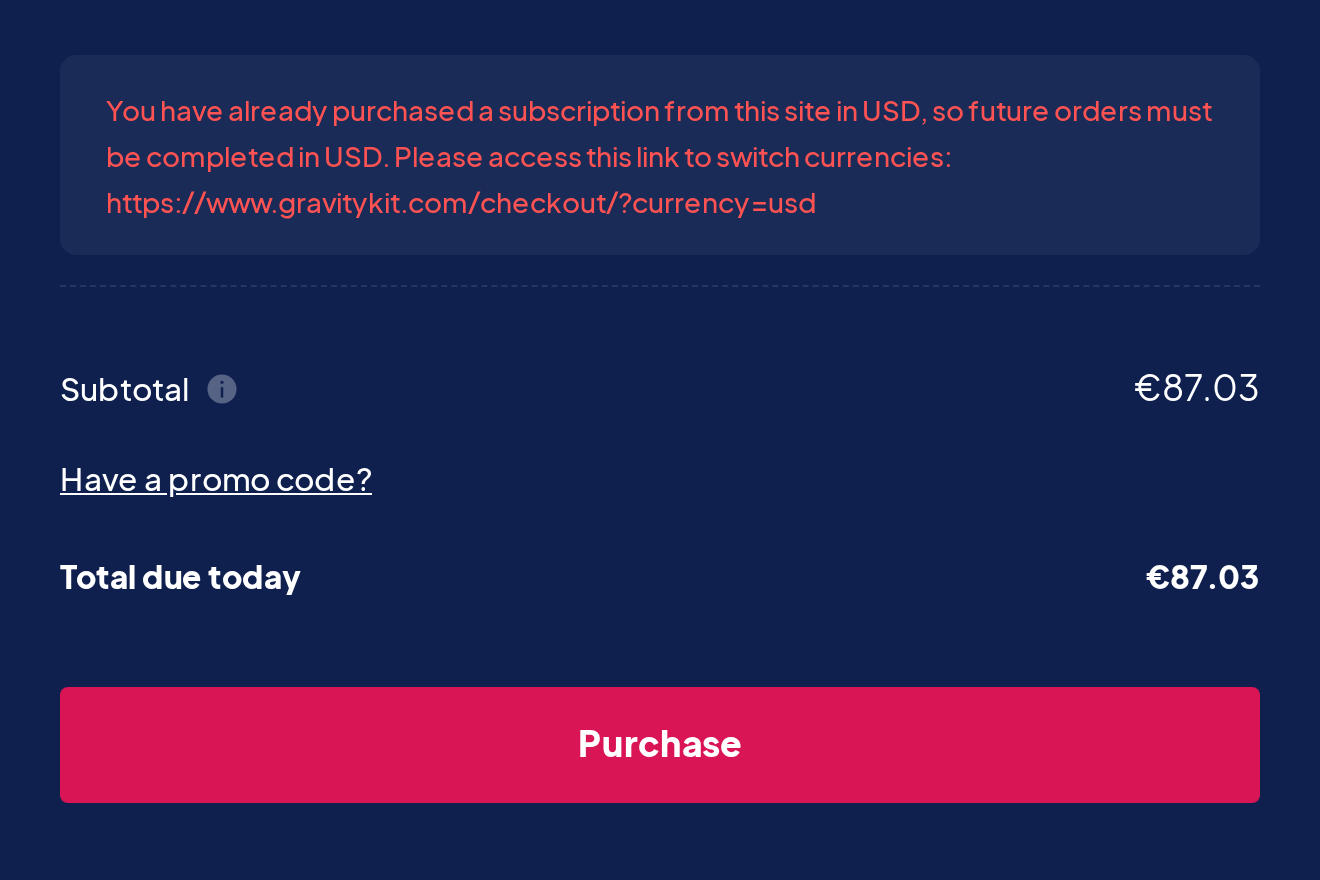
You can run into this while traveling or using a VPN, when checkout shows a different currency from the one your subscription uses. To complete the order, do one of these:
- Open checkout in the currency the message names, using the links above, and pay by card.
- Pay with PayPal, which isn’t held to this rule.
One-time purchases, such as a Lifetime license, can be paid by card in any of the four currencies.
Your account has no setting that moves a subscription to another currency. If you want to change one, contact support.
Tax and VAT #
GravityKit is a US company and doesn’t add sales tax or VAT at checkout, wherever you are. Checkout and invoices have no tax line, so the total at checkout is the full amount.
Because we don’t add tax, a tax-exempt organization doesn’t need to send us an exemption certificate. If you’re a nonprofit, you may qualify for nonprofit pricing.
We don’t have a VAT number, and there’s no separate VAT invoice. The Tax/VAT number in our address on the invoice is our US tax ID (EIN). If your accounts team needs a W-9 or our legal name, Katz Web Services, Inc., both are on the GravityKit W-9 page.
Finding the currency on your invoice #
The invoice is the record of the currency you paid.
- Sign in to your GravityKit account and click Billing.
- Open the Order History tab.
- Next to the order, click Invoice.
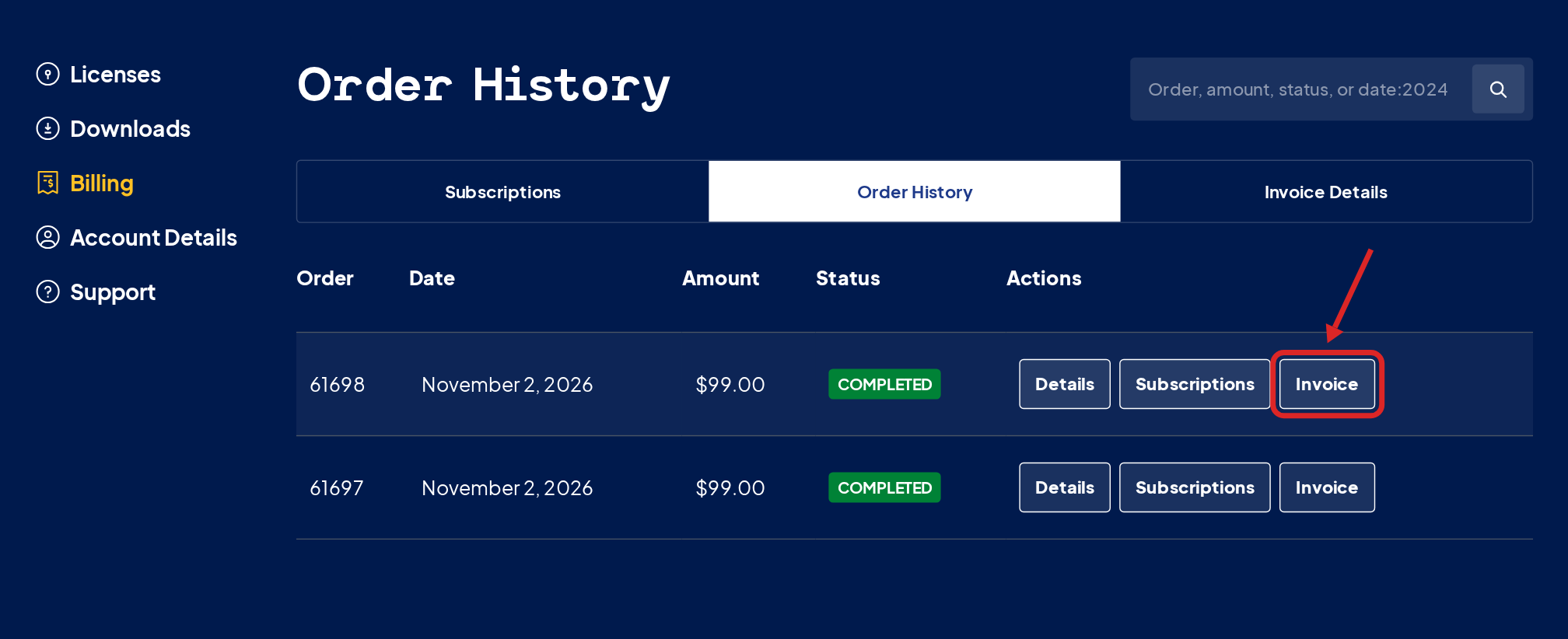
Each amount on the invoice is in the currency you paid. An invoice shows only that currency, with no exchange rate.
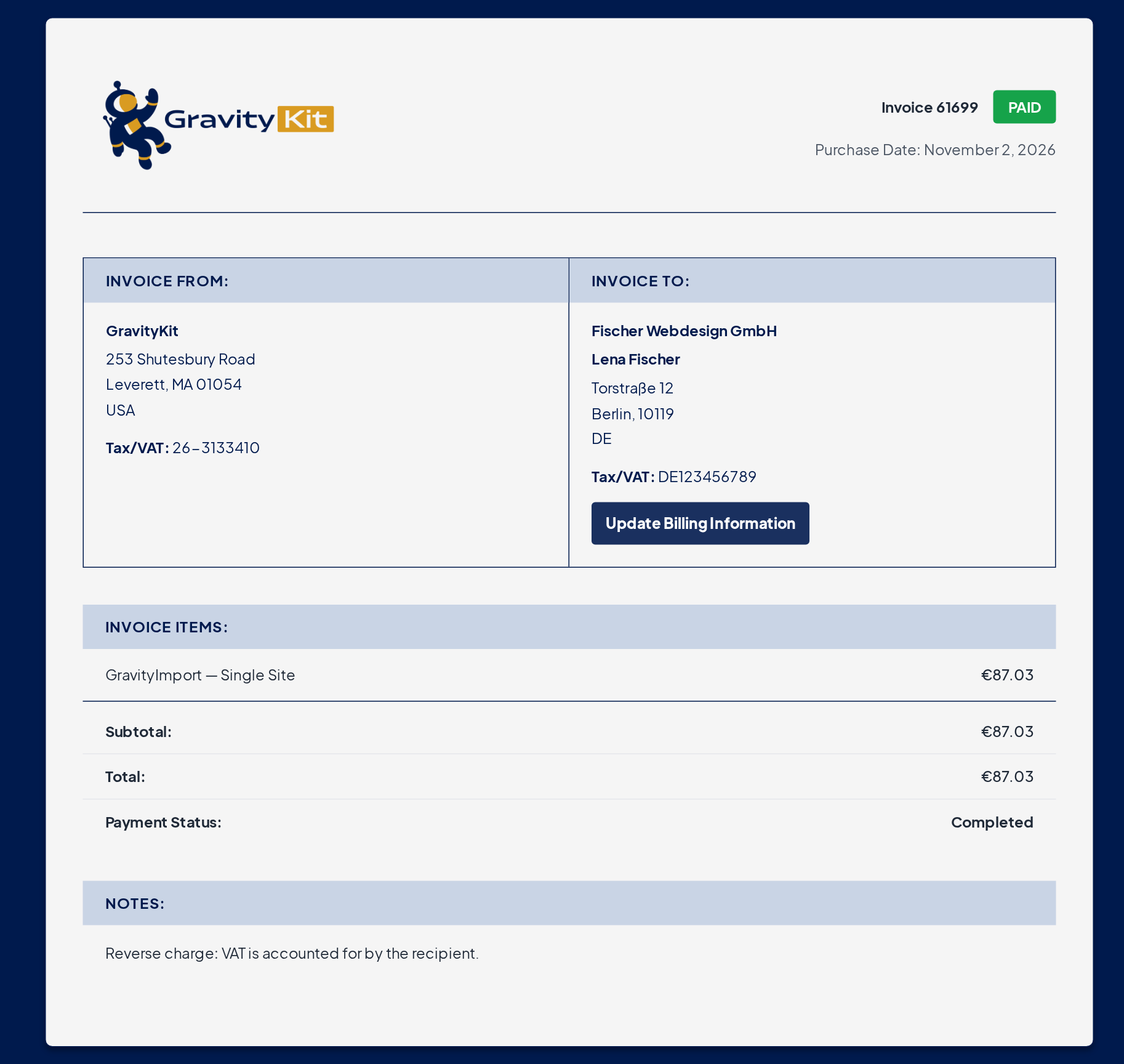
To add your company name, address, and VAT number, or a note such as a reverse charge statement, see Update your invoice with company name, address, or VAT number. To save or print a copy, see Downloading a copy of your invoice.

