
GravityKit plugins stay in English on a site in another language
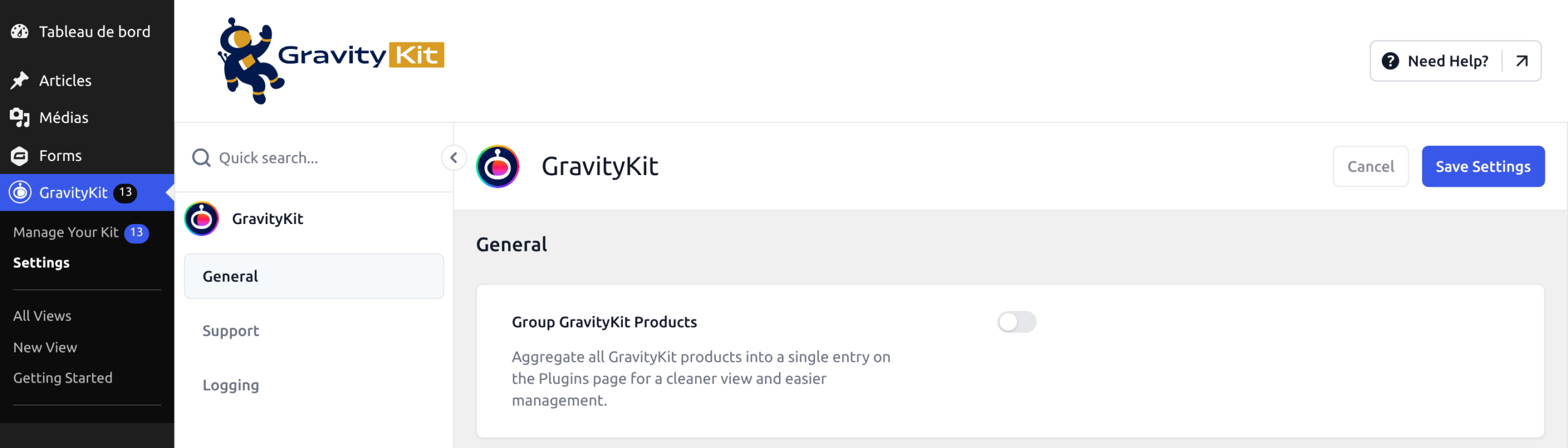
Most GravityKit plugins don’t include their translations. Your site downloads them from GravityKit’s translation server, translate.gravitykit.com, so a plugin stays in English until its translation has been downloaded. On the screen below, WordPress is in French while the GravityKit menu and settings are still in English.
How translations reach your site #
When an administrator opens the WordPress dashboard, each active GravityKit plugin looks for a translation in that administrator’s language. If the translation is missing, or a newer version has been published, the site downloads it.
- Language. The plugins use the Language set under Users, then Profile. When the profile says Site Default, they use the Site Language under Settings, then General.
- List of translations. The site downloads the list of available translations once a day and keeps it for 24 hours.
- Files. Translations are saved in
wp-content/languages/plugins/gravitykit/. On a multisite network, each site has its own folder inside it, named after the site’s ID.
GravityKit Settings, Manage Your Kit and Grant Support Access use a translation of their own, named gk-foundation, which is downloaded the same way.
Update your GravityKit plugins #
Older versions could leave GravityKit Settings, Manage Your Kit and a plugin’s own settings screens in English, so go to GravityKit, then Manage Your Kit, and install any updates.
Check that your language is on the list #
Translations are published for these languages: Arabic, Bengali, Bosnian, Chinese (China), Danish, Dutch, Finnish, French (Canada and France), German, Hebrew, Hungarian, Italian, Japanese, Korean, Norwegian Bokmål, Persian, Polish, Portuguese (Brazil and Portugal), Romanian, Russian, Spanish (Argentina, Mexico and Spain), Swedish and Turkish. The list on translate.gravitykit.com is always the current one.
The language must match exactly. A site set to a regional language that has no translation of its own, such as French (Belgium) or German (Switzerland), stays in English even though French (France) and German are available. To see your own screens translated, set the Language in your profile to the published language. For visitors and other users, copy the published language’s files under your language’s code:
- Open
wp-content/languages/plugins/gravitykit/on your server. - Copy every file whose name contains the published language code, such as
fr_FR. - In each copy, replace that code with your own, such as
fr_BE. For example,gk-gravityview-fr_FR.mobecomesgk-gravityview-fr_BE.mo.
Open the dashboard as an administrator #
Only a user who can install languages makes the site download translations. On a single site, administrators can install languages. On a multisite network, only Super Admins can. Editors and other users see a translation once it has been downloaded, but their visits never download one.
Sign in as an administrator whose language is the one you need and open any page of the WordPress dashboard. The first page can take a few seconds longer while the files download.
If DISALLOW_FILE_MODS is set to true in wp-config.php, WordPress doesn’t let anyone install languages, so translations are never downloaded. Install them by hand instead, as described below.
Make the site check for translations again #
If your server couldn’t reach translate.gravitykit.com within 3 seconds, the site stores an empty list and doesn’t look again for 24 hours. A firewall that blocks the server’s outgoing connections has the same effect. To check again without waiting, delete the stored list with WP-CLI:
wp option delete gk-translations-registryOn a multisite network, run wp site option delete gk-translations-registry instead. Then open any page of the WordPress dashboard as an administrator. Changing the Site Language also deletes the stored list.
Install a translation by hand #
- Open the list of translations and find the plugin’s name, such as
gk-gravityviewfor GravityView, and your language. - Download the ZIP file from the
packageaddress next to your language. Its name is the plugin’s name followed by the language code, such asgk-gravityview-fr_FR.zip. - Unzip it into
wp-content/languages/plugins/gravitykit/. Create the folder if it doesn’t exist. On a multisite network, use the folder named after the site’s ID inside it. - Repeat for
gk-foundation, which translates the shared GravityKit screens.
The plugin uses the files on the next page load. If your site can download translations, it later replaces them with downloaded copies.
Note: To change the wording of a few strings instead of the whole language, see How to override any translation in GravityView. To help translate GravityKit, see I want to translate GravityView (or another GravityKit add-on)!

