
Skip to content
GravityKit
Buy
Sign in
0 items
  • Plugins

    GravityKit All Access

    Our complete Kit of essential tools for extending and enhancing Gravity Forms—everything you need to build powerful web apps and workflows.

    Learn more
    • GravityView

      GravityView

      Bestseller

      Display Gravity Forms entries on the front-end of your site and build powerful web applications.

    • GravityImport

      GravityImport

      Trending

      Import entries from CSV files into Gravity Forms to transfer data, create new forms, or update existing entries.

    • GravityEdit

      GravityEdit

      Quickly edit Gravity Forms entries inline to save time, reduce clicks, and streamline your workflow.

    • GravityCharts

      GravityCharts

      Trending

      Turn Gravity Forms entries into interactive charts and graphs.

    • GravityActions

      GravityActions

      Update multiple Gravity Forms entries at once, send bulk emails, and streamline your workflow.

    • GravityCalendar

      GravityCalendar

      Turn Gravity Forms entries into dynamic calendars to showcase events, schedules, appointments, and more.

    • GravityExport

      GravityExport

      Export Gravity Forms entries to Excel, CSV, PDF, or Google Sheets, then share them with secure links or deliver them to cloud storage on a schedule.

    • GravityMath

      GravityMath

      Perform advanced calculations on Gravity Forms entries to display totals, averages, or build custom calculators.

    • GravityRevisions

      GravityRevisions

      Track, compare, and restore changes made to Gravity Forms forms and entries with a full version history.

    • GravityMigrate

      GravityMigrate

      Migrate all Gravity Forms data, including forms, entries, Views, feeds, uploads, and more.

    • GravityBoard

      GravityBoard

      Manage projects with collaborative project management. Coordinate with your team and streamline your workflows.

    • GravitySearch

      GravitySearch

      Search Gravity Forms entries across every form from one screen.

  • Ideal For

    • Nonprofits
    • Web Agencies
    • Education
    • Developers
    • Small Businesses
    • Startups
    Explore All Use Cases

    Case studies

    • West Fork Schools
    • Princeton University
    • BrightLeaf Giving
    • Jacksonville Port Authority
    • National Severe Storms Lab
    • Leadpal
    • Mediebruket
    • Dragonfly
    View All Case Studies
  • Resources

    • Blog
    • Case studies
    • Newsletter
    • GravityKit vs competitors
    • Live Demos
    • Documentation
    • Developer docs
    • GravityKit Academy

    Ultimate guides

    • How to use Gravity Forms
    • Editing Gravity Forms entries
    • Importing Gravity Forms entries
    • Exporting Gravity Forms entries
    • Displaying Gravity Forms entries
    • Gravity Forms conditional logic
    • Gravity Forms calculations
    View More Articles
  • Plugins

    • GravityView

      GravityView

      Bestseller

      Display Gravity Forms entries on the front-end of your site and build powerful web applications.

    • GravityImport

      GravityImport

      Trending

      Import entries from CSV files into Gravity Forms to transfer data, create new forms, or update existing entries.

    • GravityEdit

      GravityEdit

      Quickly edit Gravity Forms entries inline to save time, reduce clicks, and streamline your workflow.

    • GravityCharts

      GravityCharts

      Trending

      Turn Gravity Forms entries into interactive charts and graphs.

    • GravityActions

      GravityActions

      Update multiple Gravity Forms entries at once, send bulk emails, and streamline your workflow.

    • GravityCalendar

      GravityCalendar

      Turn Gravity Forms entries into dynamic calendars to showcase events, schedules, appointments, and more.

    • GravityExport

      GravityExport

      Export Gravity Forms entries to Excel, CSV, PDF, or Google Sheets, then share them with secure links or deliver them to cloud storage on a schedule.

    • GravityMath

      GravityMath

      Perform advanced calculations on Gravity Forms entries to display totals, averages, or build custom calculators.

    • GravityRevisions

      GravityRevisions

      Track, compare, and restore changes made to Gravity Forms forms and entries with a full version history.

    • GravityMigrate

      GravityMigrate

      Migrate all Gravity Forms data, including forms, entries, Views, feeds, uploads, and more.

    • GravityBoard

      GravityBoard

      Manage projects with collaborative project management. Coordinate with your team and streamline your workflows.

    • GravitySearch

      GravitySearch

      Search Gravity Forms entries across every form from one screen.

    View All Products

    GravityKit All Access

    Our complete Kit of essential tools for extending and enhancing Gravity Forms—everything you need to build powerful web apps and workflows.

    Learn more
  • Ideal For

    • Nonprofits
    • Web Agencies
    • Education
    • Developers
    • Small Businesses
    • Startups
    Explore All Use Cases

    Case studies

    • West Fork Schools
    • Princeton University
    • BrightLeaf Giving
    • Jacksonville Port Authority
    • National Severe Storms Lab
    • Leadpal
    • Mediebruket
    • Dragonfly
    View All Case Studies

    How to build...

    • Property Management
    • Product Catalog
    • Fundraising Dashboard
    • Real Estate Directory
    • Document Library
    • Academic Journal
    • Volunteer Management
    • Meal Tracker
    View All Guides
  • Resources

    • Blog
    • Case studies
    • Newsletter
    • GravityKit vs competitors
    • Live Demos
    • Documentation
    • Developer docs
    • GravityKit Academy

    ultimate guides

    • How to use Gravity Forms
    • Editing Gravity Forms entries
    • Importing Gravity Forms entries
    • Exporting Gravity Forms entries
    • Displaying Gravity Forms entries
    • Gravity Forms conditional logic
    • Gravity Forms calculations
    View More Articles
  • Support
  • Pricing
0 items

Search

Results appear automatically as you type.
Loading results…

results found matching

    Sign in
    Buy

    Docs

    • Docs Home

    Gravity Forms Add-Ons

    • GravityView
    • GravityActions
    • GravityBoard
    • GravityCalendar
    • GravityCharts
    • GravityEdit
    • GravityExport
    • GravityImport
    • GravityMath
    • GravityMigrate
    • GravityRevisions
    • GravitySearch
    • GF Widget for Elementor
    • GF Dynamic Lookup
    • GF Entry Tags
    • GF Event Field
    • GravityExport Lite
    • GF Zero Spam

    GravityView

    • Getting Started
    • View Setup
    • FAQ
    • Pre-Sale
    • Advanced
    • Common Problems
    • Customizing Your Views
    • Edit Entry
    • Entry Approval
    • Filter and Sort Results
    • Gravity Forms
    • Merge Tags
    • Roles and Capabilities
    • Search
    • Shortcodes
    • View Settings
    • WordPress Posts

    General Help

    • Account, Invoices, and Billing
    • License Related
    • Plugins and Settings
    • Contact
    • Docs Home
    • Gravity Forms Add-Ons

      • GravityView
      • GravityActions
      • GravityBoard
      • GravityCalendar
      • GravityCharts
      • GravityEdit
      • GravityExport
      • GravityImport
      • GravityMath
      • GravityMigrate
      • GravityRevisions
      • GravitySearch
      • GF Widget for Elementor
      • GF Dynamic Lookup
      • GF Entry Tags
      • GF Event Field
      • GravityExport Lite
      • GF Zero Spam
    • GravityView

      • Getting Started
      • View Setup
      • FAQ
      • Pre-Sale
      • Advanced
      • Common Problems
      • Customizing Your Views
      • Edit Entry
      • Entry Approval
      • Filter and Sort Results
      • Gravity Forms
      • Merge Tags
      • Roles and Capabilities
      • Search
      • Shortcodes
      • View Settings
      • WordPress Posts
    • General Help

      • Account, Invoices, and Billing
      • License Related
      • Plugins and Settings
    • Contact

    GravityImport

    • Importing entries from the command line with WP-CLI
    • “Row #[x] ID does not exist for form” error
    • Adding new fields to an existing form during import
    • Allow for non-standard imported values for checkbox fields
    • Bulk Edit Step: What are these fields?
    • Bulk Edit Step: What will happen to my old field data?
    • Can I import a CSV file on the front-end of my website?
    • Can I import passwords with the GravityImport plugin?
    • Capabilities necessary to import entries
    • Choosing a form for the import
    • Configure import options
    • Continue Processing If Errors Occur
    • Create a new form in Gravity Forms from a CSV
    • Does GravityImport limit the number of entries I can import?
    • Does GravityImport process calculations during import?
    • Does GravityImport support importing Nested Form fields?
    • Error: Arguments not allowed here: rest_route
    • Error: CSV file failed to upload
    • Error: Import has finished with errors – HTTP 404
    • Error: Server returned an empty response
    • Exporting a CSV from Apple Numbers
    • Exporting a CSV from Google Sheets
    • Exporting a CSV from LibreOffice
    • Exporting a CSV from Microsoft Excel
    • Exporting List fields as JSON
    • Formatting dates for Gravity Forms in Microsoft Excel
    • Getting started with GravityImport: how to import entries into Gravity Forms
    • GravityImport Developer Hooks
    • GravityImport Support for Gravity Forms Add-Ons
    • GravityImport: “The importer encountered an error that prevents it from continuing”
    • How to assign entries to users during import
    • How to change the CSV delimiter
    • How to Clean Up GravityImport Database Tables
    • How to enable pre-release versions of GravityImport
    • How to import data from a MySQL database
    • How to restrict access to Import Entries
    • How to trigger notifications for imported entries
    • Import CSV to Gravity Forms with Import Entries 2.0
    • Import Option: Skip Field Validation
    • Import Step: Where would you like to import the entries?
    • Importing dates in UTC timezone
    • Importing Gravity Forms Post Fields from CSV
    • Importing List fields into a new form
    • Importing List fields into existing forms
    • Mapping CSV columns to form fields
    • Naming your field columns
    • Restarting a Gravity Flow workflow after import
    • Updating existing entries with the GravityImport plugin
    • Uploading a CSV file
    • Home
    • Docs
    • GravityImport
    • Importing entries from the command line with WP-CLI

    Importing entries from the command line with WP-CLI

    Estimated reading: 2 minutes

    Updated on August 27, 2026

    GravityImport 2.11.0 and later can run an import from the command line. This suits large files and scripted or scheduled imports: the command works through the whole file in one process, prints its progress as it goes, and finishes only when the import is done. There is no browser tab to leave open.

    Before you start #

    You need WP-CLI access to the site, GravityImport 2.11.0 or later, and an import profile saved from a previous import. The profile carries the field mapping and the import options, so the command does not need to ask you anything.

    Saving an import profile #

    Run an import through the importer once, mapping your columns to the form fields as usual. On the Import Complete screen at the end, click Download Import Profile to save that mapping as a JSON file, then put the file somewhere the command can reach it on the server. See Mapping CSV columns to form fields for the mapping step itself.
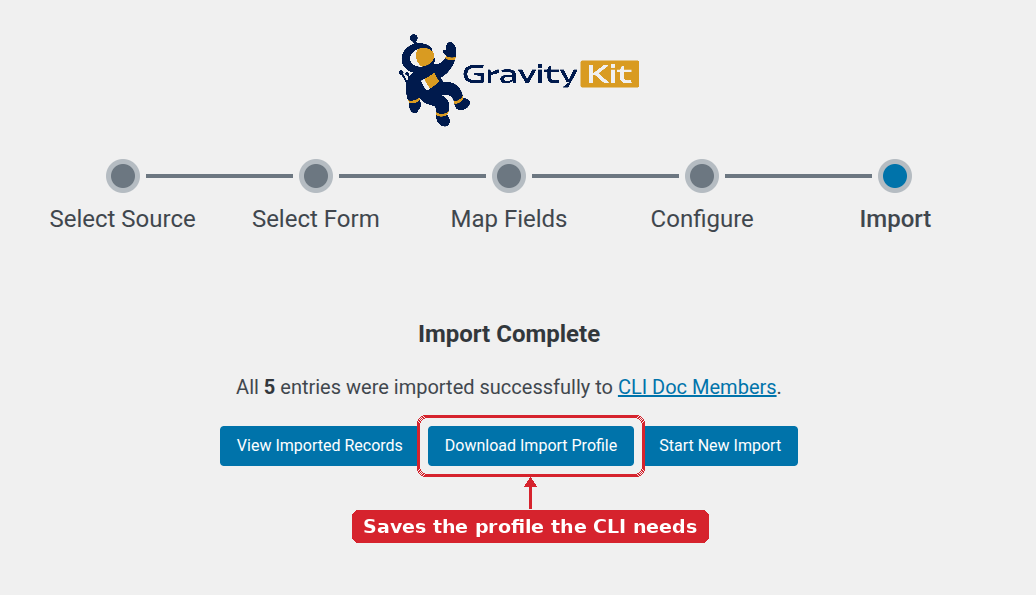
    Import Complete screen with the Download Import Profile button highlighted, labelled as the button that saves the profile the CLI needs

    Running an import #

    Pass the CSV file and the profile:

    wp gk import run --file=data.csv --profile=profile.json

    The command creates the import batch, then processes it to the end and prints a summary. On a longer file it also reports how many rows it has handled as it works.

    Creating import batch for Form #123...
    Batch #559 created. Processing...
    Status: done
    Success: Import complete: 5 entries imported from 5 rows.

    These options are available:

    OptionWhat it does
    --filePath to the CSV file to import. Required.
    --profilePath to the import profile JSON file. Required.
    --form-idImport into a different form than the one saved in the profile.
    --dry-runReport what the import would do without creating a batch or importing anything.
    --forceContinue even though the form has changed since the profile was saved.
    --formatOutput format: table (the default), json, csv, or yaml.

    Checking a profile before you run it #

    To check that a profile still fits a CSV file and a form without importing anything:

    wp gk import validate --file=data.csv --profile=profile.json
    Profile structure is valid.
    Form #123 exists: CLI Doc Members
    Form structure matches profile.
    Column matching: 5 matched, 0 unmatched.
    5 schema rules mapped successfully.
    Success: Profile validation complete.

    This confirms that the profile is readable and that the form exists, says whether the form still matches the profile, and reports how many CSV columns were matched and how many were not. Adding --dry-run to the run command gives a similar summary of the import itself.

    When the form has changed #

    A profile records the structure of the form it was saved against. If fields have been added, removed, or reordered since then, the run command stops with the message Form structure has changed since profile was saved. Use –force to proceed anyway.

    Error: Form structure has changed since profile was saved. Use --force to proceed anyway.

    The validate command reports the same thing as a warning and carries on, which makes it a safe way to check a profile before a scheduled job depends on it.

    Warning: --force imports with a mapping built for the older version of the form, so columns can land in the wrong fields. Validate the profile first, and save a fresh one if the mapping no longer fits.

    Scripting around the command #

    Both commands accept --format=json, which replaces the readable output with a single structured record. This is the easier form to parse in a deployment script or a scheduled job.

    wp gk import run --file=data.csv --profile=profile.json --format=json


    Still stuck? How can we help?

    How can we help?

    "*" indicates required fields

    This field is for validation purposes and should be left unchanged.
    Replies will go to this email.
    How can we help?*
    My pre-sale question is related to...*
    My WordPress skills are....*
    My Gravity Forms skills are...*
    You will be shown articles from our documentation.
    Vous pouvez nous écrire dans votre langue maternelle si c’est plus facile pour vous—nous nous occuperons de la traduction!
    Puedes escribirnos en tu idioma nativo si te resulta más fácil; ¡nosotros nos encargamos de la traducción!
    Sie können uns in Ihrer Muttersprache schreiben, wenn das für Sie einfacher ist – wir kümmern uns um die Übersetzung!
    U kunt ons in uw moedertaal schrijven als dat gemakkelijker voor u is — wij zorgen voor de vertaling!
    Du kan skrive til oss på ditt morsmål hvis det er enklere for deg — vi tar oss av oversettelsen!
    Du kan skriva till oss på ditt modersmål om det är lättare för dig — vi tar hand om översättningen!
    Você pode nos escrever em seu idioma nativo se for mais fácil para você — nós cuidaremos da tradução!
    Puoi scriverci nella tua lingua madre se ti è più facile — penseremo noi alla traduzione!
    Please provide as much detail as you're able; this helps us provide you with faster support.
    Drop files here or
    Accepted file types: jpg, jpeg, gif, png, tiff, pdf, bmp, zip, json, csv, xls, xlsx, Max. file size: 256 MB.
      Get better at Gravity Forms every Friday

      Was this page helpful?

      Table Of Contents
      • Before you start
      • Saving an import profile
      • Running an import
      • Checking a profile before you run it
      • When the form has changed
      • Scripting around the command
      GravityKit
      • How to Build It
      • GravityKit vs competitors
      • Pricing
      • Products
      • Our Team
      • Our Values
      • Work With Us
      • Coupons
      Support
      • Support
      • Contact
      • Documentation
      • Scope of Support
      • Brand Guidelines
      • Privacy Policy
      • Terms of Service (“Terms”)
      I am a...
      • Nonprofit
      • Web agency
      • Small business owner
      • Web developer
      • Educational institution
      • WordPress freelancer
      • Startup founder
      • One-person agency
      Get notified of updates.

      We’re constantly improving GravityKit. Fill out your email below and we’ll notify you anytime major updates drop.

      • Facebook
      • Twitter
      • Mastodon
      GravityKit is a Gravity Forms Certified Developer.

      Copyright © 2026, Katz Web Services, Inc.

      GravityKit and GravityView are registered trademarks of Katz Web Services, Inc.