
Published
•
Updated
Launch Log: Live DataTables totals, a Remove Data option, and rounding for Number field merge tags
This week's releases add live GravityMath totals to DataTables Views, a Remove Data option in GravityView, and security fixes in five GravityKit products.


This week’s releases add GravityMath totals that follow the rows on screen in DataTables Views, an option to remove GravityView’s data while keeping your Views, and security fixes in five products. Tables capped at 200 entries since DataTables 3.14.0 show every entry again, and GravityMath totals come out right in more currencies and languages.
GravityBoard v1.7.0
This update to GravityBoard lets a card’s description show a Repeater field. Each row is listed the way the Gravity Forms entry screen shows it, with field labels above their values. Boards that use a Repeater field for a card’s title, description, label, or due date also load again; before this release, they didn’t load at all.
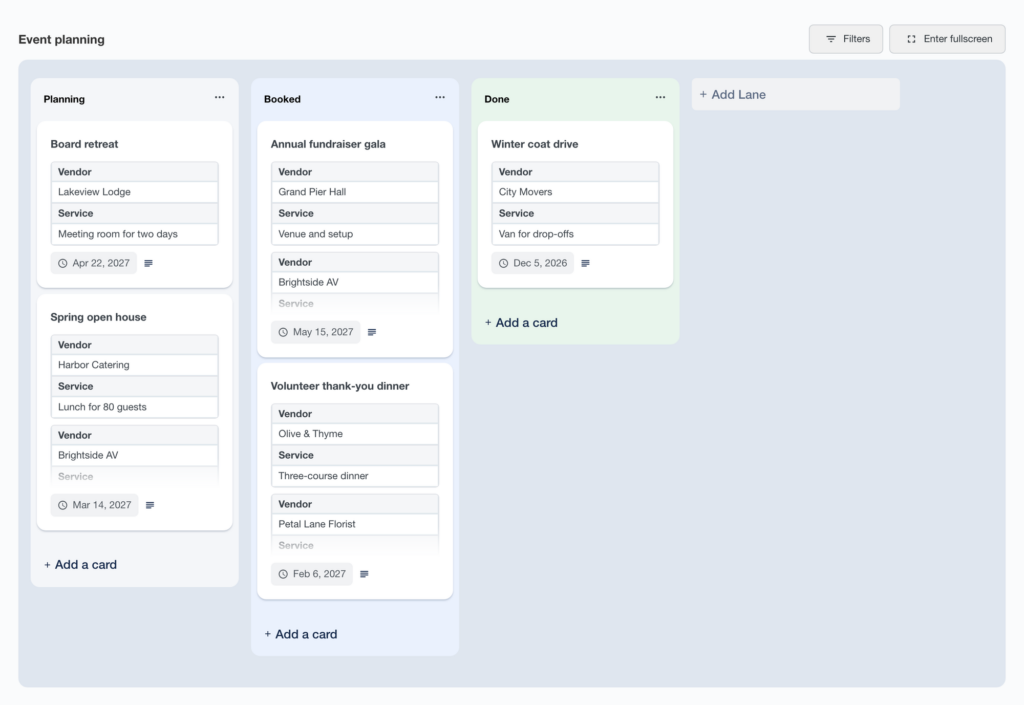
On sites set to another language, the board, the board block in the editor, the GravityView vote widget, and the condition builder in a board’s Conditional Logic setting now show their text in the site’s language instead of English. Customizing GravityBoard translations covers changing any of these strings.
More fixes and developer updates in v1.7.0
Conditional logic dropdowns that search users, entries, or posts now load their choices only when they are opened. Conditions on fields that store several users, posts, or entries, such as GP Nested Forms (Gravity Wiz), Dynamic Lookup, and Populate Anything fields, are no longer slow on forms with a few hundred entries.
Other conditional logic fixes:
- Conditions using the
{get}merge tag match the right entries when the value in the page address contains&,+, or%(such as “Research & Development”), and no longer change other{get}merge tags on the same page - “Has any of”, “has all of”, and “has none of” conditions on a Dynamic Lookup field with “Allow multiple selections” and the enhanced user interface work for entries with more than one selection
- Condition dropdowns open in front of the WordPress admin bar, pressing Enter on a selected choice keeps it, and pressing Enter on the clear button clears the choice
- Date conditions show month names, weekdays, and labels in the site’s language
- Condition labels with an apostrophe, such as “n’est pas” in French, no longer show
' - Weekday names in the date condition calendar are correct in time zones west of UTC, such as the Americas, and screen readers no longer announce the calendar as “Event”
Developer updates
- When the GravityKit MCP blocks a board, lane, or card delete tool, the message to AI assistants now gives a valid value for the
GRAVITYKIT_MCP_ALLOW_DESTRUCTIVEsetting: the tool’s name,gb, orall. Building boards with AI covers connecting an assistant.
GravityCalendar v2.26.1
This update to GravityCalendar improves security, and we recommend updating. HTML in events from other calendar feeds is handled more safely when “Allow HTML Content” is on. The events of a deactivated calendar are now available only to users who can edit calendars, and only those users see secured and deactivated calendars in the block and Elementor editors. If a secured calendar stops showing on a page, a user who can edit calendars can save the page to show it again.
Calendar widgets in DataTables Views set to Preloaded (Client-side) mode work again. A widget showing the entries on the page now shows the events of the rows on screen, and changing the table’s page, sorting, or search no longer causes a JavaScript error.
More fixes and developer updates in v2.26.1
On a page that shows the same View twice, each table now updates only its own Calendar widgets. Each widget also follows its own “Display events for” setting, even when two widgets use the same calendar.
Some searches with “Navigate to Events” and Dynamically Load Events on now show an empty calendar instead of an error. AI assistants are told that an event on a calendar with no Start Time field can only move to another day.
Developer updates
- With “Allow HTML Content” on, events added with the
gravityview/calendar/eventsfilter now go through the same HTML filtering in the browser.
GravityCharts v1.23.1
This update to GravityCharts fixes DataTables Views that wouldn’t load when “Preloaded data loading” was on and a chart widget was set to “Entries shown on the page”.
GravityEdit v2.13.2
This update to GravityEdit fixes inline editing of Drop Down fields with placeholder text on the Gravity Forms Entries screen. The placeholder showed more than once, adding one more copy on each row down the list.
GravityExport v1.18.1
This update to GravityExport lets other plugins allow or refuse secured GravityExport Filters download URLs for a given feed and user, using the gk/gravityexport/download/can-download filter. This works the same way as for GravityExport Lite download URLs and requires GravityExport Lite 2.7.6 or newer.
GravityExport Lite v2.7.6
This update to GravityExport Lite fixes how Repeater fields export. Values could appear under the wrong column, values from two rows could look like one row, and the Repeater field was offered as a sort field even though sorting by it did nothing.
The “Enable download URL” button and the “Copied!” label on a form’s GravityExport Lite settings tab now show in the site’s language.
Developer updates in v2.7.6
- Added the
gk/gravityexport/download/can-downloadfilter to allow or refuse a secured GravityExport Lite download URL for a given feed and user. By default, only users with thegravityforms_export_entriescapability can download secured exports. Public download URLs are not affected.
GravityImport v2.12.6
This update to GravityImport improves security when importing List fields, and we recommend updating.
GravityMath v2.14.0
This update to GravityMath brings live totals to DataTables Views. Totals that use [gravitymath scope="visible"] in a Custom Content widget now add up the rows on screen and update as visitors search, sort, or page through the table. This needs DataTables 3.15.0 or newer. To keep hidden values private, totals of fields the table doesn’t show as columns don’t update this way.
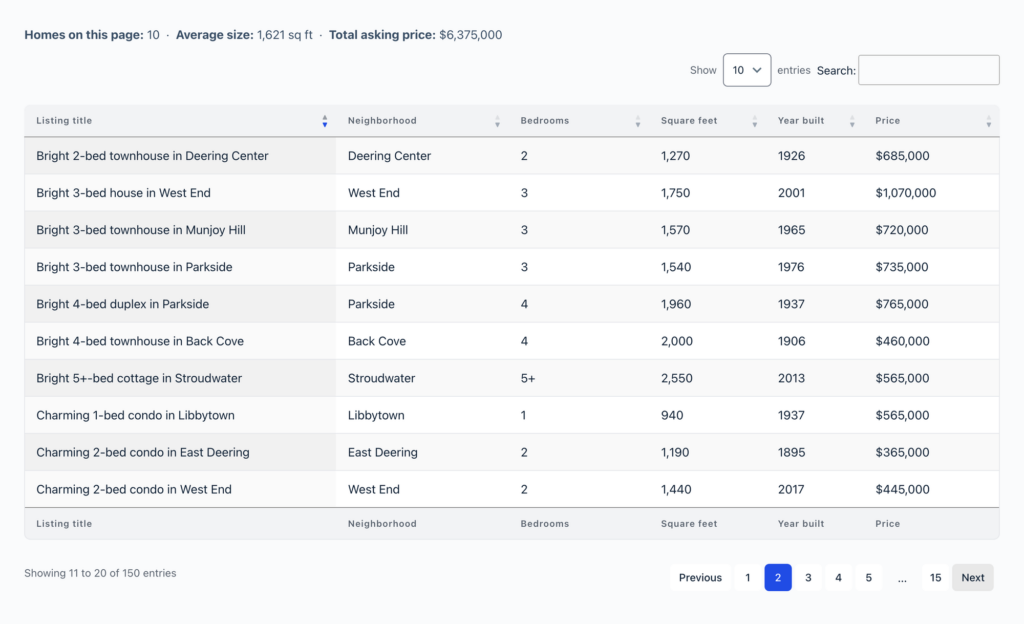
On PHP 8, a formula that can’t be calculated, such as max(1,2) or max(5), now returns an empty result instead of crashing the whole page.
Totals are also right again on sites that write decimals with a comma, such as sites in German or stores using the euro. Totals of prices with cents, and of decimal choice values, had come out 10 or 100 times too large.
More fixes and developer updates in v2.14.0
Several field types showed the wrong totals. In Views, including Ajax (Server-side) DataTables Views, totals and footer calculations of Product (Single, Hidden, and Calculation), Option, Checkbox, and Consent fields showed 0 when the merge tag had no input ID, such as {Widget:1:sum}. Product fields now add up their prices, as scope="form" does. View totals of scored Survey (Likert) fields with multiple rows now show the right result, both for the whole field and for each row.
With scope="form", Option field totals no longer show 0, and Consent field totals leave out the consent text and form revision saved with the entry. Averages, minimums, maximums, and counts of Checkbox fields, and of other fields with multiple inputs, now count each entry instead of each checked choice.
Other currency and number fixes:
- Formulas read prices correctly in currencies that format numbers differently from the site’s language; on an English site, “R$ 2,50” was read as 250 and “1.234,56 €” as 1.23456
- Calculation fields read prices with a dot for thousands and a comma for decimals, such as “R$ 1.234,56”, as decimal numbers instead of whole numbers
- Formulas work when a currency symbol starting with a capital letter (such as “R$”, “CHF”, “HK$”, or “Kč”) appears anywhere but at the start
- Formulas and footer totals work on sites with a custom currency whose symbol contains “/”, such as “S/” for the Peruvian sol
scope="form"totals of decimal choice values keep their decimals- View totals of Shipping and Option fields no longer include digits from choice labels, such as the 2 in “Zone 2”
- With
scope="entry"and an entry ID, prices are read in the currency the entry was saved in
DataTables View fixes:
- The Math Summary widget shows results again in Ajax (Server-side) tables with DataTables 3.14.0 or newer
- In Ajax (Server-side) tables with footer calculations, footer field filters appear, the footer label of a pinned column stays pinned, and hiding a column with the Columns button hides its footer cells
- In Preloaded (Client-side) tables, footer calculations update after a search with the Search Bar widget (requires DataTables 3.15.0 or newer), and Math Summary widgets set to “Entries shown on the page” update after paging, sorting, or searching
- A View placed below a Preloaded (Client-side) DataTables View calculates its View (Visible) footer results from its own entries
- With two DataTables Views on the same page, each Math Summary widget shows its own table’s results, and each table keeps its own Calculation Row Position setting
- In tables set to “Hide View data until search is performed”, Math Summary widgets showing all View entries no longer send their totals to the browser before a search
- Preloaded (Client-side) tables no longer show a PHP warning when a column’s footer calculation has no saved Decimals setting
A file in the bundled math library that failed PHP compatibility checks on PHP 8.1.2 has been removed.
Developer updates
- Added filters for live
scope="visible"totals in DataTables Views:gk/gravitymath/datatables/visible/liveto turn them off (default:true)gk/gravitymath/datatables/visible/max-tokensto set how many totals a table updates on each draw (default:20)gk/gravitymath/datatables/visible/hidden-fieldsto let totals read fields the table doesn’t show as columns (default:false)gk/gravitymath/datatables/visible/max-rowsto set how many rows a Preloaded (Client-side) table’s totals cover (default:1000, or the largest option in the View’s rows-per-page menu if higher)
GravitySearch v1.3.1
This update to GravitySearch improves security when searching entries on the Global Search page, and we recommend updating. It also fixes PHP 8.4 deprecation notices from bundled libraries.
GravityView v3.10.0
This update to GravityView adds a Remove Data option. It permanently deletes GravityView’s data (entry approval statuses, the entry notes GravityView added, and GravityView settings) and resets user role permissions to their defaults, while keeping your Views. You can find it in three places:
- The new Remove Data section of GravityView’s settings
- Manage Your Kit
- A new dialog shown when you deactivate GravityView on the Plugins page, which replaces the browser’s confirmation box and still lists the products that need GravityView
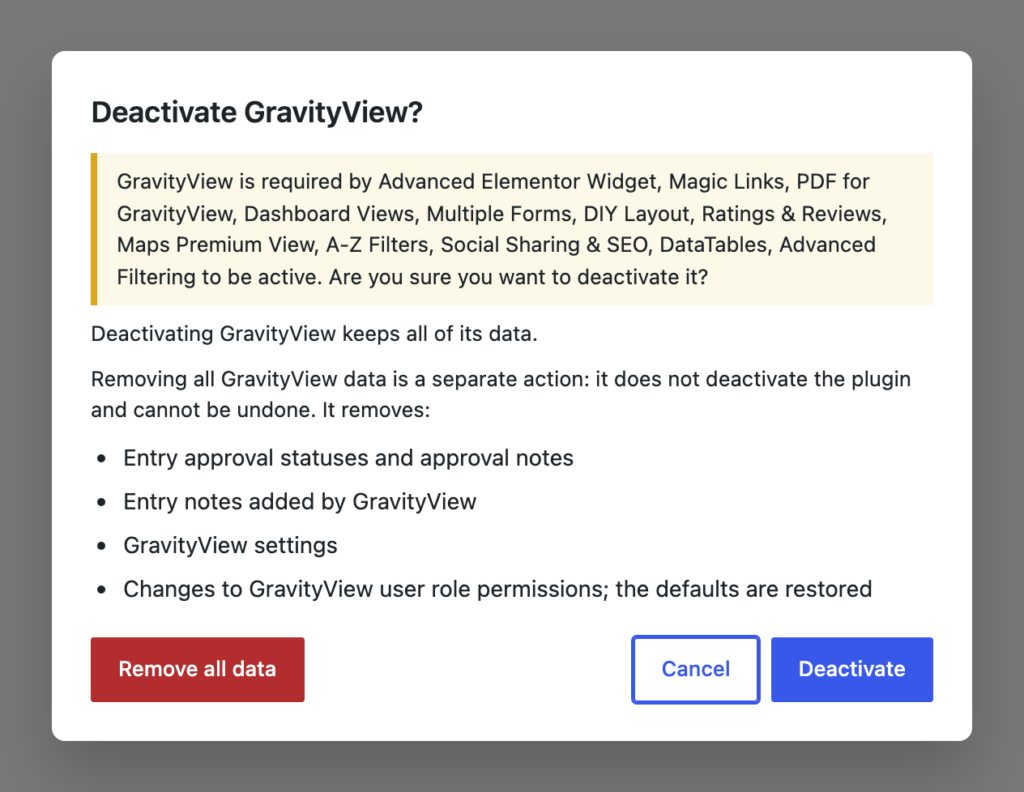
To delete the Views themselves, use the separate Delete Views section.
A new :decimals merge tag modifier rounds a Number field to a set number of decimal places and keeps the field’s number format. For a Number field using the Currency format, {Amount:3:decimals:0} shows $4,003 instead of $4,003.00.
Switching a View’s form now keeps the selected layouts and fills them with the new form’s fields, instead of leaving them empty until a layout is chosen again. With Prevent Direct Access on, Administrators and Editors can now open a View’s single entries at the View’s own URL, along with a notice that visitors can see those entries only on pages that embed the View.
This release also fixes two security issues, and we recommend updating. Views with Prevent Direct Access on, embedded on pages hidden by a membership plugin, could load entries or show entry values in the page title to visitors without access to the page; for DataTables Views, the fix needs DataTables 3.14.2 or newer. The Single Entry Title also showed entry values above the password form on password-protected Views and pages.
Views that show Checkbox, Radio Buttons, Drop Down, or Multi Select fields as labels load quickly again with GP Populate Anything (Gravity Wiz) active, after slowing down in 3.6.0.
More fixes and developer updates in v3.10.0
In the View editor, the View Type picker appears every time after choosing a form, and switching a View’s form no longer leaves the old form’s fields on every layout tab except the one changed last.
Two fixes apply to Views managed through the GravityKit MCP: moving a search field no longer removes it from the Search Bar widget in some Views, and saving View settings keeps text that looks like a number as text, so a label such as “0123” keeps its leading zero.
Other fixes:
- Edit Entry no longer triggers a deprecation notice for multi-page forms with progress steps on Gravity Forms 3.2.1 and newer
- A View embedded in another View no longer makes the outer View use its “Hide View data until search is performed” setting
Developer updates
- Renamed the class of the bulk actions widget; the old class name still works.
- Deprecated these methods, which now do nothing because each feature registers itself:
GravityView_Change_Entry_Creator::register_created_by_input(),GravityView_Theme_Hooks_Elegant_Themes::load_divi_modules(),GravityView_Theme_Hooks_Elementor::register_widgets(),GravityView_Theme_Hooks_Elementor::maybe_enqueue_editor_assets(),GravityView_Theme_Hooks_Elementor::register_widget_icons(), andViewRemovalSettings::add_component_script(). - Deprecated
GravityView_Plugin_Hooks_Gravity_Flow::add_workflow_search_fields()andGravityView_Widget_Search::add_form_search_fields(), which now return the fields they receive unchanged. To change the Search Bar widget’s fields, use thegk/gravityview/search/available-fieldsfilter after priority 0. - Added filters:
gk/gravityview/shortcode/gv-entry-link/url,gk/gravityview/shortcode/gv-entry-link/anchor-text,gk/gravityview/shortcode/gv-entry-link/link-atts,gk/gravityview/shortcode/gv-entry-link/has-cap, andgk/gravityview/shortcode/gv-entry-link/lightboxfor the[gv_entry_link]shortcodegk/gravityview/shortcode/gventry/edit-outputandgk/gravityview/oembed/edit-outputfor the Edit Entry form shown by[gventry edit="1"]and by oEmbedgk/gravityview/lightbox/entry/link-url,gk/gravityview/lightbox/entry/render-type, andgk/gravityview/lightbox/entry/action-responsefor entries opened in the lightboxgk/gravityview/admin-views/widget/sanitizeandgk/gravityview/admin-views/widget/can-duplicatefor widgets in the View editorgk/gravityview/admin-views/preset-fields/zonesandgk/gravityview/admin-views/template-switch/transferto let a layout place default fields, and fields moved from another layout, in its own zonesgk/gravityview/search/advanced-fields-sectionandgk/gravityview/search/locked-fieldsfor the Search Bar widget settingsgk/gravityview/rest/inspector/dry-run
- Added the
gk/gravityview/renderer/noticesaction, which fires after a View’s built-in notices. - Added the
GV\View::can_render_entry()method to check whether a View can show an entry on its Single Entry page. It returnstrueor aWP_Errorwith the reason.
GravityView – DataTables Layout v3.15.0
This update to the DataTables Layout works with GravityMath 2.14.0 or newer to give scope="visible" totals in Custom Content widgets the rows on screen. The totals update as visitors page, sort, search, or change the number of rows shown.
Tables capped at 200 entries since the 3.14.0 update show every entry again. The cap affected tables set to show all entries, some searches, Preloaded (Client-side) tables with Auto-Update after their first refresh, and the Copy, CSV, Excel, PDF, and Print buttons. If you added a snippet that raises the limit with the gk/gravityview/view/refresh/max-page-size filter, remove it: tables now stop at the value it sets.
More fixes and developer updates in v3.15.0
Sequence fields no longer restart at 1 on every page of Ajax (Server-side) tables, a problem since 3.14.0. Ajax (Server-side) tables that skip entries, with the “Offset entries starting from” setting or the offset shortcode attribute, leave the skipped entries out of the “Showing 1 to 25 of …” count and no longer end with empty pages.
Preloaded (Client-side) tables opened from an address that includes a page number, such as a bookmark or another View’s page links on the same page, show their entries instead of “This search returned no results.” Clear Filters now also resets the filters of hidden columns.
GravityMath footer calculation fixes:
- In Preloaded (Client-side) tables, calculations set to View (Visible) show the right totals and update when searching, sorting, or paging
- In Preloaded (Client-side) tables, calculations update after a search with the Search Bar widget (requires GravityMath 2.14.0 or newer)
- Calculations show their totals when Field Filters are in the footer and Calculation Row Position is “Above the table footer”; the filters had replaced them
- With Responsive on, calculations for hidden columns no longer stay on screen past the edge of the table
Developer updates
- Added the
gk/gravityview/datatables/hide-until-searchedfilter to control whether a table returns no entries when “Hide View data until search is performed” is on and no search has been made. - Added the
gk/gravityview/datatables/output/render-rowsfilter to control whether a table’s data request builds the table rows. - Added the
window.gvDataTablesApiJavaScript API for integrations:sideRequest()queries a table’s data endpoint without redrawing the table, andownedTables()finds the tables that belong to a View embed. - DataTables Views now skip the 200-row limit on GravityView’s
/refreshendpoint but still apply thegk/gravityview/view/refresh/max-page-sizefilter. - Export requests for Views that load rows through GravityView’s
/refreshendpoint now include the parameters thatpreXhr.dtlisteners add, as admin-ajax requests already did. If they would push the request URL past 6,000 characters, they are dropped andsettings._gvExtrasDroppedrecords the affected draw.
GravityView – Featured Entries v2.1.2
This update to Featured Entries now requires WordPress 6.5 or newer. It also fixes Views that use the offset shortcode attribute with “Move Featured Entries to Top” on, which left out featured entries and showed entries the offset should have skipped.
GravityView – Multiple Forms v1.0.2
This update to Multiple Forms fixes Advanced Filter conditions on joined forms that have a Name or Address field. Selecting the joined form still listed the main form’s fields, and saved conditions on its Name or Address fields showed as “no longer available”.
GravityView – Social Sharing & SEO v3.5.0
This update to Social Sharing & SEO, released on October 27, fixes a security issue on Single Entry pages that could show details of entries a visitor is not allowed to view, and we recommend updating. It now requires WordPress 6.5, PHP 7.4, and GravityView 2.29 or newer.
Sitemaps also stop listing Views that have “Prevent Direct Access” on. This fix needs GravityView 3.4.0 or newer; excluding Views from XML sitemaps covers the other ways to keep a View out.
Developer updates in v3.5.0
gravityview_social_get_title()now returns the title it was passed when the requested entry is not shown by the View passed to it (or by the View GravityView shows on the page when none is passed).gravityview_social_get_permalink()now returns the link it was passed on a Single Entry page whose View does not show the entry.- Added
gravityview_social_get_entry_view( $view = null ), which returns the View GravityView shows on the page when it shows the requested entry, ornull. A page with several Views needs?gvid=to pick one, as with GravityView’s Single Entry Title. - Added
gravityview_social_can_render_entry( $view, $entry ), which uses GravityView’sGV\View::can_render_entry()when available.
How to update
We recommend keeping all your GravityKit products up to date, so they stay compatible with each other and you get every new feature and fix, security patches included. You can update them from your WordPress dashboard:
- In your WordPress dashboard, hover over the GravityKit menu and click Manage Your Kit.
- Scroll past your licenses to the list of products, then click the Update Available filter to see the products with a new version. Their version numbers show in red.
- Click Update on each product.
Updates need an active license on the site.
For the full guide, read installing, activating, and updating GravityKit plugins.

Get better at Gravity Forms, one email a week
New GravityKit releases, practical Gravity Forms tutorials, and subscriber-only discounts. One short email every week, unsubscribe anytime.
More articles

Launch Log: Live DataTables totals, a Remove Data option, and rounding for Number field merge tags
This week’s releases add live GravityMath totals to DataTables Views, a Remove Data option in GravityView, and security fixes in five GravityKit products.

Launch Log: A range slider for search, AI-managed calendars, and security updates in ten products
GravityView adds a Slider search input, GravityCalendar lets AI assistants manage calendars, and ten GravityKit products get security fixes. Here’s what shipped.

9 nonprofit apps you can build with Gravity Forms and GravityKit
Nine apps nonprofits build on WordPress from Gravity Forms data: volunteer databases, member directories, client portals, donation pages, grant review and more.