
How to share your Cloudflare Ray ID, IP address, and URL
This article is for GravityKit customers!
If you are being blocked on a domain that is not gravitykit.com, contact that website’s support with the information in this article.
When you are blocked by Cloudflare on the GravityKit website, our team can resolve the issue faster if you share the Ray ID, your IP address, and the URL you are trying to access. The Ray ID provides us with detailed information about why the block happened.
Why would I be blocked? #
Your location may be why you’re blocked. In order to improve website security, we have increased our website security levels for requests coming from certain countries that represent 80%+ of malicious requests.
If you have too many failed login attempts too rapidly, you may be blocked. Bots attempt to log into the site using leaked passwords, so if you try to log into the site many times within a minute, you’ll be blocked for an hour.
What is a Ray ID? #
A Ray ID is a unique identifier generated by Cloudflare for each request. It helps us trace the exact request that was blocked and see the security checks that triggered the block.
Where to find the Ray ID #
When you see a Cloudflare block page, look toward the bottom of the page. You’ll see a line similar to:
Cloudflare Ray ID: 7f8e1234bcde5678 • Your IP: 192.0.2.123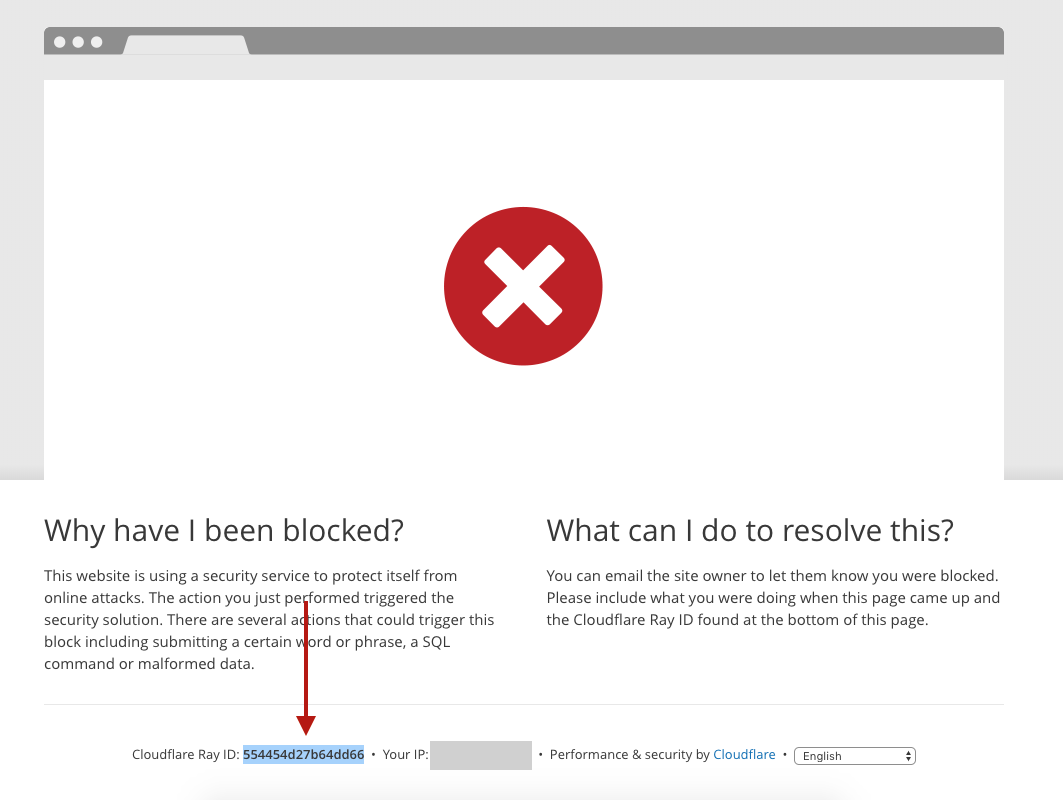
A Cloudflare block page
How to share your Ray ID and IP address with us #
- Visit the page where you encountered the block.
- Scroll to the bottom of the block page.
- Copy the Ray ID and the IP address
- Paste it into your support request, along with any additional details about what you were doing when blocked.
Example message:
Cloudflare Ray ID: 7f8e1234bcde5678 • IP: 192.0.2.123
I was trying to log in to my account.
Then we’ll unblock you! #
Once you share this information, our support will be able to quickly unblock you.
If you are blocked on a domain that is not gravitykit.com, contact that website’s support with the information in this article.

