GravityImport
- โRow #[x] ID does not exist for formโ error
- Allow for non-standard imported values for checkbox fields
- Can I import a CSV file on the front-end of my website?
- Can I import passwords with the GravityImport plugin?
- Capabilities necessary to import entries
- Configure screen in Entry Importer
- Create a new form in Gravity Forms from a CSV
- Does GravityImport limit the number of entries I can import?
- Does GravityImport process calculations during import?
- Does GravityImport support importing Nested Form fields?
- Error: Arguments not allowed here: rest_route
- Error: CSV file failed to upload
- Error: Import has finished with errors – HTTP 404
- Error: Server returned an empty response
- Exporting a CSV from Apple Numbers
- Exporting a CSV from Google Sheets
- Exporting a CSV from LibreOffice
- Exporting a CSV from Microsoft Excel
- Exporting List fields as JSON
- Formatting Dates for Gravity Forms in Microsoft Excel
- Getting Started with GravityImport: How to Import Entries into Gravity Forms
- GravityImport Developer Hooks
- GravityImport Support for Gravity Forms Add-Ons
- GravityImport: “The importer encountered an error that prevents it from continuing”
- How to add new fields to an existing form during import
- How to assign entries to users during import
- How to change the CSV delimiter
- How to Clean Up GravityImport Database Tables
- How to enable pre-release versions of GravityImport
- How to import data from a MySQL database
- How to restrict access to Import Entries
- How to trigger notifications for imported entries
- Import CSV to Gravity Forms with Import Entries 2.0
- Import Option: Skip Field Validation
- Import Step: Choose a form for this import
- Import Step: Continue Processing if Error Occurs
- Import Step: Upload CSV
- Import Step: Where would you like to import the entries?
- Importing dates in UTC timezone
- Importing Gravity Forms Post Fields from CSV
- Importing List fields into a new form
- Importing List fields into existing foms
- Naming Your Field Columns
- Restarting a Gravity Flow workflow after import
- Updating existing entries with the GravityImport plugin
- Home
- Docs
- GravityImport
- Exporting a CSV from Apple Numbers
Exporting a CSV from Apple Numbers
Estimated reading: < 1 minutes
Updated on April 23, 2026
Numbers is a spreadsheet program developed by Apple which is included in every OS X installation. If you want to export your entries from Numbers into Gravity Forms / GravityView, this guide is for you!
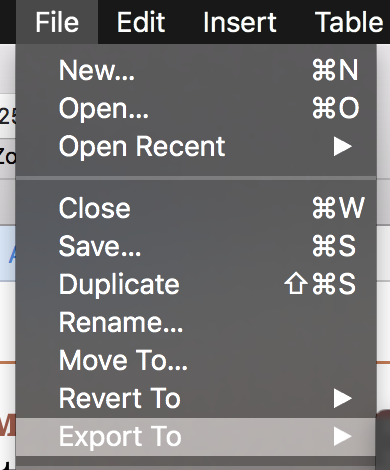
Under the Fileย menu, select Export To

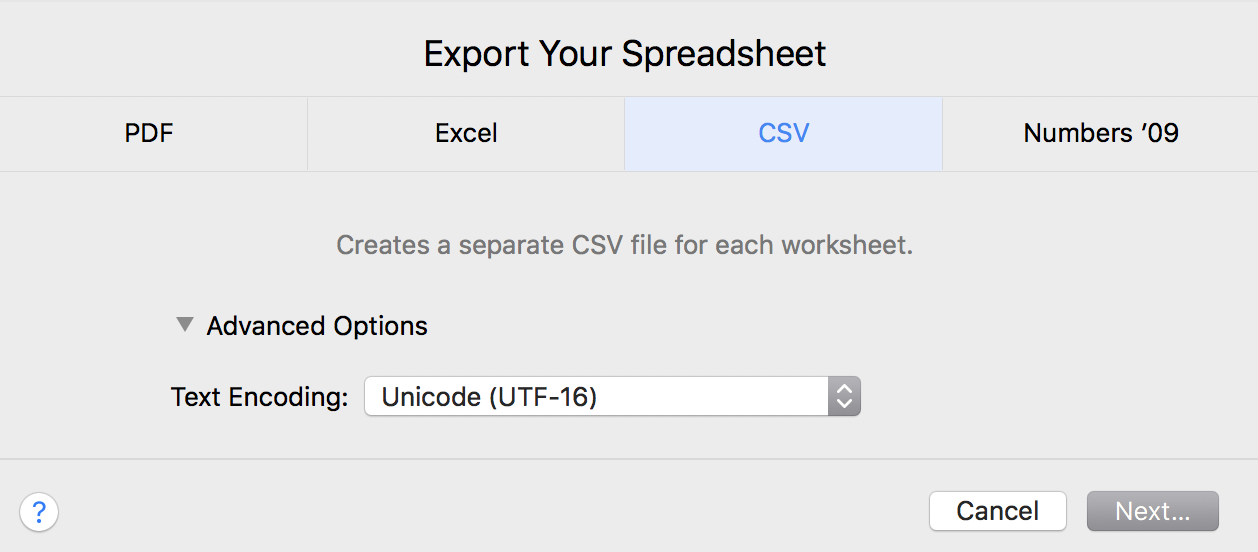
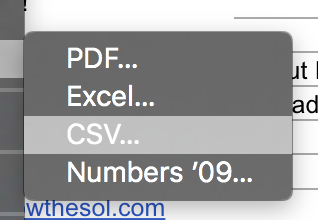
Then, Select CSV
Finally, Click Next and Save Your File

ย If you are having issues importing your file, try exporting it as Unicode (UTF-16).
Importing Your File into Gravity Forms
To import your CSV file into Gravity Forms, follow this guide.

Finally, Click Next and Save Your File