
Published
•
Updated
Launch Log: Visual Merge Tags, Elementor widget style settings, and security updates
Visual Merge Tags arrives with Foundation 1.35.0, GravityView and Magic Links get security fixes, and the Elementor widget gains the form block's style settings.


This week’s releases bring Visual Merge Tags to GravityKit sites, so merge tags become chips you can read, edit, and preview. GravityView and Magic Links get security updates we recommend installing soon, and the Gravity Forms Widget for Elementor gains the form block’s style settings. GravityImport sees fixes for Quiz scores and File Upload fields, event descriptions in GravityCalendar now work with a keyboard and screen reader, and the Gravity Forms tools in the GravityKit MCP get stricter about the values they save.
All eleven releases shipped this week, and several raise their minimum requirements. The Event Field, GravityEdit, A-Z Filters, Magic Links, and the Elementor widget now require WordPress 6.5 or newer. Dynamic Lookup, A-Z Filters, and the Elementor widget require PHP 7.4 or newer, and Dynamic Lookup, GravityImport, and GravityView require Gravity Forms 2.9.4 or newer.
New: Visual Merge Tags
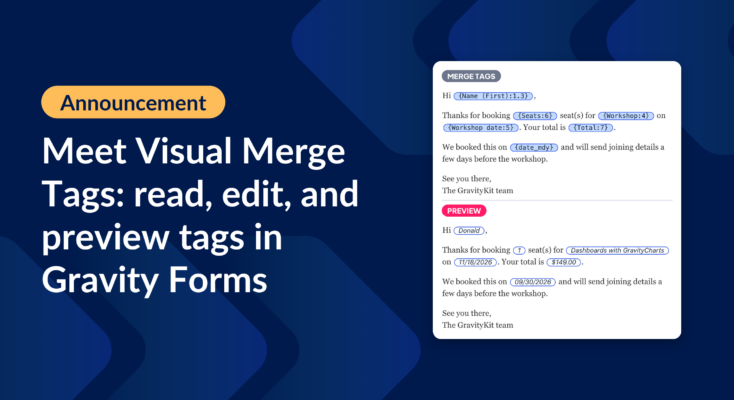
Visual Merge Tags shows every merge tag as a chip that stands out from the text around it, on Gravity Forms’ own screens as well as GravityKit’s. Type { to insert a tag, or click a chip to change what it outputs without writing modifier syntax. The settings panel also previews the tag with a real entry from your form, so you can check the result before you save.
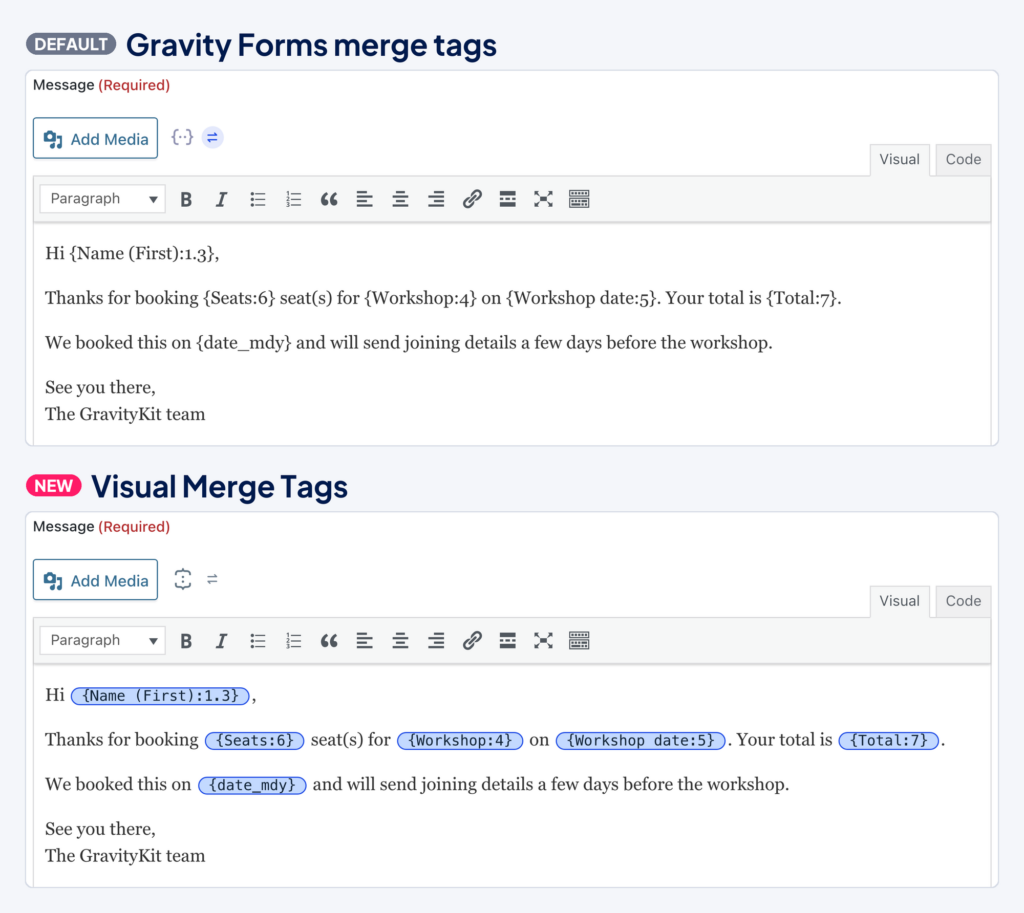
Visual Merge Tags is free and ships in Foundation 1.35.0, the framework that powers GravityKit plugins. It rolled out in this week’s releases, and every GravityKit product will include it soon. If you prefer Gravity Forms’ own picker, switch back on any field, or go to GravityKit Settings to choose where Visual Merge Tags appears.
Gravity Forms Dynamic Lookup v1.9.0
This update to Gravity Forms Dynamic Lookup fixes a blank page that could appear when Gravity Forms was inactive and another plugin or cached data loaded the Lookup field. Deactivating Dynamic Lookup while Gravity Forms was inactive also caused a critical error and left the plugin active. Both now work as expected.
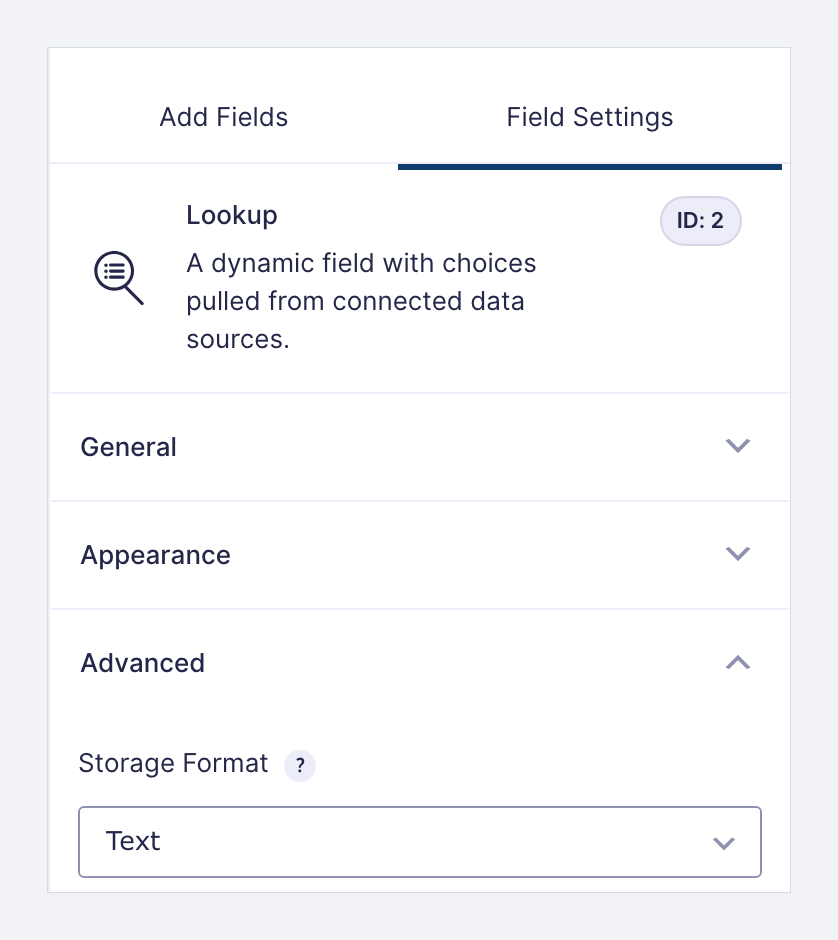
Lookup fields that store IDs get several fixes. When two source entries, users, or posts shared a name, only one of them appeared in the list, and editing an entry linked to the hidden one silently switched it to the other record. Each record now appears. If you’d prefer each name listed once, set the field’s Storage Format to Text.
Fields that read from a Checkboxes field now list each source entry once with all of its values, instead of once per checked value.
In GravityView, dropdown and radio Lookup fields now sort by the displayed name instead of the stored ID, and the Search Bar’s Search Everything field matches them. The update also removes a PHP deprecation notice that Gravity Forms 3.0 and newer wrote on every entry save.
Gravity Forms Event Field v1.9.0
This update to Gravity Forms Event Field fixes forms that couldn’t be submitted at all. If an Event field had its End Date input turned off, every submission failed with an “Event must have an end date” error. Those events now end on the day they start.
A single entry with an unrecognized Timezone value could empty a whole GravityCalendar calendar and break its subscription links. Such entries now use the site’s timezone. Editing an entry no longer resets its Timezone to the first option when the saved value isn’t in the list, and a repeating event with a malformed Timezone value no longer causes a server error on PHP 8.
The date picker no longer accepts past dates, and on Gravity Forms 2.x, picking a start date now updates the end date. Default values and placeholders set for Event field inputs in the form editor now appear on the form and are kept when you save the form.
Gravity Forms Widget for Elementor v1.2.0
This update to the Gravity Forms Widget for Elementor gives the widget’s Style tab the same style settings as the Gravity Forms form block. You can set input size, border radius and colors, accent color, image choice appearance, and button colors, and a form looks the same in the widget as it does in the block. The Style tab also has text settings for field labels and field descriptions.
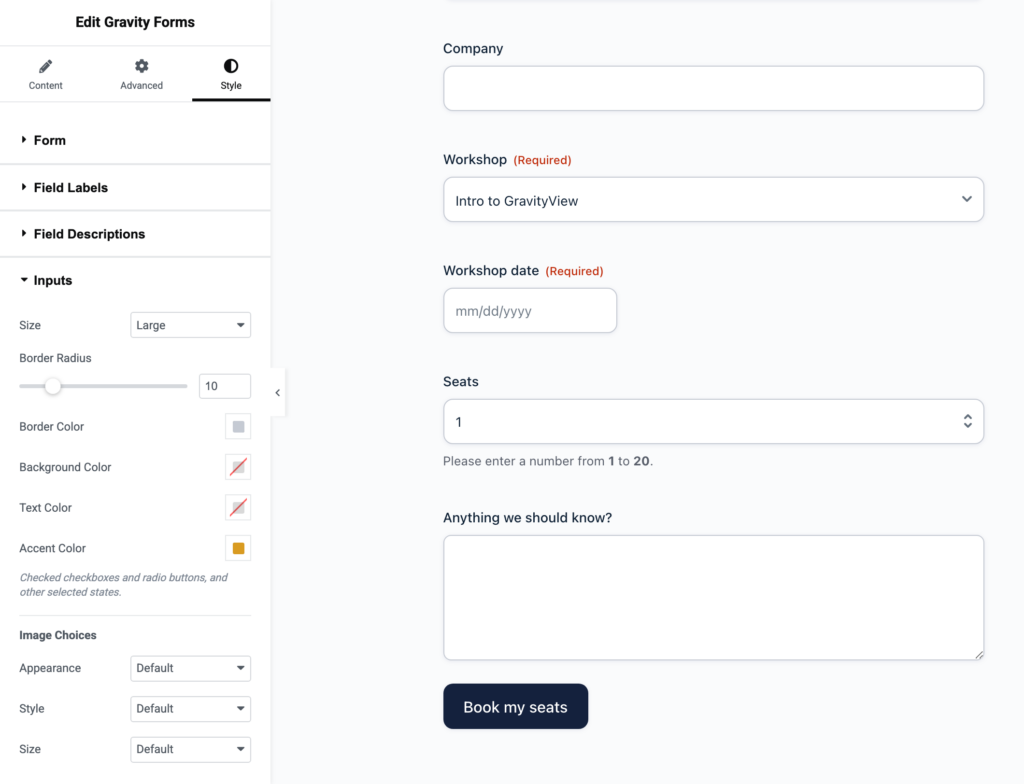
Field values with apostrophes or quotes now display correctly. A name like O'Brien used to appear on the page as O'Brien. The Disable Theme option now stops the Gravity Forms Orbital theme from styling the form on the page. Forms using the Gravity Forms 2.5 theme are styled when the page first opens in the Elementor editor, and forms no longer flash unstyled while the page loads.
GravityCalendar v2.23.1
This update to GravityCalendar makes event descriptions work for keyboard and screen reader users. In the List and Agenda layouts, a description now opens when you reach the event with the keyboard, as well as on mouse hover. List events without a link can be reached with the Tab key, descriptions close once focus moves past a link inside them, and screen readers announce an event’s description when the event has focus.
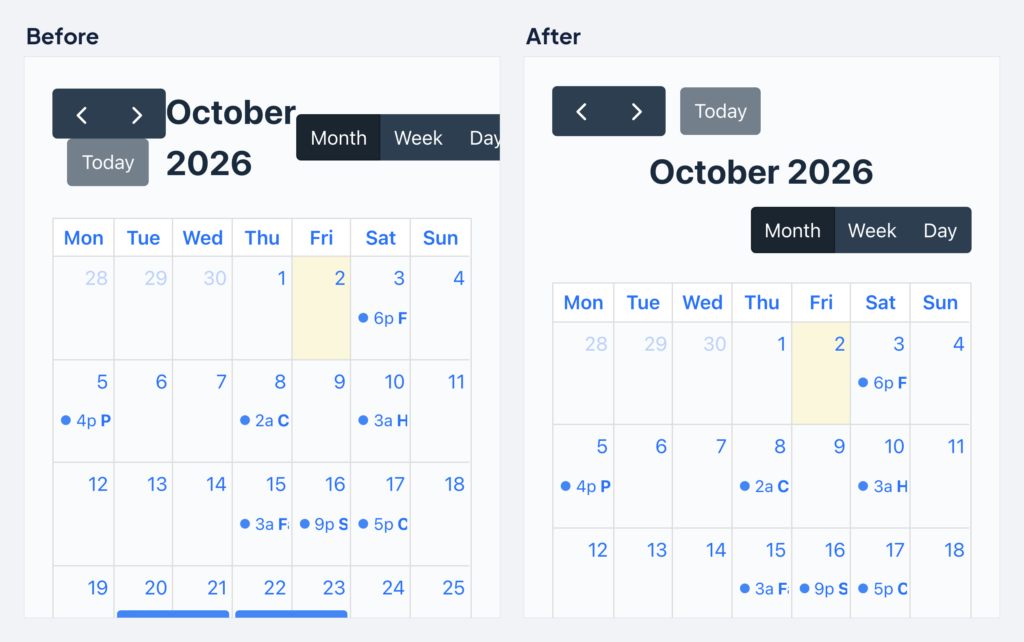
Calendar buttons that don’t fit on one row now wrap onto extra rows. They used to run past the calendar’s edge and squeeze the month title onto two lines, which happened with the default buttons on phones. With Gravity Forms 2.x, the GravityCalendar block no longer shows “This block has encountered an error and cannot be previewed” after you select a feed, and the preview matches how the calendar looks on the site.
GravityEdit v2.12.0
This update to GravityEdit keeps inline editing working after a View refreshes its entries without a page reload. Before this release, the Toggle Inline Edit link and editable fields stopped responding.
Several fixes stop choice fields from losing saved values, especially fields filled in by GP Populate Anything (Gravity Wiz). Multi Select fields listed the first entry’s choices when you edited any entry, so saving could erase values when entries had different choices. Radio Buttons and Checkboxes fields could lose their value on save in the same situation, or when the saved choice was beyond the first 501 that Populate Anything loads. Editing any other field could also clear selections in a Populate Anything Checkboxes field whose choices depended on another field.
Selections in Image Choice and Multiple Choice fields no longer appear unchecked in Gravity Forms after a save when the field’s choices were reordered or deleted. After saving, Multi Select fields show choice labels instead of stored values, Image Choice labels no longer run together, and Image Choice fields set to the “Input value” display option show values instead of images.
GravityImport v2.12.3
This update to GravityImport fixes Quiz scoring. Imported Quiz entries could get the wrong score, percentage, and grade, because the form’s last question was skipped and the one before it was counted twice.
File Upload fields get three fixes. Files imported into a single-file File Upload field created with Gravity Forms 2.10 or newer were downloaded but didn’t appear on the entry, its Edit screen, Views, or merge tags. A row that kept a file link formatted as a list, such as ["https://example.com/photo.png"], lost the files downloaded into its other File Upload fields. After one row failed to import, later rows also stored single-file values as a list instead of a single link.
A CSV column mapped to the “(Any Choice)” option of a Checkboxes, Multiple Choice, or Image Choice field now checks every choice listed in a cell, such as friday,saturday. It used to leave every box unchecked. On the Map Fields step, the “Email Will Be Rejected” notice now lists the email patterns Gravity Forms rejects instead of showing “%s”, and the format dialog for unrecognized dates names the format actually in use, such as YYYY-MM-DD hh:mm:ss for Entry Date.
Developer updates
- Added the
gk/gravityimport/column/checkbox/delimiterfilter to change the separator between choices in a cell mapped to “(Any Choice)”. The default is a comma.
GravityKit MCP v2.6.0
This update to the GravityKit MCP, the Model Context Protocol server that connects AI assistants to your Gravity Forms site, starts with two security fixes. The GravityKit product tools now connect to the same site as the Gravity Forms tools. Each set used to work out its own address and credentials, so a server set up with only Gravity Forms credentials could send GravityView reads, writes, and those credentials to a local development address set in your shell.
The entry tools also now refuse full card numbers, security codes, expiration dates, cardholder names, and passwords. The reply tells the assistant to send an already-masked card number, or to submit the form instead, which masks the values for you.
The Gravity Forms tools now say so when they can’t save a value, where they used to report success. Checkbox, Multi Select, Name, and Address values either save correctly or come back with instructions for sending them, and a Multi Select choice containing a comma, such as “Reno, NV”, stays one choice. Updating a feed or form keeps the settings you didn’t send, and several field edits on one form no longer overwrite each other.
Other fixes in this release:
- Listing entries for a form returns only that form’s entries and count
- Notifications created through the tools now fire, and sending notifications reports which ones went out
- Deleting a field with cascade turned on deletes the field and reports what still refers to it
- A missing form returns an error, where it used to report success
- Submissions keep addresses and lists intact, and an empty submission is refused
- Entry dates accept the format Gravity Forms returns, and editing an entry updates its Date Updated value
GravityMath v2.12.2
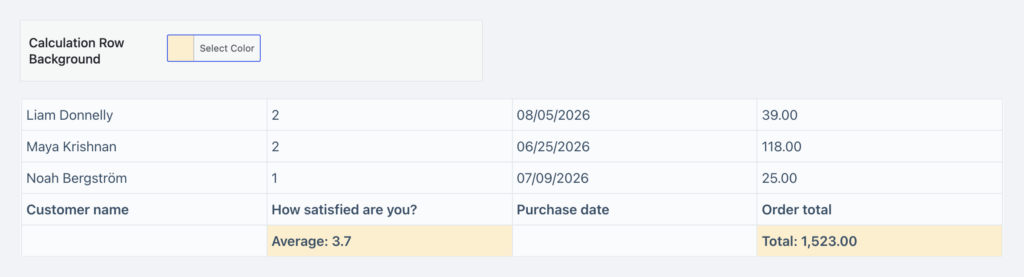
This update to GravityMath restores the Calculation Row Background setting on GravityView 3.0 and newer. The setting styles the calculation row in a table footer and is back in the Multiple Entries settings of Table and DataTables Views.
GravityView v3.6.0
This update to GravityView includes security fixes, and we recommend updating. Removing a file in Edit Entry now takes effect only after you click Update, so leaving the page without updating keeps the file. Deleting uploaded files in Edit Entry is also more secure, and a data disclosure issue in Edit Entry is fixed. That issue was limited to users who were already allowed to edit the entry.
The “Hide View data until search is performed” setting now hides entries everywhere. Entries could still be reached through the REST API, CSV and TSV exports, and [gravityview detail] counts, and a blank search or a search on a field the View didn’t offer still showed them.
Choice fields filled in by GP Populate Anything (Gravity Wiz) get several fixes. Saving an entry in Edit Entry no longer changes or erases choices beyond the first 501, the most Populate Anything loads by default. Inline editing with GravityEdit now offers saved choices that weren’t among the loaded ones, so saving no longer erases them. Merge tags used outside Custom Content fields show the label instead of the stored value, and custom entry slugs built from these fields always use the label.
In Edit Entry, calculation fields keep updating after the first save when the entry had no stored value for them, and conditional logic restores the right value to a dynamically populated field whose parameter name matches an entry property, such as ip. With Gravity Forms 3.1.2, files uploaded to a multi-file field are no longer rejected when you resubmit after a validation error, and multi-file upload errors show a message for each file instead of “Array”.
Other fixes in this release:
- Gravity Flow assignees can delete uploaded files on User Input steps while GravityView is active
- DataTables column filters work again after the 3.5.0 update
- Settings added by add-ons, such as GravityMath’s Calculation Row Background, appear in the View editor again
- Searches that don’t name a search mode follow the Search Mode saved on the View
- The Search Bar’s Horizontal layout no longer leaves a large gap before the Search button on Views that don’t use the Vantage theme
- Radio, checkbox, date, date range, and number range labels in the Search Bar follow the theme’s label styling
- List and Layout Builder Views set to more than one column spread their entries across the columns
- Vantage Layout Builder Views keep the space between entries, and Vantage Table Views wrap long text within the column widths
Developer updates
- Deprecated
GravityView_Edit_Entry::delete_file()and removed GravityView’s handler for therg_delete_fileAJAX action, since Edit Entry now deletes removed files when the entry is updated.
GravityView – A-Z Filters v1.4.3
This update to A-Z Filters fixes the A-Z Entry Filter widget on Views that hide results until a search is performed. Those Views stayed empty after a visitor clicked a letter, and they now show the matching entries.
Filtering by the Created By (User) field gets two fixes. The 0-9 link now shows only entries from users whose display name starts with a number, where it used to show every entry, and accented and non-Latin letters now match correctly. The Search Bar widget also returns correct results on Views that use the A-Z Entry Filter widget, and pages with several Views no longer apply letter filtering more than once.
GravityView – Magic Links v1.3.0
This update to Magic Links tightens security, and we recommend installing it soon. A magic link now works only for the entry, View, and action it was created for, and link details are kept out of logs and away from other sites. The request form also follows the View’s email validation settings, so a View set to “Don’t validate by email field” with an empty Allowed Emails list sends links only through notifications.
Request forms now submit faster, because links are created and emailed in the background. On some servers, the email may take a few minutes to arrive.
The {gv_magic_link} merge tag gets several fixes. Tags inserted from the Gravity Forms merge tag menu now produce output, confirmations show the link instead of its HTML, and delete links work when the tag outputs a plain URL. Plain-text notifications no longer include link markup, and the tag no longer creates links for Views that are disabled, unpublished, or connected to a different form.
Email addresses now match when only their capitalization differs, and magic links work for some addresses that failed before. Opening a malformed magic link no longer causes an error on PHP 8, and each new entry stores its magic link once instead of twice.
Developer updates
- Added the
gk/gravityview/magic-links/query-param/tokenandgk/gravityview/magic-links/query-param/emailfilters to rename thegv_magicandgv_emailURL parameters. Names already used by WordPress or GravityView are ignored, with the reason written to the Magic Links log. Links sent with the default names keep working after a rename, but links sent with an earlier custom name don’t. - Fixed a PHP warning written to the debug log when a magic link opened Edit Entry for a View with an empty Edit Entry layout.
In summary
Visual Merge Tags arrives with Foundation 1.35.0, and the Gravity Forms Widget for Elementor gains the form block’s style settings. GravityView and Magic Links get security fixes worth installing soon. GravityView also sees a long list of Edit Entry and layout fixes, and fixes in GravityImport, GravityEdit, and Dynamic Lookup stop saved values from being lost or changed.
GravityCalendar is easier to use with a keyboard and screen reader, and the Event Field and A-Z Filters get targeted fixes. GravityMath gets a missing setting back, and the GravityKit MCP is stricter about what its Gravity Forms tools save.
Before updating, check the new minimum requirements listed at the top of this post.

Get better at Gravity Forms, one email a week
New GravityKit releases, practical Gravity Forms tutorials, and subscriber-only discounts. One short email every week, unsubscribe anytime.
More articles
Announcing Visual Merge Tags: tags you can read, edit, and preview in Gravity Forms
Visual Merge Tags turns Gravity Forms merge tags into chips you can read, change from a settings panel, and preview with real entries before you save.

Launch Log: Visual Merge Tags, Elementor widget style settings, and security updates
Visual Merge Tags arrives with Foundation 1.35.0, GravityView and Magic Links get security fixes, and the Elementor widget gains the form block’s style settings.

10 school apps you can build with Gravity Forms and GravityKit
Ten apps schools and universities build on Gravity Forms without custom code: application review, enrollment, student portals, report cards, libraries, calendars, and more. Walkthroughs for each.