
Published
•
Updated
Launch Log: AI-built boards, inline Entry Tags editing, and Views kept on uninstall
This week: AI-built GravityBoard boards, inline Entry Tags editing in Views, Views kept when GravityView is deleted, and security fixes we recommend installing.


This week’s releases let an AI assistant build and run GravityBoard boards, and make Entry Tags fields editable inline in GravityView Views with GravityEdit. Views now stay in place when GravityView is deleted, and a new “Delete all Views” button handles it when you do want them gone. GravityView, GravityBoard, GravityCalendar, GravityEdit, Entry Tags, and Dashboard Views all get security fixes, and we recommend updating soon.
Gravity Forms Dynamic Lookup v1.11.0
This update to Gravity Forms Dynamic Lookup extends last week’s name-based sorting and searching in GravityView. Lookup fields that store IDs now sort and search by their displayed name in Views that combine forms with Multiple Forms, and in fields that show a user’s first name, last name, or nickname (requires GravityView 3.7.0 or newer). GravityCharts charts of these fields now label bars, slices, and legends with names instead of IDs.
More fixes and developer updates in v1.11.0
A View that searches a Lookup field for one ID, such as a View embedded in an entry with an {entry_id} search value, now includes entries with several selections in a multi-select Lookup field, and is not searches leave them out. In the Search Bar’s “Search Everything” field, _ and % in a Lookup search match only themselves.
Developer updates
- Added the
Field::gk_get_search_target()method, which tells GravityView where to search and sort by a stored ID’s label.
Gravity Forms Entry Tags v1.5.0
This update to Gravity Forms Entry Tags improves security when tag values are displayed and edited, and we recommend updating. Entry Tags fields can now be edited inline in GravityView Views with GravityEdit 2.13.0 or newer (see the GravityEdit section below). Views that link a field to its entry, or open it in a lightbox, now wrap all of a field’s tags in one link instead of linking each tag.
Searching by tag works again: searching a View by an Entry Tags field, from a tag link or the Search Bar, found no entries. Entry Tags now requires Gravity Forms 2.9.4, PHP 7.4, and WordPress 6.5 or newer.
More fixes and developer updates in v1.5.0 (includes a breaking change)
A search for “Bug” no longer matches longer tags such as “Bugfix” in Views (requires GravityView 2.57 or newer) and the Gravity Forms entries list, and tag links work for tags containing & or +.
Other fixes:
- Tags saved as comma-separated text, such as by an import, appear in Views and the entries list, and stay separate tags when the entry is edited
- Using the tag box in a GravityEdit editor no longer stops other clicks on the page from working
- Default tags with accented letters or quotation marks are saved correctly
- Fields shown by an
isconditional logic rule on an Entry Tags field are saved - Gravity Forms entry exports and View CSV and TSV exports show tag names instead of code
- Uninstalling Entry Tags from Gravity Forms’ Uninstall settings screen works
Developer updates
- Replaced GravityView hooks deprecated in GravityView 2.55 with their current equivalents.
- Tag output in GravityView is now built on the
gravityview/template/field/outputfilter at priority 4, before GravityView’s entry link (priority 5) and GravityEdit (priority 6). - Breaking change: the
gravityview/template/field/entry_tags/outputfilter now receives the finished field HTML, including the tags, any entry link, and GravityEdit’s wrapper.
GravityBoard v1.6.0
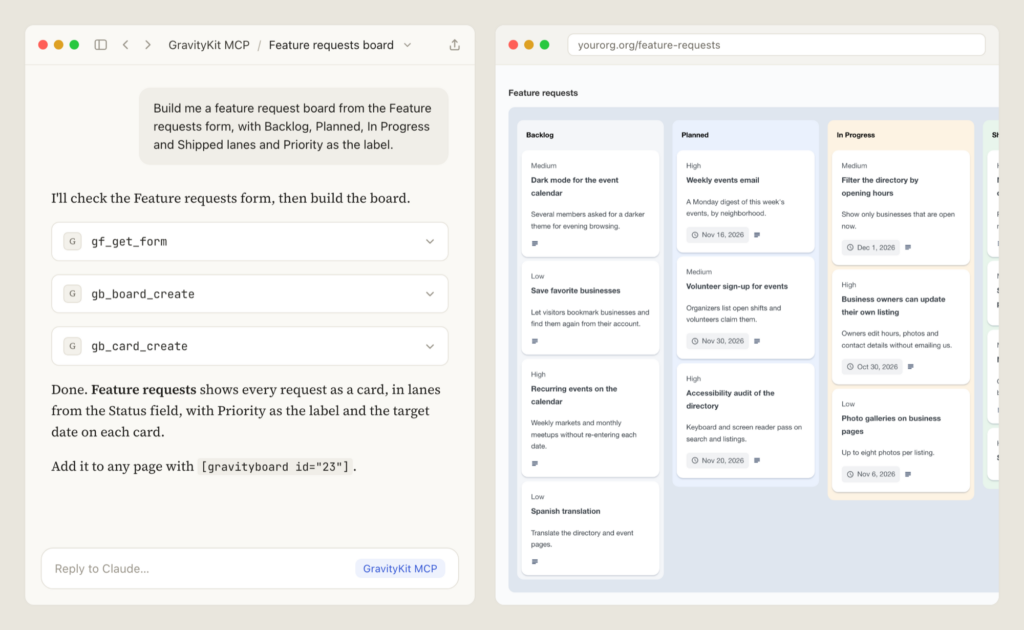
This update to GravityBoard lets an AI assistant connected through the GravityKit MCP build and run boards. Describe the board you want, and the assistant can create and configure it, manage lanes, and add, edit, move, and delete cards. It can only do what the account it signs in with is allowed to do on each board. The guide to building boards with AI covers setup and permissions.
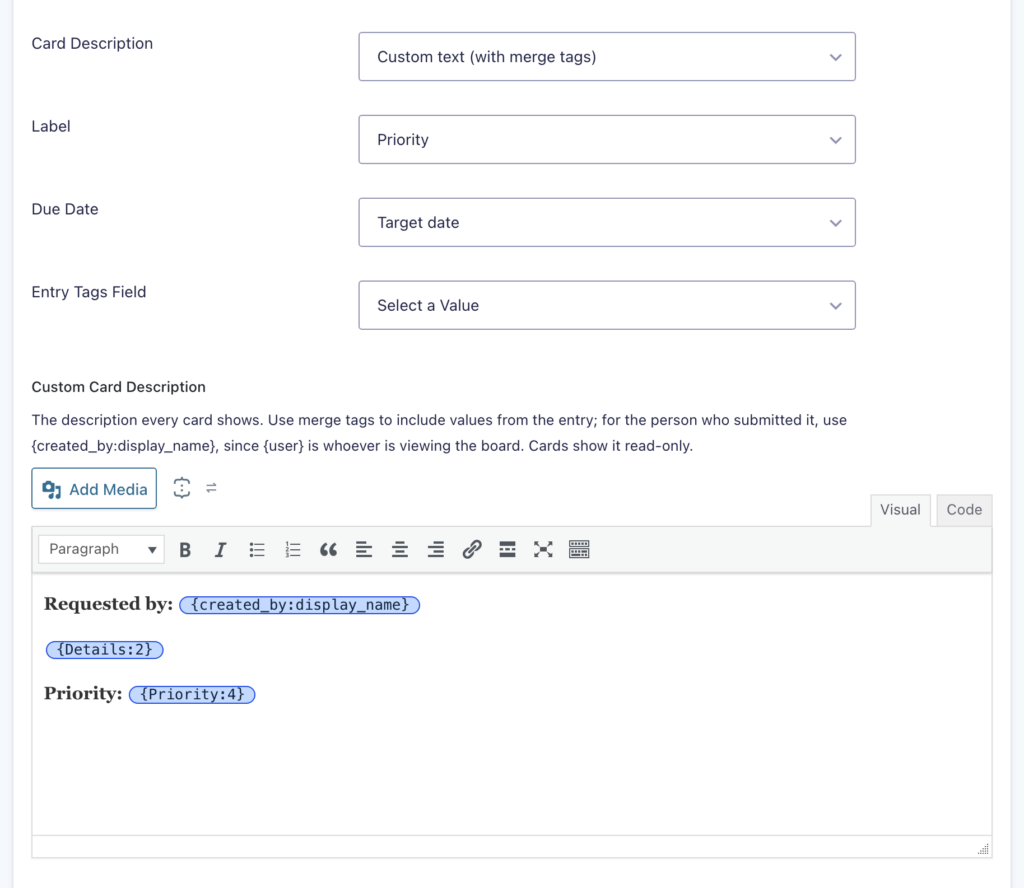
Card descriptions can now use “Custom text (with merge tags).” You write the description once in a rich text editor, with merge tags such as {all_fields}, and each card fills it in from its own entry. GravityBoard’s merge tags and their options for assignees, votes, and voters also appear in the Visual Merge Tags picker.
The release includes security fixes, and we recommend updating. Boards that limit which cards each user can see check permissions more closely, and board pages and notes share less user information with people who don’t manage the board.
More fixes and developer updates in v1.6.0 (includes a breaking change)
When a card’s Label uses the same field as the lanes, changing the Label now moves the card to the matching lane, and dragging the card to another lane updates the Label without a reload. Conditional logic on fields that store a user, post, or entry ID, such as Dynamic Lookup, GP Populate Anything (Gravity Wiz), or Nested Forms fields, now matches the name the field shows. Rules using is and is not with a number still compare the ID. @ mention emails offer their own merge tags, such as {notifier_name}, and attachments, mention emails, voting, and rich text in cards and notes get security improvements.
Other fixes:
- Conditions on Entry Date, Date Updated, or Payment Date with a non-date value no longer cause a fatal error on PHP 8
- Conditions using
is,is not,in, ornot inon Product, Option, or Shipping choices find entries - Screen readers on translated sites announce the day, month, and year of date conditions in the site’s language
- Cards moved or added by two people at the same time keep the right order
- Permanently deleting a card removes its votes on boards with “Trigger Form Notifications” turned off
Developer updates
- Added board, lane, and card abilities to the WordPress Abilities API under
gk-gravityboard/*, runnable at/wp-json/wp-abilities/v1/abilities/gk-gravityboard/<name>/run. - Added the
gk/gravityboard/card/lock_timeoutandgk/gravityboard/lane/lock_timeoutfilters to set how many seconds a card or lane change waits for another change on the same form to finish before it is refused (default: 5). - Added the
gk/gravityboard/attachments/blocked-extensionsfilter to modify which file extensions are refused on boards that allow all file types. - Added the
gk/gravityboard/merge-tags/assignee-propertiesfilter to modify which user fields the{gravityboard_assignee:<property>}merge tag can output. - Breaking change: board users and card assignees in the board data no longer include
email, and a note’suser_emailis empty unless the current user can edit forms. - The
gk/gravityboard/card/sortedhook now skips drags within a lane on boards sorted by votes, since nothing is saved. Feed::get_feed()now returnsfalsefor feeds that belong to another add-on.- Deprecated
Ajax::can_add_attachment()andAjax::can_delete_attachment()in favor ofAttachments::can_upload_attachment()andAttachments::can_delete_attachment(), andHelpers::has_entries_in_lane()in favor ofHelpers::get_lane_entry_ids().
GravityCalendar v2.25.0
This update to GravityCalendar shows calendars entirely in the language chosen in their Localization setting. Labels such as “all-day,” “+3 more,” and “No events to display,” and the Previous and Next tooltips, used to appear in English, and toolbar buttons such as Today and Month used the site’s language. When you pick a language other than the site’s and save, the calendar now downloads that translation itself.
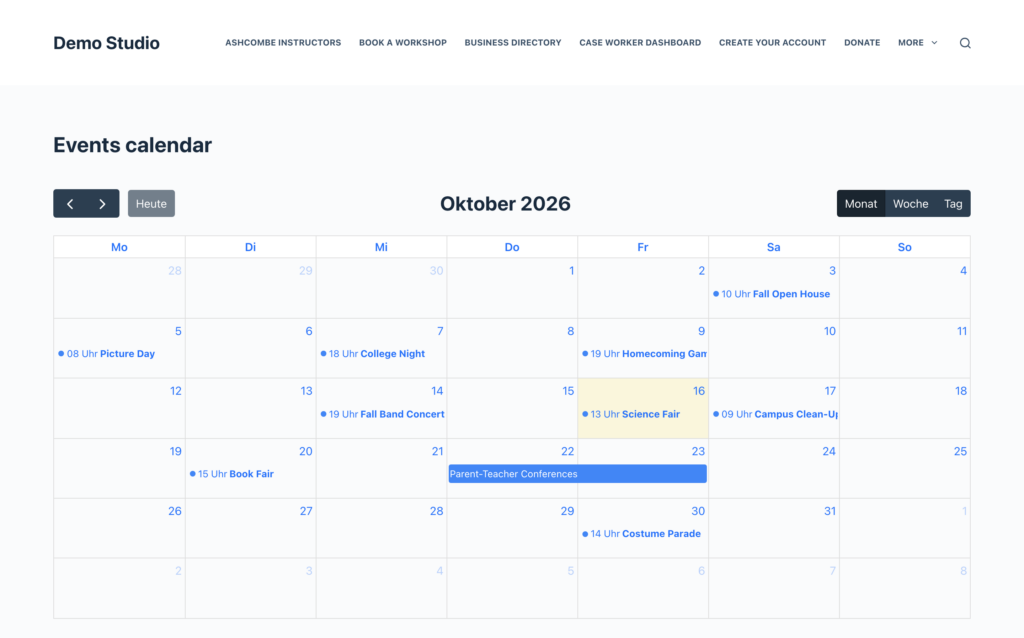
The release also includes a security improvement for moving and resizing events on the calendar, and we recommend updating.
More fixes and developer updates in v2.25.0
All calendar text can now be translated or reworded with a translation plugin such as Loco Translate. Timed events from external calendar feeds, such as Google Calendar, Outlook, or iCloud, now convert to the site’s time zone like the calendar’s own events.
All-day events in calendar subscription links now end on the right day. One-day events used to end on the day they started, and events without an end date ran until the subscription last updated. Resizing an event across several days on a calendar without an End Date field now undoes the resize, where it used to change the event’s start date.
Developer updates
- The calendar’s language downloads respect the
gk/foundation/translations/disable-downloadfilter, so a site that turns off translation downloads gets none. - Deprecated the
gravityview/calendar/scripts/fullcalendar/locales_dir_urlfilter, which no longer has an effect. Change the calendar’s text with a translation or thegravityview/calendar/optionsfilter, whose values still take priority.
GravityEdit v2.13.0
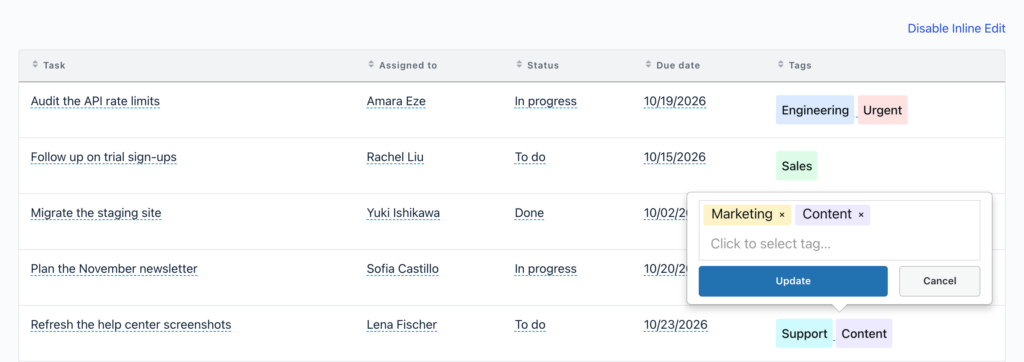
This update to GravityEdit adds inline editing of Entry Tags fields in GravityView Views (requires Entry Tags 1.5.0 or newer). Turn on inline editing, click a Tags cell, and add or remove tags in place.
The release also includes security fixes, and we recommend updating. Inline editing could allow unintended changes to entries under certain conditions, and Entry Tags values shown after an inline edit are now displayed more safely.
More fixes in v2.13.0
Inline editing of Entry Tags fields gets a set of fixes. Saving on the Gravity Forms entries list now finishes, the editor no longer shows the first entry’s tags alongside the entry’s own, and a tag containing a quotation mark or < no longer erases every tag. Tags saved as comma-separated text open in the tag picker, and an entry with damaged tag data no longer stops inline editing for the fields below it.
Dynamic Lookup fields whose selected record is no longer one of their choices, such as an entry moved to the trash, keep their selection when edited inline. Dynamic Lookup checkboxes show the right boxes ticked after their choices change, and editing another field inline no longer removes those selections.
Saving a field inline no longer removes backslashes from its value. With Inline Edit Mode set to “In-Place,” or when editing a whole column, opening another field while an editor is open now takes one click instead of two.
GravityKit MCP v2.6.1
This update to the GravityKit MCP makes the gf_update_field tool refuse requests it can’t carry out, where it used to report success and change nothing. A property sent beside properties instead of inside it, such as placeholder, is refused with a reply showing where it belongs. Calls with nothing to change, and calls that try to change a field’s ID, are refused too. The tools reference lists every tool the server offers.
GravityMigrate v2.1.2
This update to GravityMigrate stops duplicate forms when migrating with an AI assistant. An assistant that retried a migration while the first attempt was still running created the same forms twice.
GravityView v3.8.0
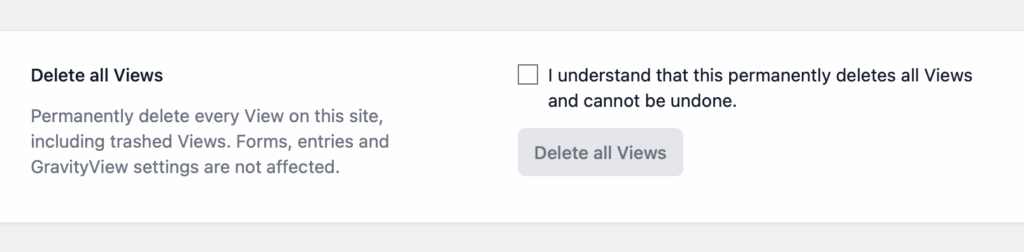
This update to GravityView keeps your Views when GravityView is deleted from the Plugins page. Deleting the plugin used to permanently remove every View, entry approval status, and GravityView entry note. When you do want the Views gone, a new “Delete all Views” button in GravityView’s settings deletes them all, including trashed ones, without touching forms, entries, or settings. Deleting all Views and uninstalling GravityView has the steps.
Edit Entry gets a “Use as Page Title” setting that decides whether the Edit Entry Title also replaces the page and browser tab titles. It’s on by default, so existing Views keep their titles, and the Edit Entry Title no longer renames menu items or other posts listed on the page.
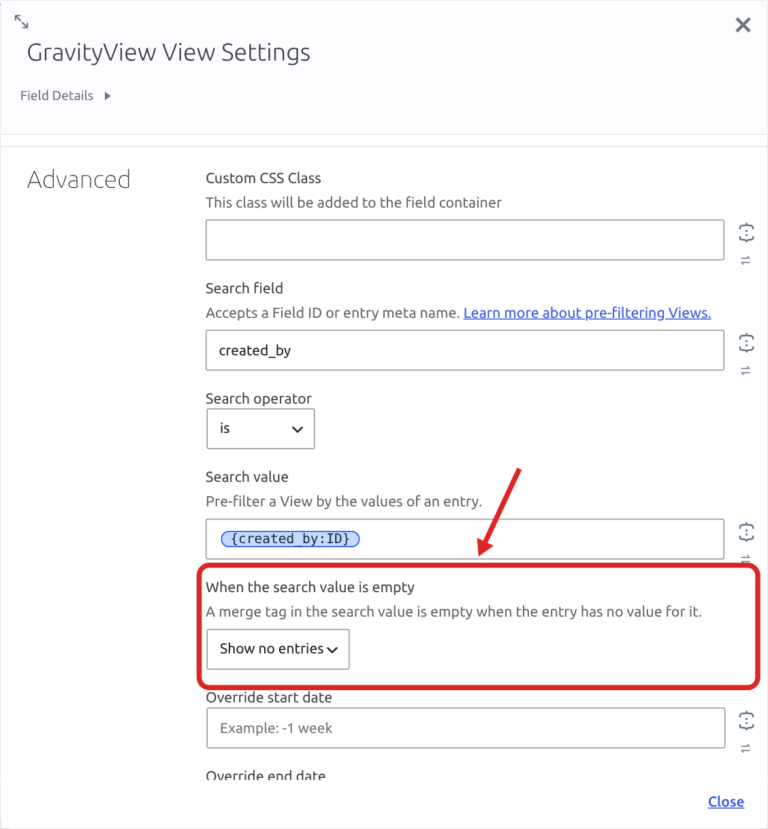
Embedded Views can now choose what to show when their search value is empty, such as a {get:customer} merge tag on a page address without a customer parameter. The View field for embedding a View inside another View now shows no entries by default in that case. The [gravityview] shortcode takes search_value_empty="none", and the View block and the Elementor, Divi, and Beaver Builder modules offer “Show no entries.” Existing embeds keep showing every entry, and an admin notice lists the pages that use them.
Search Operators other than Is, Is Not, and Contains in embedded Views now work as named. Not Equal and Not In used to list the entries they should have left out.
The release also includes security fixes, and we recommend updating soon:
- Deleting, approving, and rejecting entries from the front end check more closely which entries they act on
- Embedded Views apply their Search Field and Search Value more strictly, so they show only the entries they’re set to show (sites using the GravityView Widget for Elementor plugin also need its next update)
- Views built or cloned with the GravityKit MCP could show entries their settings were meant to restrict, or allow REST access that was turned off
- Page and browser tab titles on Views with an Edit Entry Title could show entry values to visitors not allowed to edit the entry
More fixes and developer updates in v3.8.0 (includes breaking changes)
Views built with the GravityKit MCP now behave like Views built in the View editor. New Views use the site’s default theme instead of Legacy (as do Views created with the REST API), Edit Entry fields show for users editing their own entries, and unsaved settings show their default values. Settings turned on or off with text such as “yes” or “off” are applied correctly, and cloned Views keep their Multiple Forms joins and unions, Layout Builder row settings, and backslashes.
Restoring a View revision now brings back Advanced Filter conditions, Multiple Forms joins and unions, and Layout Builder row settings. Restoring a revision saved before GravityView 3.0.0 no longer removes the View’s form, layouts, fields, and widgets, and the Revisions screen shows the right changes after a restore. In the View editor, Advanced Custom Fields (ACF) fields no longer keep a draft View from publishing or saving, and saving with Enter or during an autosave no longer asks you to confirm leaving the page.
Custom CSS can now override the layout’s styles, such as table cell padding, along with the Vantage theme’s styles and DataTables features such as Buttons. On the Vantage theme, a Google Fonts @import no longer wipes out the rest of the Custom CSS. Views shown inside another View, such as through a Custom Content widget or the [gventry] shortcode, keep their Custom CSS, Custom JavaScript, layout styles, and Style settings.
Views that join or union forms with Multiple Forms get a set of fixes. In joined Views, the Entry Field block and [gvfield] set to First or Last show a value, the Entry block and [gventry] show the joined form’s values, and links such as /entry/12,34/ work. Edit Entry shows and saves the right fields, where a field added from another form could change the entry’s own field with the same ID. In unioned Views, entries from the added form follow the field mapping in CSV and TSV exports and the REST API, and respect field settings such as “Link phone number” and “Encrypt email address.”
Other fixes:
- A search value of
0in the[gravityview]shortcode or an embedded View is no longer ignored - In DataTables Views, clearing the Search Bar and searching again shows every entry, and the browser Back button steps back through earlier searches and pages
- “Embed only” DataTables Views placed with Beaver Builder load for visitors and users below the Editor role
- Edit Entry no longer erases GP Populate Anything (Gravity Wiz) Drop Down values that depend on a field placed later in the form
- Edit Entry shows the right fields when the same form is embedded on the page, and a field added to the Edit Entry tab twice saves correctly
:urlencodeno longer encodes Dynamic Lookup values twice, and merge tag modifiers print{instead of{when a value contains a curly brace- On block themes such as Twenty Twenty-Five, images and entry links open in the lightbox even when the page’s first View has “Enable lightbox for images” turned off
- CSV and TSV exports keep trailing empty values
- Cloning a View from the Views list keeps backslashes in its title and settings
- Sites with a View embed missing its secret no longer create a separate admin notice for every nonexistent address visited
Developer updates
- Added the
gk/gravityview/search/empty-value/defaultfilter to set what embeds without asearch_value_emptyvalue show when their search value is empty (returnnoneto show no entries). - Added the
gk/gravityview/edit-entry/page-titlefilter to change the page title on the Edit Entry screen (return an empty string to keep the page’s own title). It andgk/gravityview/edit-entry/document-titledefault to an empty string when “Use as Page Title” is unchecked. - Added
GV\Entry::is_active()andGV\Entry::is_trashed()methods, which compare the entry’s status case-insensitively. - Breaking change:
gravityview()->plugin->uninstall()now removes only temporary data and keeps Views, entry approval statuses, GravityView entry notes, capabilities, and options. UseGravityKit\GravityView\View\ViewRemover::remove_all()to delete Views. - Breaking change:
GV\View::get_entry()now returns the joined row (aGV\Multi_Entry) on Views that join forms and accepts joined entry slugs such as12,34. On that row,$entry['id']and$entry['form_id']arenull, so use$entry->IDor$entry->entriesinstead. - Deletes granted by the
gk/gravityview/delete-entry/can-deletefilter are now checked against the View’s forms and the entry’s status. - Each View’s Custom CSS and Style settings now print from their own
gravityview_view_css_{View ID}stylesheet handle, after GravityView’s stylesheets. - A View’s
idsetting now stays an integer when a shortcode embeds the View, so strict (===) comparisons with the View ID match correctly. gk-gravityview/view-clonenow copies every_gravityview_meta key of the source View, and View revisions also track_gravityview_filters,_gravityview_form_joins,_gravityview_form_unions, and_gravityview_row_settings.gk-gravityview/view-config-getandgk-gravityview/view-settings-patchnow return the default value of each core View setting that is not saved, and refuse to turn onshow_only_entries_by_current_userwhen Advanced Filtering is not active or conflicts with the View’s filters.- The entry lightbox page now includes a doctype, so browsers no longer render it in quirks mode.
GravityView – Dashboard Views v2.0.6
This update to Dashboard Views tightens access to internal-only Views, and we recommend updating. Their entries, entry counts, and Maps Layout map data are now available only to users whose role can open the View.
DataTables Views set to “Restrict to Internal-Only View” no longer show empty cells in the Dashboard, and the Single Entry lightbox in the Dashboard hides fields set to be hidden there. Dashboard Views now requires GravityView 3.5.0, PHP 7.4, and WordPress 6.5 or newer.
GravityView – DataTables Layout v3.14.1
This update to the DataTables Layout fixes two cases where a table showed “This table could not load”: on some sites where another plugin or the theme printed stray output, and after changing page, sorting, or searching when the server took more than 30 seconds to respond.
More fixes in v3.14.1
On sites with permalinks set to “Plain,” Single Entry, Edit Entry, and Delete Entry links in the table now open the right page instead of raw data. The Calendar widget shows events again in DataTables Views on sites running GravityCalendar 2.23.1 or older. DataTables Views embedded outside the page content, such as by the theme, now honor Search Operators like Not Equal and Not In (requires GravityView 3.8.0 or newer).
On Views that union forms with Multiple Forms, the table now follows the field mapping for entries from the added form, including in Copy, CSV, and Print exports and in Preloaded (Client-side) search. A PHP deprecation notice on PHP 8.4 or newer is also gone.
How to update
Updates are available from your WordPress dashboard; installing and updating GravityKit plugins has the steps. Start with GravityView, GravityBoard, GravityCalendar, GravityEdit, Entry Tags, and Dashboard Views, which include security fixes.

Get better at Gravity Forms, one email a week
New GravityKit releases, practical Gravity Forms tutorials, and subscriber-only discounts. One short email every week, unsubscribe anytime.
More articles

Launch Log: AI-built boards, inline Entry Tags editing, and Views kept on uninstall
This week: AI-built GravityBoard boards, inline Entry Tags editing in Views, Views kept when GravityView is deleted, and security fixes we recommend installing.
How to migrate from WPForms to Gravity Forms without rebuilding your forms
Move your WPForms forms into Gravity Forms with GravityMigrate, keeping their fields, conditional logic, confirmations, and notifications. Then bring your entries across with GravityImport.

Launch Log: Search Everything matches what fields show, steadier map searches, and security updates
GravityView’s Search Everything now matches the names fields display, and GravityView, Maps, GravityCalendar, and Dynamic Lookup get important security fixes.