Case study
How BrightLeaf Giving built a live ledger and client portal with GravityKit
BrightLeaf Giving runs a fiscal sponsorship platform where every dollar in and out has to be traceable. Its ledger, client portal, approval queues, and internal KPI dashboard all run on one set of Gravity Forms entries: GravityView displays them, and GravityMath works out every balance and total from them live. As co-founder Gil Amminadav puts it, “GravityKit turned Gravity Forms from our intake layer into our operating system.”
Meet Gil Amminadav
Gil Amminadav co-founded BrightLeaf Giving and runs its operations and product. BrightLeaf lets community leaders, philanthropists, and campaign organizers launch charitable programs under its 501(c)(3) partners, without forming a nonprofit of their own. Those programs include Community Support Funds, Education Opportunity Funds for donor-advised scholarships, and Social Impact Campaigns. BrightLeaf runs the donation pages, grant requests, approvals, and disbursements, and every program manager gets a live dashboard.
Gil has worked with Gravity Forms and GravityKit for more than a decade. BrightLeaf’s sister company, BrightLeaf Digital, builds the platform and ships GravityOps, its own suite of Gravity Forms add-ons. Several of those add-ons started as tools the team needed on top of GravityView and GravityMath.
We first featured BrightLeaf in a case study on its client messaging system. This one covers the financial side of the platform: how BrightLeaf records each transaction, works out balances, and shows them to clients.

Discovering GravityKit
Gil came across GravityView years ago and saw it as the right tool for putting a user interface on Gravity Forms data. When BrightLeaf needed a system to track program funds, the team weighed two other options: a custom app, or fund-accounting software sold as a service.
The alternatives were a custom app or SaaS fund-accounting software, and both meant a second database and sync jobs.
In the end, BrightLeaf chose GravityKit because it let the team keep all its data in one place. Every record stays a Gravity Forms entry, and the team builds as many screens on top of those entries as it needs, for clients, admins, and donors. Each screen is a GravityView View (a page that displays form entries), filtered so each user sees only the entries meant for them. GravityMath totals follow the same filters, so a client’s balance counts only that client’s own transactions.
Building with GravityKit
The whole platform runs on Gravity Forms, Gravity Flow, and GravityKit. Two pieces do most of the work: a live ledger and a client portal built from more than 30 GravityView Views.
A ledger that calculates its own balances
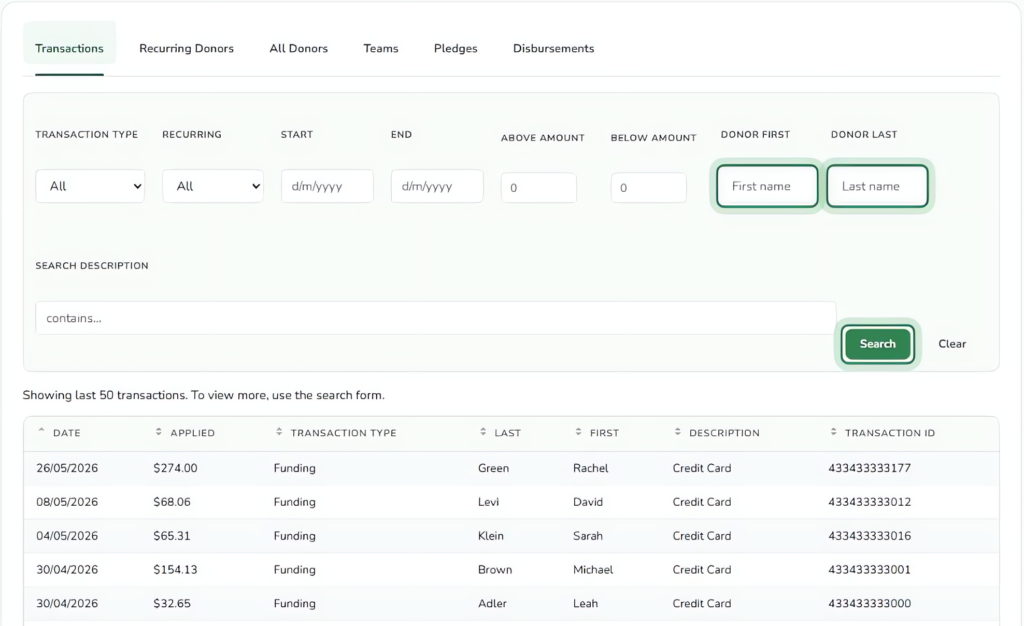
Every funding, disbursal, and fee transaction lands in one Gravity Forms form that acts as BrightLeaf’s master ledger. It now holds more than 5,500 transactions across 128 program accounts.
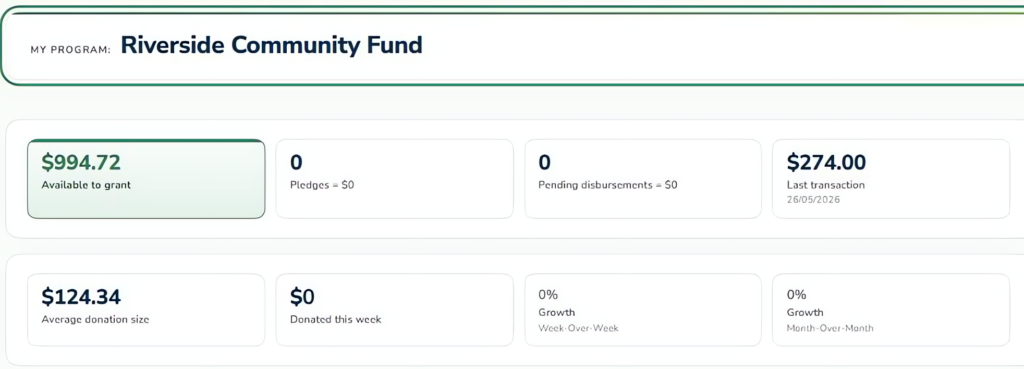
Balances are never stored. GravityMath calculates each one live: it adds up the signed amounts in the program’s ledger View, then subtracts what’s waiting in the program’s pending-grants View. GravityMath respects each View’s filters, so one formula works for every program and every user.
The dashboard number can’t drift from the ledger, because the dashboard is the ledger.
A client portal powered by GravityView
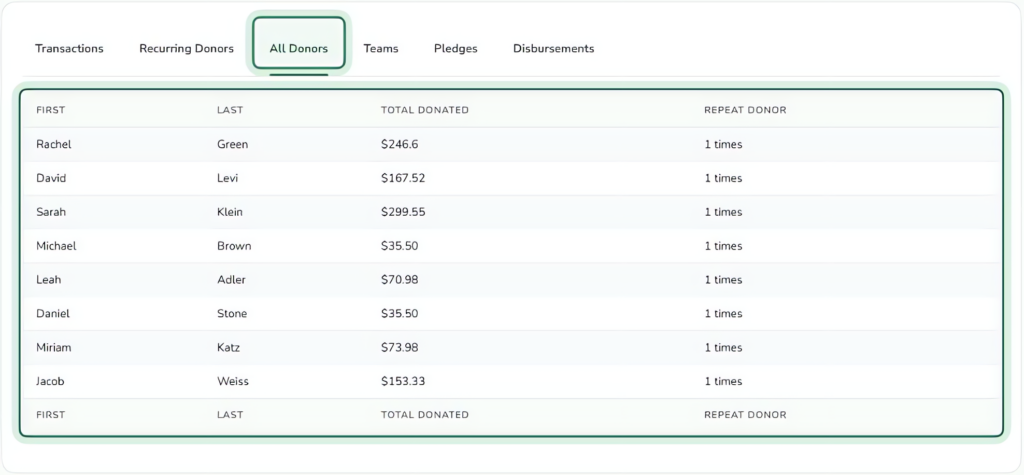
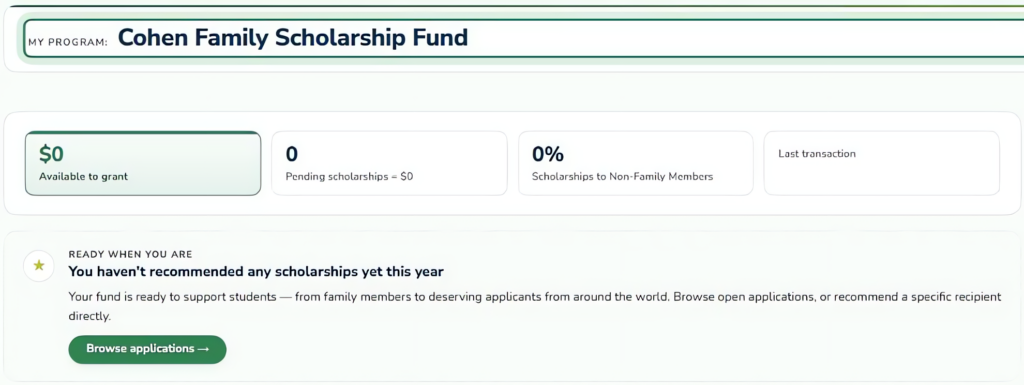
Program managers log in to a dashboard made entirely of user-filtered Views, so each manager sees only their own data. That covers their funds, campaigns and scholarship funds, ledger, pending and past grants, teams, matchers, recurring donors, all donors, referrals, messages, and platform updates.
BrightLeaf builds these with GravityView’s Table, List, and DIY layouts, along with DataTables, Multiple Forms, Advanced Filtering, and inline editing with GravityEdit.
On mobile, each program collapses into an accordion that shows its balance, last transaction, pending funds, and pending disbursals. Each of these figures is calculated by GravityMath.
Grant requests and third-party approvals run through Gravity Flow. The approval queues are Views too, and the badge counts admins see are GravityMath counts of the entries in each queue.
Formulas that grow with the platform
As the portal grew, so did the math. BrightLeaf now maintains about 65 named formulas, covering revenue by program type and partner, approval queues, and the amount raised, amount disbursed, and average gift for each program.
To manage them, BrightLeaf Digital built Global Variables for GravityMath, one of its GravityOps add-ons. A formula is defined once and then used as a merge tag anywhere on the site.
The impact
BrightLeaf runs a financial operation on WordPress with a small team, and every dollar in and out must be traceable. Because each dashboard reads straight from the ledger, program managers see the same records the BrightLeaf team works from.
Dashboard changes ship in hours. Clients see real-time balances, pending donations, pending grants and full transaction history, and we never had to build a custom report.
GravityKit also shaped BrightLeaf’s business. BrightLeaf Digital now builds its own add-ons for GravityKit products, including a Kanban view type for GravityView and Global Variables for GravityMath.
Next, BrightLeaf plans to add Donor Notes and more donor-management Views to the client dashboard, and to bring the same data into its mobile app. Gil’s advice for other WordPress builders is short:
If your data already lives in Gravity Forms, GravityView and GravityMath are the shortest path from entries to a real application.
Takeaways
BrightLeaf had a hard requirement: every dollar traceable, run by a small team, with no second database to keep in sync. Keeping the ledger as Gravity Forms entries and calculating balances live with GravityMath means the numbers clients see come straight from the transactions.
The lesson other builders can reuse is about filters. When the View that limits what a user can see also limits what a formula counts, one dashboard design can serve 128 programs without a separate report for each.

Ready to get
started?
GravityKit’s integrated toolkit of Gravity Forms add-ons transforms your data into actionable applications.
Browse more case studies
Be There Local
Killer Shorts

Think:Kids
Leadpal
Jacksonville Port Authority

Princeton University
South Florida Web Advisors
NSSL
Dragonfly
West Fork School District
HappyTree IT
Mediebruket
Bet Hannon
Experience Solutions

Slight Revision

LifterLMS
Jamie Madden
GCPE
Rochelle Victor