
Published
•
Updated
Launch Log: Refined conditional logic filters, choice labels in Math Summary, and WordPress 7.1 fixes
The August 20 releases refine the Advanced Filter conditional logic builder, add choice labels to GravityMath's Math Summary, and fix entry approval on WordPress 7.1.


This week’s releases focus on reliability and polish across the suite. The GravityView Advanced Filter Extension gets a friendlier, more accessible conditional logic builder, the Math Summary widget becomes easier to read when grouping by choice fields, and GravityView sees fixes for entry approval on WordPress 7.1, alongside caching-related fixes for the Maps and DataTables layouts.
Block MCP v2.2.1
This update to Block MCP makes the plugin more resilient. A damaged or incomplete installation no longer breaks the WordPress admin with a critical error. Instead, the admin keeps loading and displays a notice explaining that part of Block MCP could not be loaded and that reinstalling usually fixes it.
We also fixed issues with the Claude Desktop installer download. Stray output from another plugin or theme could corrupt the file, causing Claude Desktop to reject it with a “Failed to preview extension” error. Downloads are now protected from interference, and failed downloads clean up after themselves instead of leaving behind an unused connection.
Finally, this release corrects two content issues: changing a code block’s font through the assistant now updates the displayed code immediately, and lists written by the assistant no longer show up empty on the site.
Developer updates
- Output buffering now starts when the plugin loads and is discarded before the installer file is sent, so stray output from earlier-loading plugins and themes cannot corrupt the download
Gravity Forms Event Field v1.8.0
This update to the Gravity Forms Event Field fixes the field’s behavior on multi-page and AJAX-enabled forms. Date, time, and other values are now saved correctly when the field appears on a multi-page form or when the form is redisplayed after a validation error. The “All Day Event” toggle and the repeat frequency controls also respond correctly on these forms.
Please note: Gravity Forms Event Field now requires PHP 7.4 or newer.
GravityMath v2.12.0
This update to GravityMath improves the Math Summary widget. When grouping by a choice field, the summary now displays choice labels instead of stored values, making results much easier to read. A new “Use values for labels” checkbox (the use_values shortcode attribute) restores the previous behavior if you need it. The setting is available on the Math Summary View widget, the block, and the shortcode.
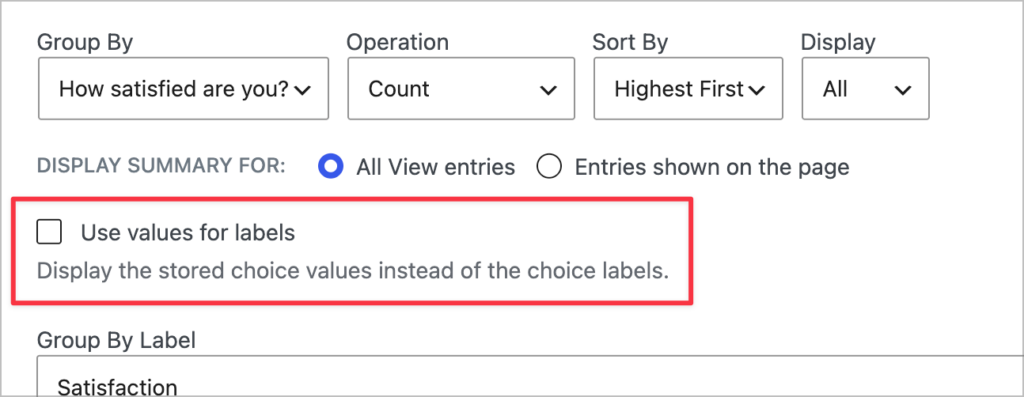
We also fixed an issue where the Math Summary dropped groups with a stored value of “0” or a calculated result of 0 when set to “Entries shown on the page”, and resolved translation loading notices that appeared when editing a View on WordPress 6.7 and newer.
GravityView v3.3.2
This update to GravityView fixes several issues with entry approval in the Gravity Forms Entries list, including the approval toggle not responding on WordPress 7.1. Confirmation messages now appear after bulk approval actions, and the approval column no longer appears on forms without entries.
Edit Entry received an important fix: changes are no longer ignored, and stored values are no longer cleared, on forms where a field with its Gravity Forms visibility set to “Hidden” controls conditional logic or dynamically populated choices.
This release also fixes View settings that store multiple checkbox choices being discarded when saving a View, GravityView shortcodes inside code blocks displaying encoded text instead of attribute values, and single entry links opening the entry list instead of the entry on sites running Formidable Forms Pro.
GravityView – Advanced Filter Extension v4.7.1
This update to the Advanced Filter Extension refines the conditional logic builder. Date filters now include a clear button so you can empty a date without selecting over it, and the date picker’s controls now sit inside the field for easier recognition. Dynamic Lookup filters now use the Lookup plugin’s own choice API when available (Gravity Forms Lookup Field 1.8 or newer).
Accessibility also improved: date picker segments are now reachable by keyboard navigation, the calendar button announces which field it opens, and screen readers announce each choice field as a labelled group.
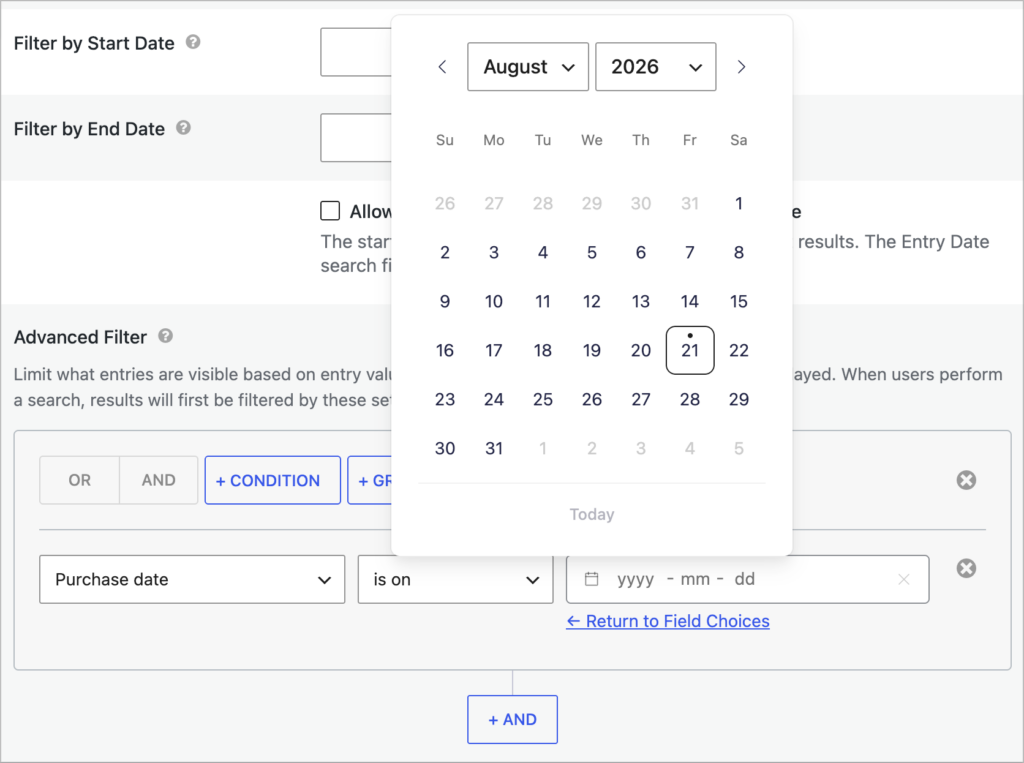
On the fixes side, the searchable dropdown for choice-based filters now loads on sites accessed over plain HTTP, numeric comparisons on currency-formatted Number fields return correct results when the site currency uses a dot as the thousand separator (such as the Euro), and form: merge tag modifiers now work regardless of their position or spacing. We also fixed the condition value dropdown detaching from its input while scrolling, and mismatched values being saved when switching between single-value and multi-value operators.
GravityView – Dashboard Views v2.0.5
This update to Dashboard Views fixes a malformed stylesheet URL that produced a console error on every admin screen.
GravityView – DataTables Layout v3.13.1
This update to the DataTables Layout addresses stale page caches: when a cached page was saved before a View’s columns changed, values could appear under the wrong headings. The table now reports that the page is out of date instead of displaying misaligned data.
Sorting in Views using “Preloaded (Client-side)” processing also received fixes: currency-formatted Number columns now sort correctly, Number columns using a comma decimal point sort by amount rather than by digits, and Time columns sort chronologically instead of alphabetically.
GravityView – Maps Layout v3.10.4
This update to the Maps Layout fixes issues on map pages served from a cache or left open for a long time: clicking a marker on a map with more than 100 entries no longer shows an empty popup, and searching within a map on a DataTables layout returns results correctly. The Google Maps API key verification action now also confirms that the current user can manage settings before running.
In summary
The Advanced Filter Extension gets a refined and more accessible conditional logic builder, GravityMath’s Math Summary becomes more readable with choice labels, GravityView sees fixes for entry approval on WordPress 7.1 and Edit Entry reliability, and the Maps and DataTables layouts both receive fixes for cache-related display issues. Block MCP becomes more resilient to broken installs and interference from other plugins, and the Event Field now works reliably on multi-page and AJAX forms.
As always, we recommend updating to the latest versions to benefit from these improvements and to ensure compatibility across the GravityKit suite!

Get better at Gravity Forms, one email a week
New GravityKit releases, practical Gravity Forms tutorials, and subscriber-only discounts. One short email every week, unsubscribe anytime.
More articles
How to migrate from WPForms to Gravity Forms without rebuilding your forms
Move your WPForms forms into Gravity Forms with GravityMigrate, keeping their fields, conditional logic, confirmations, and notifications. Then bring your entries across with GravityImport.

Launch Log: Search Everything matches what fields show, steadier map searches, and security updates
GravityView’s Search Everything now matches the names fields display, and GravityView, Maps, GravityCalendar, and Dynamic Lookup get important security fixes.

How to build a WordPress client portal with Gravity Forms
Build a client portal on WordPress where each client logs in to see their profile, their requests, and the documents they’ve shared, using Gravity Forms and GravityView.