

Block MCP
The WordPress AI connector that just works. Block MCP lets Claude, Cursor, and other AI agents edit your WordPress posts and pages at the block level, without breaking your layout.
Free & open source · MIT licensed · Works with Claude, Cursor, and any MCP client
Version
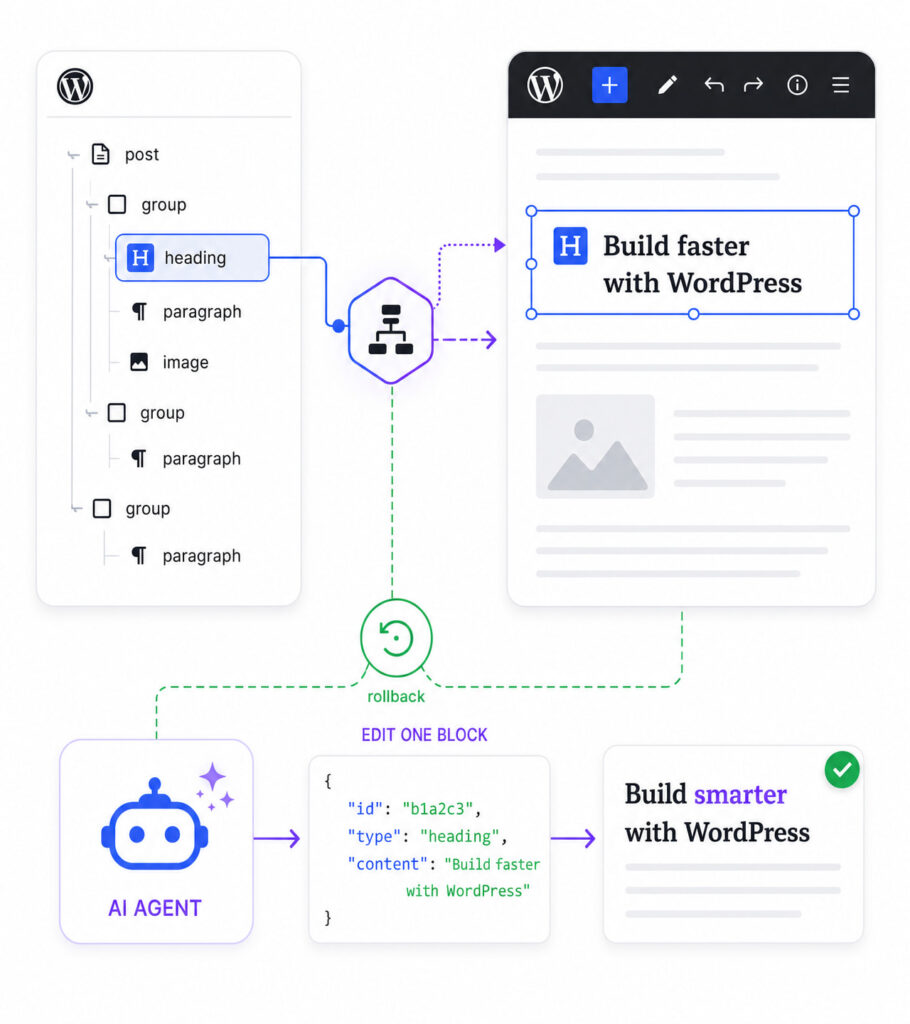
Edit individual blocks, not whole posts
Read, insert, update, delete, move, duplicate, wrap, and replace blocks one at a time. Your AI agent fixes a single paragraph without rewriting, and risking, the entire page.
- Surgical edits: change one heading or swap a button, nothing else moves.
- Persistent block IDs let your agent plan changes across multiple turns.
- Atomic batch edits: up to 50 changes in one revision, no broken blocks.
Connect your AI app in minutes
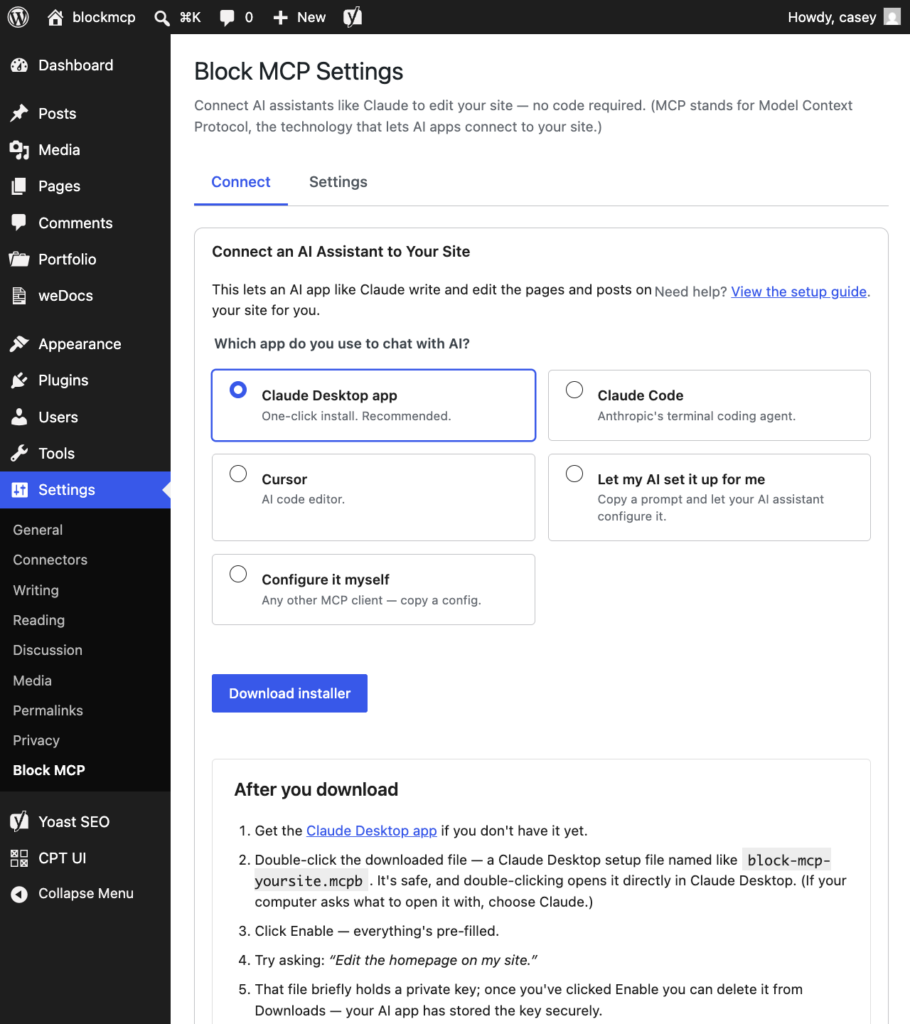
Install the free plugin, go to Settings, then click Block MCP, and pick the app you use to chat with AI. The plugin walks you through the rest. No config files to edit, no Application Password to copy by hand.
- One-click installer for the Claude Desktop app.
- Claude Code and Cursor connect with a single command, generated for your site.
- Any other MCP client gets a ready-to-paste configuration.
Your AI gets a limited account, not your password
Block MCP connects through a dedicated account that can create and edit content, but can’t sign in to your dashboard, change your settings, or delete other people’s work. Your content and credentials stay between your computer and your WordPress site, never on a third-party server.
- Choose which content types the AI can edit. Moving anything to trash is off by default.
- Every edit is revision-backed, so undo is one click.
- Disconnect any AI app at any time to revoke its access immediately.
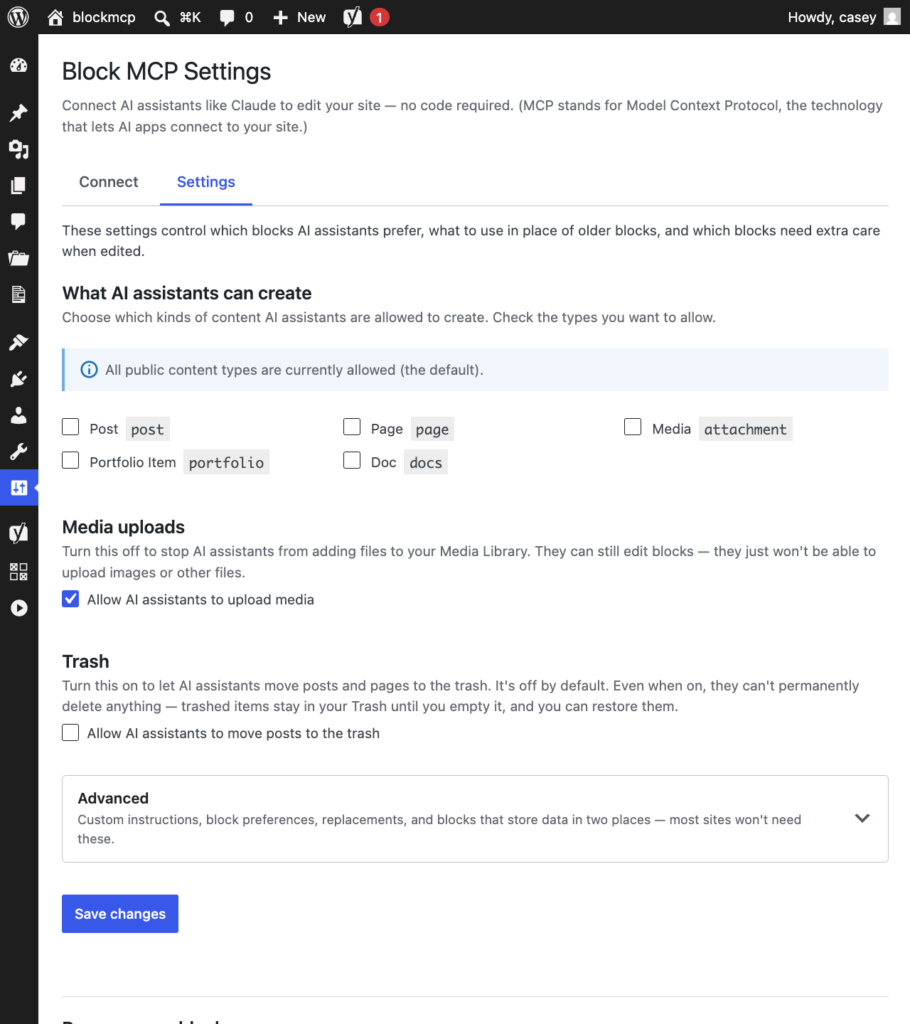


Don’t let all the technical details on this page scare you. Download the free plugin, install it, go to Settings, click on Block MCP, and follow the steps.
Here’s an article showing you the complete setup flow.
Still have any questions? Ask support.
I would love for you to use this because it’s changed how I use WordPress, and I’m confident it will for you, too.

How it compares to the WordPress REST API
Most WordPress automation—including other MCP servers—ultimately writes through the standard REST API, which treats a post as one big blob of HTML. That’s fine for publishing a finished draft, but it falls apart fast when an AI agent needs to make small, targeted edits to an existing page. Here’s what changes when the agent can work at the block level instead.
| What the agent can do | Standard WP REST API | Block MCP |
|---|---|---|
| Edit one heading without touching the rest of the page | ❌ Rewrites the entire page on every edit | ✅ Updates just the one heading |
| Make 5 edits in a row without re-sending the whole page each time | ❌ Sends the full page body 5× | ✅ Sends only what changed |
| Find which block contains “Pricing” without scanning rendered HTML | ❌ No structured search—the agent has to regex through HTML | ✅ Built-in search by text or block type |
| Stop legacy or deprecated blocks from being saved in the first place | ❌ No block-aware validation; deprecated blocks save without warning | ✅ Server rejects legacy blocks and suggests modern replacements |
| Edit a page and have it still open cleanly in the block editor afterward | ❌ Edits as raw HTML—expect many blocks flagged “This block contains unexpected or invalid content” because the original block markers got stripped | ✅ Block markup is preserved exactly |
| Keep editing the right block after adding or removing other blocks above it | ❌ Has to re-read the whole page after each edit | ✅ The agent keeps working without re-reading |
| Fix several typos across one page in a single revision | ❌ Multiple round-trips and revisions cluttering history | ✅ One update_blocks call, one revision, atomic—partial failure rolls back the whole batch |
We tested it. Only Block MCP worked every time.
We put Claude in front of popular WordPress MCP servers and gave it one instruction: “change the H2 heading ‘Code samples’ to H3,” then reopened the page to inspect it. 27 runs total—3 servers × 3 models (Haiku, Sonnet, Opus) × 3 runs each.
| Model | Block MCP | AI Engine Pro | InstaWP/mcp-wp |
|---|---|---|---|
| Haiku | ✅ 3 / 3 · 10s avg | ⚠️ 2 / 3 · 44s avg | ❌ 0 / 3 · 20s avg |
| Sonnet | ✅ 3 / 3 · 9s avg | ✅ 3 / 3 · 14s avg | ❌ 0 / 3 · 36s avg |
| Opus | ✅ 3 / 3 · 9s avg | ✅ 3 / 3 · 13s avg | ⚠️ 2 / 3 · 38s avg |
| Total | ✅ 9 / 9 | 8 / 9 | 2 / 9 |
Only Block MCP succeeded reliably across every model. The full, reproducible benchmark script is in the README—run it against your own site.
Free. Open source. Sets itself up.
Don’t know what an MCP is? Don’t worry: install the free connector plugin and it will guide you from there.
Block-level read & write for any Gutenberg post or page, with atomic batch edits, persistent block IDs, and one-click undo.
- Edit individual blocks, not whole posts
- Guided setup connects Claude or Cursor in minutes
- Atomic batch edits with one-click undo via revisions
- Built-in Yoast SEO support and per-site block preferences
- Free and MIT licensed, use it on every site you build
Have more questions?
A few common questions about what Block MCP does and how to get started.
You must log in to submit a review.