
Published
•
Updated
What is a WordPress MCP server? (And which ones are worth using)
A WordPress MCP server lets AI agents read and edit your site through a standardized protocol. Here is what they do, why they matter, and how six popular options compare.

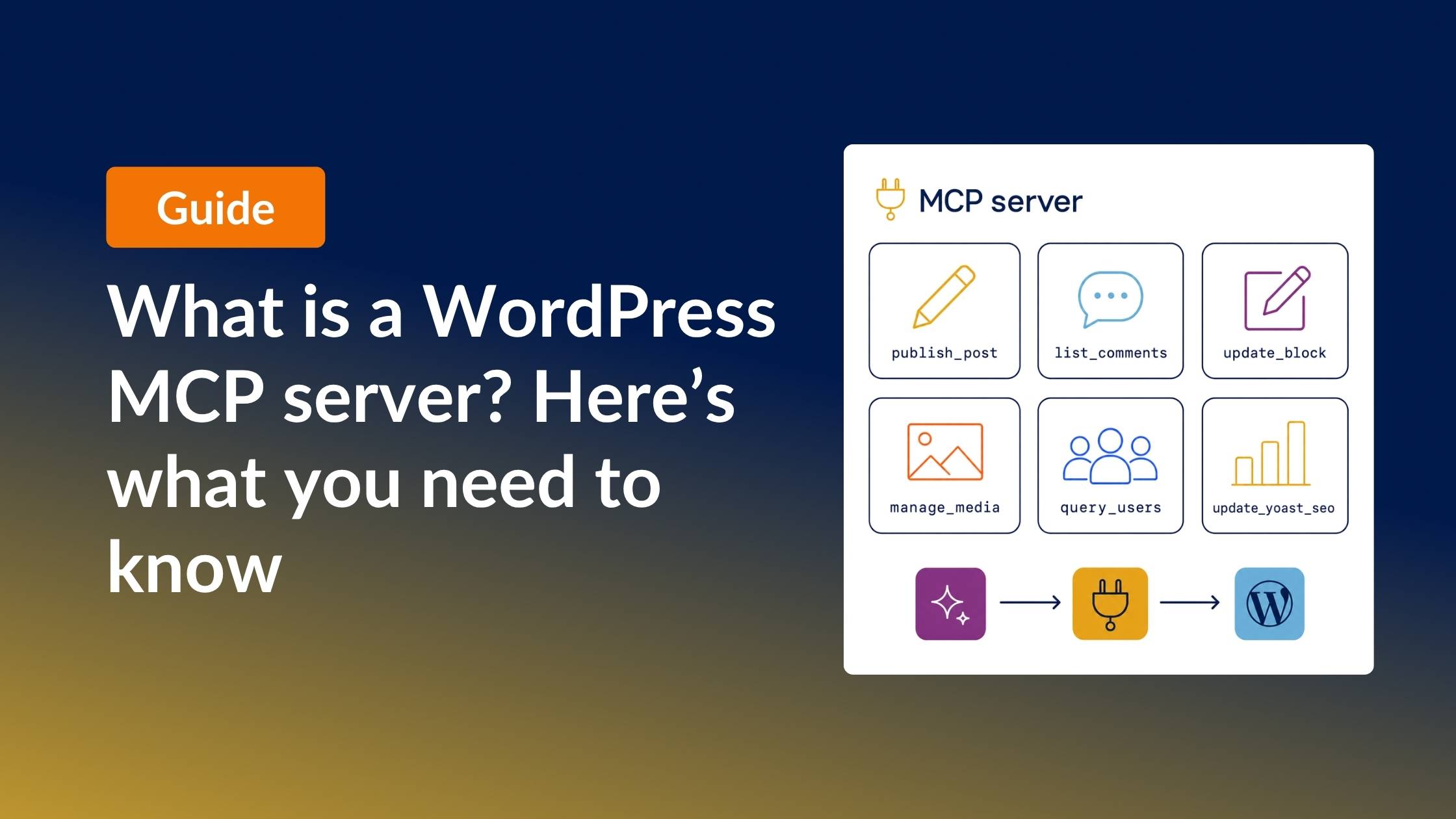
New here? In one sentence: a WordPress MCP server lets an AI assistant like Claude make changes to your WordPress site when you ask it to in plain English — no code required. The rest of this guide explains how it works and which ones are worth using.
A WordPress MCP server is a plugin, local server, or hosted service that lets AI agents like Claude or ChatGPT read, edit, and manage your WordPress site through a standardized protocol, without handing them full admin access.
Until recently, there was no clean way to let an AI agent do meaningful work on a WordPress site. You could hand over a wp-admin password and hope the model behaved itself, paste content back and forth between Claude and the block editor, write custom scripts against the REST API, or stitch something together with Zapier or Make. But none of those scale.
MCP servers are the ecosystem’s response. They give AI clients a structured, scoped interface to WordPress, which runs about a third of the web, with curated tools instead of full admin credentials. The protocol itself only landed in late 2024, but the ecosystem already has 20-plus options across self-hosted plugins, hosted services, and an official adapter shipped with WordPress 6.9.
This guide explains what a WordPress MCP server actually is, why people (including us!) are using them, how the architecture works under the hood, and how six of the most established options compare. By the end you will know which one fits your workflow and which trade-offs you are signing up for.
What’s a WordPress MCP server?
An MCP server is a structured API surface that lets AI agents read and modify a system through natural-language requests. MCP stands for Model Context Protocol, an open standard that Anthropic released in late 2024 and that has since been adopted by Claude, ChatGPT, Cursor, Gemini, Windsurf, and a growing list of AI clients.
The “server” in the name is a slight misnomer. A WordPress MCP server is usually just a plugin you install on your site, or a hosted endpoint that an AI client talks to using the MCP specification. When the agent calls a tool like “list recent posts” or “update this paragraph,” the MCP server translates that call into a real WordPress action and returns the result.
The reason this matters is access scoping. Without an MCP server, the only way to give an AI agent meaningful control of your site is to hand over an admin password or a WordPress application password with broad permissions. An MCP server exposes a curated list of tools instead. The agent can only perform the actions the MCP author chose to expose.
A concrete example: instead of spending three hours manually updating the FAQ section on every post in a category to reflect new pricing, you can ask an agent connected to a WordPress MCP server to do it in a single prompt. The agent finds the matching posts, locates the right block, and applies the change, with you reviewing the result before publish.
Benefits of a WordPress MCP server
Once an MCP server is wired up, the kinds of jobs you can ask an AI agent to do change significantly. The most useful patterns:
- Editorial sweeps – Refreshing dated stats, fixing typos, swapping outdated links across a category or your entire blog, all in a single conversational session.
- Bulk content updates – Updating CTAs, pricing, or schema across a category without writing a CSV import.
- Yoast metadata at scale – Rewriting meta descriptions and focus keywords across a content cluster.
- Building entire sites from scratch via AI – Theme files, posts, images, generated in one prompt-driven workflow.
- Migration assistance – Rewriting content for a new tone or brand voice, moving pages between sites.
- Agency client work – Running the same content operation across many client sites with one prompt.
- Replacing brittle Zapier or Make workflows – Doing in one conversational interface what used to require five connected services.
- Tighter access control – Giving an agent a curated tool surface (publish a post, list comments, update a block) instead of a wp-admin password that unlocks everything.
The common thread is operations that are tedious for humans, well-defined enough for AI, and small enough to verify in review.
How a WordPress MCP server actually works
The architecture has three components.
The AI client is the application speaking to the MCP on the user’s end. Claude Desktop, Claude Code, Cursor, Gemini, and ChatGPT (which added MCP connector support in 2026) all qualify.
The MCP server sits between the AI client and WordPress. It might be a server running locally, a WordPress plugin running on your site, a hosted endpoint that proxies requests, or a hybrid. Its job is to publish a list of “tools” (callable functions like update_post or list_comments) and execute them when the agent asks.
The WordPress site is where the actual work happens. The MCP server authenticates with WordPress using an application password or an OAuth token, then makes REST API calls (or, in some cases, block-level operations) on the agent’s behalf.
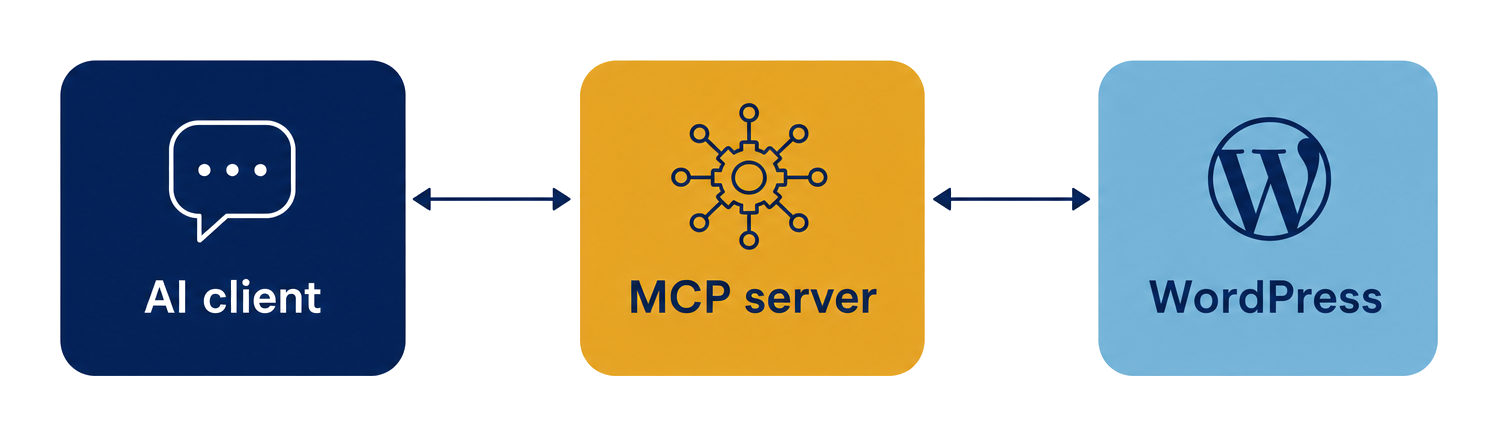
The output flows back as structured data the agent can reason over. Because the data is structured, the agent can chain operations, verify results, and explain what it did, which is more difficult when the same job runs over a raw HTML round-trip.
Two architectural approaches: REST API wrapper vs block-level
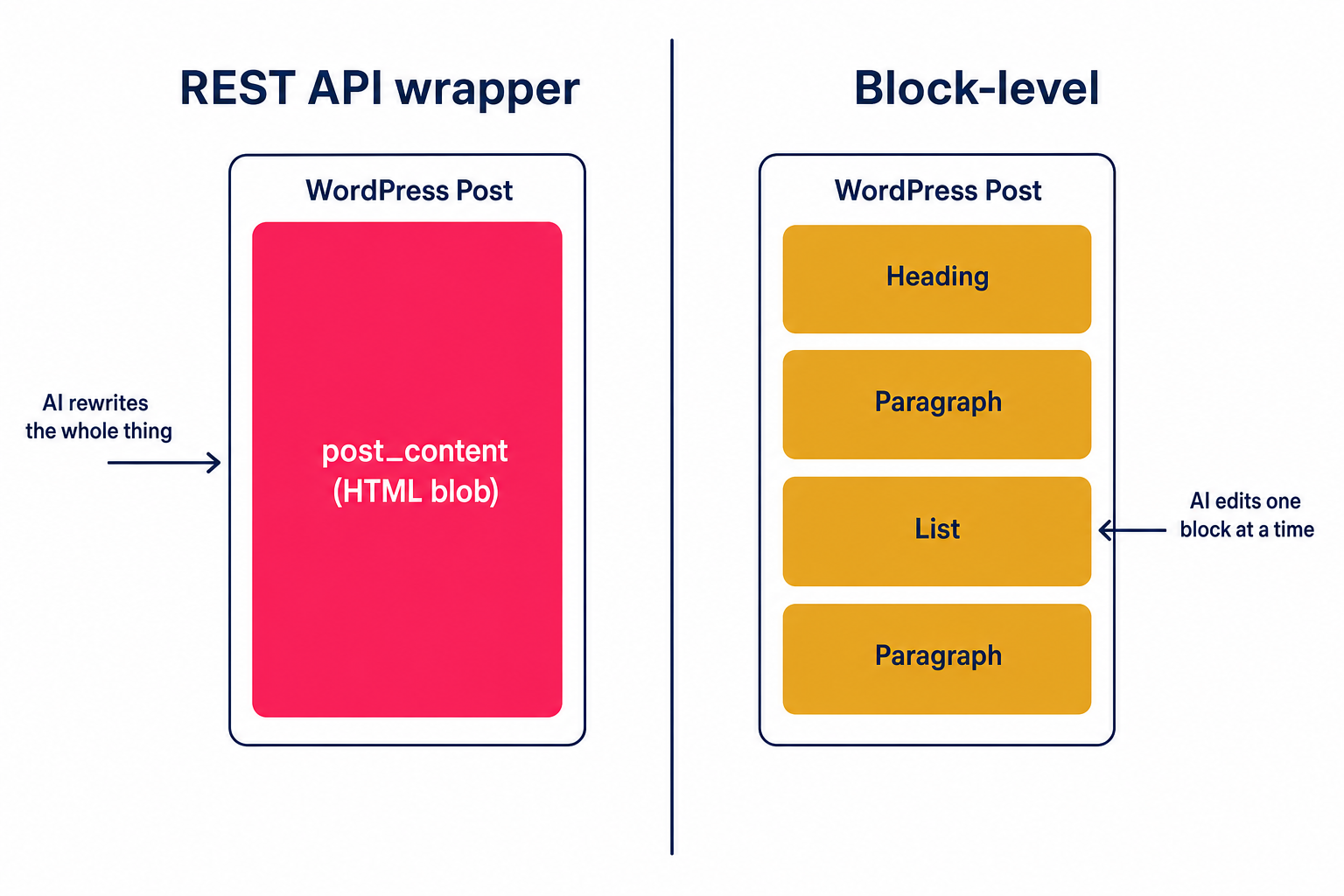
There is one technical distinction that shapes everything else in this category, and most posts about WordPress MCPs skip it.
REST API wrappers (the common approach)
Most WordPress MCPs wrap the existing wp/v2 REST API. They send and receive post content as a single HTML blob, which is the entire post_content field on the post. This is fast to build, well-understood, and works very well for creating new posts, listing data, managing media, and admin tasks.
The trade-off shows up when editing existing Gutenberg posts. When the agent rewrites post_content, Gutenberg block delimiters like <!-- wp:paragraph --> can get stripped, and the block editor may flag the post with “this block contains unexpected or invalid content.”
Block-level MCPs (a newer approach)
A block-level MCP, like our Block MCP, uses a companion WordPress plugin that parses Gutenberg blocks into individually addressable units with stable IDs. The MCP server talks to that plugin instead of to wp/v2 directly. The agent can read, update, insert, or delete one block at a time without touching the rest of the post.
This type of MCP is designed specifically to preserve block structure on edit, and works more reliably on Gutenberg-heavy WordPress websites.
Which approach matters for you depends on the job
If your AI workflow is mostly creating new posts, publishing drafts, or reading data, a REST API wrapper is more than adequate, and most of the ecosystem fits that pattern.
If you want AI to refresh stats, fix typos, or rearrange blocks on existing Gutenberg posts, the block-level approach holds up better. The architecture is the difference between an AI that occasionally breaks your formatting and one that does not.
Popular WordPress MCPs
There are more than 20 WordPress MCPs in the wild today. Most are open-source community projects, a few are hosted services, and at least one follows a hybrid model. Below is a snapshot of some of the most established options as of mid-2026.
| MCP | Maintainer | Hosted or self-hosted | Architecture | Best fit |
|---|---|---|---|---|
| AI Engine | Jordy Meow (Meow Apps) | Self-hosted plugin | REST-style writes via purpose-built MCP tools | On-site AI chatbot plus light content tools |
| InstaWP mcp-wp | InstaWP | Self-hosted MCP server | REST-style | General-purpose WP automation and content publishing |
| Block MCP | GravityKit | Self-hosted plugin + MCP server | Block-level (companion plugin parses Gutenberg) | Editorial workflows that edit existing Gutenberg posts |
| WordPress.com MCP | Automattic | Hosted (built-in) | Built on the Abilities API and MCP Adapter | Sites hosted on WordPress.com |
| WordPress MCP Adapter (official) | WordPress core | Self-hosted | Abilities API-based | Developers building on WordPress 6.9+ Abilities |
| Vibe AI (WPVibe) | SeedProd | Hosted MCP at mcp.wpvibe.ai with optional plugin | REST API + Abilities API (proxied) | Teams that want one MCP URL across many AI clients |
AI Engine
AI Engine by Meow Apps is a popular commercial plugin with a large user base and consistently positive community sentiment. The MCP layer sits alongside a strong frontend AI chatbot, image generation, and other content tools. It is the strongest fit when an on-site AI assistant for visitors is the primary goal. Content writes are REST-style, so existing Gutenberg posts can pick up block-validity warnings if the agent rewrites them. A free version is on WordPress.org, with paid tiers unlocking additional MCP tools.
InstaWP mcp-wp
InstaWP’s mcp-wp is an independent open-source WordPress MCP built by the InstaWP team, focused on multi-site content management through one MCP endpoint. It wraps the WordPress REST API, authenticates with application passwords, and covers posts, taxonomies, media, users, plugins, and optional SQL queries. A natural fit for agencies and developers already using InstaWP for dev environments. Same REST-style caveat applies for editing existing block content.
Block MCP
Block MCP operates at the block level via a companion plugin that parses Gutenberg structure into individually addressable units with stable UUIDs. It supports atomic batch edits, persistent block IDs, and Yoast bulk updates. It’s MIT-licensed and free: download and install the plugin from our site, then connect your AI assistant in a few clicks from Settings → Block MCP. Newer to the space, with a smaller community than Automattic’s wordpress-mcp or AI Engine. We built Block MCP because we needed an MCP that could edit existing GravityKit posts and pages without breaking our content. You can read the launch announcement for the full backstory. If your AI workflows revolve around forms rather than posts, we also build GravityKit MCP for managing Gravity Forms and entries through AI assistants.
WordPress.com MCP
The WordPress.com MCP is built directly into WordPress.com hosted sites and runs on Automattic’s infrastructure at public-api.wordpress.com/wpcom/v2/mcp/v1. It uses OAuth 2.1 with PKCE and is free with no install required. Only relevant if your site is hosted on WordPress.com.
WordPress MCP Adapter
The WordPress MCP Adapter on GitHub is the official direction for the platform. It bridges WordPress’s Abilities API to the MCP specification and is sanctioned by core contributors. The Abilities API was introduced with WordPress 6.9. The Adapter itself is solid, but it is currently thin on registered abilities, because the plugin ecosystem is still catching up. This is the official successor to Automattic’s now-archived wordpress-mcp plugin.
Vibe AI (WPVibe)
Vibe AI on WordPress.org is built by SeedProd, the team behind WPForms and OptinMonster, and follows a hosted model. You connect AI clients to the hosted MCP server at mcp.wpvibe.ai, which proxies authenticated REST API calls back to your site. App-password credentials are encrypted with AES-256-GCM on their Cloudflare-hosted infrastructure. Convenient for using one MCP URL across Claude, ChatGPT, Cursor, and Windsurf. The trade-off is that you are trusting Vibe AI to hold encrypted credentials.
Plenty of other community-built MCPs exist on GitHub, including WP Engine’s Smart Search MCP, Zapier’s WordPress MCP, and Royal MCP. This list is an entry point, not a complete inventory.
Which one should you actually use?
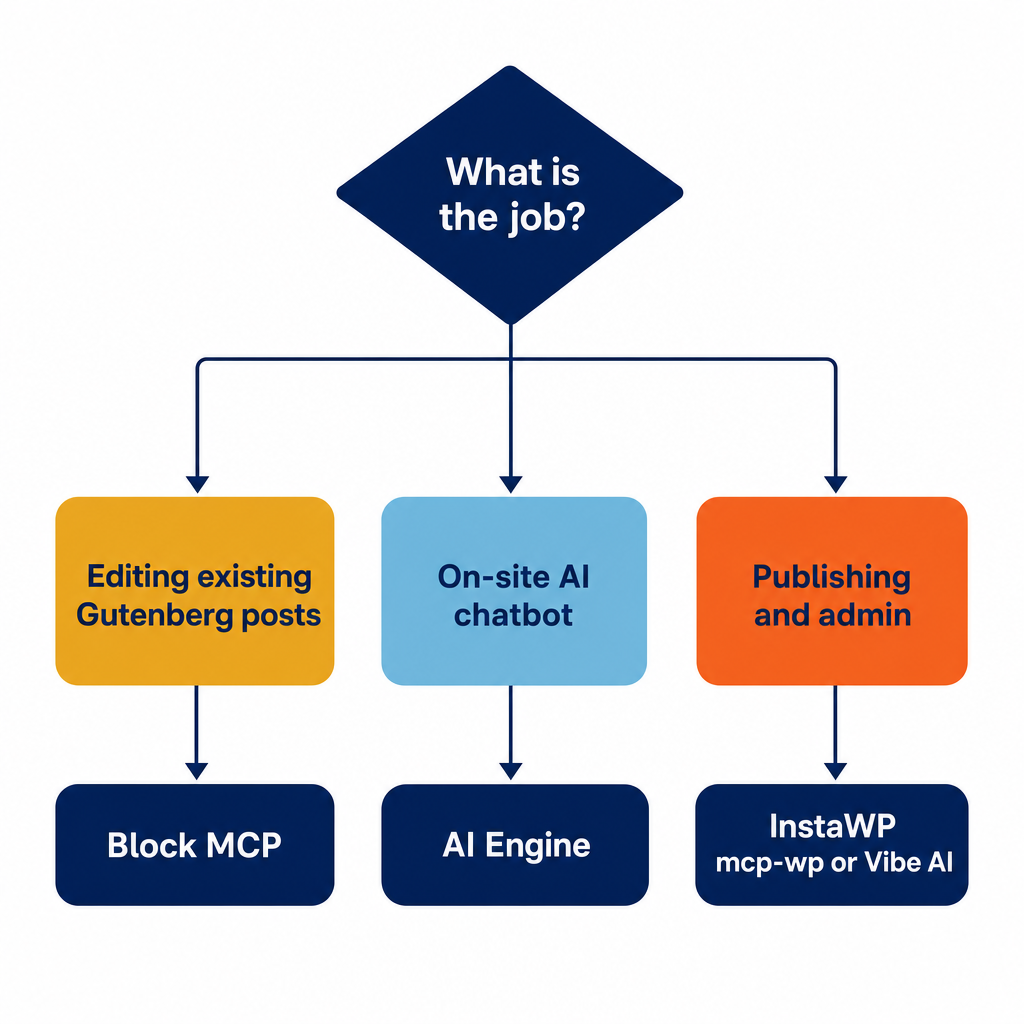
There is no universal right answer. Match the MCP to the job.
- Publishing new posts, reading data, admin automation – Most REST-API-based options handle this well. Pick by ecosystem fit. InstaWP’s mcp-wp is an most established open-source choice. AI Engine adds a chatbot. Vibe AI works well if you would rather not run your own MCP server.
- An on-site AI chatbot for visitors – AI Engine Pro. The MCP layer is a side feature; the chatbot is powerful and simple to configure.
- You’re on WordPress.com – WordPress.com MCP. Built-in, free, zero install.
- Building and editing Gutenberg pages (refreshing stats, fixing typos, rearranging sections) – This is where the architectural distinction matters. Block MCP is designed for this specifically and produces much better results than many standard MCPs.
- Building on the Abilities API as a developer – WordPress MCP Adapter. It is the long-term direction for the platform.
What’s next for WordPress MCPs
The Abilities API and MCP Adapter is the long-term direction for the WordPress platform. Vendor-specific MCPs like Block MCP, AI Engine, and Vibe AI will not disappear. Over time they will register their tools through the Adapter so agents can discover everything in one place, which is a healthier outcome than a fragmented ecosystem where every MCP reinvents the same primitives.
This is one piece of a bigger shift toward open-source WordPress winning the AI-powered web—proprietary CMS platforms may have a harder time matching the pace of open-source MCP development.
Frequently asked questions
MCP stands for Model Context Protocol. It is an open standard from Anthropic, released in late 2024, that lets AI agents like Claude, ChatGPT, Cursor, and Continue talk to external systems through a structured interface. In a WordPress context, “MCP” usually refers to either an MCP server (a plugin or hosted service that exposes your site to AI agents) or the MCP Adapter (the official scaffolding for building one).
Yes, more than 20 of them as of mid-2026. Options range from open-source plugins (InstaWP’s mcp-wp, Block MCP, AI Engine) to hosted services (WordPress.com’s built-in MCP, Vibe AI) to the official WordPress MCP Adapter introduced with WordPress 6.9’s Abilities API. The overview section above lists the most established options.
Any MCP-compatible client. The most common in WordPress workflows are Claude Desktop, Claude Code, and Cursor. ChatGPT added MCP connector support in 2026 (older posts may say otherwise). The MCP server itself does not care which client talks to it, as long as the client speaks the protocol.
Yes. Several solid open-source options are free: InstaWP’s mcp-wp (GPL), Block MCP (MIT), the official WordPress MCP Adapter (GPL), and the WordPress.com MCP (built into all WP.com plans). Commercial options like AI Engine Pro layer paid features on top, but a fully functional WordPress MCP server costs nothing to run.
It is as secure as the credentials you give it. Most WordPress MCPs authenticate via WordPress application passwords, which are separate from your wp-admin login, scoped to specific permissions, and revokable at any time. Hosted MCPs like Vibe AI hold those credentials on their infrastructure, which is an extra trust assumption. For sensitive sites, use a single-purpose app password per MCP and revoke it when you’re done. This connects to a broader theme around WordPress security in the AI era.
Only for MCPs built on the official MCP Adapter, which uses the Abilities API introduced in WordPress 6.9. Vendor MCPs like Block MCP, AI Engine, and InstaWP’s mcp-wp work on earlier WordPress versions, typically 6.0+, because they don’t depend on the Abilities API.
It can. Agents occasionally rewrite blocks in ways that break Gutenberg, install plugins you did not expect, or update settings unpredictably. The mitigation depends on the MCP. WordPress’s built-in revisions catch most content changes. Some MCPs (Block MCP) return a saved snapshot after every write so you can verify. Best practice: test workflows on a staging site, scope your app password tightly, and review changes before publishing.
What could go wrong (the honest section)
Most posts about WordPress MCPs skip the friction. Real users report several recurring issues, and it is fairer to surface them before you commit to a setup.
- Reliability is uneven – output can have rough edges, especially on agent-driven edits to existing content. Test on a non-production site before pointing an agent at anything you care about.
- App password security – an MCP that uses an application password has the same blast radius as that password. Use scoped, single-purpose app passwords per MCP, and revoke them when not in use. Hosted MCPs like Vibe AI and the WordPress.com MCP carry an additional trust assumption because a third party is holding those credentials.
- Version compatibility – WordPress 6.9+ for anything Abilities-API-based. Earlier versions work with vendor MCPs (Block MCP, AI Engine, Automattic’s wordpress-mcp) but not the official Adapter.
- Block-structure corruption on edits – Most MCPs that operate at the REST-style
post_contentlevel can strip Gutenberg block delimiters on edit. This can result in broken page content. Test with a real existing post before trusting any MCP for content updates. If your content uses Gutenberg, try our Block MCP instead (we literally built it to solve this problem).
None of these issues are dealbreakers. They are just the cost of experiment with new technologies!
Get started with WordPress MCP today
MCP servers let AI agents talk to WordPress through a structured interface, enabling them to take meaningful actions on your site. The WordPress MCP landscape splits into two architectural camps. REST API wrappers cover most needs. Block-level MCPs shine when you are editing existing Gutenberg content. Match the MCP to the job. Most importantly—experiment with different MCPs on test sites to get a feel for how they work, and which ones make more sense for your workflow. Ready to try the block-level approach? Download Block MCP free from our site and connect your AI assistant in a few clicks — the setup guide walks you through it.

Get better at Gravity Forms, one email a week
New GravityKit releases, practical Gravity Forms tutorials, and subscriber-only discounts. One short email every week, unsubscribe anytime.
More articles
How to migrate from WPForms to Gravity Forms without rebuilding your forms
Move your WPForms forms into Gravity Forms with GravityMigrate, keeping their fields, conditional logic, confirmations, and notifications. Then bring your entries across with GravityImport.

Launch Log: Search Everything matches what fields show, steadier map searches, and security updates
GravityView’s Search Everything now matches the names fields display, and GravityView, Maps, GravityCalendar, and Dynamic Lookup get important security fixes.
How to build a WordPress client portal with Gravity Forms
Build a client portal on WordPress where each client logs in to see their profile, their requests, and the documents they’ve shared, using Gravity Forms and GravityView.