
Published
•
Updated
Launch Log: Drag-to-copy in the View editor, Gravity Forms 3.0 fixes
This week's GravityKit releases add drag-to-copy and accessibility upgrades to the GravityView View editor, fix Gravity Forms 3.0 compatibility issues, and tighten security in the DataTables Layout.


This week’s releases add a faster way to duplicate fields in the GravityView View editor along with major keyboard and screen reader improvements, resolve Gravity Forms 3.0 compatibility issues in GravityImport and the Event Field, and tighten security in the DataTables Layout.
Gravity Forms Dynamic Lookup v1.8.1
This update to Gravity Forms Dynamic Lookup resolves a critical error that could prevent pages with forms from loading. On sites using a theme or plugin that requires a whole number for translated plural strings, such as Divi 5, any page containing a Gravity Forms form showed “There has been a critical error on this website.” This is now fixed.
Gravity Forms Event Field v1.6.1
This update to the Gravity Forms Event Field fixes form submissions on Gravity Forms 3.0. Previously, submitting a form containing an Event field returned a blank page with no confirmation and saved an entry with none of the submitted data. Forms with an Event field now submit normally.
Developer updates
- The plugin now uses current GravityView hooks instead of ones deprecated in GravityView 2.55.
GravityImport v2.12.0
This update to GravityImport gives clearer reasons when rows fail to import. Rows rejected by a form-level validation failure now report the actual cause instead of “Failed validation: Unknown,” including when Gravity Forms is blocking submissions while its database upgrade is pending (common on freshly cloned staging sites), or when an anti-spam or CAPTCHA plugin rejects the submission.
This release also fixes several compatibility issues. Imports with a file upload column failed on Gravity Forms 3.0+; downloaded files are now given a temporary name matching the uploaded file’s extension, which Gravity Forms 3.0+ requires. Entries imported with an Entry Status column using different capitalization (such as “Active”) could not be opened or edited in GravityView; the standard statuses are now saved in the lowercase form Gravity Forms expects.
We also fixed a fatal error on PHP 8 when a row was rejected by a multi-file upload field, and resolved a “translation loading was triggered too early” notice on WordPress 6.7+.
GravityView v3.2.0
This update to GravityView adds a faster way to duplicate items in the View editor: hold Alt (Option on Mac) while dropping a dragged field, widget, or search field to copy it instead of moving it. The original stays in place and the copy keeps its settings.
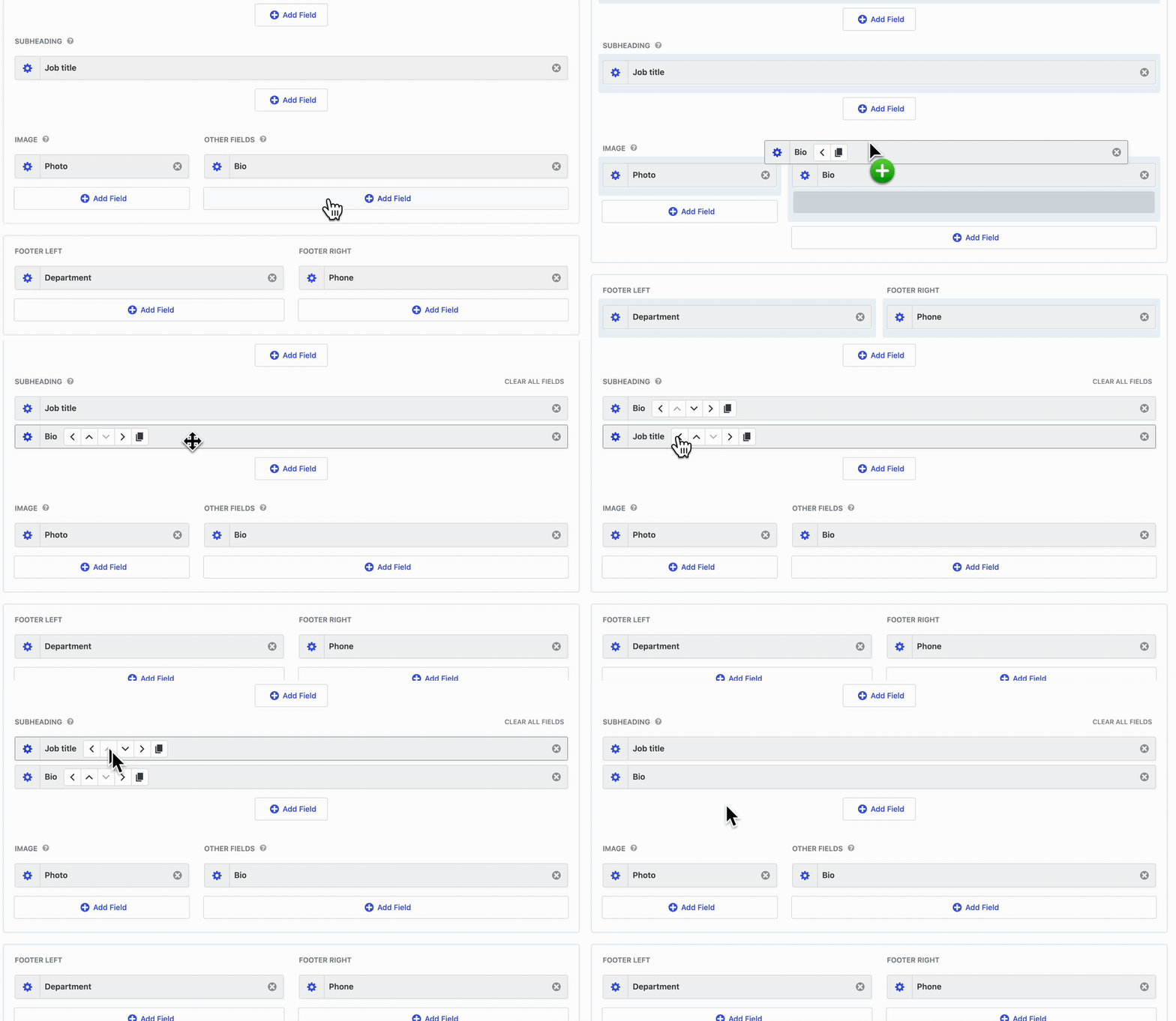
The View editor is also now easier to use without a mouse. Rows and fields can be reordered using Move buttons in a keyboard-navigable toolbar (Up and Down to reorder, Left and Right to move a field between columns), with a screen reader announcement after each move. Layout controls received better keyboard and screen reader support as well.
Views that combine entries from multiple forms using the Multiple Forms extension now display their results reliably.
This release also fixes several issues:
- Sorting a View by a Checkbox field left the rows unchanged; clicking the column header now sorts by the first checked choice, in both directions
- Pressing Ctrl+F inside the Custom CSS and Custom JavaScript editors saved the View and reloaded the page instead of opening the search
- An entry opened in a lightbox showed “The requested entry could not be found.” when the View was placed inside a Group, Columns, or other container block, and the lightbox now reads the embed page’s filtering context only when that page actually displays the View
- Opening an entry in a View that uses the Maps single entry layout logged a PHP warning on every request, and the “Go back” link could lose its View reference or not render at all
- Opening a single entry from a View embedded on the site’s static front page showed the theme’s “not found” page when the entry link contained extra URL parameters
- Fatal errors when a percent sign appeared in a Search Bar field label (for example, “100% sure”) or in a Table layout row attribute name added by a custom filter
Developer updates
--gv-shadow-coloris now a true color value (default#121961), tinted viacolor-mix()instead ofrgb(var(--gv-shadow-color) / <alpha>). If you set this variable in your own CSS, replace18 25 97with#121961; the old three-number value now falls back to the default tint on browsers with@propertysupport (Chrome 85+, Safari 16.4+, Firefox 128+) and removes the shadow on Firefox 113–127 and Safari 16.2–16.3.color-mix()requires Chromium 111+, Safari 16.2+, or Firefox 113+. Older engines keep shadows at the default tint via staticrgba()fallbacks, except per-View shadow depth overrides, which are emitted unguarded and render without a shadow.
GravityView – DataTables Layout v3.11.0
This update to the DataTables Layout tightens the access checks applied before a View’s entries are returned to the browser. We recommend updating promptly to benefit from the hardened checks.
Several loading and sorting issues are also resolved. Logged-out visitors saw “Loading data…” indefinitely, with no explanation, when a full-page cache served a page whose security token had since expired. After a failed request, a later search that genuinely returned no results was labeled as a server error. When rows were grouped by a column, clicking its header for descending order flipped the arrow but left the rows unchanged; the groups now reverse, and sorting any other column keeps the rows grouped. Finally, a sort parameter in the page address no longer overrides columns the visitor sorts by clicking.
GravityView – Maps Layout v3.10.2
This update to the Maps Layout resolves a script error that could quietly keep parts of a map page from finishing their setup. Maps with clustered or overlapping markers could log an uncaught JavaScript error on page load.
In summary
GravityView gains drag-to-copy and a View editor you can fully operate from the keyboard, GravityImport sees clearer import failure reporting plus Gravity Forms 3.0 file upload fixes, the DataTables Layout receives tightened security and sorting fixes, and the Event Field, Dynamic Lookup, and Maps Layout each get a targeted fix.
As always, we recommend updating to the latest versions to benefit from these improvements and to ensure compatibility across the GravityKit suite!

Get better at Gravity Forms, one email a week
New GravityKit releases, practical Gravity Forms tutorials, and subscriber-only discounts. One short email every week, unsubscribe anytime.
More articles

How we’re making gravitykit.com agent-ready
How we made gravitykit.com agent-ready: two MCP servers, Markdown endpoints, llms.txt, and what 149 test questions taught us about answers on your pages.

Launch Log: Live DataTables totals, a Remove Data option, and rounding for Number field merge tags
This week’s releases add live GravityMath totals to DataTables Views, a Remove Data option in GravityView, and security fixes in five GravityKit products.

Launch Log: A range slider for search, AI-managed calendars, and security updates in ten products
GravityView adds a Slider search input, GravityCalendar lets AI assistants manage calendars, and ten GravityKit products get security fixes. Here’s what shipped.