
Published
•
Updated
Launch Log: Multiple Forms unions, rich text inline editing, and Gravity Forms 3.0 fixes
Multiple Forms adds union support for combining entries from multiple forms in one View, GravityEdit gains rich text inline editing, and GravityView 3.3.0 lands with fixes across the suite for Gravity Forms 3.0 and WordPress 7.0.


This is a big release window: the Multiple Forms extension gains union support for combining entries from multiple forms into one View, GravityEdit adds a rich text editor for inline editing, the DataTables Layout gets a huge update with pinned columns, complete exports, and a security fix, and GravityView 3.3.0 lands alongside compatibility fixes for Gravity Forms 3.0 and WordPress 7.0 across the suite.
Gravity Forms Event Field v1.7.0
This update to Gravity Forms Event Field fixes an end date appearing on single-day events listed after a multi-day event, even when the End Date input is turned off.
Developer updates
- The
gk/field-event/cron-valuefilter now also receives the selected repeat frequency, the event’s start date and timestamp, whether the event runs all day, and the start time. Existing callbacks that accept only the first parameter continue to work. - Documented the
gk/field-event/inputs,gk/field-event/input-name, andgk/field-event/input-wrapper-classesfilters, each available since 1.1.0.
Gravity Forms Widget for Elementor v1.1.1
This update to the Gravity Forms Widget for Elementor fixes an issue in Elementor 4 where only the first field received its starting value when multiple values were entered in the widget’s Field Values setting.
Gravity Forms Zero Spam v1.10.1
This update to Gravity Forms Zero Spam speeds up multi-page forms. Previously, an anti-spam token was fetched on every Next and Previous click, which delayed page navigation on slow servers. The token is now only fetched on final submission and Save and Continue.
GravityCalendar v2.19.0
This update to GravityCalendar removes an unnecessary database query that ran, and returned no results, every time a calendar’s events were loaded. It also makes the event limit behave correctly on calendars that read their events from the database: setting the limit to a negative value now means “no limit”, as it does elsewhere in WordPress, and the warning logged when the limit is reached now appears only when entries were actually left out.
Developer updates
- The
gravityview/calendar/settings/total-event-limitfilter now applies to events read from the database, where it previously had no effect. The limit defaults to unlimited for database entries, so calendars without a filter callback display exactly as before. Events supplied throughgravityview/calendar/events/source_datastill default to 1000.
GravityCharts v1.20.2
This update to GravityCharts fixes chart preview toggle icons (Colors, Design, Title & Legend, Axis, Labels) being vertically misaligned with their labels on the feed settings page on WordPress 7.0 and newer, and resolves a “translation loading was triggered too early” notice on WordPress 6.7 and newer.
GravityEdit v2.11.0
This update to GravityEdit adds a rich text editor for inline editing. Paragraph fields that use the rich text editor are now edited in place with a formatting toolbar (bold, italic, underline, lists, quotes, and links) instead of showing HTML tags, and your formatting is saved exactly as you see it. Submit with the Update button or Cmd/Ctrl+Enter, and cancel with Esc.
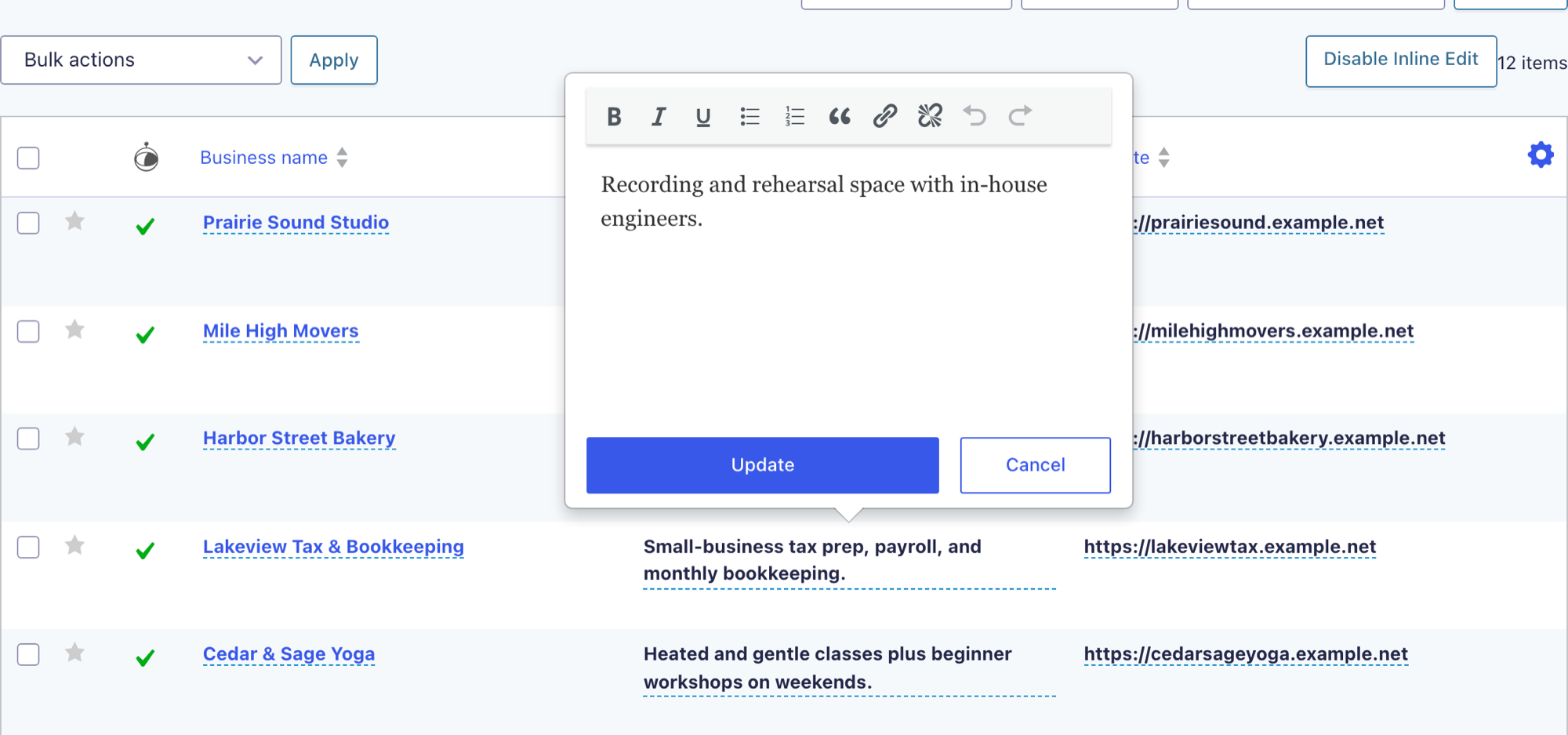
This release also strengthens data handling and security: entries can no longer be edited through a form they don’t belong to, inline uploads now honor the field’s allowed file types and maximum size, and permission checks for the inline file-upload action are stricter.
Compatibility with Gravity Forms 3.0 is restored for two field types that rejected every inline edit: phone fields using the “International (formatted)” format, and text fields with an input mask. Mask punctuation is now filled in for you, so typing 5559876543 into a (999) 999-9999 field stores (555) 987-6543.
Other fixes include:
- List field values not showing correctly when editing, resulting in empty or incorrect data
- Uploaded files saved to the wrong directory when multiple uploads happened on the same page
- Number fields with calculations stopping updates when a single calculation failed
- Entry Creator, Source URL, Date Created, and Entry Tags not being editable inline
- Failed inline edits appearing to have saved, showing a value that was not stored
- Clearing a multi-file upload field removing only the first file
- The “Toggle Inline Edit” button never appearing on an entries view with no rows
Developer updates
- Inline edit saves now use
GF_Field::get_value_save_input()on Gravity Forms 3.0+ instead of the deprecatedGFFormsModel::prepare_value(), andGF_Field::get_value_entry_detail()for number, product, and address fields. - Now uses the current GravityView hooks instead of ones deprecated in GravityView 2.55.
GravityExport v1.14.0
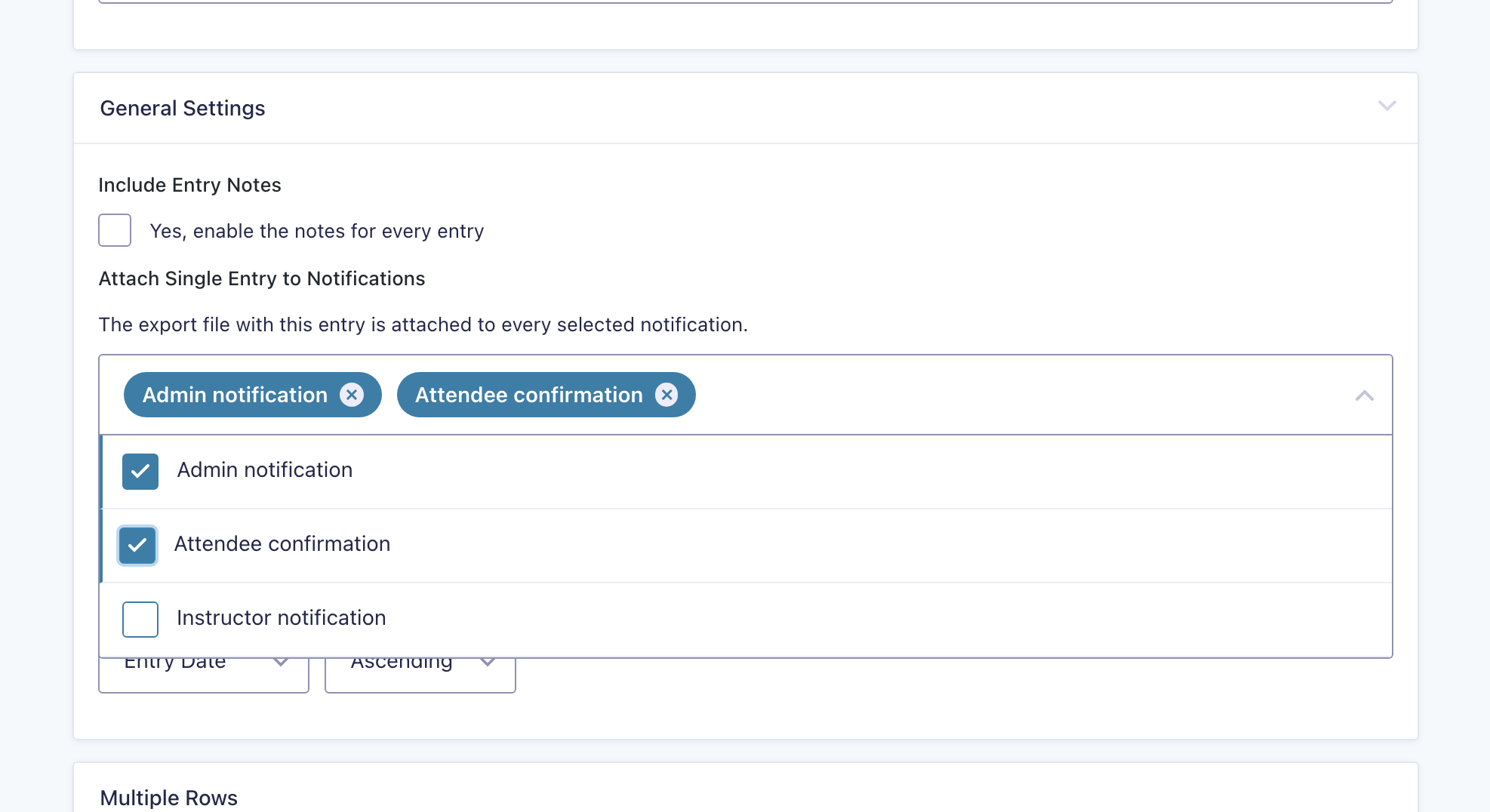
This update to GravityExport adds the ability to attach the single-entry export file to multiple notifications at once (requires GravityExport Lite 2.7.0 or newer and Gravity Forms 2.9.9.2 or newer). It also fixes a translation-loading notice on WordPress 6.7 and newer.
GravityExport Lite v2.7.0
This update to GravityExport Lite saves the single-entry export attached to a notification in a unique temporary folder, so simultaneous submissions can no longer overwrite each other’s attachment. It also fixes misaligned copy-to-clipboard button icons in WordPress 7.0, a translation-loading notice on WordPress 6.7 and newer, and the success message that was lost after regenerating, enabling, or disabling a download URL.
Developer updates
- Added
gk/gravityexport/notification/attachment-idsto change the notification IDs the single-entry export is attached to, andgk/gravityexport/notification/attachment-source-idsto replace the stored notification selection. - Added
gk/gravityexport/renderer/save-pathto change the path a rendered export file is saved to, andgk/gravityexport/feed/pre-save-settingsto change feed settings before they are stored.
GravityMigrate v1.3.1
This update to GravityMigrate fixes data-integrity issues when importing entries. Imported entry meta and notes could attach to the wrong entries when the destination site’s new entry IDs overlapped the imported entries’ original IDs, breaking Gravity Wiz Nested Forms parent references. Imports that were interrupted and resumed could point Nested Forms child entries at the wrong parent, or import the same batch of entries twice after the connection dropped mid-transfer. Both scenarios are now handled correctly.
GravityView v3.3.0
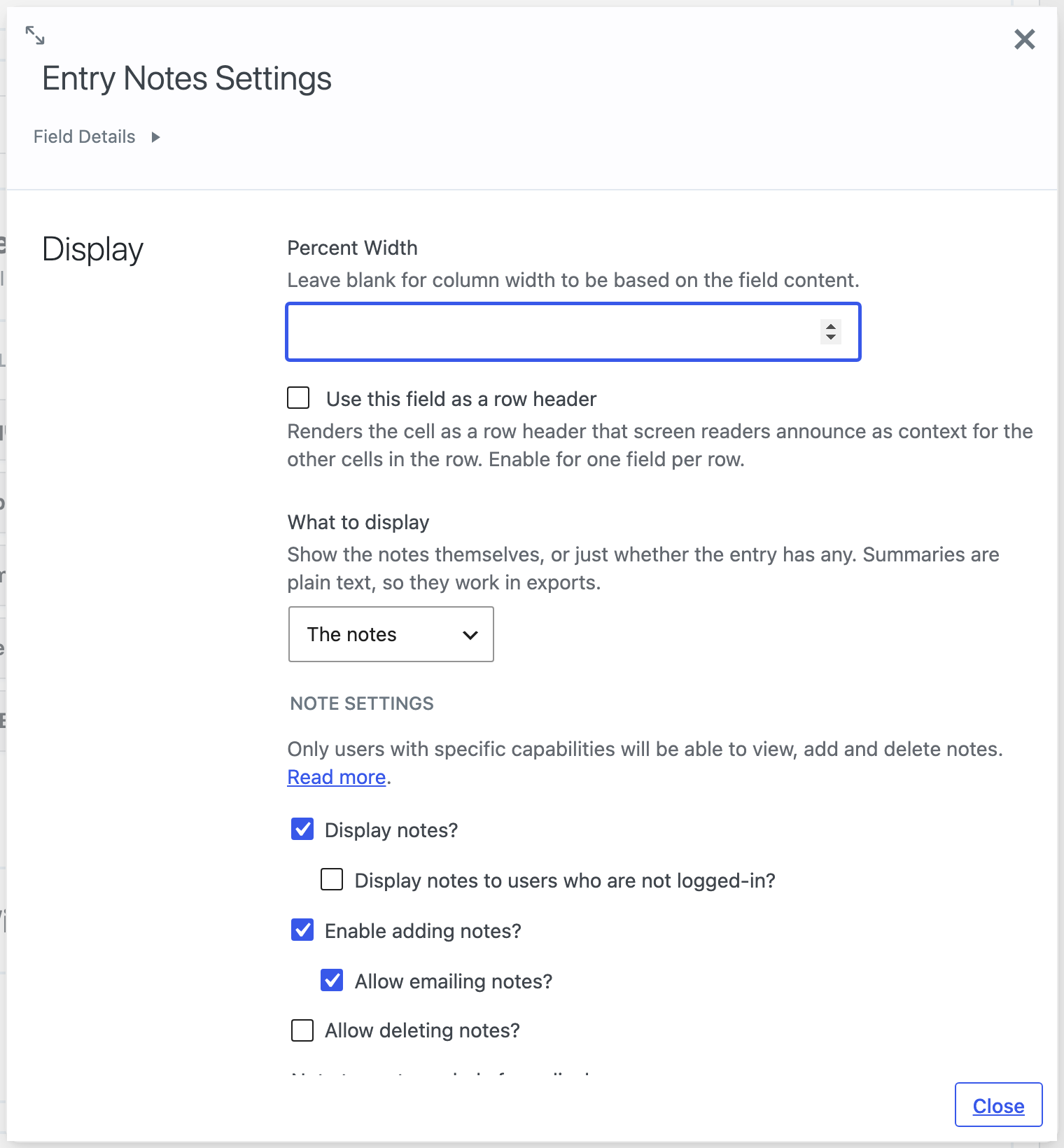
This update to GravityView adds display options to the Entry Notes field: it can now show the number of notes, a simple Yes/No, or custom text (merge tags supported) instead of the notes themselves. This is useful for flagging entries that have been commented on, including in exports.
Dragging a field in the View editor now follows the pointer, so the zone under the mouse receives the field, making narrow and empty zones easier to target.
This release also fixes a long list of issues, including:
- Searching by Entry Date returning the wrong entries on sites with a non-UTC timezone
- Pagination and entry totals counting only the primary form’s entries in multi-form Views on Gravity Forms 3.0
- Single entry pages opening the wrong entry, or none at all, in multi-form Views on sites using custom entry slugs
- Table layouts displaying a solid white background behind the table, making rounded corners look square on colored or dark pages
- View block issues in the block editor: preview styles leaking into the editor, unstyled block controls, and a failed preview error persisting after a later success
- GravityView’s notification events (entry approved, updated, deleted, duplicated) silently not sending on sites where another plugin modified the form through
gform_pre_render - The Entry Notes field exporting an empty column to CSV
Developer updates
- Views that combine entries from multiple forms now pass an extra
unionkey in the SQL fragments array filtered bygform_gf_query_sql, holding theUNION ALLstatements and the subquery’s closing alias. Code that rebuilds that array from a fixed list of keys needs to carry it through, or the query loses its unioned forms.
GravityView – DataTables Layout v3.12.0
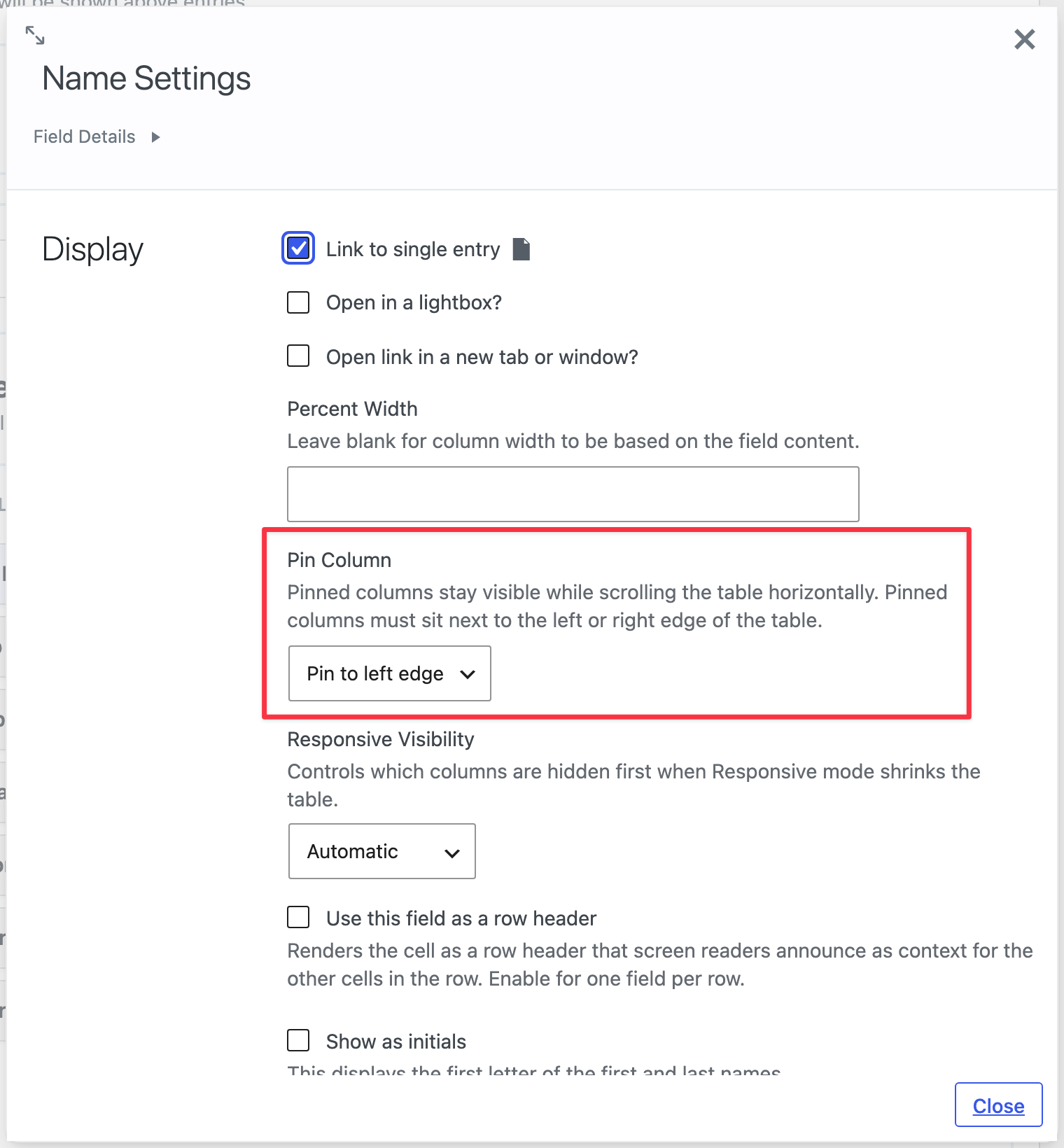
This is a huge update to the DataTables Layout. Columns can now be pinned to the left or right edge of the table, you can choose which columns collapse first in Responsive mode, and a new Clear Filters button (enabled in View Settings) empties every field filter at once.
Exports are no longer limited to the rows on screen: exported files now include every matching entry, honoring the active search, filters, and sorting. And when a table can’t load its data, it now shows a message and a Retry button instead of appearing to load forever, with administrators also seeing which plugin caused the failure.
This release also includes a security fix: a View restricted using the “Search Value” setting could expose additional entry data outside the search, so please update. Note that DataTables now requires GravityView 2.57 or newer.
Beyond that, this is a massive bug fix release. Highlights include:
- Sorting fixes: the View’s Sort Field setting not being applied, a direction set on a shortcode or block being ignored, sorting by a joined form’s field breaking the table, and “Random” sort repeating rows while paging
- Search fixes: multi-word searches now require every word, and a Search Bar search combined with a column filter now matches both instead of either
- Field filter fixes: filters now appear on every eligible column when none are specifically chosen, “Clear” actually clears them, and typed values survive a window resize
- Column width fixes: “Percent Width” applies in both processing modes and widths no longer shift once data loads
- Pages that embed the same View more than once no longer share searches, “Clear”, and saved table state between copies
- CSV files containing accented text now display properly in Excel
- A table too wide for its space now scrolls within its own area instead of being cut off or pushing the page sideways
- The Page Links, Pagination Info, and Page Size widgets are removed from DataTables Views; the table’s own page-size menu replaces Page Size without reloading the page
Developer updates
- Added filters:
gk/gravityview/datatables/response/error-payload(the error response sent to the browser),gk/gravityview/datatables/export/max-rows(the 1,000-row export cap),gk/gravityview/datatables/columns/widths(column widths after calculation), andgk/gravityview/datatables/search/split-words(whether a multi-word search splits into per-word matches). - Field settings are now registered on
gk/gravityview/template/optionsinstead of the deprecatedgravityview_template_field_options. - The REST and inspector schema now covers the whole DataTables settings group, including
processing_mode, so a client can discover whether a View uses server-side or client-side processing.
GravityView – Maps Layout v3.10.3
This update to the GravityView Maps Layout stops default map pins from disappearing when a site moves or the plugin is installed into a differently named folder (for example, via Composer), and fixes the broken Default Pin Icon preview in the same scenario.
Note: GravityView Maps now requires PHP 7.4 or newer.
GravityView – Multiple Forms v0.7.0
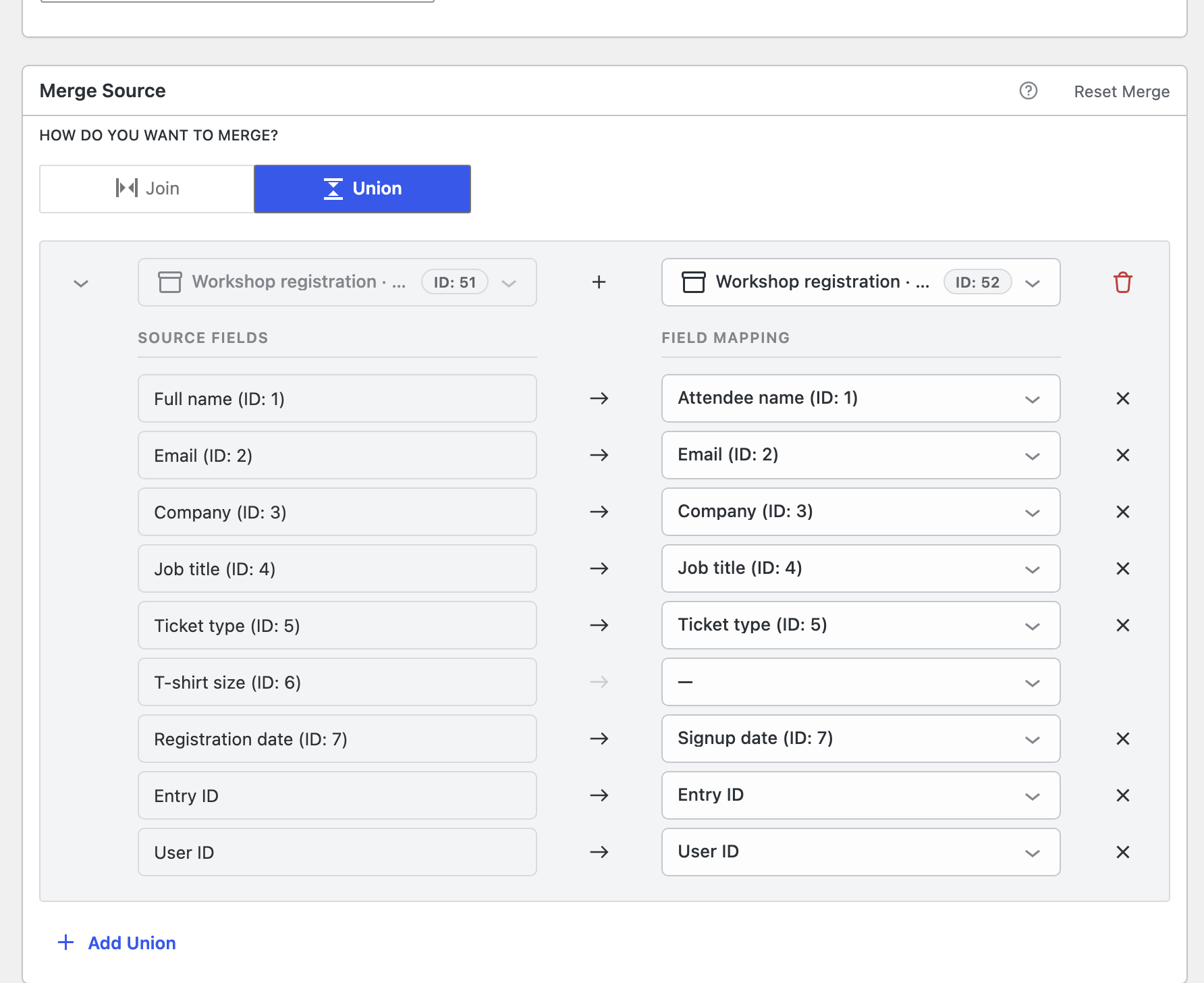
This update to Multiple Forms adds support for unions (requires GravityView 3.3.0 or newer), which combine entries from multiple forms into a single View by aligning each form’s fields into a shared set of columns. Where a join matches related entries side by side, a union stacks entries into one longer list, and the forms don’t need a shared field.
The merge editor has also been redesigned. Each merge is now a collapsible block, switching between Join and Union takes a single click, and the form and field dropdowns are searchable and show field IDs. Multiple joins on the same form are now configured in a single block, letting you match on several fields (such as first and last name) in one place. The editor’s controls are now named for screen readers, and the arrow keys move between merge blocks.
Fixes include a fatal error when using the plugin with Gravity Forms 3.0 or newer, fields being removed from the View editor when deleting one of several joins on the same form, and duplicate fields appearing in the join field dropdowns.
Developer updates
- Added the
gk/multiple-forms/merge/split-field-typesfilter to control which field input types are split into their individual inputs in the merge editor. Defaults tonameandaddress.
In summary
Multiple Forms gains union support and a redesigned merge editor, GravityEdit adds rich text inline editing with strengthened validation and security, GravityView sees Entry Notes display options and fixes for search, multi-form Views, and the View block, the DataTables Layout adds pinned columns and complete exports alongside a security fix, and products across the suite get compatibility fixes for Gravity Forms 3.0, WordPress 6.7+, and WordPress 7.0.
As always, we recommend updating to the latest versions to benefit from these improvements and to ensure compatibility across the GravityKit suite!

Get better at Gravity Forms, one email a week
New GravityKit releases, practical Gravity Forms tutorials, and subscriber-only discounts. One short email every week, unsubscribe anytime.
More articles

Launch Log: AI-assisted migrations and a stronger Prevent Direct Access setting
GravityMigrate can now hand a whole migration to an AI assistant, GravityKit MCP installs into Claude Desktop in one click, and GravityView tightens the Prevent Direct Access setting.

What actually decides whether a WordPress agency makes money? We looked at the data
Two 2026 surveys of 832 WordPress agencies, plus our own analysis of the raw data. What separates the profitable agencies from the rest, and what does not.

GravityMigrate 2.0: No-sweat WordPress form plugin migrations
Nobody wants to move forms between plugins. They want the site launched, the client onboarded, the referrals to stop falling through the cracks. GravityMigrate 2.0 makes moving forms effortless.