
Published
•
Updated
Launch Log: 3D maps in the Maps Layout, plus enhanced conditional logic in Charts and Calendar
3D map types and an Edit Entry location picker land in the Maps Layout, plus conditional logic upgrades in GravityCharts and GravityCalendar.


This week’s releases bring 3D map types and an interactive Edit Entry location picker to the Maps Layout, conditional logic upgrades in GravityCharts and GravityCalendar, and a wave of fixes across Dynamic Lookup, Entry Tags, GravityBoard, GravityEdit, GravityImport, GravityView, and DataTables.
Gravity Forms Dynamic Lookup v1.6.0
This update to Gravity Forms Dynamic Lookup improves Lookup field rendering performance. Lookup fields no longer run duplicate database queries each time they render in a View, which reduces overhead on pages that display the same Lookup field across multiple rows.
Gravity Forms Entry Tags v1.4.4
This update to Gravity Forms Entry Tags fixes an issue where Entry Tags appeared as a block of link code (for example, [/wp-admin/admin-ajax.php?...]Tag) instead of the selected tag names in Gravity Forms notification emails.
GravityBoard v1.4.2
This update to GravityBoard resolves a card attachment deletion issue. Attachments could fail to delete on sites with custom upload directories, symlinks, multisite configurations, or paths containing mixed forward and backslash separators.
GravityCalendar v2.17.0
This update to GravityCalendar enhances conditional logic. Value filters that accept multiple selections now use a searchable picker for quicker selection, and a new “has NONE of” operator lets you exclude multiple values at once. Conditions on date fields use a redesigned calendar date picker for easier date entry.
GravityCharts v1.20.0
This update to GravityCharts brings the same conditional logic enhancements as GravityCalendar. Multi-selection value filters now use a searchable picker, a new “has NONE of” operator excludes multiple values at once, and date-field conditions use a redesigned calendar date picker.
GravityEdit v2.10.0
This update to GravityEdit fixes a compatibility issue with Gravity Forms 2.9.29 and later, where inline editing of number, product, and address fields triggered PHP warnings. The release also includes internal component updates for stability and compatibility.
GravityImport v2.11.2
This hotfix to GravityImport resolves an issue where the Map Fields step could appear blank when importing very large CSV files.
GravityView v2.61.1
This update to GravityView resolves several Post Image field issues when editing entries. The field’s Alternative Text was not shown when editing an entry, was discarded when saving, and was not copied to the image in the Media Library. All three behaviors are corrected in this release.
GravityView – DataTables Layout v3.8.1
This update to the GravityView DataTables Layout fixes export buttons (Copy, CSV, Excel, Print) and other DataTables scripts not loading when a View was placed outside the main page content, such as in a theme template, widget, or page builder.
GravityView – Maps Layout v3.8.0
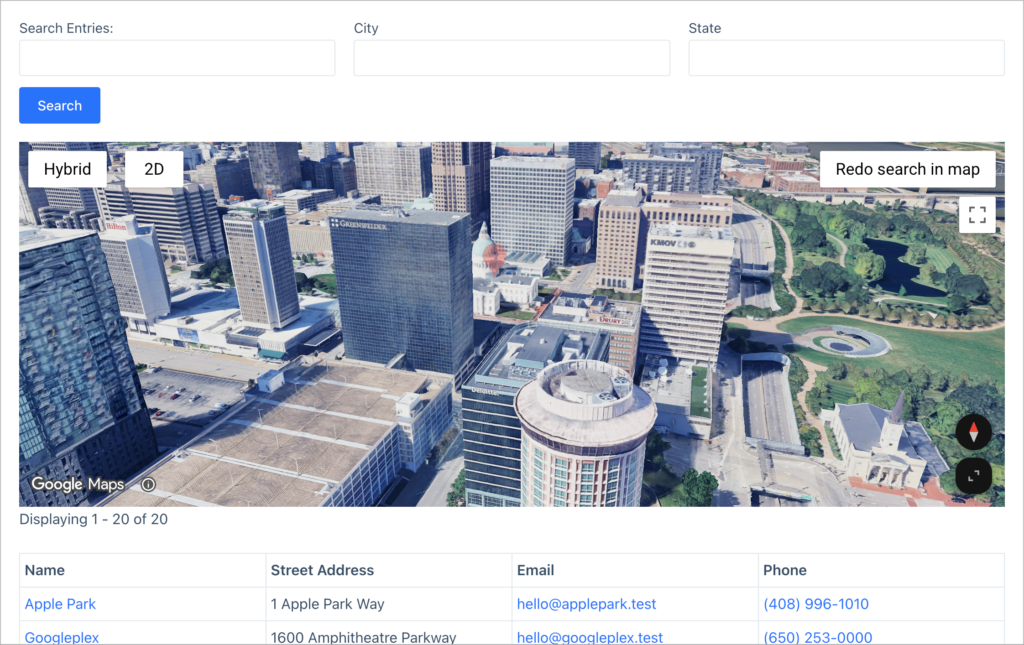
This is the largest release in this batch. This update to the GravityView Maps Layout adds two new map types, “3D Satellite” and “3D Hybrid”, that render Google’s photorealistic 3D Maps, with a control to switch between 2D and 3D views.
In the GravityView Maps settings, first enable the new map types by checking the box that says “Enable 3D map types”. After that, you will see the two new map types as options in the Map Type dropdown field.
An interactive map is now available on the Edit Entry screen and in the Gravity Forms entry view for setting an entry’s exact location. To enable this, check the box that says “Show geocoding map” in the GravityView Edit Entry settings.
This release also resolves several map search and geocoding issues:
- “Search as map moves” and “Redo search in map” could return no results when the GravityView REST API was enabled for a View but disabled globally
- Map searches could return entries outside the visible area when the map crossed the 180° meridian (such as Pacific-centered views)
- “Search as map moves” could intermittently stop running new searches after the map moved, leaving stale results
- The Map widget on a DataTables View could intermittently fail to render, and logged-in administrators could see an incorrect notice that no addresses were geocoded
- Editing an entry’s location in Gravity Forms with a non-numeric latitude or longitude could delete the saved coordinates instead of rejecting the value
- Geocoding an entry with out-of-range or malformed coordinates could return a server error on PHP 8 instead of a clear validation message
- Map searches could behave unexpectedly when the map bounds contained invalid latitude or longitude values
Developer updates
- Added
gk/gravitymaps/maps/3d/optionsandgk/gravitymaps/maps/3d/marker-capPHP filters to customize the 3D Maps settings and the maximum number of 3D markers rendered in the viewport - Added the
gk/gravitymaps/map-services/google-maps/librariesPHP filter to control which Google Maps JavaScript API libraries are loaded - Added
gk.maps.services.google_maps.maps3d.settings,gk.maps.services.google_maps.maps3d.create_marker_options, andgk.maps.services.google_maps.maps3d.create_pin_optionsJavaScript filters, plus thegk.maps.services.google_maps.maps3d.fallbackJavaScript action, to customize 3D markers and pins and to react when the map falls back to 2D
In summary
The Maps Layout introduces 3D map types and an interactive Edit Entry location picker, GravityCalendar and GravityCharts both gain a searchable multi-select picker plus a “has NONE of” operator for conditional logic, and a round of fixes lands across Dynamic Lookup, Entry Tags, GravityBoard, GravityEdit, GravityImport, GravityView, and DataTables. Several other products (GravityActions, GravityMath, GravityMigrate, GravityRevisions, Gravity Forms Event Field, Gravity Forms Widget for Elementor, and GravityView – Advanced Elementor Widget) received internal component updates only.
As always, we recommend updating to the latest versions to benefit from these improvements and to ensure compatibility across the GravityKit suite.

Get better at Gravity Forms, one email a week
New GravityKit releases, practical Gravity Forms tutorials, and subscriber-only discounts. One short email every week, unsubscribe anytime.
More articles

Launch Log: AI-assisted migrations and a stronger Prevent Direct Access setting
GravityMigrate can now hand a whole migration to an AI assistant, GravityKit MCP installs into Claude Desktop in one click, and GravityView tightens the Prevent Direct Access setting.

What actually decides whether a WordPress agency makes money? We looked at the data
Two 2026 surveys of 832 WordPress agencies, plus our own analysis of the raw data. What separates the profitable agencies from the rest, and what does not.

GravityMigrate 2.0: No-sweat WordPress form plugin migrations
Nobody wants to move forms between plugins. They want the site launched, the client onboarded, the referrals to stop falling through the cracks. GravityMigrate 2.0 makes moving forms effortless.