
Published
•
Updated
Announcing GravityImport 2.8.0: A smarter and more accessible way to map, validate, and import Gravity Forms data
We couldn’t be more excited to release GravityImport 2.8.0! This is a major usability-focused release that rethinks one of the most critical parts of the import process: field mapping. Alongside a redesigned interface, this update introduces comprehensive pre-import data validation, and several accessibility improvements. Here’s what’s new. Watch the video A completely redesigned field mapping…

We couldn’t be more excited to release GravityImport 2.8.0! This is a major usability-focused release that rethinks one of the most critical parts of the import process: field mapping. Alongside a redesigned interface, this update introduces comprehensive pre-import data validation, and several accessibility improvements.
Here’s what’s new.
Watch the video
A completely redesigned field mapping experience
The headline feature in GravityImport 2.8.0 is a full redesign of the field mapping interface.
Instead of the previous spreadsheet layout, field mapping now uses a transposed layout that’s easier to scan, understand, and work with, especially when dealing with CSVs that contain dozens of columns. Instead of columns being vertical, each field gets its own horizontal row with a preview of values across multiple records.
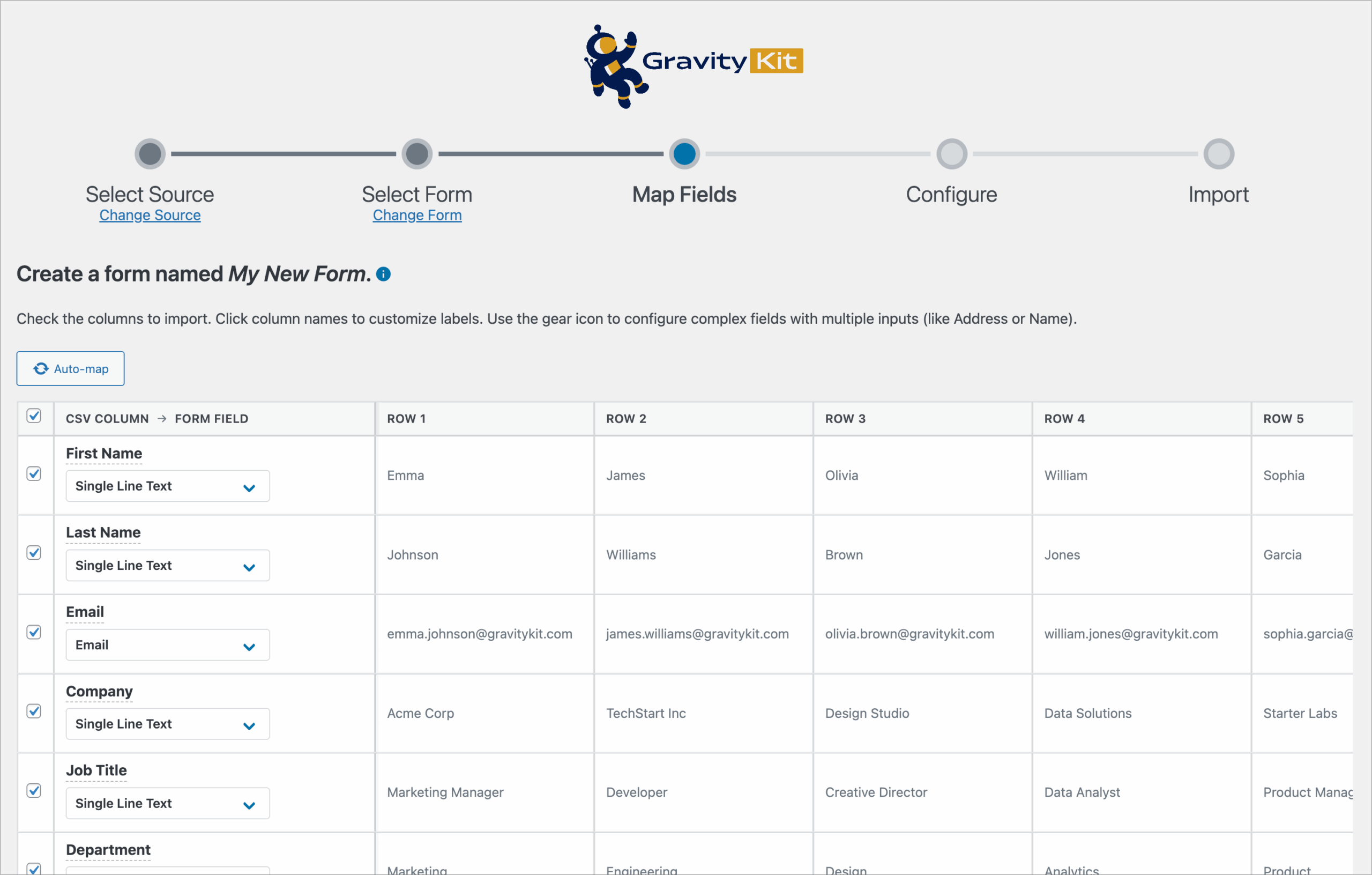
Correct field mapping is the crux of ensuring a seamless import process. This new layout makes relationships between CSV columns and form fields clearer, reduces visual clutter for wide or complex datasets, and scales better for users working with large amounts of data.
The result? Less guesswork and fewer accidental mis-mappings before you ever click “Import”!
Catch data issues before they become import problems
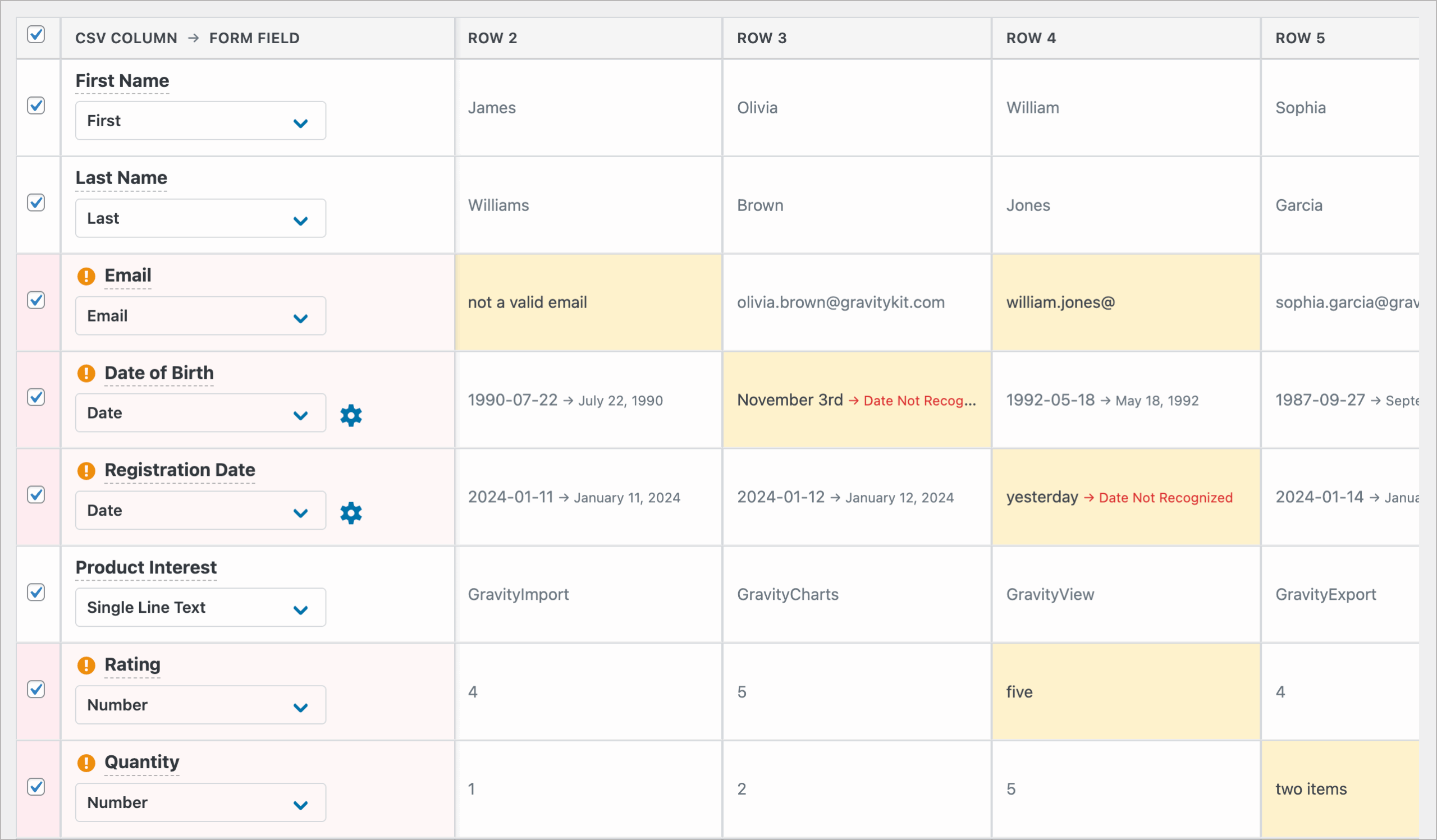
GravityImport 2.8.0 introduces pre-import validation warnings that flag potential issues before any data is written to your site. Validation now checks up to 50 rows of your CSV (up from 10), giving you a much more reliable snapshot of data quality.
In the data preview, problematic values are now highlighted at the cell level, so you can immediately see exactly what needs fixing.
There is also a detailed summary below the data preview showing what errors were detected, along with sample failing values.
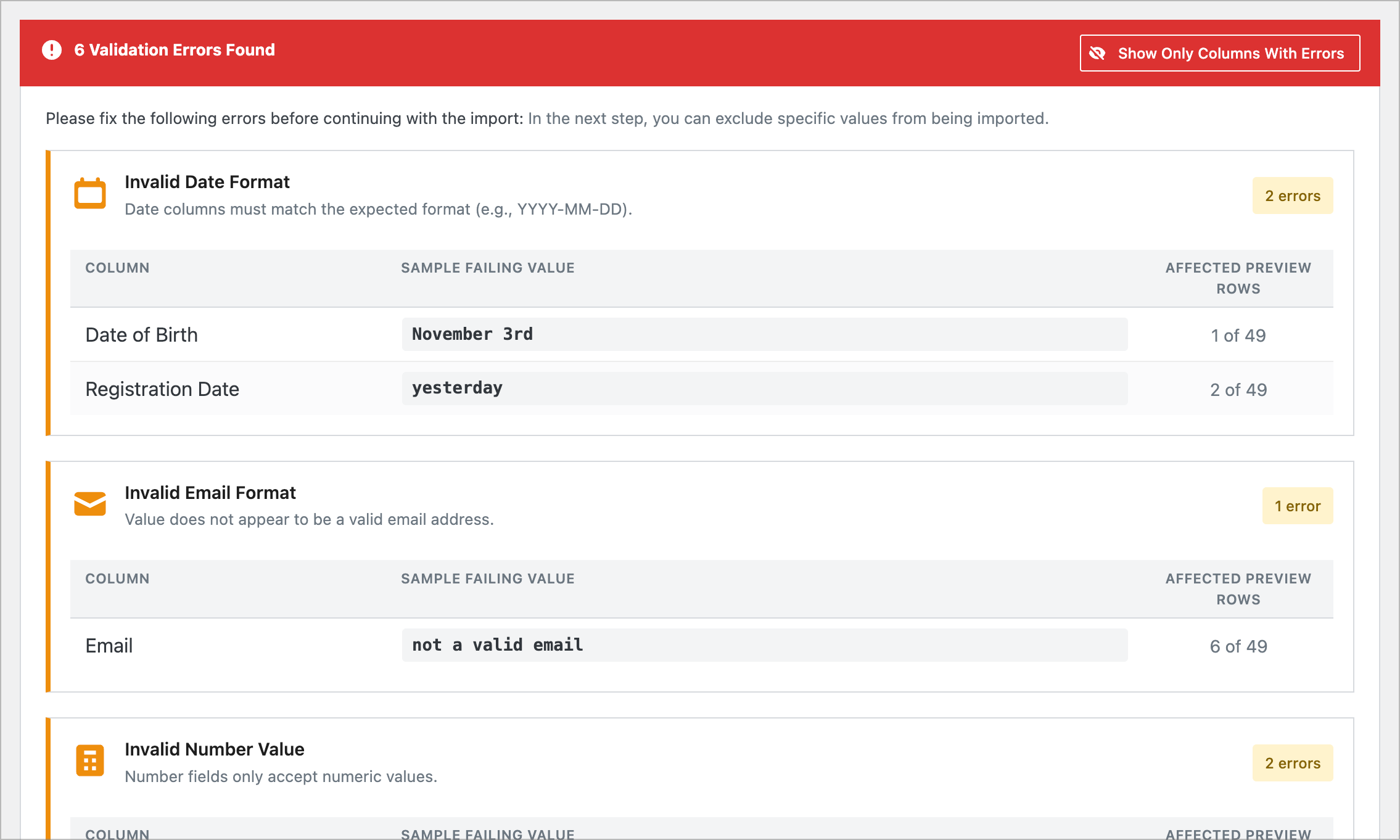
You’ll see warnings for things like:
- Invalid email addresses
- Non-numeric values in numeric fields
- Unrecognized or inconsistent date and time formats
By surfacing issues earlier (and more precisely!), GravityImport 2.8.0 helps you fix problems upstream instead of cleaning up entries after the fact. This avoids failed or partially broken imports resulting from small data inconsistencies.
Improved control over how data gets imported
Several new tools make it easier and quicker to control how data actually makes it into Gravity Forms.
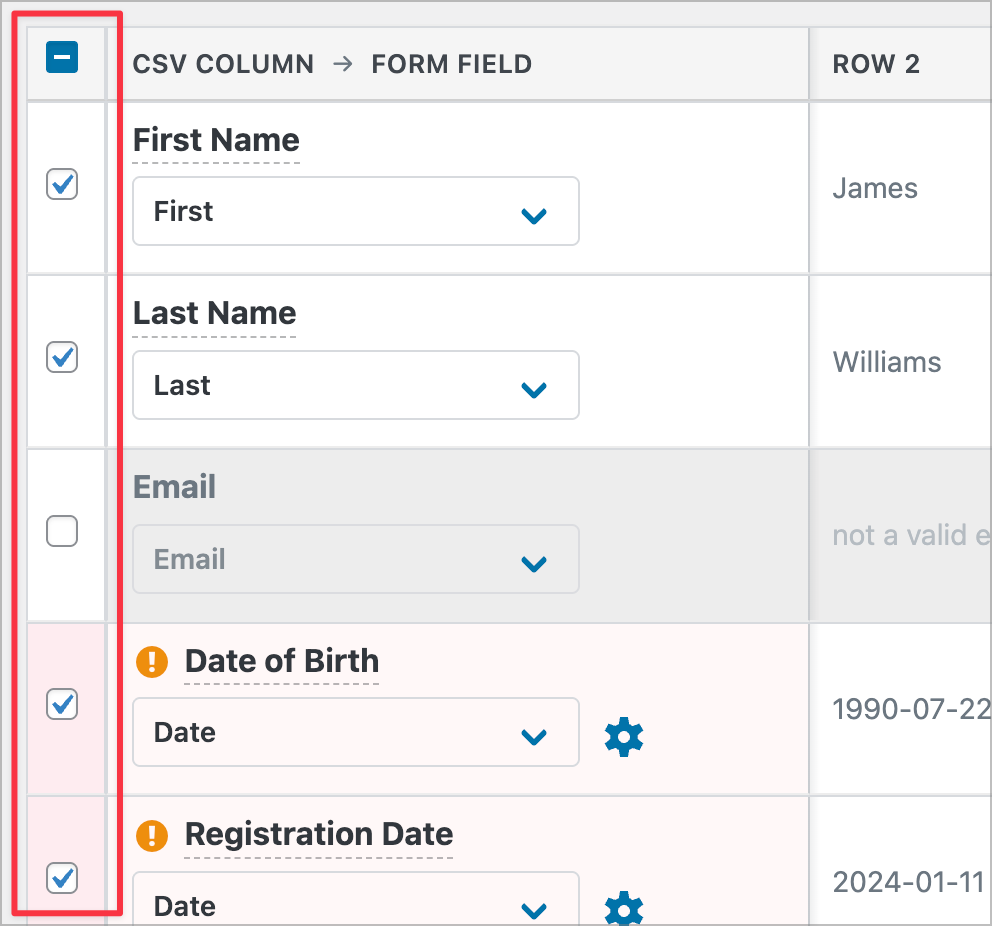
Column selection checkboxes
You can now quickly select or deselect individual columns during mapping, with a header checkbox to select or deselect everything at once.
This makes it easier to exclude certain columns from the import, and is especially useful when working with large CSVs that contain many more columns than you need.
Auto-map reset button
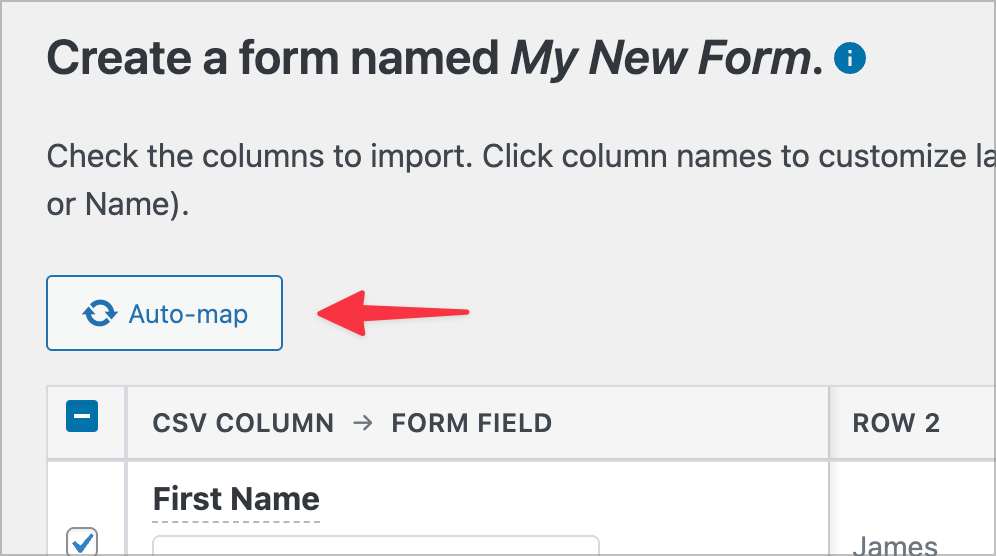
An Auto-map button lets you reset field mappings back to GravityImport’s auto-detected values. A confirmation dialog prevents accidental resets.
Inline column name editing
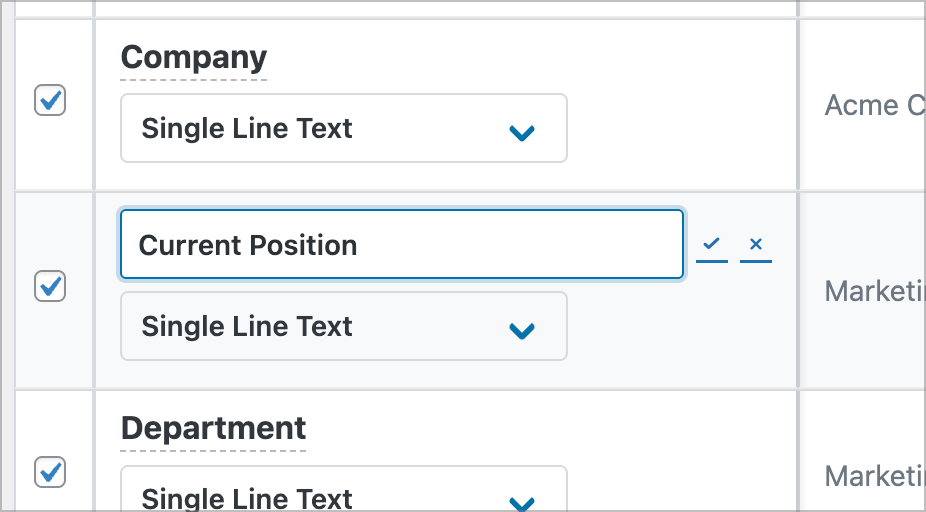
CSV column headers can now be renamed directly within the import interface by simply clicking on the column name. This makes it easier to:
- Clean up unclear column names
- Match columns to form fields more accurately
- Avoid needing to edit the CSV file itself
Smarter field matching and better date handling
Imports should adapt to your data—not the other way around. That’s why we’ve made several under-the-hood improvements in GravityImport 2.8.0 that reduce manual work.
- Smarter field matching: GravityImport now does a better job at auto-detecting data formats from your CSV and matching them to the correct field types in Gravity Forms. This means fewer manual adjustments when mapping CSV columns to form fields.
- Improved date and time detection: Date and time values are now auto-detected from CSV data, instead of requiring manual selection. Additionally, datetime values with milliseconds (for example,
2024-12-01 00:43:21.000) are now parsed correctly. - More precise Entry Notes mapping: Gravity Forms Entry Notes now require exact column name matches, preventing accidental mapping of unrelated data.
Major usability and accessibility improvements
This release also puts a strong focus on accessibility and keyboard usability. Improvements include:
- Full keyboard navigation using
Tab,Enter, andEscape - Better screen reader support across the import interface
- Improved support for right-to-left (RTL) languages
A better import experience, end to end
GravityImport 2.8.0 sees a reimagined field mapping interface that makes imports safer, clearer, and more predictable from start to finish. With improved field validation and error handling, you can catch issues earlier and import data with greater confidence.
So what are you waiting for? Update GravityImport today!

Get better at Gravity Forms, one email a week
New GravityKit releases, practical Gravity Forms tutorials, and subscriber-only discounts. One short email every week, unsubscribe anytime.
More articles

GravityMigrate 2.0: No-sweat WordPress form plugin migrations
Nobody wants to move forms between plugins. They want the site launched, the client onboarded, the referrals to stop falling through the cracks. GravityMigrate 2.0 makes moving forms effortless.

Launch Log: Two-way form migrations, a modernized chart block, and tighter board permissions
GravityMigrate 2.0.0 moves forms between Gravity Forms and seven other form plugins, GravityCharts modernizes its block in the WordPress editor, and GravityBoard tightens how board permissions are enforced.

9 ways to automate client work with the GravityKit MCP
Nine client jobs you can hand to the free GravityKit MCP, from auditing broken Views to cloning a finished build. Every one verified on a live site.