
Calculate the time between two dates with [gravitymath]
Add :timestamp to a date merge tag, and [gravitymath] can subtract one date from another. The examples show the time from submission to the last update, how long ago an entry was submitted, and the nights between two Date fields. Each one goes in a Custom Content field in a View, where GravityView fills in the row’s dates before GravityMath calculates.
How dates become numbers #
Gravity Forms stores dates as text. The date an entry was submitted is stored in UTC, such as 2026-10-07 09:12:00, and a Date field as 2026-10-07, whatever format the field shows. The :timestamp modifier turns a date into a number of seconds, counted from January 1, 1970. Subtract two of them to get the seconds between the dates, then divide by 86,400 for days, 3,600 for hours or 60 for minutes.
| Merge tag | Gives |
|---|---|
{date_created:timestamp} | When the entry was submitted |
{date_updated:timestamp} | When the entry was last updated |
{now:timestamp} | The current time |
{Check-in:2:timestamp} | The date in a Date field (here field 2, labeled Check-in), at midnight |
GravityView merge tag modifiers lists :timestamp and the other modifiers.
Show the time between submission and the last update #
These three shortcodes print the days, hours and minutes between when an entry was submitted and when it was last updated:
[gravitymath scope="entry"]
floor(
  max(0, ({date_updated:timestamp}+0) - ({date_created:timestamp}+0)) / 86400
)
[/gravitymath]d

[gravitymath scope="entry"]
floor(
  (
    max(0, ({date_updated:timestamp}+0) - ({date_created:timestamp}+0))
    - floor( max(0, ({date_updated:timestamp}+0) - ({date_created:timestamp}+0)) / 86400 ) * 86400
  ) / 3600
)
[/gravitymath]h

[gravitymath scope="entry"]
floor(
  (
    max(0, ({date_updated:timestamp}+0) - ({date_created:timestamp}+0))
    - floor( max(0, ({date_updated:timestamp}+0) - ({date_created:timestamp}+0)) / 3600 ) * 3600
  ) / 60
)
[/gravitymath]mFor an entry submitted on October 7 at 9:12 a.m. and updated on October 9 at 1:47 p.m., the field shows 2d 4h 35m:
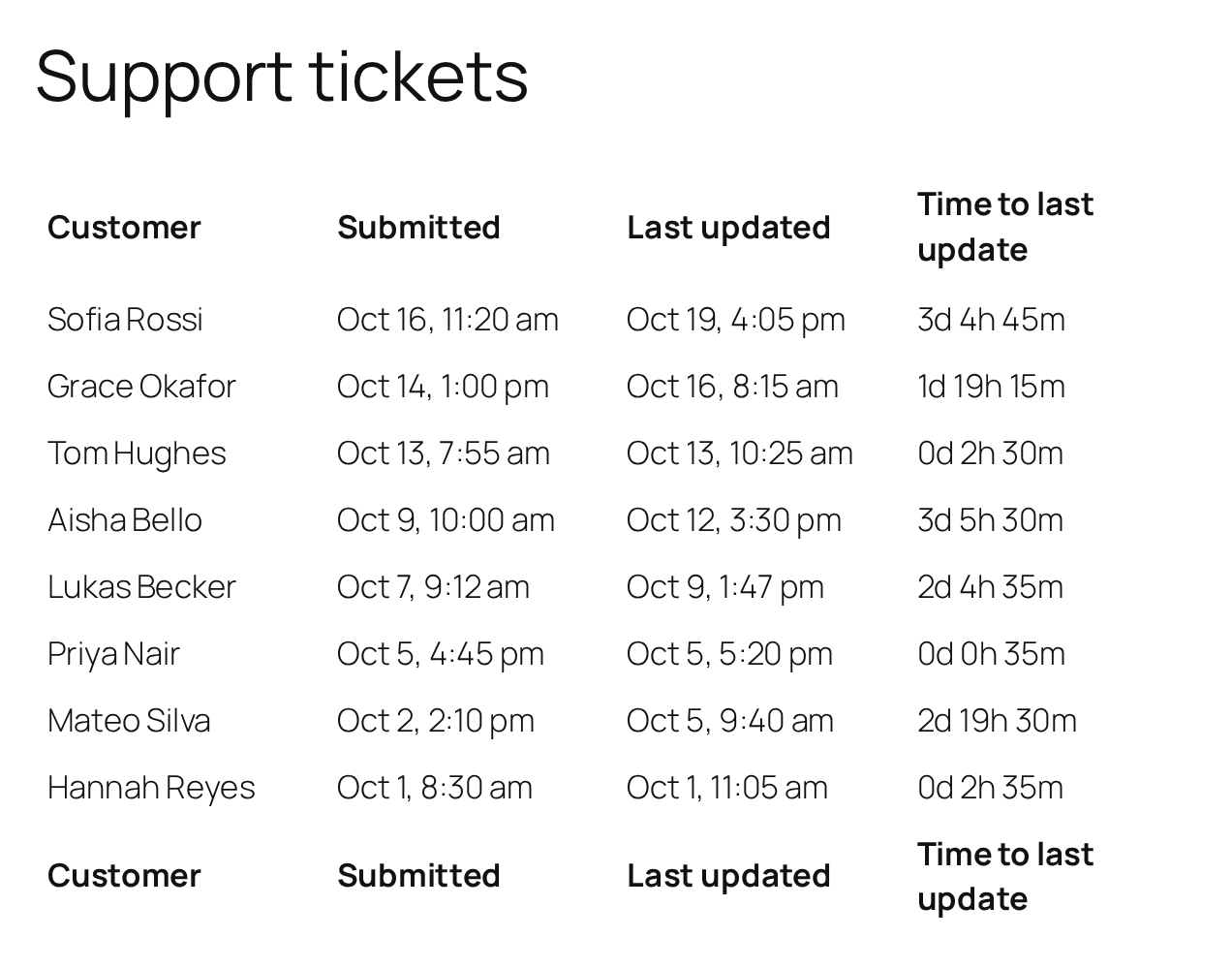
- The first shortcode divides the seconds by 86,400 (24 × 60 × 60) for whole days.
- The second removes the whole days and divides what is left by 3,600 for whole hours.
- The third removes the whole hours and divides what is left by 60 for whole minutes.
floor()rounds down, so a part of a day, hour or minute is never counted.
Leave Automatically add paragraphs to content unchecked in the field’s settings, which is the default. With it checked, the days, hours and minutes show on three separate lines.
The submission and update timestamps follow your site’s clock. On a site that changes to or from daylight saving time, a span that crosses the change is one hour longer or shorter than the time that passed.
Show how long ago an entry was submitted #
Subtract the submission date from {now:timestamp}:
[gravitymath scope="entry" decimals="1"] ( {now:timestamp} - {date_created:timestamp} ) / 86400 [/gravitymath] daysFor an entry submitted on October 7 at 9:12 a.m., it showed 13.2 days on October 20 at 3:01 p.m. Use {now:timestamp} for the current time. Gravity Forms’ {today:timestamp} doesn’t follow your site’s time zone, so on a site outside UTC it is off by the difference.
Count the days between two Date fields #
This shows the number of nights between a Check-in Date field (field 2) and a Check-out Date field (field 3):
[gravitymath scope="entry"] max(0, ( {Check-out:3:timestamp} - {Check-in:2:timestamp} ) / 86400 ) [/gravitymath]To charge a nightly rate, multiply by the rate field:
[gravitymath scope="entry" decimals="2"] max(0, ( {Check-out:3:timestamp} - {Check-in:2:timestamp} ) / 86400 ) * {Nightly rate:4} [/gravitymath]A booking from October 28 to November 4 at 110 a night shows 7 and 770.00. max(0, …) shows 0 when the check-out date is empty. Without it, the empty date gives a large negative number.

