
Published
•
Updated
Just Released: GravityView 2.4!
GravityView 2.4 introduces the {sequence} merge tag for entry counters, improved CSV export for all entries, and a range of bug fixes. See the full changelog for details.

📆 Happy Emoji Day! 🎡🤸♂️
July 17 is World Emoji Day, and also the release date of Version 2.4 of GravityView! This GravityView update includes much-requested functionality and bug fixes. Alas, there were no additional emoji included in GravityView. This was, indeed, an oversight. 😿
Here are some highlights of the release:
Display an entry counter with the {sequence} Merge Tag
We added a {sequence} Merge Tag, which allows you to add a counter to the results in a View. This is a handy addition. Check out the video above for more information, and you can read about the Merge Tag on our docs site.
Show all entries when exporting a CSV
Customers love the functionality in GravityView that allows exporting entries as CSV by adding /csv/ to the URL. That functionality had a limitation, though: by default, it would only export the number of entries shown on a page (with a default of twenty-five). We were asked many times “How do I export all my GravityView entries to CSV at once?”
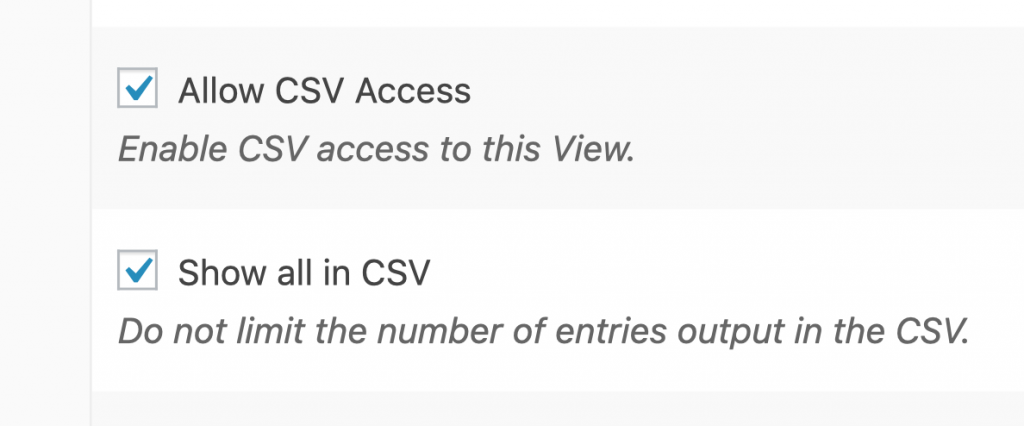
We heard you: In 2.4, we added a checkbox to export all entries at once. To enable in your View, check the new “Show all in CSV” checkbox.
Changes to who can edit a View
We are changing the capabilities required to add and edit a View in GravityView. Before Version 2.4, users with the Author role were able to create and edit Views, even if they lacked a capability called unfiltered_html. This capability gives users the permission to add HTML to a site that may include code that isn’t safe, like external JavaScript. In 2.4, we tightened security by requiring users to have the unfiltered_html capability to edit a View.
We understand this may be an inconvenience, and apologize! Here’s how to add the required capability to an existing role (such as Author) on your site.
All the changes
Here’s the full changelog for the release. If you have any questions, please email us at support@gravitykit.com and let us know!
2.4 on July 17, 2019
We tightened security by limiting who can edit Views. Read how to grant Authors access.
- Added: A new Result Number field and
{sequence}Merge Tag learn all about it! - Added:
{date_updated}Merge Tag (see all GravityView Merge Tags) - Added: Option to output all CSV entries, instead of a single page of results
- Fixed: Settings compatibility issues on Multisite
- Fixed: CSV output for address fields contained Google Maps link
- Fixed: When editing an entry in Gravity Forms, clicking the “Cancel” button would not exit edit mode
- Fixed: Some fatal errors when Gravity Forms is deactivated while GravityView is active
- Fixed: Search All Fields functionality with latest Gravity Forms
Developer Updates:
- Breaking Change: Users without the
unfiltered_htmlcapability can no longer edit Views. - Added:
gravityview/security/allow_unfiltered_htmlto not requireunfiltered_html. Dangerous! - Added:
gravityview/template/field/address/csv/delimiterfilter for CSV output of addresses

Get better at Gravity Forms, one email a week
New GravityKit releases, practical Gravity Forms tutorials, and subscriber-only discounts. One short email every week, unsubscribe anytime.
More articles

Launch Log: A range slider for search, AI-managed calendars, and security updates in ten products
GravityView adds a Slider search input, GravityCalendar lets AI assistants manage calendars, and ten GravityKit products get security fixes. Here’s what shipped.

9 nonprofit apps you can build with Gravity Forms and GravityKit
Nine apps nonprofits build on WordPress from Gravity Forms data: volunteer databases, member directories, client portals, donation pages, grant review and more.
How to migrate from Fluent Forms to Gravity Forms without rebuilding your forms
Move your Fluent Forms forms into Gravity Forms with GravityMigrate, then bring your entries across with GravityImport. Every step was tested on the free version of Fluent Forms.