
Published
•
Updated
Gravity Forms vs Elementor Forms: In-depth comparison
Gravity Forms and Elementor Forms are both powerful tools for creating forms on your WordPress site, but they emphasize different features and functionality: In this post, we’re going to compare both solutions by taking an in-depth look at their features, functionality, pricing, and more. TL;DR Gravity Forms is a premium WordPress plugin renowned for its…


Gravity Forms and Elementor Forms are both powerful tools for creating forms on your WordPress site, but they emphasize different features and functionality:
- Gravity Forms is a premium form builder plugin with advanced features, a vast ecosystem of add-ons, and integrations that make it ideal for complex form needs and data management.
- Elementor Forms is a built-in feature of the Elementor page builder, the most-used WordPress page builder, that allows you to create and style forms directly within Elementor’s visual interface, focusing on design flexibility and ease of use.
In this post, we’re going to compare both solutions by taking an in-depth look at their features, functionality, pricing, and more.
TL;DR
Gravity Forms is a premium WordPress plugin renowned for its flexibility and powerful feature set. It is particularly favored by agencies and advanced users due to its extensibility and developer-focused capabilities. If you’re building custom forms with intricate logic or integrations, Gravity Forms is your go-to solution.
Gravity Forms is ideal for enterprise workflows involving internal forms and custom CRM integrations. It’s a powerful tool for marketing forms demanding heavy automation and conditional logic.
Elementor Forms is integrated within the Elementor Pro page builder, offering a seamless way to design forms directly on your pages. It’s ideal for users invested in frontend design who need a straightforward form builder. Elementor Forms excels in visual design and ease of use, particularly for users already utilizing the Elementor ecosystem.
Elementor Forms is well-suited to bloggers or small businesses needing simple contact forms or lead capture forms that align closely with their site’s design.
Pro tipGet the best of both worlds! Embed and style Gravity Forms forms directly inside Elementor using our free Gravity Forms Widget for Elementor add-on. And to display submitted entries (not just the form), GravityView 3.0 now embeds Views natively in Elementor (plus Divi and Beaver Builder), with no shortcode required.
1. Key feature comparison
Here’s a side-by-side comparison of key features between Gravity Forms and Elementor Forms:
| Feature | Gravity Forms | Elementor Forms |
|---|---|---|
| Visual builder | Yes | Yes (Inside Elementor) |
| Advanced field types | Extensive | Limited |
| Entry storage | Built-in | Store entries in Elementor account |
| Conditional logic | Advanced | Basic |
| Third-party integrations | Extensive (Email marketing, eCommerce, CRM, automation, and more) | Limited (Mainly email marketing and CRM) |
| Spam protection (e.g., honeypot) | Robust | Basic |
| Payment integration | Yes (Stripe, PayPal, etc.) | No (requires third-party add-on) |
| Styling options | Built-in themes or custom CSS | Drag-and-drop styling |
| Backend entry management | Yes, searchable with filters | Yes, searchable with filters (from Elementor account) |
| Analytics & reporting | Requires add-ons | Requires third-party add-ons |
| Accessibility (WCAG Compliance) | Yes | Varies by theme/design |
Main takeaways
- Gravity Forms excels in flexibility and advanced conditional logic, making it a strong choice for those needing complex form functionalities.
- Elementor Forms stands out for its visually appealing design and ease of use, making it ideal for styling forms directly on your site’s frontend.
2. Form creation and styling
Gravity Forms has a visual form editor, allowing you to create complex forms using drag and drop. It also supports a wide range of field types from text inputs to list fields, payment fields and file uploaders.

The styling options in Gravity Forms are limited. While Gravity Forms does support themes that change the look and feel of your forms with preset styles, there is currently only one available, Orbital. That said, if the default styles don’t align with your site, then you can customize colors, fonts, and button styles via the block. To do more advanced styling requires CSS or third-party add-ons.
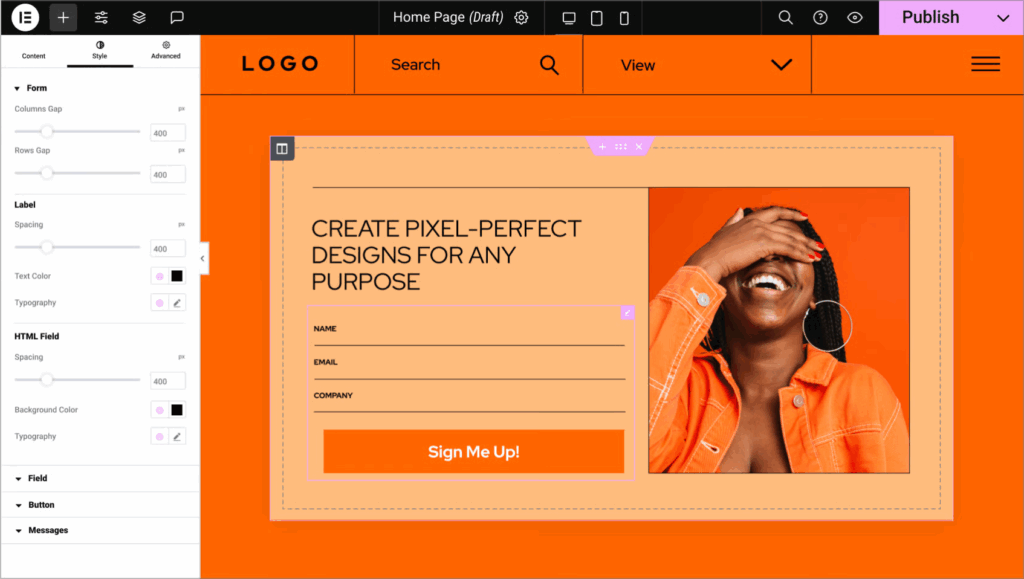
Elementor Forms offers robust styling options right out of the box. With the visual customization through the Elementor interface, you can easily design forms to match your site’s aesthetic. Enhancements are also available through add-ons like Essential Addons for Elementor.
Summary
| Feature | Gravity Forms | Elementor |
|---|---|---|
| Drag-and-drop form builder | ✅ | ✅ |
| Built-in styling options | ✅ (Via the block, limited) | ✅ |
| Wide range of field types | ✅ | ✅ (Limited) |
| Multi-page forms | ✅ | ✅ |
3. Supported field types
Here is a comparison of supported field types in Gravity Forms and Elementor Forms. Some Gravity Forms field types require either Basic, Pro or Elite add-ons to be installed. This has been noted in the comparison.
| Field type | Gravity Forms | Elementor Forms |
|---|---|---|
| Text | ✅ | ✅ |
| ✅ | ✅ | |
| Textarea | ✅ | ✅ |
| Website | ✅ | ✅ |
| Phone | ✅ | ✅ |
| Radio buttons | ✅ | ✅ |
| Select (Dropdown) | ✅ | ✅ |
| Checkboxes | ✅ | ✅ |
| Acceptance/Consent | ✅ | ✅ |
| Number | ✅ | ✅ |
| Date | ✅ | ✅ |
| Time | ✅ | ✅ |
| File Upload | ✅ | ✅ |
| Password | ✅ (Requires User Registration Add-On) | ✅ |
| Username | ✅ (Requires User Registration Add-On) | ❌ |
| HTML | ✅ | ✅ |
| Hidden | ✅ | ✅ |
| reCAPTCHA | ✅ | ✅ |
| Honeypot | ✅ | ✅ |
| Step/Page | ✅ | ✅ |
| Post fields (Title, Body, Excerpt, tags, Category, Post Image, Custom Field) | ✅ | ❌ |
| Images choices | ✅ | ❌ |
| List | ✅ | ❌ |
| Multi-Select | ✅ | ❌ |
| Multiple Choice | ✅ | ❌ |
| Section | ✅ | ❌ |
| Address | ✅ | ❌ |
| Pricing fields (Product, Quantity, Option, Shipping, Total) | ✅ | ❌ |
| Payment (PayPal, Stripe, 2Checkout, Mollie, Square) | ✅ (Requires add-on) | ❌ |
| Survey | ✅ (Requires add-on) | ❌ |
| Poll | ✅ (Requires add-on) | ❌ |
| Quiz | ✅ (Requires add-on) | ❌ |
| Chained Selects | ✅ (Requires add-on) | ❌ |
| Pipe Recorder | ✅ (Requires add-on) | ❌ |
| Cloudflare Turnstile | ✅ (Requires add-on) | ❌ |
| Signature | ✅ (Requires add-on) | ❌ |
- See all supported field types in Elementor Forms here.
- See all supported field types in Gravity Forms here.
4. Pricing
Gravity Forms is available through different paid licenses:
- Basic ($59/year) – For use on a single site, includes Basic add-ons.
- Pro ($159/year) – For use on up to 3 sites, includes Pro add-ons.
- Elite ($259/year) – For use on unlimited sites, includes Elite add-ons.
Elementor Forms comes bundled with Elementor’s paid plans:
- Essential ($60/year) – For use on a single site, does not include form submission storage or marketing add-ons.
- Advanced Solo ($84/year) – For use on up to 3 sites, includes form submission storage and marketing add-ons.
- Advanced ($99/year) – For use on up to 3 sites, includes form submission storage and marketing add-ons.
- Expert ($204/year) – For use on up to 25 sites, includes form submission storage and marketing add-ons.
5. Add-ons, integrations and ecosystem
Gravity Forms boasts a vast array of integrations including CRM systems, email marketing services, and tools like Zapier. It also provides a robust API for developers seeking deep custom integrations.
Another advantage of using Gravity Forms is its large community of Certified Developers that build and maintain hundreds of additional add-ons. For example, GravityKit plugins turn Gravity Forms into an app builder, enabling the creation of dynamic, front-end interfaces, custom dashboards, and more.
While Elementor Forms integrates natively with major marketing automation platforms, such as Mailchimp and ActiveCampaign, it lacks the extensive ecosystem of add-ons that Gravity Forms has.
6. Accessibility and SEO best practices
Gravity Forms promotes accessibility with features that support accessibility-ready markup. This gives you everything you need to comply with government standards for Section 508 and WCAG 2.1 AA (Web Content Accessibility Guidelines) standards set by the World Wide Web Consortium (W3C).
Elementor Forms provides a good starting point for accessibility, but the onus is on the user to implement best practices. SEO impacts are largely dependent on how forms are incorporated within the page builder structure.
7. Support, documentation and community
Gravity Forms offers ticket-based support with a wealth of documentation and active community forums. This is complemented by an ecosystem of third-party developers offering additional resources, tutorials, and plugins.
Subscribers to Elementor Pro receive premium support, along with access to a large community and numerous tutorials on Elementor’s Academy site.
8. Data security and privacy
Gravity Forms includes GDPR features such as consent fields and offers add-ons for encryption and secure data storage.
Elementor Forms supports basic GDPR compliance fields, with security largely dependent on broader site settings and configurations.
Conclusion: Which one should you choose?
Choosing between Gravity Forms and Elementor Forms ultimately depends on your specific use case, the complexity of your desired forms, and your budget. For those seeking powerful backend capabilities and extensive integrations, Gravity Forms is the superior choice. Meanwhile, for users prioritizing visual appeal and ease of use, especially in a design-heavy workflow, Elementor Forms excels.
Choose Gravity Forms if:
- You need to create scalable, complex forms with enterprise-level features.
- You’re a developer or agency focused on creating tailored workflows.
Choose Elementor Forms if:
- Visual design and fast deployment are priorities.
- You’re already utilizing Elementor Pro and need simpler forms with medium complexity.
Or, use Gravity Forms inside Elementor with our free Gravity Forms Widget for Elementor add-on.
Happy form building!

Get better at Gravity Forms, one email a week
New GravityKit releases, practical Gravity Forms tutorials, and subscriber-only discounts. One short email every week, unsubscribe anytime.
More articles

Launch Log: A range slider for search, AI-managed calendars, and security updates in ten products
GravityView adds a Slider search input, GravityCalendar lets AI assistants manage calendars, and ten GravityKit products get security fixes. Here’s what shipped.

9 nonprofit apps you can build with Gravity Forms and GravityKit
Nine apps nonprofits build on WordPress from Gravity Forms data: volunteer databases, member directories, client portals, donation pages, grant review and more.
How to migrate from Fluent Forms to Gravity Forms without rebuilding your forms
Move your Fluent Forms forms into Gravity Forms with GravityMigrate, then bring your entries across with GravityImport. Every step was tested on the free version of Fluent Forms.