
Published
•
Updated
Announcing the release of GravityBoard: Visual workflow management for Gravity Forms
We’re excited to officially launch GravityBoard, our powerful new add-on that brings visual workflow management to Gravity Forms. Whether you’re managing tasks, tracking sales leads, or running an editorial calendar, GravityBoard displays your form entries on collaborative boards, making it easy to visualize your workflows, manage your projects, and stay organized. Built with a modern…

We’re excited to officially launch GravityBoard, our powerful new add-on that brings visual workflow management to Gravity Forms. Whether you’re managing tasks, tracking sales leads, or running an editorial calendar, GravityBoard displays your form entries on collaborative boards, making it easy to visualize your workflows, manage your projects, and stay organized.
Built with a modern stack, GravityBoard is lightweight, fast, flexible, and fully responsive. Think Trello for Gravity Forms, but self-hosted and private. It’s the future of project management for WordPress. And it’s ready to use today.
What you can do with GravityBoard
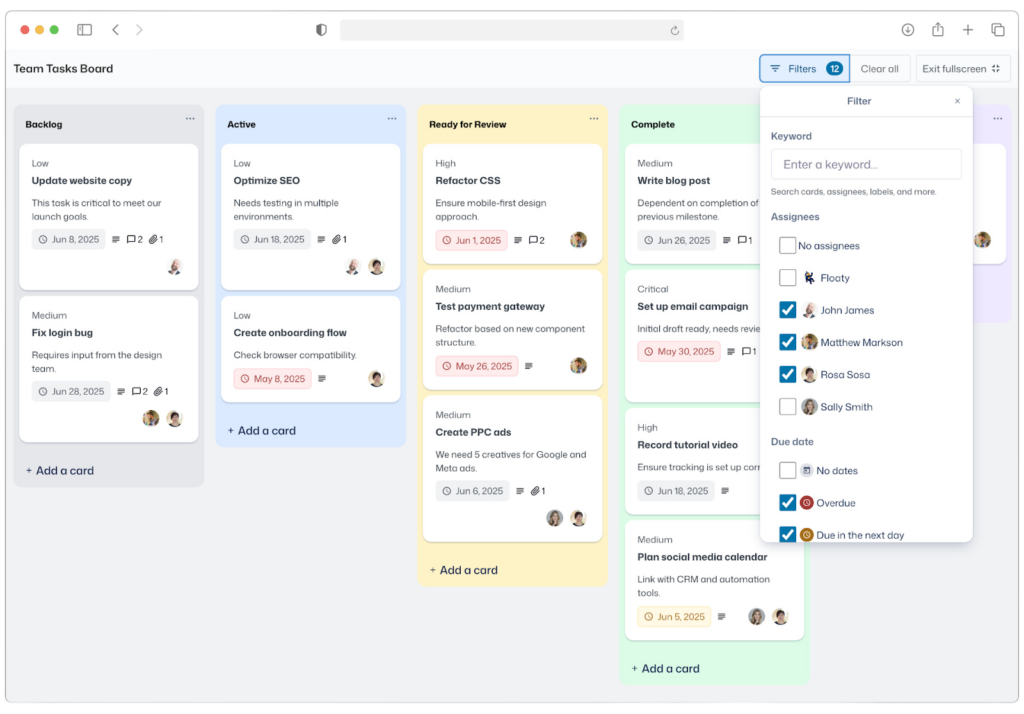
GravityBoard adapts to almost any workflow, making it perfect for teams across industries. Whether you’re managing internal projects or external client requests, it turns form submissions into actionable tasks—with features like @mentions, file attachments and comments, all in one place.
Use GravityBoard to run your project management pipeline, track customer support tickets, streamline your hiring and recruitment process, or plan your next big event. Content and marketing teams can also use it to manage editorial calendars, moving ideas from concept to publication.
And that’s just the tip of the iceberg! GravityBoard’s flexible design enables it to fit your workflow—whatever it looks like.
Designed with purpose, built for productivity
GravityBoard isn’t just a new way to view your form entries, it’s a modern, collaborative workspace tailored to Gravity Forms and WordPress.
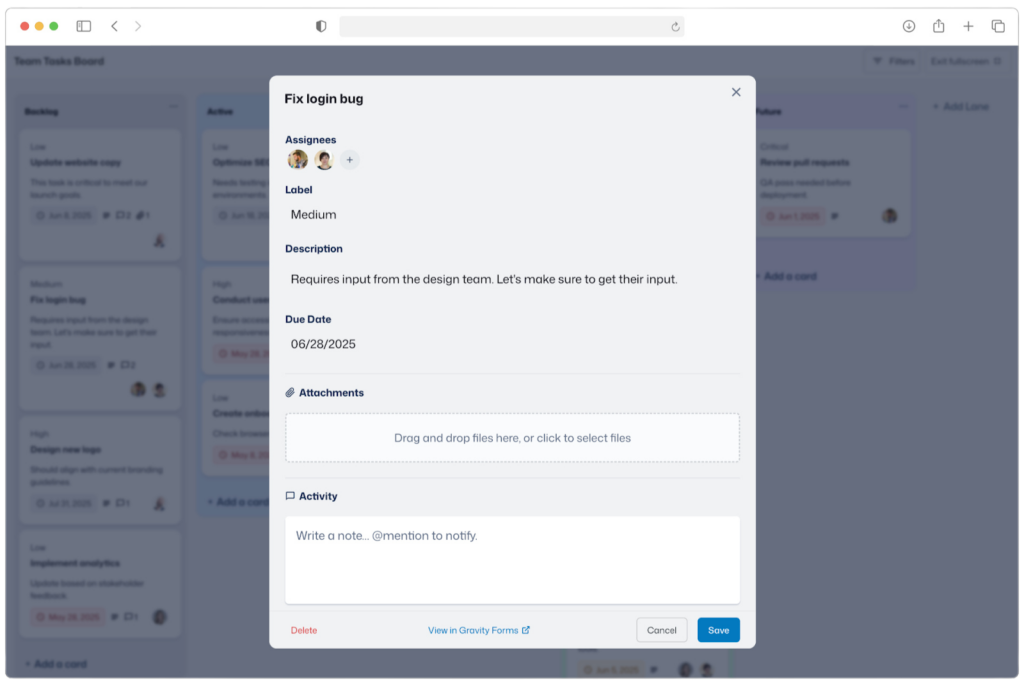
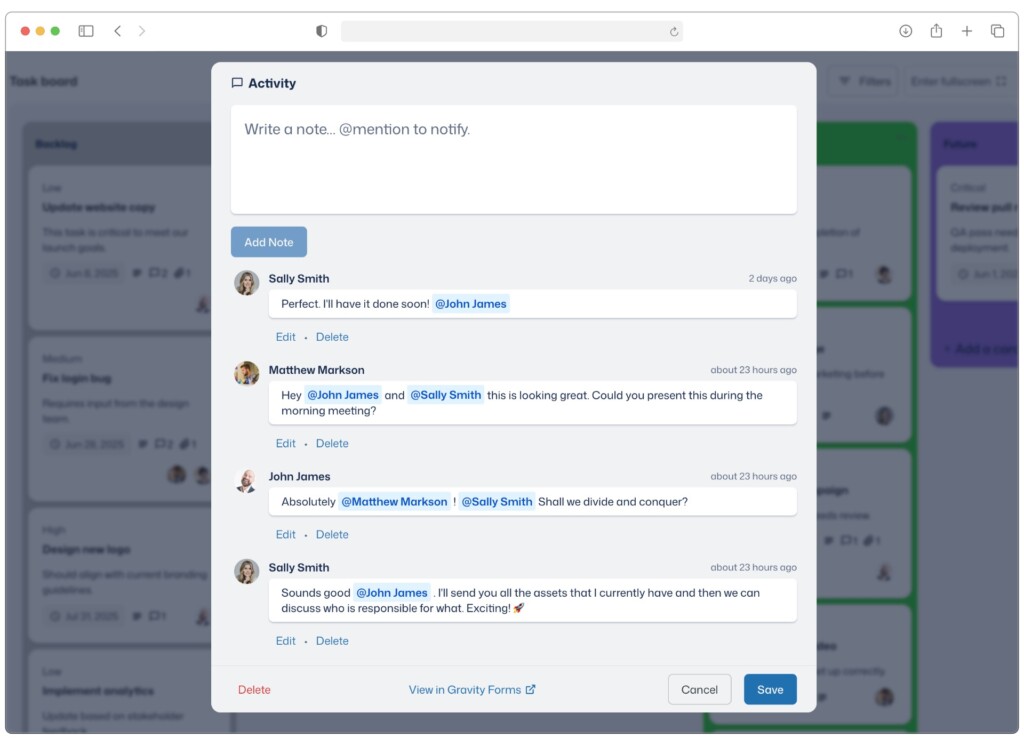
Built for teams, GravityBoard includes user assignments, card-level comments, @mentions, notifications, and file attachments, keeping communication and task management all in one place. With granular access controls, you can fine-tune who is allowed to view, edit, or interact with boards.
Each board is fully configurable, using your form’s fields to define lanes. Map the fields you want to show, enable the features that you need, and apply your branding. From access control to color schemes, the experience is yours to shape.
Updates made on the board sync directly with Gravity Forms, keeping everything connected and accurate.
Unlike SaaS tools like Trello, Jira, or ClickUp, GravityBoard is fully self-hosted on your WordPress site, giving you complete control over your data and privacy.
GravityBoard taps directly into the powerful data management capabilities offered by Gravity Forms, enabling you to leverage conditional logic, dynamic merge tags, notifications, and all the other features you already know and love.
Plus, with seamless integration into the broader GravityKit suite, you’re unlocking a powerful, extensible workflow engine tailored to your site, your team, and your needs.
Works seamlessly with the rest of the ’Kit
GravityBoard is designed to fit naturally into the broader GravityKit ecosystem, unlocking even more power when paired with our other essential tools. Here are a few examples:
- Track every update with GravityRevisions
Want to see how a card has changed over time? Pair GravityBoard with GravityRevisions to keep a detailed record of edits and revert changes with a single click. - Generate reports with GravityExport
Need to share your data or create backups? With GravityExport, you can easily create reports and send data to external storage. - Visualize progress with GravityCharts
Need to generate quick status reports or progress dashboards? GravityCharts lets you create interactive charts and graphs based on Gravity Forms data. Visualise project progress, spot trends and keep stakeholders informed. - Loads more possibilities!
As we continue to develop GravityBoard, we plan to add deeper integrations with other popular Gravity Forms add-ons, including Gravity Flow, Gravity Perks, and more!
Building on your feedback
We received some incredibly positive feedback already during pre-release and we’re thrilled to finally launch GravityBoard. Your insights are invaluable so we encourage you to keep sharing your thoughts. Here’s what some of our early users and viewers had to say:
This is 1000% applicable to some projects I’m working on right now – THIS IS GREAT!
Thanks for this wonderful creation! It further broadens the many applications of Gravity Forms and GravityKit.
Well done, nice product. Looking forward to using it. Bye Trello :)
See GravityBoard in action
Explore all the features in real-time with our fully functional demo. Get a feel for GravityBoard’s capabilities and experience visual workflow management firsthand! You can also clone the site to explore everything GravityBoard has to offer, free for 7 days, with your own personalized demo.
Get started with GravityBoard today!
With GravityBoard, you can visualize your Gravity Forms entries on customizable kanban boards. GravityBoard is perfect for managing projects, tracking to-do items, and staying organized.
Thank you to all the early beta testers and everyone who shared their valuable insights with us during the development stage. Now we can’t wait for you to experience all that GravityBoard has to offer! Get started today and be sure to let us know what you think.

Get better at Gravity Forms, one email a week
New GravityKit releases, practical Gravity Forms tutorials, and subscriber-only discounts. One short email every week, unsubscribe anytime.
More articles

GravityMigrate 2.0: No-sweat WordPress form plugin migrations
Nobody wants to move forms between plugins. They want the site launched, the client onboarded, the referrals to stop falling through the cracks. GravityMigrate 2.0 makes moving forms effortless.

Launch Log: Two-way form migrations, a modernized chart block, and tighter board permissions
GravityMigrate 2.0.0 moves forms between Gravity Forms and seven other form plugins, GravityCharts modernizes its block in the WordPress editor, and GravityBoard tightens how board permissions are enforced.

9 ways to automate client work with the GravityKit MCP
Nine client jobs you can hand to the free GravityKit MCP, from auditing broken Views to cloning a finished build. Every one verified on a live site.