
Skip to content
GravityKit
Buy
Sign in
0 items
  • Plugins

    GravityKit All Access

    Our complete Kit of essential tools for extending and enhancing Gravity Forms—everything you need to build powerful web apps and workflows.

    Learn more
    • GravityView

      GravityView

      Bestseller

      Display Gravity Forms entries on the front-end of your site and build powerful web applications.

    • GravityImport

      GravityImport

      Trending

      Import entries from CSV files into Gravity Forms to transfer data, create new forms, or update existing entries.

    • GravityEdit

      GravityEdit

      Quickly edit Gravity Forms entries inline to save time, reduce clicks, and streamline your workflow.

    • GravityCharts

      GravityCharts

      Trending

      Turn Gravity Forms entries into interactive charts and graphs.

    • GravityActions

      GravityActions

      Update multiple Gravity Forms entries at once, send bulk emails, and streamline your workflow.

    • GravityCalendar

      GravityCalendar

      Turn Gravity Forms entries into dynamic calendars to showcase events, schedules, appointments, and more.

    • GravityExport

      GravityExport

      Export Gravity Forms entries to Excel, CSV, or PDF and share them instantly with secure download links.

    • GravityMath

      GravityMath

      Perform advanced calculations on Gravity Forms entries to display totals, averages, or build custom calculators.

    • GravityRevisions

      GravityRevisions

      Track, compare, and restore changes made to Gravity Forms forms and entries with a full version history.

    • GravityMigrate

      GravityMigrate

      Migrate all Gravity Forms data, including forms, entries, Views, feeds, uploads, and more.

    • GravityBoard

      GravityBoard

      Manage projects with collaborative project management. Coordinate with your team and streamline your workflows.

    • GravitySearch

      GravitySearch

      Search Gravity Forms entries across every form from one screen.

  • Ideal For

    • Nonprofits
    • Web Agencies
    • Education
    • Developers
    • Small Businesses
    • Startups
    Explore All Use Cases

    Case studies

    • West Fork Schools
    • Princeton University
    • BrightLeaf Giving
    • Jacksonville Port Authority
    • National Severe Storms Lab
    • Leadpal
    • Mediebruket
    • Dragonfly
    View All Case Studies
  • Resources

    • Blog
    • Case studies
    • GravityKit vs competitors
    • Live Demos
    • Documentation
    • Developer docs
    • GravityKit Academy
    • GravityKit Live!

    Ultimate guides

    • How to use Gravity Forms
    • Editing Gravity Forms entries
    • Importing Gravity Forms entries
    • Exporting Gravity Forms entries
    • Displaying Gravity Forms entries
    • Gravity Forms conditional logic
    • Gravity Forms calculations
    View More Articles
  • Plugins

    • GravityView

      GravityView

      Bestseller

      Display Gravity Forms entries on the front-end of your site and build powerful web applications.

    • GravityImport

      GravityImport

      Trending

      Import entries from CSV files into Gravity Forms to transfer data, create new forms, or update existing entries.

    • GravityEdit

      GravityEdit

      Quickly edit Gravity Forms entries inline to save time, reduce clicks, and streamline your workflow.

    • GravityCharts

      GravityCharts

      Trending

      Turn Gravity Forms entries into interactive charts and graphs.

    • GravityActions

      GravityActions

      Update multiple Gravity Forms entries at once, send bulk emails, and streamline your workflow.

    • GravityCalendar

      GravityCalendar

      Turn Gravity Forms entries into dynamic calendars to showcase events, schedules, appointments, and more.

    • GravityExport

      GravityExport

      Export Gravity Forms entries to Excel, CSV, or PDF and share them instantly with secure download links.

    • GravityMath

      GravityMath

      Perform advanced calculations on Gravity Forms entries to display totals, averages, or build custom calculators.

    • GravityRevisions

      GravityRevisions

      Track, compare, and restore changes made to Gravity Forms forms and entries with a full version history.

    • GravityMigrate

      GravityMigrate

      Migrate all Gravity Forms data, including forms, entries, Views, feeds, uploads, and more.

    • GravityBoard

      GravityBoard

      Manage projects with collaborative project management. Coordinate with your team and streamline your workflows.

    • GravitySearch

      GravitySearch

      Search Gravity Forms entries across every form from one screen.

    GravityKit All Access

    Our complete Kit of essential tools for extending and enhancing Gravity Forms—everything you need to build powerful web apps and workflows.

    Learn more
  • Ideal For

    • Nonprofits
    • Web Agencies
    • Education
    • Developers
    • Small Businesses
    • Startups
    Explore All Use Cases

    Case studies

    • West Fork Schools
    • Princeton University
    • BrightLeaf Giving
    • Jacksonville Port Authority
    • National Severe Storms Lab
    • Leadpal
    • Mediebruket
    • Dragonfly
    View All Case Studies

    How to build...

    • Property Management
    • Product Catalog
    • Fundraising Dashboard
    • Real Estate Directory
    • Document Library
    • Academic Journal
    • Volunteer Management
    • Meal Tracker
    View All Guides
  • Resources

    • Blog
    • Case studies
    • GravityKit vs competitors
    • Live Demos
    • Documentation
    • Developer docs
    • GravityKit Academy
    • GravityKit Live!

    ultimate guides

    • How to use Gravity Forms
    • Editing Gravity Forms entries
    • Importing Gravity Forms entries
    • Exporting Gravity Forms entries
    • Displaying Gravity Forms entries
    • Gravity Forms conditional logic
    • Gravity Forms calculations
    View More Articles
  • Support
  • Pricing
0 items

Search

Results appear automatically as you type.
Loading results…

results found matching

    Sign in
    Buy

    Docs

    • Docs Home

    Gravity Forms Add-Ons

    • GravityView
    • GravityActions
    • GravityBoard
    • GravityCalendar
    • GravityCharts
    • GravityEdit
    • GravityExport
    • GravityImport
    • GravityMath
    • GravityMigrate
    • GravityRevisions
    • GravitySearch
    • GF Widget for Elementor
    • GF Dynamic Lookup
    • GF Entry Tags
    • GF Event Field
    • GravityExport Lite
    • GF Zero Spam

    GravityView

    • Getting Started
    • View Setup
    • FAQ
    • Pre-Sale
    • Advanced
    • Common Problems
    • Customizing Your Views
    • Edit Entry
    • Entry Approval
    • Filter and Sort Results
    • Gravity Forms
    • Merge Tags
    • Roles and Capabilities
    • Search
    • Shortcodes
    • View Settings
    • WordPress Posts

    General Help

    • Account, Invoices, and Billing
    • License Related
    • Plugins and Settings
    • Contact
    • Docs Home
    • Gravity Forms Add-Ons

      • GravityView
      • GravityActions
      • GravityBoard
      • GravityCalendar
      • GravityCharts
      • GravityEdit
      • GravityExport
      • GravityImport
      • GravityMath
      • GravityMigrate
      • GravityRevisions
      • GravitySearch
      • GF Widget for Elementor
      • GF Dynamic Lookup
      • GF Entry Tags
      • GF Event Field
      • GravityExport Lite
      • GF Zero Spam
    • GravityView

      • Getting Started
      • View Setup
      • FAQ
      • Pre-Sale
      • Advanced
      • Common Problems
      • Customizing Your Views
      • Edit Entry
      • Entry Approval
      • Filter and Sort Results
      • Gravity Forms
      • Merge Tags
      • Roles and Capabilities
      • Search
      • Shortcodes
      • View Settings
      • WordPress Posts
    • General Help

      • Account, Invoices, and Billing
      • License Related
      • Plugins and Settings
    • Contact

    Gravity Forms Zero Spam

    • How Gravity Forms Zero Spam works (and how to test it)
    • Troubleshooting Gravity Forms Zero Spam
    • Using AI Spam Review with Gravity Forms Zero Spam
    • Using Shield silentCAPTCHA with Gravity Forms Zero Spam
    • Getting started with Gravity Forms Zero Spam
    • Home
    • Docs
    • Gravity Forms Zero Spam
    • Troubleshooting Gravity Forms Zero Spam

    Troubleshooting Gravity Forms Zero Spam

    Estimated reading: 4 minutes

    Updated on July 22, 2026

    This guide covers the problems we see most often with Gravity Forms Zero Spam: real submissions being flagged as spam, spam report emails not arriving, and spam that still gets through.

    Real submissions are being flagged as spam #

    Before anything else, update to the latest version of the plugin. Several releases in the 1.7.x series each fixed a specific cause of wrongly flagged submissions (forms in modals or popups, pages with several forms, token delivery failures), so an update alone often resolves the problem.

    Then let the entry itself tell you why it was flagged. Open the entry under Forms > Entries (click the “Spam” link above the list) and check the note in the Notes box. The wording points at the cause:

    “The submission did not include a spam prevention token.” The plugin’s JavaScript never ran on the page, so the hidden token was not added to the submission. Common causes:

    • An optimization plugin minified, combined, deferred, or delayed the plugin’s JavaScript. This is the cause we see most often when every submission is flagged. Exclude gf-zero-spam and gfZeroSpamConfig from JavaScript optimization (for example, WP Rocket’s “Delay JavaScript execution” exclusion list, or JavaScript minification in WP-Optimize), then clear the cache and submit a test.
    • A consent manager or privacy browser extension blocked the script from loading.
    • The form is rendered after the page loads (in a modal or popup, or output late by a page builder). Recent plugin versions handle most of these cases, so update first.
    • The form is submitted through custom AJAX code that bypasses the normal Gravity Forms submission flow, so the token is never included.
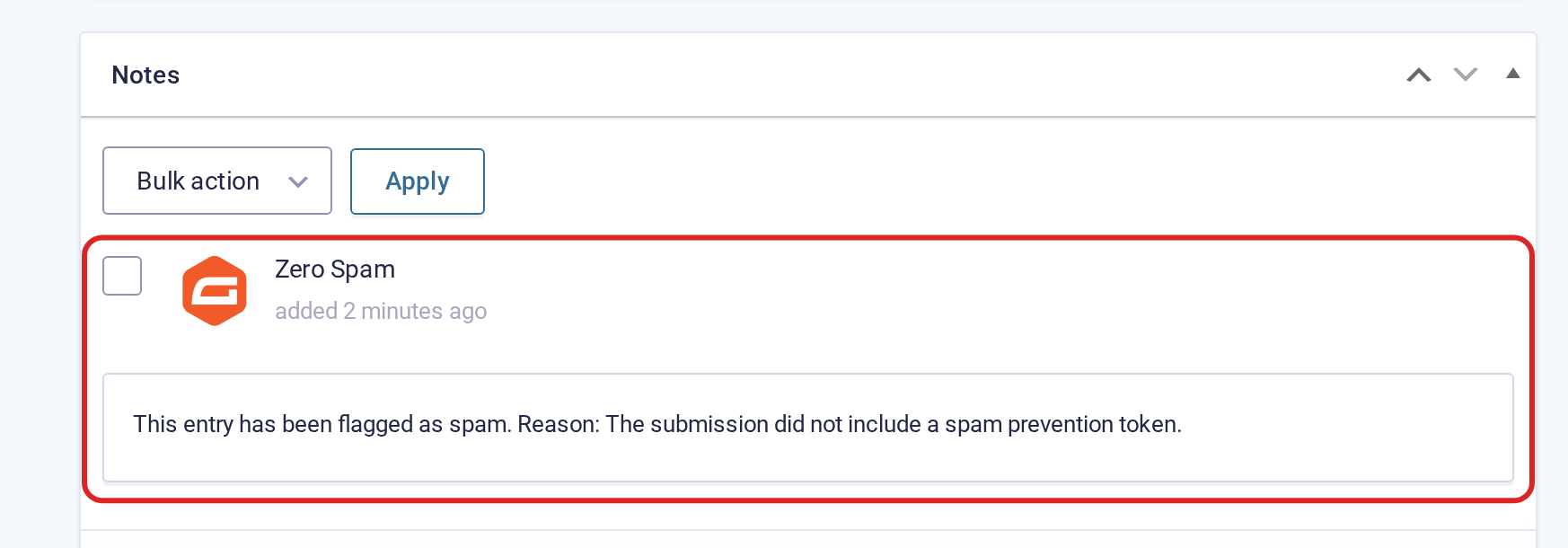
    Entry note reading: This entry has been flagged as spam. Reason: The submission did not include a spam prevention token.

    “The spam prevention token has expired. This may be caused by page caching.” The visitor loaded a cached copy of the page that contained an old token. The fix is to raise the “Anti-Spam Expiration” value under Forms > Settings > Zero Spam so tokens stay valid longer than your page cache keeps pages. The default is 7 days; if your cache holds pages longer than that, increase the value to match.
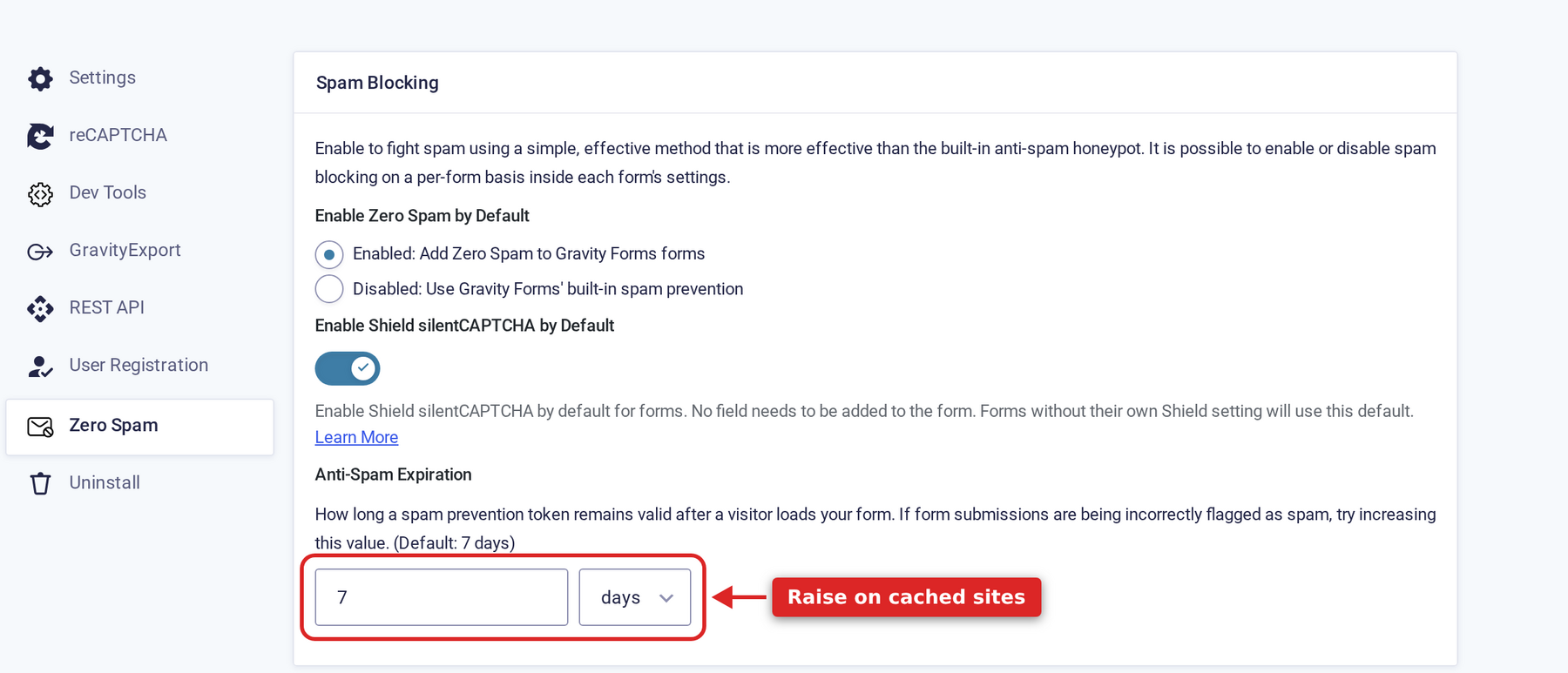
    Anti-Spam Expiration setting under Forms, Settings, Zero Spam

    The note names a different check. Zero Spam records which check flagged each entry, and other spam tools (the Gravity Forms honeypot, Akismet, Shield silentCAPTCHA, AI Spam Review) add their own notes. If the note names another tool, that tool made the call, and its settings are the place to look.

    Where flagged submissions go, and how to restore one #

    Flagged entries are not lost. They sit under Forms > Entries in the Spam view, and hovering an entry row shows a “Not Spam” action that restores it to the active entries.
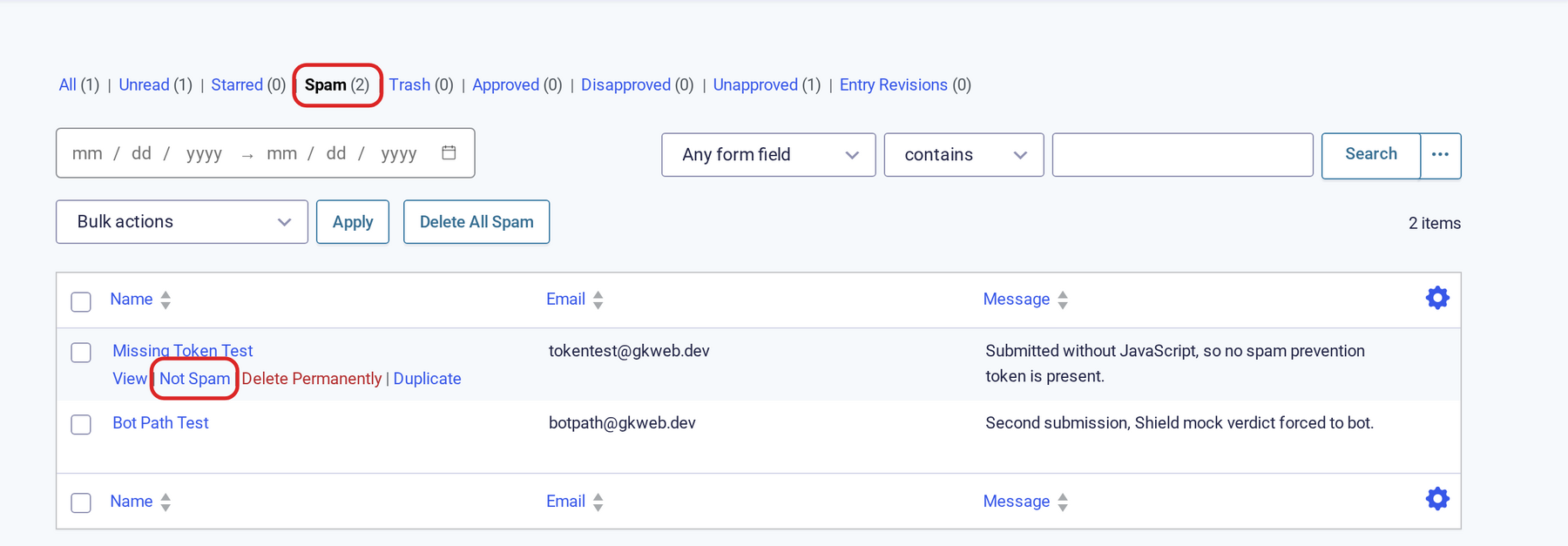
    Spam view of the entries list with the Spam filter and the Not Spam row action highlighted

    Note: While an entry is marked as spam, Gravity Forms does not process its notifications, confirmations, or add-on feeds. The person who submitted the form sees the default Gravity Forms confirmation text instead of your configured confirmation or redirect, and no notification emails go out.

    Spam report emails are not arriving #

    Report emails depend on two things working:

    • WP-Cron. Reports are sent on a WordPress cron schedule. If your host disables WP-Cron or the site uses a server-side cron that is not running, reports never send.
    • Email delivery. Reports go out through the same wp_mail() path as other WordPress email. The “Send Test Email & Save Settings” button on the Zero Spam settings page sends a test through that same path, so a working test email proves delivery is fine. If the test does not arrive, the site’s mail or SMTP setup is the problem, not the plugin.

    Also keep in mind that a quiet period is not a failure: when there are no new spam entries in the reporting period, no email is sent by design.

    Spam is still getting through #

    The token check stops automated submissions that post directly to your site without running JavaScript, which is most bot traffic. Sophisticated bots that execute JavaScript can pass it. If some spam still reaches you:

    • Enable AI Spam Review, which reads the content of submissions that passed the token check and flags the ones that look like spam.
    • Add Shield silentCAPTCHA as an additional signal based on the visitor’s behavior.
    • Zero Spam also runs alongside the Gravity Forms honeypot, Akismet, reCAPTCHA, and other spam plugins without conflict.

    Still stuck? How can we help?

    How can we help?

    "*" indicates required fields

    This field is for validation purposes and should be left unchanged.
    Replies will go to this email.
    How can we help?*
    My pre-sale question is related to...*
    My WordPress skills are....*
    My Gravity Forms skills are...*
    You will be shown articles from our documentation.
    Vous pouvez nous écrire dans votre langue maternelle si c’est plus facile pour vous—nous nous occuperons de la traduction!
    Puedes escribirnos en tu idioma nativo si te resulta más fácil; ¡nosotros nos encargamos de la traducción!
    Sie können uns in Ihrer Muttersprache schreiben, wenn das für Sie einfacher ist – wir kümmern uns um die Übersetzung!
    U kunt ons in uw moedertaal schrijven als dat gemakkelijker voor u is — wij zorgen voor de vertaling!
    Du kan skrive til oss på ditt morsmål hvis det er enklere for deg — vi tar oss av oversettelsen!
    Du kan skriva till oss på ditt modersmål om det är lättare för dig — vi tar hand om översättningen!
    Você pode nos escrever em seu idioma nativo se for mais fácil para você — nós cuidaremos da tradução!
    Puoi scriverci nella tua lingua madre se ti è più facile — penseremo noi alla traduzione!
    Please provide as much detail as you're able; this helps us provide you with faster support.
    Drop files here or
    Accepted file types: jpg, jpeg, gif, png, tiff, pdf, bmp, zip, json, csv, xls, xlsx, Max. file size: 256 MB.
      Stay informed?

      Was this page helpful?

      Table Of Contents
      • Real submissions are being flagged as spam
      • Where flagged submissions go, and how to restore one
      • Spam report emails are not arriving
      • Spam is still getting through
      GravityKit
      • How to Build It
      • GravityKit vs competitors
      • Pricing
      • Products
      • Our Team
      • Our Values
      • Work With Us
      • Coupons
      Support
      • Support
      • Contact
      • Documentation
      • Scope of Support
      • Brand Guidelines
      • Privacy Policy
      • Terms of Service (“Terms”)
      I am a...
      • Nonprofit
      • Web agency
      • Small business owner
      • Web developer
      • Educational institution
      • WordPress freelancer
      • Startup founder
      • One-person agency
      Get notified of updates.

      We’re constantly improving GravityKit. Fill out your email below and we’ll notify you anytime major updates drop.

      • Facebook
      • Twitter
      • Mastodon
      GravityKit is a Gravity Forms Certified Developer.

      Copyright © 2026, Katz Web Services, Inc.

      GravityKit and GravityView are registered trademarks of Katz Web Services, Inc.

      Birthday cake with 12 candles

      It’s GravityKit’s 12th birthday!

      Celebrate by taking 30% off Lifetime All Access.

      Shop the Sale
