
Published
•
Updated
GravityView version 1.7.2
Many customers have asked how to display other entries that were created by the same user. Here’s a way this new feature can be used: Aliyah uses GravityView to display running statistics for a non-profit that holds fund-raiser races. Users submit their statistics on her site, and they take part in multiple races over time.…

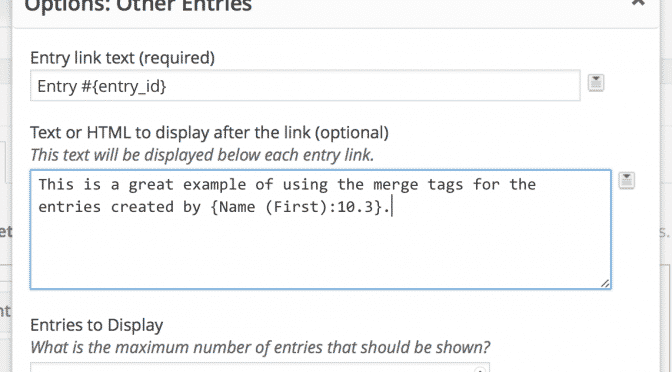
Many customers have asked how to display other entries that were created by the same user.
Here’s a way this new feature can be used:
Aliyah uses GravityView to display running statistics for a non-profit that holds fund-raiser races. Users submit their statistics on her site, and they take part in multiple races over time. Before, Aliyah had no way to show the other events run by her supporters. Now, she can use the Other Entries field to easily show other races run by the form submitter.
1.7.2 on March 18
- Added: Other Entries field – Show what other entries the entry creator has in the current View
- Added: Ability to hide the Approve/Reject column when viewing Gravity Forms entries (Learn how)
- Fixed: Missing Row Action links for non-View types (posts, pages)
- Fixed: Embedded DataTable Views with
search_valuenot filtering correctly - Fixed: Not possible to change View status to ‘Publish’
- Fixed: Not able to turn off No-Conflict mode on the Settings page (oh, the irony!)
- Fixed: Allow for non-numeric search fields in
gravityview_get_entries() - Fixed: Social icons displaying on GravityView settings page
- Tweak: Improved Javascript & PHP speed and structure

Get better at Gravity Forms, one email a week
New GravityKit releases, practical Gravity Forms tutorials, and subscriber-only discounts. One short email every week, unsubscribe anytime.
More articles

Launch Log: A range slider for search, AI-managed calendars, and security updates in ten products
GravityView adds a Slider search input, GravityCalendar lets AI assistants manage calendars, and ten GravityKit products get security fixes. Here’s what shipped.

9 nonprofit apps you can build with Gravity Forms and GravityKit
Nine apps nonprofits build on WordPress from Gravity Forms data: volunteer databases, member directories, client portals, donation pages, grant review and more.
How to migrate from Fluent Forms to Gravity Forms without rebuilding your forms
Move your Fluent Forms forms into Gravity Forms with GravityMigrate, then bring your entries across with GravityImport. Every step was tested on the free version of Fluent Forms.