

GravityImport
Import entries from CSV files into Gravity Forms to transfer data, create new forms, or update existing entries.



Instantly import form entries to Gravity Forms
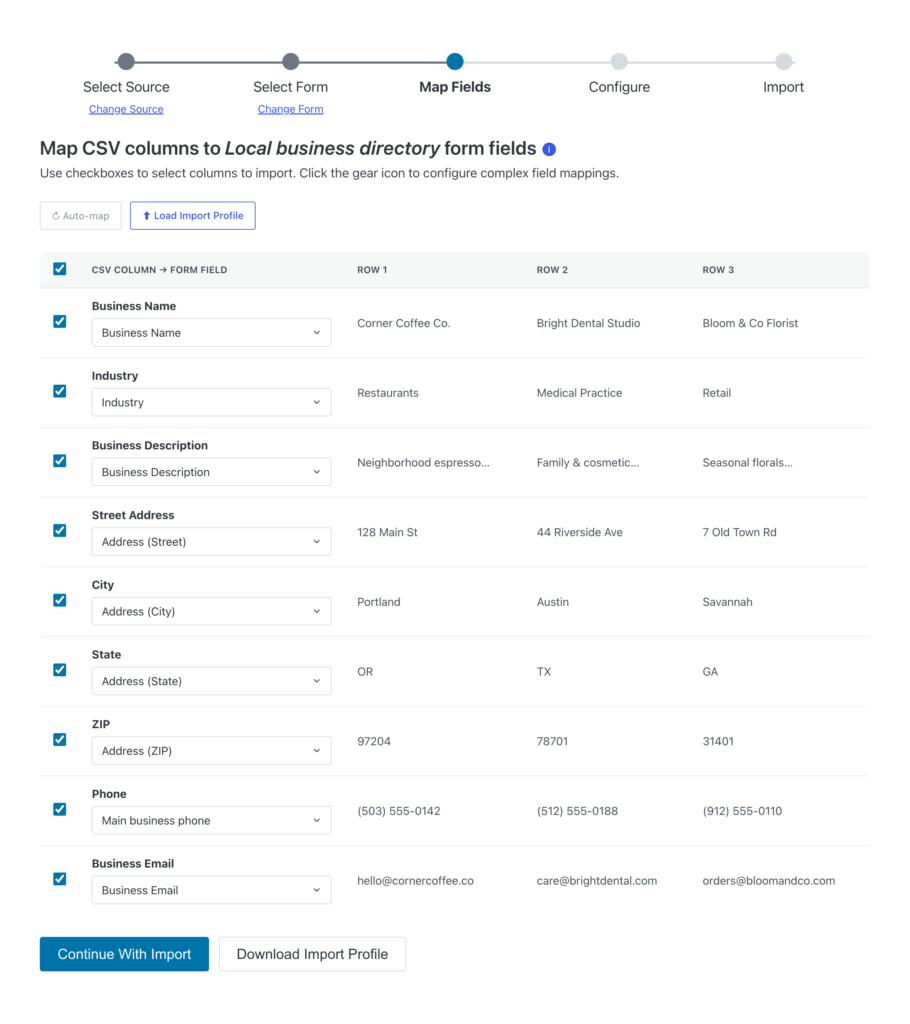
Upload any CSV, map your columns, and migrate entries to an existing Gravity Forms form—no reformatting required. GravityImport’s intuitive, guided import process makes for a hassle-free process.
- Comprehensive support for all Gravity Forms field types, plus entry metadata.
- Update existing entries by including an Entry ID column.
- Conditional rules to filter which rows import.

Save time with these powerful features
No form yet? No problem. Upload your CSV and GravityImport will automatically create a new form in Gravity Forms. Workflows stay intact with deep integration across the Gravity Forms ecosystem.
- Run feeds via compatible add-ons during import.
- Seamless compatibility with popular Gravity Forms add-ons.
- Import files uploaded to a Gravity Forms File upload field.
Imports without the technical hassle
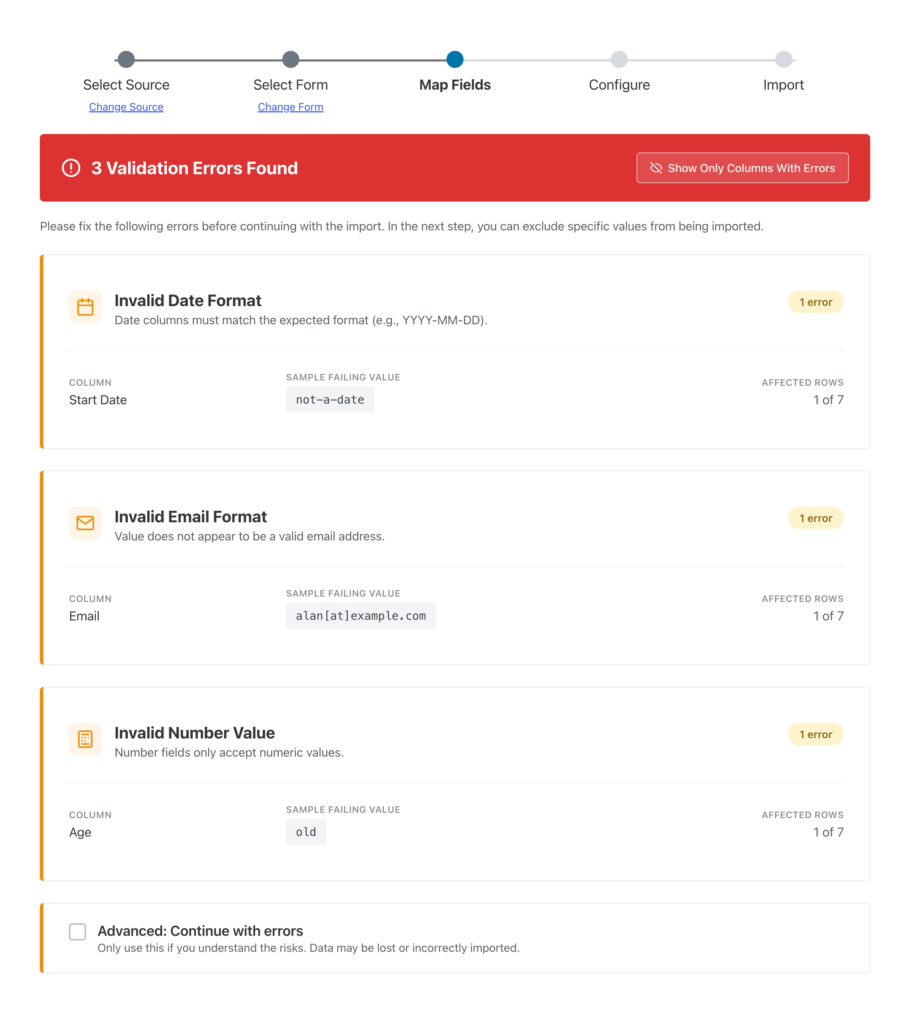
Move thousands of entries at once while maintaining data quality. The import process is optimized for performance and flexibility, letting you handle massive CSVs, catch invalid or incomplete data before it reaches your database, and fine-tune behavior with developer hooks and optional automations.
- Import large CSVs (thousands of entries) with high performance.
- Validate and block incomplete or invalid entries automatically.
- Export failed rows as a CSV for quick review and correction.


Trusted by thousands of businesses and developers



Not only does GravityKit have excellent support with fast response times, they continually add a lot of new features to their products.
See what people are saying.
GravityImport is trusted by developers, nonprofits, web agencies, entrepreneurs, and experienced WordPress users.
“Any apps that require you to create, read, update, or delete data can be built using Gravity Forms and GravityKit—you can literally throw together an MVP within a day!”
“Prior to discovering GravityKit, I had to hire developers, or build solutions that could take months. Then I would have to maintain that custom code for years. GravityKit allows me to focus on getting results today.”
“GravityKit is absolutely an essential plugin for our business. It gives us the ability to quickly and easily deliver effective and efficient web tools to our clients to meet their unique needs.”
“GravityKit has enabled me to get creative across a variety of websites, building powerful features without the need for custom PHP or complex coding. It’s saved me significant development time.”
“When we wanted to implement a certain feature, there was always a GravityKit plugin that did what we needed. It’s been a delightful experience! Instead of needing to write custom code for things we want, we are able to leverage the power of the Gravity Forms ecosystem.”
“I really like what you’re doing with Gravity Forms stuff. Your tools have helped me build better tools and improved functionality for my clients. Big fan!”
Simple pricing.
Infinite possibilities.
GravityImport is trusted by agencies, nonprofits, developers, and WordPress users all over the world.
Our complete Kit of essential tools for extending and enhancing Gravity Forms—everything you need to build powerful web apps and workflows.
- All GravityKit Add-Ons
- All GravityView Layouts & Extensions
- Perfect for heavy Gravity Forms users
- Priority support via email
- Save $713 (65%) vs. buying separately
Import entries from CSV files into Gravity Forms to transfer data, create new forms, or update existing entries.
- Support for all Gravity Forms field types
- Auto-create forms from CSV data
- Import thousands of entries with high performance
- Update existing entries
- Field validation during import

We proudly offer a 30-day money-back guarantee
We want you to be 100% happy with your purchase, or we’ll make it right.
Got questions? Ask away!
Got a question about GravityImport or any other GravityKit plugin? Our AI assistant can help you find answers instantly.

Ready to get started?
Import entries from CSV into Gravity Forms.
You will love our other Gravity Forms add-ons, too.

All Access Pass
Our complete Kit of essential tools for extending and enhancing Gravity Forms—everything you need to build powerful web apps and workflows.

GravityView Pro
Take GravityView to the next level with all premium layouts, extensions, and advanced functionality in one package.
GravityView
Display Gravity Forms entries on the front-end of your site and build powerful web applications.

GravityEdit
Quickly edit Gravity Forms entries inline to save time, reduce clicks, and streamline your workflow.

GravityCharts
Turn Gravity Forms entries into interactive charts and graphs to build dashboards, reports, and derive data-driven insights.

GravityActions
Update multiple Gravity Forms entries at once, send bulk emails, and streamline your workflow.

GravityCalendar
Turn Gravity Forms entries into dynamic calendars to showcase events, schedules, appointments, and more.

GravityExport
Export Gravity Forms entries to Excel, CSV, PDF, or Google Sheets, then share them with secure links or deliver them to cloud storage on a schedule.

GravityMath
Perform advanced calculations on Gravity Forms entries to display totals, averages, or build custom calculators.

GravityRevisions
Track, compare, and restore changes made to Gravity Forms forms and entries with a full version history.

GravityMigrate
The ultimate, all-in-one solution for migrating Gravity Forms data, including forms, entries, settings, Views, feeds, file uploads, workflows, and more.

GravityBoard
Display Gravity Forms entries on collaborative kanban boards: manage projects, coordinate with your team, and streamline your workflows.

GravitySearch
Search Gravity Forms entries across every form from one screen, with advanced filters, instant previews, and bulk actions.
Have more questions?
Here are a few common questions that help explain what is possible with the power of GravityKit.
You must log in to submit a review.