
Published
•
Updated
New Release: Introducing Entry Revisions 1.1
We’re pleased to announce the release of Entry Revisions 1.1! This new release allows you to add revisions for edits made using our Inline Edit add-on. This update goes hand in hand with our recent release of Inline Edit 1.5 so be sure to check that out if you haven’t done so already. Track Edits…


We’re pleased to announce the release of Entry Revisions 1.1! This new release allows you to add revisions for edits made using our Inline Edit add-on.
This update goes hand in hand with our recent release of Inline Edit 1.5 so be sure to check that out if you haven’t done so already.
Track Edits Made Using Inline Edit
Our Inline Edit add-on allows you to update existing entries faster by editing field values inline.
Prior to version 1.1, Entry Revisions did not track changes made using Inline Edit. That has changed with the latest release!
Here’s how to enable this new option:
Modifying the Default Settings
Head over to the Gravity Forms Settings page and click on the Entry Revisions tab. You’ll see a new option called “Default Inline Edit Behavior”. This allows you to add or ignore revisions made using Inline Edit.
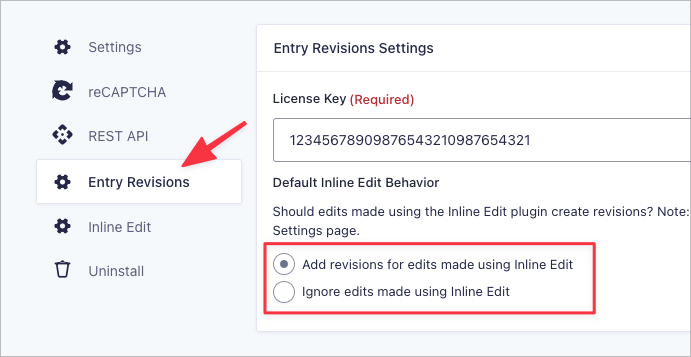
The default setting applies across all of your forms unless you override it in the form settings.
Modifying the Form Settings
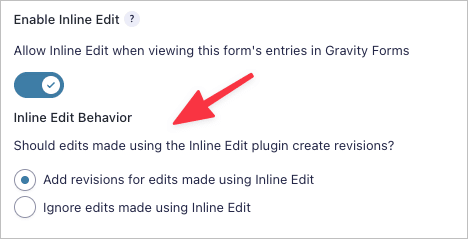
You can also change these settings per form. All you need to do is head over to the Form Settings page. Here you’ll see the same set of options, but this time the option you select only applies to that specific form.
Our development team has certainly hit the ground running in 2022 and we’re excited to maintain this momentum as the year progresses! If you’d like to learn more about this new feature, check out the article on our docs site.
Join Our Newsletter!📧🙌
✅ Helpful Gravity Forms content straight to your inbox
✅ Be the first to hear about new updates and releases

Get better at Gravity Forms, one email a week
New GravityKit releases, practical Gravity Forms tutorials, and subscriber-only discounts. One short email every week, unsubscribe anytime.
More articles
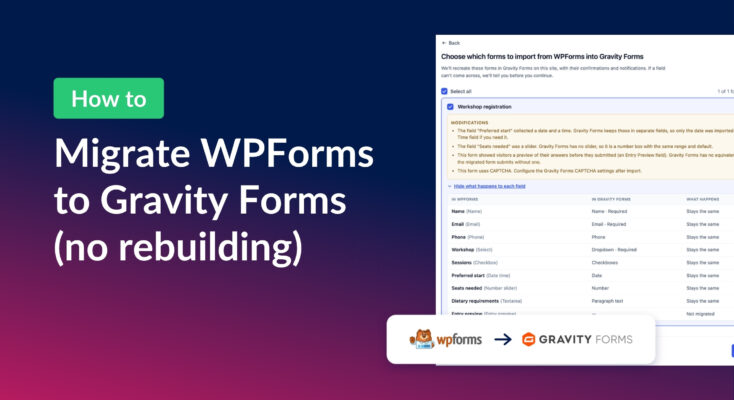
How to migrate from WPForms to Gravity Forms without rebuilding your forms
Move your WPForms forms into Gravity Forms with GravityMigrate, keeping their fields, conditional logic, confirmations, and notifications. Then bring your entries across with GravityImport.

Launch Log: Search Everything matches what fields show, steadier map searches, and security updates
GravityView’s Search Everything now matches the names fields display, and GravityView, Maps, GravityCalendar, and Dynamic Lookup get important security fixes.

How to build a WordPress client portal with Gravity Forms
Build a client portal on WordPress where each client logs in to see their profile, their requests, and the documents they’ve shared, using Gravity Forms and GravityView.