
Published
•
Updated
Gravity Forms Calendar 1.4 Released
GravityCalendar 1.4 adds Gravity Forms 2.5 compatibility, shortcode support in event titles and descriptions, Members plugin integration, and several display fixes.

Gravity Forms is close to releasing a shiny new user interface in Version 2.5. We’re excited about the changes and have updated our Gravity Forms Calendar plugin to be fully compatible with the upcoming beta.
In addition, we made a bunch of fixes and improvements under the hood to ensure that Gravity Forms Calendar remains the best way to display Gravity Forms events!
Full Changelog:
- Added: Compatibility with Gravity Forms 2.5
- Added: You can now use shortcodes inside the Event Title and Event Description feed settings
- Added: Integration with the Members plugin
- Modified: Start time will not be displayed for all-day events
- Fixed: GravityView widget not applying View settings (e.g., filter conditions) to events selected for display
- Fixed: Event tooltips not may not appear for themes or plugins using Bootstrap tooltips
- Fixed: Two-day events without start/end time would display as a one-day event
- Fixed: Scripts/styles are enqueued when their dependencies are not registered
- Fixed: Calendar preview throws an error when a feed has not yet been created
- Fixed: PHP error when deactivating Calendar in GravityView Extensions installer
- Fixed: Calendar grid looked bad with some themes due to CSS margins
Developer Updates:
- Updated FullCalendar scripts to 4.4.2
- Added:
gravityview/calendar/events/do_shortcodesWhether to process shortcodes in the event title and event description - Added:
gravityview/calendar/events/source_datafilter to define form entries that will be used as the basis for FullCalendar events - Added:
gravityview/calendar/optionsfilter to modify calendar options that are passed to FullCalendar - Added:
gravityview/calendar/eventsfilter to modify the events array that is passed to FullCalendar - Added:
gravityview/calendar/shortcode/render/element_attributesfilter to apply attributes to the calendar container element - Modified: Stopped using
gravityforms_edit_formscapability for access to Calendar settings. Now usinggravityview_calendarcapability. - Modified: Event description tooltips now use
.gv-tooltipand.gv-tooltip-arrowclasses instead of.gv_tooltipand.tooltip-arrow - Modified: Set
.gv-fullcalendar tablemargin to0to fix display issues for the nested tables in the calendar output - Fixed:
scripts/fullcalendar/locales_dir_urlfilter was not being applied

Get better at Gravity Forms, one email a week
New GravityKit releases, practical Gravity Forms tutorials, and subscriber-only discounts. One short email every week, unsubscribe anytime.
More articles

Launch Log: AI-assisted migrations and a stronger Prevent Direct Access setting
GravityMigrate can now hand a whole migration to an AI assistant, GravityKit MCP installs into Claude Desktop in one click, and GravityView tightens the Prevent Direct Access setting.
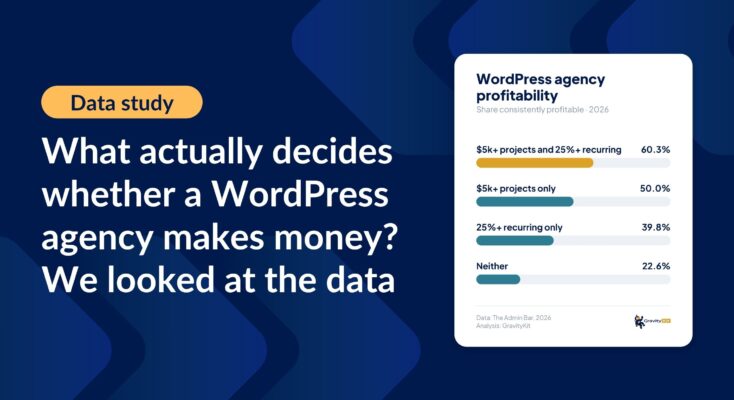
What actually decides whether a WordPress agency makes money? We looked at the data
Two 2026 surveys of 832 WordPress agencies, plus our own analysis of the raw data. What separates the profitable agencies from the rest, and what does not.

GravityMigrate 2.0: No-sweat WordPress form plugin migrations
Nobody wants to move forms between plugins. They want the site launched, the client onboarded, the referrals to stop falling through the cracks. GravityMigrate 2.0 makes moving forms effortless.