Last week we launched the new GravityView Pro. This week, Lookup fields can now narrow each other's choices, each Live Filter in a View gets its own Clear link, and fixes landed across the ’Kit. You'll also find the replay of this month's GravityKit Live!, plus a reminder that Black Friday Pro starts on Monday.
In this edition:
🌟 Product spotlight: Lookup fields that filter each other
⏯️ Replay: GravityView Pro demos and PDF for GravityView 2.0
🎁 Black Friday Pro: opens Monday, November 23
🤖 The Prompt: what WordPress 7.2 ships for AI
🧰 Updates to the ’Kit
🌟 PRODUCT SPOTLIGHT
Gravity Forms Dynamic Lookup
The Gravity Forms Dynamic Lookup add-on enables you to populate field choices dynamically with Gravity Forms entry data or WordPress users.
Dynamic Lookup v1.13.0 lets one Lookup field filter another. A Lookup field pulls its choices from entries on another form, and Filter by Field narrows them based on an earlier answer. That earlier answer can now come from a Lookup field too, so both dropdowns run on your own data.
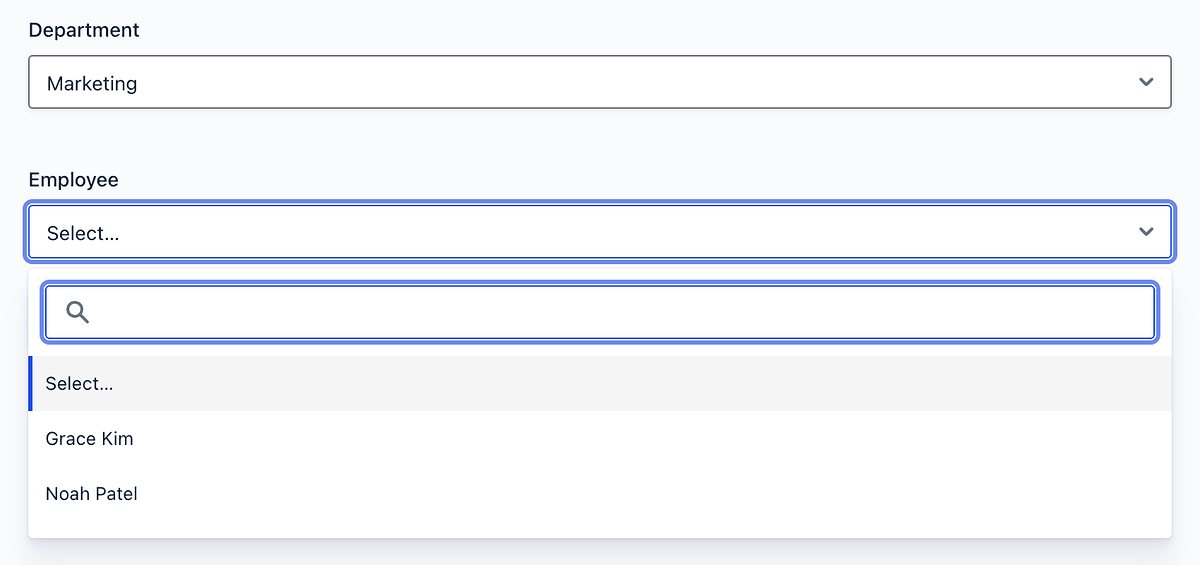
For example, on a staff request form, picking Marketing in the Department field means the Employee field shows only the people in Marketing.
Picking Marketing narrows the Employee field to two people
That means you can chain choices straight from your own entries: pick a client, then see only that client's projects. Any Lookup field that allows a single selection can do the filtering.
Lookup fields also get a new Message for Values No Longer in the Source setting. When someone edits an entry whose saved choice is gone from the source (for example, because the source entry was moved to the trash), they see your message, like "This employee has left the company."
GravityView Pro
Get Live Filters, Maps, DataTables, the Advanced Elementor Widget and every other Pro feature to build the app your process needs.
GravityView Pro v3.13.0 adds a Clear link next to each Live Filters heading while that filter has a selection. Visitors can empty one filter and keep the rest, instead of resetting everything. It's on for new filters, and you can turn it off per filter.
The new Clear link beside a Live Filters heading
In v3.14.0, Edit Window gets a "Text when editing has closed" setting. Once someone's window to edit has closed, they see your short text, such as "Editing closed", where the edit link used to be. Featured Tiers are also easier to set up, and reviews from Ratings & Reviews now match the Vantage theme.
These updates are part of our latest round of releases, which also includes updates to GravityView, GravityBoard, GravityCalendar, GravityCharts, GravityExport, GravityMath, GravityRevisions, and more.
On Tuesday, we hosted our November edition of GravityKit Live! Thank you to everyone who tuned in!
Casey and I demoed Live Filters, Connected Views, Edit Window, and Featured Tiers in GravityView Pro, and shared when Black Friday starts. Then Jake Jackson, the developer behind Gravity PDF, walked through PDF for GravityView 2.0, including Multiple Entries PDFs and maps in your PDFs.
Our Black Friday sale runs from Monday, November 23, to Tuesday, December 1. If you've been eyeing the new GravityView Pro features, or want every GravityKit product on one license, this is the week to do it.
Our deal: 25% off GravityView Pro, the All Access Pass, and the Lifetime All Access Pass, at every site count. The discount applies to your first payment on new licenses and upgrades.
WordPress 7.2 is due on December 8, and its first release candidate, the near-final test version, arrived on November 17. One AI-related piece didn't make the cut. The Secrets API, which would have given plugins an encrypted place to store passwords and AI service keys, was pulled from the release so its design can be reworked.
What does ship is groundwork for developers. WP 7.2 expands the Abilities API, WordPress's list of actions that other apps and AI tools are allowed to take on your site. The new abilities let those tools look up your content, users, and settings. The WordPress AI team is aiming for more in 7.3, including abilities that manage content. None of it adds an AI feature your visitors or editors will see.
The change you're more likely to notice is a controversial new /random/ address. Visiting yoursite.com/random/ sends people to a random published post, and it's on by default. Blog posts are included, and so is any custom post type with an archive, such as a testimonials or directory type you never linked in your menus. There's a filter to turn the feature off.
Elsewhere in AI, Anthropic launched Claude Sheets and Claude Whiteboards in beta on November 10. With Sheets, you describe the spreadsheet you need and Claude builds it, with tabs, formulas and drop-down menus, and your team can edit the same cells alongside it. When you need more, it exports to Excel or CSV.
A forecast built in Claude Sheets (image: Anthropic)
If your reports start as Gravity Forms entries, you can skip the CSV export. Connect Claude to your site with GravityKit MCP, then ask Claude to pull a form's entries and build the sheet from them.
🧰 UPDATES TO THE ’KIT
Here are the plugins that got updates since our last newsletter: