We've been shipping powerful features and we showed off the headliner live on GravityKit Live: unions in Multiple Forms, a new way to stack entries from different forms into a single View (more on that below). One more thing before we dive in. We're honored that Think:Kids, a program run out of Massachusetts General Hospital, uses GravityKit to power their community directory. Massachusetts is home for me, so seeing GravityKit at work in my own back yard makes this one extra special!
In this edition:
🌟 Product spotlight: Multiple Forms adds unions
⏯️ Replay: GravityKit Live (product feature demos)
💼 Case study: Think:Kids maps its community with GravityView
✍️ From the blog: New Account Connection feature
🧰 Updates to the ’Kit
🌟 PRODUCT SPOTLIGHT
GravityView – Multiple Forms Extension
Join related entries from different Gravity Forms forms, or stack entries from multiple forms into one combined View.
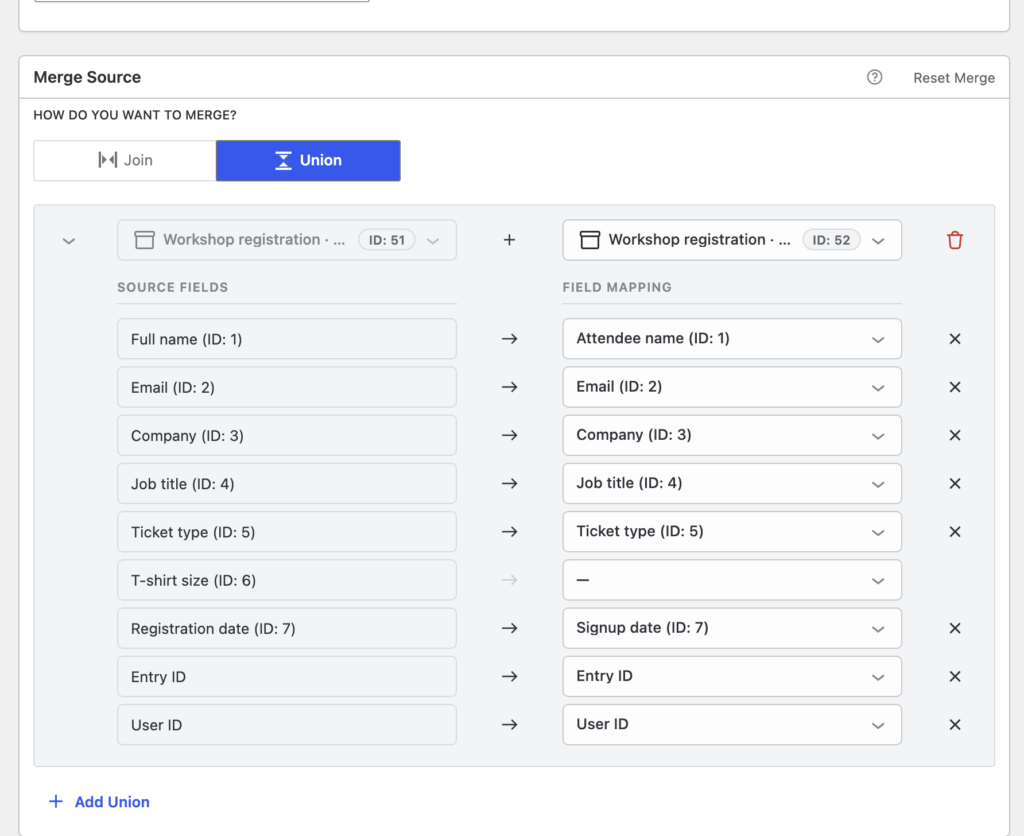
This one has been the most-requested Multiple Forms feature for years, and we're excited to finally launch it: unions. Until now, Multiple Forms could only join forms, matching related entries side by side using a shared field. A union stacks entries from different forms into one longer list, one row per entry, and the forms don't need anything in common.
Say you collect event registrations through two different forms, one for in-person attendees and one for virtual. With a union, all your registrations appear in a single table. You map each form's fields into shared columns once (GravityView auto-matches fields with the same name), and searching, sorting, and Single Entry pages treat the combined results like one data source.
Here's a clip from our recent livestream where Casey goes through unions in depth:
The user interface (merge editor) got a full redesign to go with it: each merge is now a collapsible block, switching between Join and Union takes one click, the form and field dropdowns are searchable, and you can join on several fields at once, such as first and last name. Unions require GravityView 3.3.0.
If you edit entries inline, this update is a nice quality-of-life jump. Paragraph fields that use the rich text editor now open with a proper formatting toolbar, so you get bold, italic, lists, quotes, and links instead of raw HTML tags, and your formatting is saved exactly as you see it. Submit with Cmd/Ctrl+Enter, cancel with Esc.
This release also restores Gravity Forms 3.0 compatibility for phone fields using the international format and text fields with input masks, which previously rejected every inline edit. Mask punctuation now fills itself in: type the digits and (555) 987-6543 comes out the other side. Under the hood, there's strengthened validation and security across inline editing, including stricter permission checks and file uploads that respect the field's allowed types and size limits.
These updates are part of our latest round of releases, which also includes updates to GravityView, the DataTables Layout, and other plugins.
On Tuesday, we hosted our August edition of GravityKit Live! Thank you to everyone who tuned in live, and for all the excellent questions you submitted.
We gave a demo of Multiple Forms unions, its most-requested feature: stack entries from several forms in a single View, no shared field required. We also showed multi-field joins, 3D maps in the Maps Layout, cascading dropdowns with the Dynamic Lookup field, and field comparisons across forms in Advanced Filtering.
Highlights:
04:22 WordPress 7.1: notes, responsive styling, and AI search
How Think:Kids maps its Certified Community with GravityView
Think:Kids, a program based at Massachusetts General Hospital (the original teaching hospital of Harvard Medical School), trains parents, educators, and mental health professionals in its evidence-based Collaborative Problem Solving® approach. To help families find that growing network, Lindsay O’Connell built an interactive map directory with GravityView and the Maps Layout. Certified members now keep their own listings up to date, and her team simply approves the changes.
"It has saved our team time because it enables our members to update their form directly, all we have to do is approve their entry. We no longer have to enter map coordinates, update their information manually, or create pins on the map."
Copying and pasting license keys is nobody’s favorite part of setting up a WordPress site. Find the email, open your account page, copy the key, paste it into wp-admin, repeat for every product and every site. Account connections put an end to that. Now you can link a WordPress site to your GravityKit account, and your licenses appear on the site, ready to activate with a click. No keys required. The feature is part of Foundation, the framework that powers GravityKit plugins, and it’s live now.
🧰 UPDATES TO THE ’KIT
Here are the plugins that got updates since our last newsletter:
Our new Account Connection feature enables you to connect your sites to your GravityKit account, making it easier to manage your license keys. We encourage you to connect your account now if you haven't already.
Until next time, Zack with GravityKit
Get this every Friday
One short email a week: new releases, practical Gravity Forms tutorials, and subscriber-only discounts.