Before the updates, a small ask: nominations for The WP Awards 2026 are open until September 16. If any GravityKit plugin has been useful to you this year, a nomination takes about a minute. No pressure either way.
This week we're opening early access to a GravityMigrate update that moves forms from other form plugins into Gravity Forms, GravityCalendar gets a widget for Elementor, and Views with Prevent Direct Access now stay out of your XML sitemap.
In this edition:
🚚 Early access: Move forms from popular form plugins into Gravity Forms
🌟 Product spotlight: A GravityCalendar widget for Elementor, and more
🤖 The prompt: An AI design agent that builds native block themes
✍️ From the blog: 9 client apps you can build with Gravity Forms and GravityKit
🧰 Updates to the ’Kit
🚚 EARLY ACCESS
Move your forms into Gravity Forms from seven other plugins
Until now, moving a site's forms from another plugin into Gravity Forms has meant rebuilding each one by hand: every field, every choice, every piece of conditional logic.
Pick the form plugin to migrate from in the new wizard
The next GravityMigrate release imports forms from popular form plugins such as Contact Form 7, Fluent Forms, Formidable Forms, WPForms, and WS Form, several at a time, and tells you which fields and settings didn't survive the trip instead of dropping them. It only moves the forms themselves (entries stay where they are).
We're opening early access to a small group before general release. Join the early access list to get it first.
Turn Gravity Forms entries into dynamic calendars to showcase events, schedules, appointments, and more.
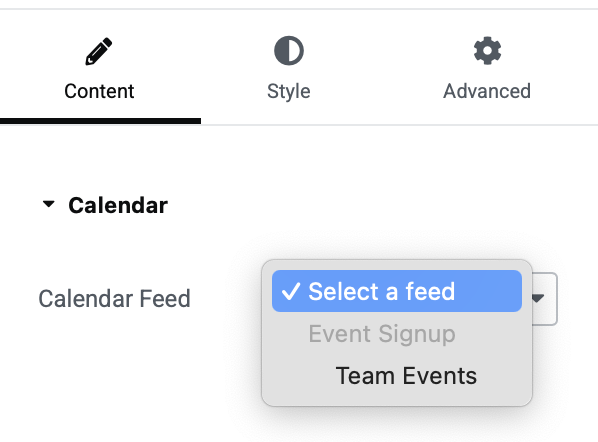
GravityCalendar 2.22.0 adds a calendar widget for Elementor. Drag it onto the page, pick a calendar, and it renders in the Elementor editor the way it will on the published page, with no shortcode to paste. You'll find it under the GravityKit category in the widget panel. Read our Elementor widget guide to see how it works.
Choosing a calendar in the new Elementor widget
You can also now override a calendar's height where you embed it, so the same calendar can be short in a sidebar and tall on a full-width page without creating a second one. Add a height attribute to the shortcode, use the Height field in the GravityCalendar block, or drag the Height slider on the widget's Style tab.
Also in this release: WordPress 7.1 compatibility fixes, and anyone who can edit a form can now edit its calendar feed, where previously only administrators could.
GravityView – Social Sharing & SEO
The Social Sharing & SEO extension for GravityView enables you to add social sharing buttons to Views and enhance the search engine visibility of Gravity Forms entries.
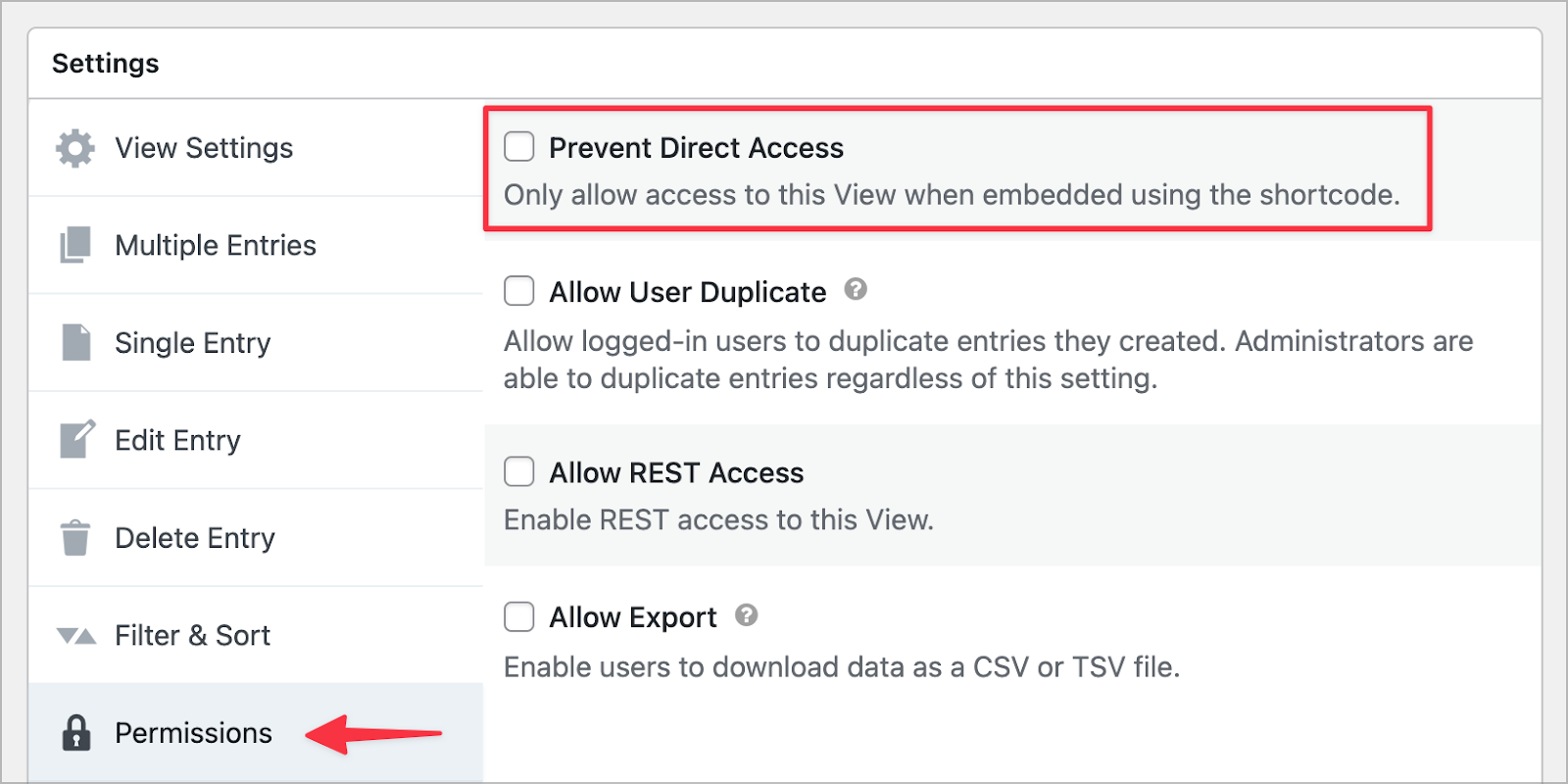
Views are a public post type, so a View's own URL ends up in your XML sitemap even when you only ever show that View embedded in a page, and search engines get pointed at a URL you kept off your site. Social Sharing & SEO 3.4 fixes that. Turn on Prevent Direct Access on a View and it drops out of your sitemaps, including the ones generated by Yoast SEO, Rank Math, All in One SEO, SEOPress, The SEO Framework, Slim SEO, Jetpack, and SmartCrawl.
Prevent Direct Access, under the View's Permissions tab
We wrote up how the exclusion works, where to find your Views sitemap to check it, and what to do for a View that should stay public but out of search results.
These updates are part of our latest round of releases, which also includes updates to GravityView, GravityEdit, GravityBoard, the DataTables Layout, and more.
An AI design agent that builds native block themes
Andy Peatling spent 17 years at Automattic, where he built BuddyPress and later led WordPress.com's AI site builder. This week The Repository profiled what he built after leaving: Miles, an AI design agent for WordPress, opened to everyone during WordCamp US last month. You answer a few discovery questions about the business and its audience. Miles turns the answers into a brief and several design directions, and the one you pick becomes an editable block theme!
Miles AI editing a block theme in the editor (image: Miles)
Everything Miles produces is native blocks, global styles, and theme settings: a standard block theme you own and can edit in the Site Editor, with no page builder and no proprietary layer underneath. Plenty of AI tools will generate a website for you. Far fewer generate WordPress block themes, in a form you can hand to a client or keep building on.
Peatling also raised a sobering point: when someone asks an AI agent to build a website, WordPress often doesn't come up. The agent usually decides to use Astro or Lovable instead. His fix? Miles, plus more documentation and worked examples of WordPress on the web for models to learn from. That part is on all of us who publish about WordPress.
Miles has a free plan, it runs inside wp-admin through a plugin or alongside Claude Code, Codex, and Cursor, and it currently supports its own themes plus Ollie, Spectra One, Frost, and others.
Heads up: We haven't used Miles internally, so this isn't an endorsement, just something we think is pretty cool and worth your attention if you build a lot of WordPress sites.
Client portals, member directories, admin dashboards, application review queues: here are nine tools that agencies and freelancers build for clients from Gravity Forms data, each with the products involved, the build notes, and a link to the full walkthrough. If you already manage Gravity Forms sites for clients, you're sitting on the data every one of these runs on.
🧰 UPDATES TO THE ’KIT
Here are the plugins that got updates since our last newsletter: