On the product side, GravityView picks up a screen reader accessibility upgrade along with a long list of fixes, and GravityCalendar's conditional logic gets a lot smarter. We also published a new data study, this time on ecommerce platform market share, and the results are genuinely interesting: WooCommerce leads the web, but Shopify leads the top tier.
In this edition:
🌟 Product spotlight: Accessibility improvements in GravityView
🤖 The Prompt: WordPress 7.1 takes shape, and Claude learns to browse
✍️ From the blog: WooCommerce powers 6.64% of the web
🧰 Updates to the ’Kit
🌟 PRODUCT SPOTLIGHT
GravityView
Display Gravity Forms entries on the front end of your site and build powerful web applications.
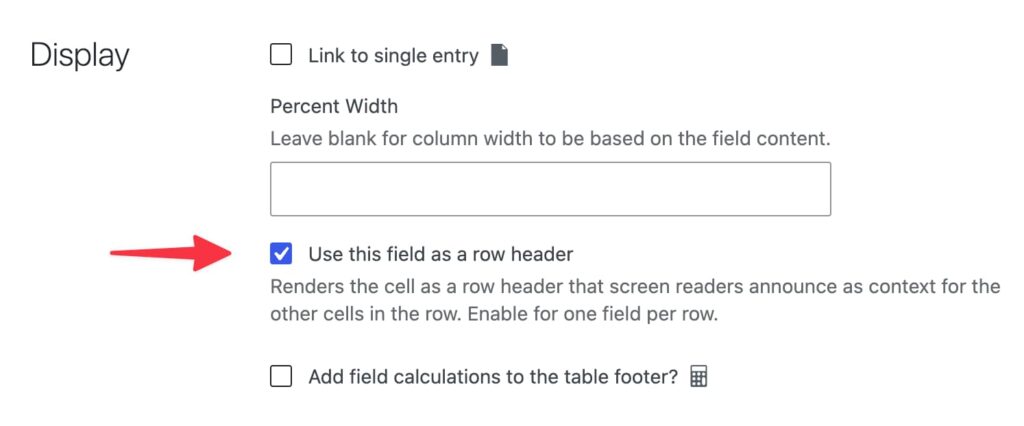
Here's the problem it solves: when a sighted visitor scans a table, the name in each row anchors everything else: find "Jane Smith," then slide across to her phone number. A screen reader user doesn't get that anchor. Moving down a column, they hear bare values ("555-0142... 555-0198...") with no indication of whose data it is.
Now you can check "Use this field as a row header" in the Display settings of the field that identifies each row, like a name. Screen readers then announce that field as context for every cell in the row: "Jane Smith, Phone, 555-0142." Nothing changes visually, but your tables become far easier to navigate with assistive technology, and it helps directories pass WCAG accessibility audits. That matters if you're building for government, education, or any public-facing site.
The new "Use this field as a row header" field display setting
GravityCalendar
Turn Gravity Forms entries into dynamic calendars to showcase events, schedules, appointments, and more.
GravityCalendar 2.18 upgrades conditional logic across the board. Choice-based filters now use a searchable dropdown that loads options as you scroll, so fields with hundreds of choices (including Dynamic Lookup and Populate Anything fields) stay fast and usable.
Filter values can now be field merge tags too, which means you can compare two fields of the same entry, or even a field on a joined form via the Multiple Forms extension. Set a condition like Registrations less than {Capacity:7} and your calendar only shows sessions with open seats. No custom code required.
A condition comparing two fields: Registrations less than the {Capacity:7} merge tag
These conditional logic upgrades come from the filtering engine shared across GravityKit products. The same improvements are already available in the Advanced Filter extension (v4.7.0) for GravityView, and they'll roll out to other products built on the same engine, like GravityCharts and GravityExport, in future updates.
These updates are part of our latest round of releases, which also includes updates to GravityCalendar, Dynamic Lookup, DataTables, and Maps.
WordPress 7.1 takes shape, and Claude learns to browse
WordPress 7.1 Beta 1 landed on July 15, and it's shaping up to be a good release for site builders. Responsive styling lets you define how a block looks at different screen sizes directly in the editor, and new interaction controls handle hover and focus states, both without writing custom CSS.
On the AI side, Beta 1 brings continued refinement of the Abilities API: improved querying, filtering, and input validation. The more interesting story is what's still being decided. A merge proposal would add the first three read-only core Abilities (reading settings, content, and users), giving AI agents a standard, permission-checked way to ask your site basic questions. Nothing would be exposed by default: settings and post types opt in through a new show_in_abilities flag.
The Abilities API's own component maintainer thinks the features need another release cycle of testing first, and that debate is still playing out. However it resolves, WordPress is actively working out how fast AI plumbing should move into core. The 7.1 final arrives August 19, timed with WordCamp US. Download the 7.1 beta here.
In other news, Anthropic gave Claude Code's desktop app a built-in browser. Claude can now open documentation, click through pages, and test web flows the same way it interacts with your local dev server.
Claude doing research on dog grooming via its own browser
What I like is the safety model: it runs in a clean, sandboxed profile with none of your saved logins, and the first time it tries to take an action on any site, you decide whether to allow it. If you build or maintain WordPress sites, an agent that can open your site and check its own work is a practical step forward.
As of May 2026, WooCommerce is detected on 6.64% of all measurable web origins (mobile sample), and Shopify on 4.76%. They are the two largest ecommerce platforms by a wide margin. The next platform, Wix eCommerce, sits at 1.48%. That whole-web ranking does not hold everywhere, though. Among the world’s most-visited sites, the order flips.
GravityBoard is a self-hosted voting and Kanban board for Gravity Forms entries, while Canny is a hosted SaaS feedback platform with a native roadmap. Compare data ownership, voting, pricing, and see which fits how you work.
🧰 UPDATES TO THE ’KIT
Here are the plugins that got updates since our last newsletter:
We're publishing more original research about how much of the web runs on WordPress, how that share is changing, and what actually powers WordPress sites. If you're interested, see our WordPress statistics hub page.
Until next time, Zack with GravityKit
Get this every Friday
One short email a week: new releases, practical Gravity Forms tutorials, and subscriber-only discounts.