If you were in Phoenix for WordCamp US this week, we're a little jealous. How did you handle the heat? The conference wrapped with WordPress 7.1 "Mary Lou" launching live on stage, and with Matt Mullenweg arguing in his closing keynote that tech needs to get simpler: fewer, better plugins, cleaner code, easier to use. Speaking of which: we shipped a number of quality-of-life releases this week (more below). Plus, the Gravity Summer Sale enters its final weekend.
In this edition:
🌟 Product spotlight: A fresher filter builder, enhanced Math Summaries, and WordPress 7.1 fixes
🌞 Last call: the Gravity Summer Sale ends Monday
🤖 The Prompt: WordPress 7.1 and MM's case for a simpler WordPress
✍️ From the blog: Google Sheets export, announced and compared
🧰 Updates to the ’Kit
🌟 PRODUCT SPOTLIGHT
GravityView – Advanced Filter Extension
Apply smart conditional logic for enhanced personalization and finer control over which Gravity Forms entries are displayed in a View.
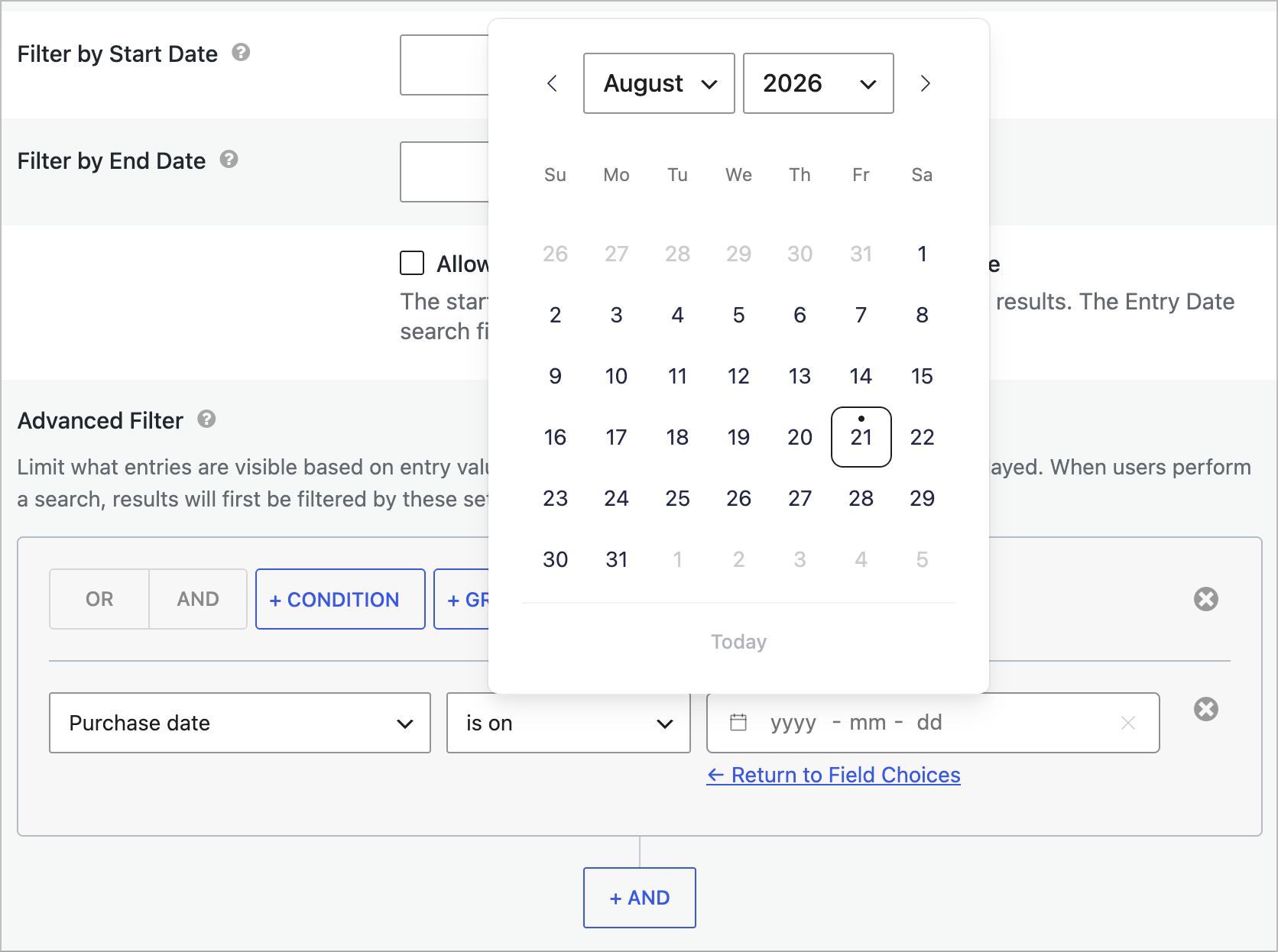
Version 4.7.1 gives the conditional logic builder a serious usability upgrade. Date filters now have a "clear" icon so you can empty a date without having to select a new one, and the date picker's calendar and clear controls sit right inside the field, so you can tell what a filter does at a glance.
Advanced Filter: improved date picker
Accessibility improved too: keyboard navigation now reaches every part of the date picker, and screen readers announce each choice field as a labeled group. Dynamic Lookup filters also plug into the Lookup plugin's own choice API when available (Gravity Forms Lookup Field 1.8 or newer).
GravityMath
Perform advanced calculations on Gravity Forms entries to display totals, averages, or build custom calculators.
GravityMath 2.12.0 makes the Math Summary widget much easier to read. When you group a summary by a choice field, it now displays choice labels instead of stored values, so a satisfaction report reads "Very satisfied: 5 responses" instead of a cryptic "5: 5".
New checkbox in the GravityMath Summary widget settings
If you were relying on the raw values, the new "Use values for labels" checkbox (or the use_values shortcode attribute) brings back the old behavior. The setting is available on the View widget, the block, and the shortcode.
GravityView
Display Gravity Forms entries on the front-end of your site and build powerful web applications.
GravityView 3.3.2 is our WordPress 7.1 readiness release! It fixes entry approval in the Gravity Forms Entries list on 7.1, where the approval toggle stopped responding, and restores confirmation messages after bulk approval actions.
It also fixes an important Edit Entry issue: changes are no longer ignored (and stored values no longer cleared) on forms where a field with "Hidden" visibility controls conditional logic. If you're planning the jump to WordPress 7.1, update GravityView first.
These updates are part of our latest round of releases, which also includes updates to the DataTables and Maps layouts, Dashboard Views, Block MCP, the Gravity Forms Event Field, and more.
The first-ever ecosystem-wide sale wraps up on Monday, August 24. Gravity Forms, GravityKit, and certified developers across the ecosystem are all running deals until then.
Our deal: 50% off every GravityKit annual license with code SUMMER26, from individual add-ons to All Access.
WordPress 7.1 "Mary Lou" shipped on August 19, released live on stage during the closing session of WordCamp US in Phoenix. The headline features answer two of the oldest items on every site builder's wish list: responsive styling and hover states you can set right in the editor, no CSS required. Add a new Tabs block, an audio Playlist block, and a rebuilt media workflow, and 7.1 is a genuinely useful release rather than a maintenance one. The official announcement has the full tour.
In his closing fireside chat at WordCamp US 2026, Matt Mullenweg argued that "tech needs to be simpler": cleaner HTML output, fewer-but-better plugins in the directory, and a revived 2007 experiment called WordPress Piplets (an entire micro-app in a single self-modifying PHP file—no packages, no database!). His reasoning is AI-flavored: as models get smarter, they produce simpler, more self-contained solutions, and platforms that embrace that will thrive. We think that's the right read, and it's a notable shift from the AI feature race of the past two years.
Before you update: 7.1 now always runs the block editor in an iframe, which can affect older custom blocks, so test on a staging site first (and make sure you update GravityView to 3.3.2 as well). If you have an hour, the full fireside chat is worth your time.
There are four ways to export Gravity Forms entries to Google Sheets, and one of them now keeps the sheet in sync with your form. Here's how each works, what it costs, and when to use it.
GravityExport now exports Gravity Forms entries straight to Google Sheets and keeps the spreadsheet in step with your form. New entries, edits, and deletions all reach the sheet, and numbers, dates, and currency arrive as real values. Available in GravityExport 1.15.0.
🧰 UPDATES TO THE ’KIT
Here are the plugins that got updates since our last newsletter:
In case you missed it: our latest case study shows how Think:Kids, a program at Massachusetts General Hospital, maps its Certified Community with GravityView, and we have another great story in the pipeline 😉
Want your site featured next? Share your story and we'll be in touch.
Until next time, Zack with GravityKit
Get this every Friday
One short email a week: new releases, practical Gravity Forms tutorials, and subscriber-only discounts.