An AI assistant can now build and run your GravityBoard boards: describe the board you want, and it sets up the lanes and cards for you. Our latest case study shows how Be There Local runs a nonprofit events calendar and map built on GravityKit, plus we take a look at what's coming in WordPress 7.2. Finally, GravityKit Live is next Tuesday, so there’s still time to save your spot 😉
In this edition:
🌟 Product spotlight: Boards an AI assistant can build
🎙️ GravityKit Live: Visual Merge Tags, GravityMigrate 2.0, and more
💼 Case study: A city-by-city nonprofit events calendar
🤖 The Prompt: Meet Ipsum, a quieter default theme for WordPress 7.2
✍️ From the blog: Move from WPForms to Gravity Forms
🧰 Updates to the ’Kit
🌟 PRODUCT SPOTLIGHT
GravityBoard
Display Gravity Forms entries on collaborative kanban boards: manage projects, coordinate with your team, and streamline your workflows.
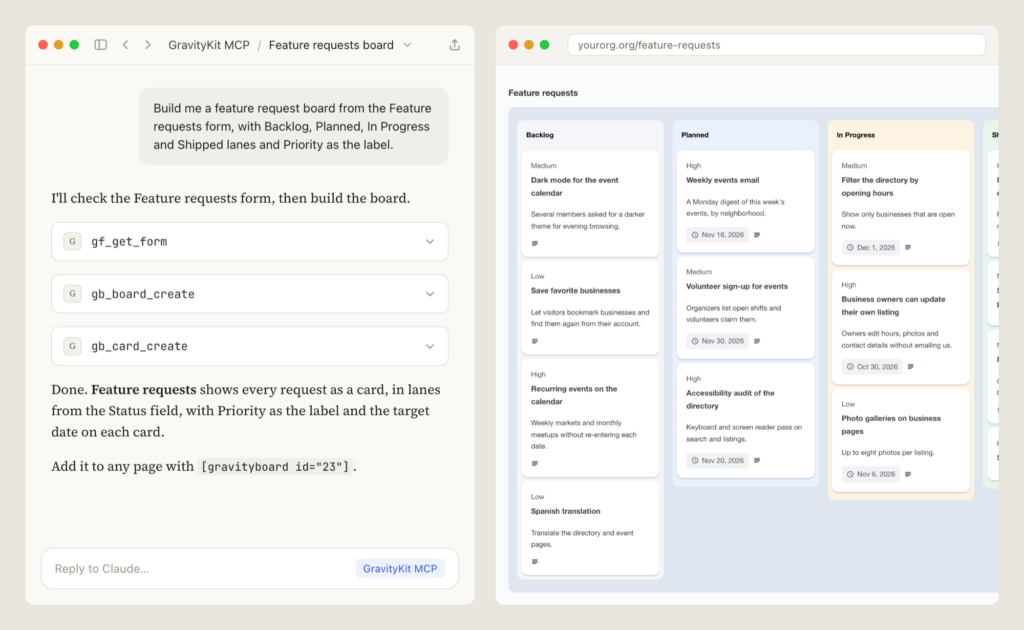
GravityBoard 1.6.0 lets an AI assistant build and run your boards. Connect Claude or another assistant to your site with the GravityKit MCP, describe the board you want, and it creates the board, sets up the lanes, and adds, edits, and moves cards for you. Our guide to building boards with AI walks through the setup.
Claude building a feature request board through MCP
The assistant works as the WordPress account it signs in with, so it can only do what that account is allowed to do on each board. Card descriptions got more flexible too: choose “Custom text (with merge tags)”, write the description once with merge tags like {all_fields}, and each card fills it in from its own entry.
GravityEdit
Quickly edit Gravity Forms entries inline to save time, reduce clicks, and streamline your workflow.
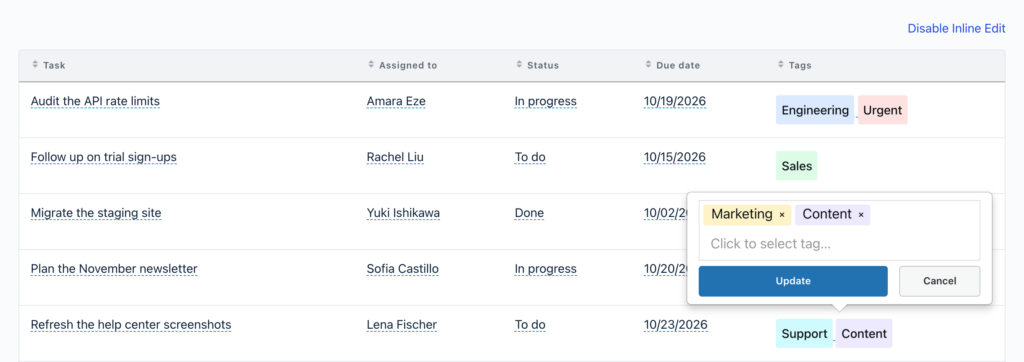
GravityEdit 2.13.0 adds inline editing for Entry Tags fields in your GravityView Views. Turn on inline editing, click a Tags cell, and add or remove tags right there in the table, without opening the Edit Entry screen.
Editing a task’s tags inline in a GravityView table
It needs Entry Tags 1.5.0, which also fixes searching Views by tag. Both releases include security fixes, so we recommend updating soon.
These updates are part of our latest round of releases, which also includes updates to GravityView, GravityCalendar, the DataTables Layout, Dashboard Views, Dynamic Lookup, GravityMigrate, and more.
Visual Merge Tags and GravityMigrate 2.0, plus a GravityView Pro sneak peek
Join us on Tuesday, October 20 at 11am ET for another installment of GravityKit Live! Apart from Visual Merge Tags and GravityMigrate 2.0 (two exciting releases in their own right), Casey and I will demo two brand-new features coming to GravityView Pro that change how visitors find things in your Views, and where they can go once they do.
Can't make the live show? Register anyway and we'll send you the recording afterward.
How Be There Local built a city-by-city nonprofit events calendar with GravityKit
Be There Local helps people in Central Ohio find nonprofit events in their own town. MaryAnn Davis, a volunteer who taught herself web design for the project, built it with Gravity Forms, GravityView, and GravityCalendar: a visitor types their city and gets that community’s own calendar, map, and list of events. She approves each submitted event before it goes live, and the site now covers several communities.
Meet Ipsum, a quieter default theme for WordPress 7.2
WordPress 7.2, the last major release of 2026, reaches Beta 1 on Tuesday, October 20, the same day as our livestream. RC1 follows on November 17 and the final release on December 8, according to the WordPress Developer Blog’s October roundup. The headline is Ipsum, the first default theme that isn’t named after a year.
Ipsum, the new default theme in WordPress 7.2
Ipsum is worth a closer look. It’s a deliberately minimal blog theme: quiet pages, dotted underlines, and a handful of typefaces, with headers, heroes, and sidebars there when you want them and out of the way when you don’t. Its style variations go further than most, “re-inking” the whole page, images included, and the team says every combination meets WCAG AA accessibility standards, not just the default.
The rest of 7.2 leans the same way: more design control, less custom CSS. The roadmap lists expanded block supports and brings form elements into Global Styles. The Gutenberg plugin, where these features are built first, has already switched on backgrounds, shadows, borders, and text columns for nearly every core block. From the 20th, you'll find 7.2 Beta 1 on the WordPress.org beta releases page.
Moving off WPForms used to mean rebuilding every form by hand. This guide shows how GravityMigrate recreates your WPForms forms in Gravity Forms, with their fields, conditional logic, confirmations, and notifications, and how to bring the entries across with GravityImport.
🧰 UPDATES TO THE ’KIT
Here are the plugins that got updates since our last newsletter: