Two quick things before we dive in. I was on The WP Minute this week to talk through AI workflows in WordPress and our Block MCP (a free plugin we built to let AI manage your WordPress site, reliably). Give it a watch if you want a look at how we're putting AI to work day to day. We also published a page builder market share study digging into which page builders WordPress sites are actually built with, and how that picture is shifting in 2026 (link below!).
In this edition:
🌟 Product spotlight: Enhancements to GravityView's Maps Layout
🤖 The Prompt: WooCommerce goes agent-ready (and why it matters)
✍️ From the blog: Elementor powers 32.7% of WordPress sites in 2026
🧰 Updates to the ’Kit
🌟 PRODUCT SPOTLIGHT
GravityView – Maps Layout
Display entries on an interactive Google Map with geolocation functionality.
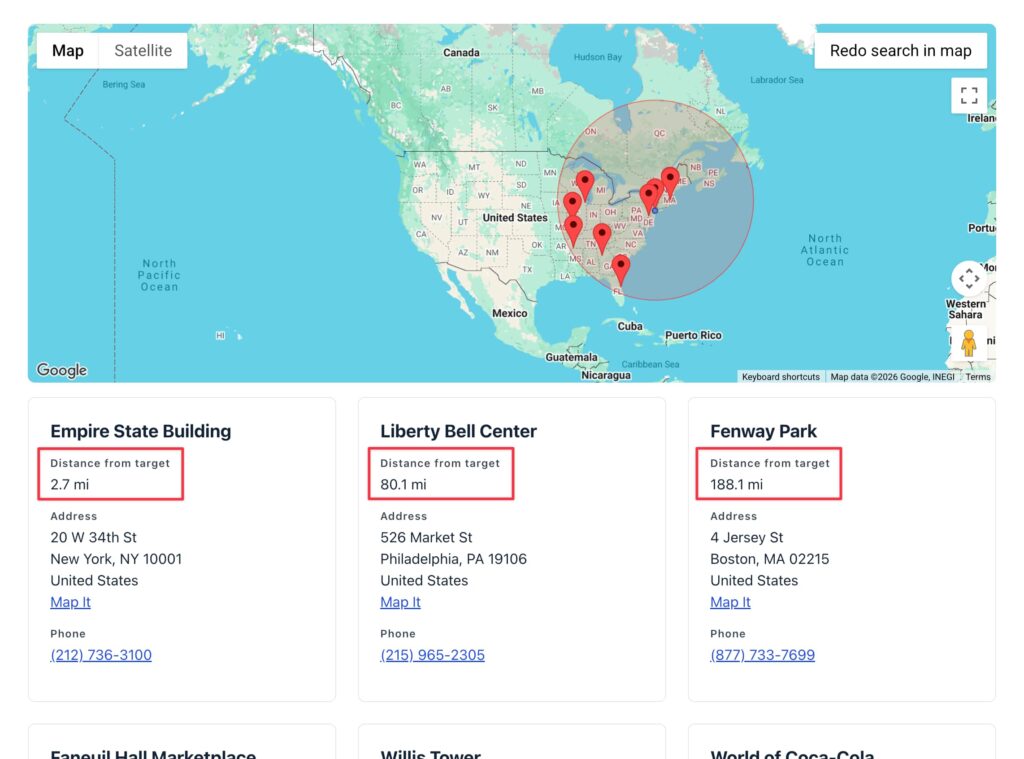
When someone searches a map directory by location, they're usually asking one question: what's closest to me? The latest Maps Layout update answers it directly. The GravityView Maps Layout now includes a Distance field, so every result can show exactly how far it is from the searched location, in miles or kilometers.
Pair that with the new sort by distance View setting and your radius results reorder themselves nearest-first, automatically. We can see this being a game-changer for anyone running a store or location finder, a member or agent directory, a real estate listing, or any "find the closest X" app.
These updates are part of our latest round of releases, which also includes updates to GravityCharts, GravityImport, GravityView, and more.
WooCommerce, the ecommerce plugin we all know and love, has been experimenting with Model Context Protocol (MCP) support since last fall, and this week's version 10.9 matured it: a rebuilt set of native "abilities" that describe store operations as real business actions (look up products, read and update orders, add order notes) instead of thin wrappers around REST endpoints, now reaching across more than 20 official extensions.
In plain English: Any MCP client (e.g., Claude Code, Cursor) can now query and update products and orders directly.
When the world's largest ecommerce platform invests this much in MCP, that's not a novelty. It's a signal of where the whole ecosystem is heading. It builds on the WordPress Abilities API, the shared standard that lets plugins describe what they can do in a way both people and AI can understand. More plugins adopt it every month.
We've been building on that same foundation. GravityKit MCP, our free MCP server, lets you manage Gravity Forms and GravityView (v3.0 or newer) by telling your AI assistant what you want. Forms, entries, feeds, Views: you can build an entire web app from a single prompt. I recorded a short segment walking through it:
The pattern is clear: With the AI foundations released in v6.9 and v7.0, WordPress is quickly becoming a platform that AI agents can operate, one plugin at a time.
In our WordPress market share study we analyzed the HTTP Archive dataset to examine the growth and decline of the most-used CMSes. This companion piece zooms into the WordPress slice by looking at the page builders WordPress sites are actually built with. The numbers below come from the HTTP Archive Tech Report API and reflect the April 2026 crawl. Elementor reaches 32.7% of WordPress sites. WordPress Block Editor 20.6%, wpBakery 8.5%, Divi 5.7%.
🧰 UPDATES TO THE ’KIT
Here are the plugins that got updates since our last newsletter:
One more thing before you go: if you manage entries across a lot of forms, take a look at GravitySearch. It's our newest add-on, and it puts every Gravity Forms entry on a single screen, with a visual filter builder, inline previews, and bulk actions. We only just released it, so we'd love to hear what you think!
Until next time, Zack with GravityKit
Get this every Friday
One short email a week: new releases, practical Gravity Forms tutorials, and subscriber-only discounts.