GravityView 3.0 beta 2, Block MCP, and WordPress 7.0
Hey there,
Two big releases this week. GravityView 3.0 beta 2 just landed, and the headline feature? Frontend bulk actions (more info below!). We also officially open-sourced Block MCP, our WordPress MCP server. It's been quietly running our own AI content workflows for weeks, and now it's free for anyone to use. If you've been waiting for an AI tool that can actually edit existing WordPress posts at the block level without breaking them, this is it.
In this edition:
🌟 Product spotlight: GravityImport gets reusable field mappings, GravityView 3.0 beta sees bulk actions on the frontend
🤖 The prompt: WordPress 7.0 is here (what it means for you)
✍️ From the blog: Casey shares 7 important takeaways from the Ahrefs Evolve conference in Singapore
🧰 Updates to the ’Kit
🌟 PRODUCT SPOTLIGHT
GravityImport
Import entries from CSV files into Gravity Forms to transfer data, create new forms, or update existing entries.
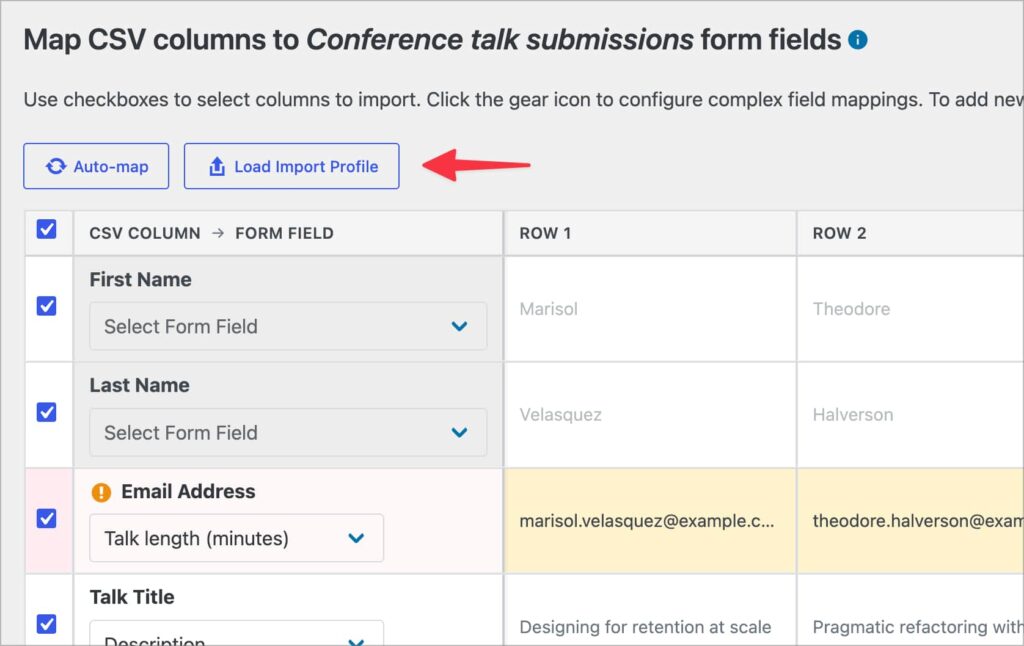
This update to GravityImport introduces the ability to save your field mappings and import options as a downloadable configuration file. You can load that file on subsequent imports to restore the field mappings without configuring them again from scratch—useful for recurring imports against the same form.
Imports can now also be triggered from the command line via WP-CLI, making it easier to script bulk operations or integrate imports into a deployment workflow. A new “Enable Background Processing” setting (under GravityKit > Settings > GravityImport) lets you turn off background imports site-wide and force synchronous processing instead.
GravityView 3.0 beta 2
The biggest structural upgrade for GravityView in years, v3.0 is an exciting upgrade that is currently still in beta.
GravityView 3.0 beta sees frontend bulk actions for the Table layout. Visitors with the right permissions can select multiple entries directly from a View and run actions against them without leaving the page.
A new Bulk Actions widget adds row checkboxes to table Views and a toolbar of actions you choose to enable, including approve, disapprove, reset approval, delete, edit, and export!
GravityView 3.0 is in active development with more features still to come. Learn how to try the current beta and share feedback by reading the GravityView 3.0 beta announcement.
WordPress 7.0 is live: here's what it means for you
This week's big WordPress story is the release of WordPress 7.0 ("Armstrong"). The headline feature is native AI integration. WordPress 7.0 introduces the Abilities API, a standardized way for plugins and themes to register capabilities that AI agents can discover and call.
There's also a new Connectors screen that centralizes external AI service connections (Anthropic, OpenAI, Google, and others) in one place, instead of every plugin shipping its own settings UI.
The most notable thing missing: real-time collaboration was removed from the release on May 8, after issues surfaced during testing—Matt Mullenweg made the call. It'll ship in a future release once the implementation is stable enough.
Other things worth knowing: a new DataViews-driven admin redesign, two new blocks (Icon and Breadcrumbs), viewport-based show/hide on every block (so you can hide things on mobile without custom CSS!), per-block custom CSS, font management now available to classic themes, and visual revisions for design history.
What this means for you: WordPress is becoming an environment where AI agents do real work inside your site, not just generate text you paste in. If you're running client sites or your own, expect more plugins (and core itself) to expose their capabilities to AI tools in the near future. We're investing in that future, too! First with GravityKit MCP, and more recently with Block MCP, which gives AI agents a way to create and update content at the block level without breaking your page structure.
Casey recently spent two days at Ahrefs Evolve in Singapore, a conference that pulls in digital marketing professionals from around the world to talk AI, SEO, content, and brand building. While much of the content was aimed at in-house marketing teams and agencies with dedicated SEO departments, Casey had a secret agenda: he wanted to know what would actually matter for the people building and running WordPress sites! He shares the 7 takeaways he found most impactful.
We released Block MCP as an open-source project. It’s the WordPress MCP server we built to let AI agents edit our own posts and pages without breaking them, and it’s now available for any WordPress user who has hit the same wall! Block MCP enables your AI agent to make surgical edits to your page content: add rows to a comparison table, move headings further down the page, swap CTA buttons, and insert new paragraphs inside a group.
🧰 UPDATES TO THE ’KIT
Here are the plugins that got updates since our last newsletter:
Want to try GravityView 3.0 beta for yourself? It's an opt-in release, and we'd love your feedback while we shape the stable version. Opt in and install the beta.
Until next time Zack with GravityKit
Get this every Friday
One short email a week: new releases, practical Gravity Forms tutorials, and subscriber-only discounts.