Zack and Casey will be in Tempe, Arizona for PressConf from April 6–10. Whether you're a WordPress user, developer, agency, or just want to say hi, we'd love to grab a coffee and chat.
We had a fun GravityKit Live! session this week—packed with practical demos and thoughtful viewer questions. If you couldn’t make it, it’s definitely worth checking out. We’re also excited to share a new case study featuring Cory Robbins from West Fork School District. Their team uses Gravity Forms and GravityKit to power critical administrative operations, giving a real-world look at what’s possible with our plugins!
In this edition:
🌟 Product spotlight: GravityView v2.55 sees new admin column
💼 Case study: How West Fork School District powers critical operations with GravityKit
⏯️ GravityKit Live! replay: WP 7.0, Dev Tools, product updates, and more
✍️ From the blog: How to build a vendor service request portal
🧰 Updates to the ’Kit
🌟 PRODUCT SPOTLIGHT
GravityView
Display Gravity Forms entries on the front-end of your site and build powerful web applications.
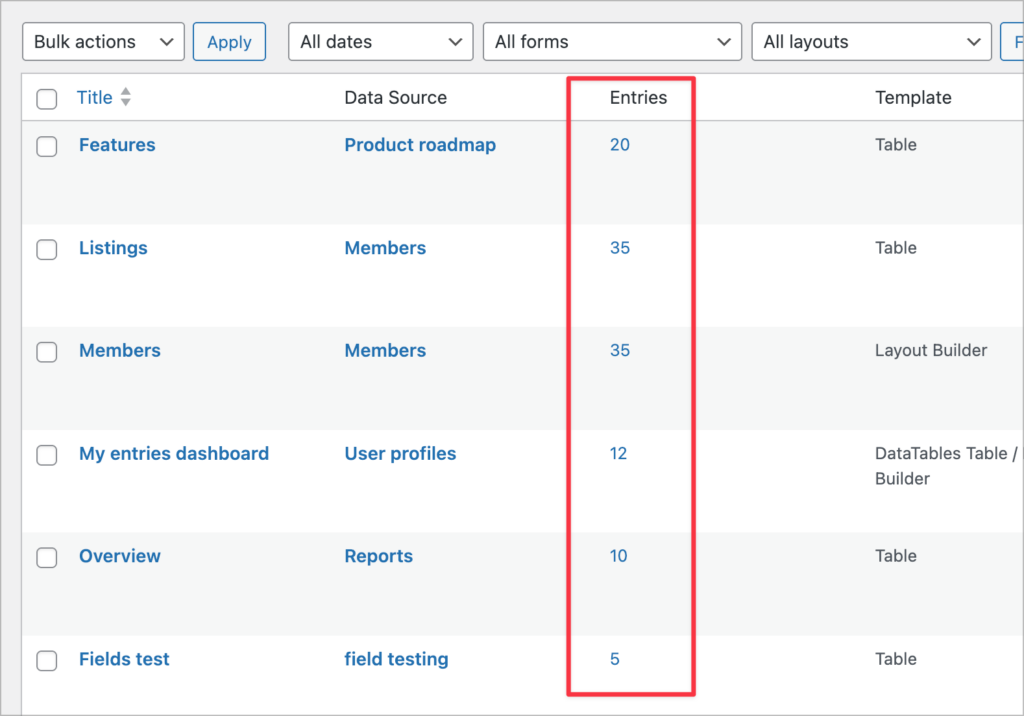
GravityView v2.55 includes a new Entries column in the admin Views list, so you can now see how many entries each View's data source contains without having to click into each one. It's a small change, but one that makes managing multiple Views much faster, especially if you're working with a lot of forms!
A note for developers: GravityView v2.55 deprecates 40+ legacy gravityview_* hooks in favor of modern namespaced equivalents. The old hooks still work for now, but we recommend updating your code when you get a chance. See the full changelog for the complete mapping of old hooks to new ones.
These updates are part of our latest round of releases, which also includes updates to GravityCharts, GravityCalendar, GravityMath, and DataTables.
How West Fork School District powers student registration, job listings, and applicant tracking with GravityKit
Cory Robbins, a musician turned technologist, runs special projects for West Fork School District. Using GravityKit, he’s built a student registration and enrollment system now in its third year, and a district-wide forms hub and job board that uses over a dozen GravityKit products.
GravityKit has enabled West Fork to bolster operations across the district, and replace expensive third-party tools with WordPress-based systems that are affordable, more capable, and easier to manage.
"GravityKit has saved me countless hours of work, provided incalculable inspiration, and made a much higher quality of product the standard for our district tools. It has given me the ability to create tools that reshape the way we operate, without being required to spend months on custom builds."
Thank you to everyone who tuned in to GravityKit Live! this week. For the first time ever, we had a guest on the show: Dave from Gravity Wiz, who walked us through an in-depth demo of their new Dev Tools add-on.
If you spend any time testing or debugging in Gravity Forms, Dev Tools is a must-have. It’ll save you time, reduce headaches, and make your workflow much smoother.
We also shared some exciting product updates, including scheduled reporting, background processing, and a new voting system coming soon to GravityBoard and GravityView. And as always, you all brought great questions throughout the session.
I’ve linked some of the highlights below, and you can watch the full replay on our YouTube channel.
If you manage service requests for vendors, clients, or tenants, you know how quickly things can spiral when everything runs through email. In this tutorial, Casey shows you how to build a fully functional vendor service request portal on your WordPress site using Gravity Forms and GravityView Pro. Vendors will be able to submit service requests, track their status, edit details, and even cancel requests, all from the front end. Meanwhile, admins get a powerful dashboard to manage incoming requests, update statuses, and attach completion reports.
🧰 UPDATES TO THE ’KIT
Here are the plugins that got updates since our last newsletter: