We’ve got a lot to share this week. We’re excited to announce the release of two major features: background processing for imports, and scheduled exports. We’re also hosting a new GravityKit Live! this month with special guest Dave Smith of Gravity Wiz. And if you have two minutes, take our quick survey to earn $20 in account credit 💸
In this edition:
🌟 Product spotlight: GravityExport sees scheduled reporting
🎙️ GravityKit Live: Join us live for product updates and a special guest
📝 Survey: Help us build better by completing this 2-minute survey
✍️ From the blog: Exporting Gravity Forms to PDF (4 methods)
🧰 Updates to the ’Kit
🌟 PRODUCT SPOTLIGHT
GravityExport
Export Gravity Forms entries to Excel, CSV, or PDF and share them instantly with secure download links.
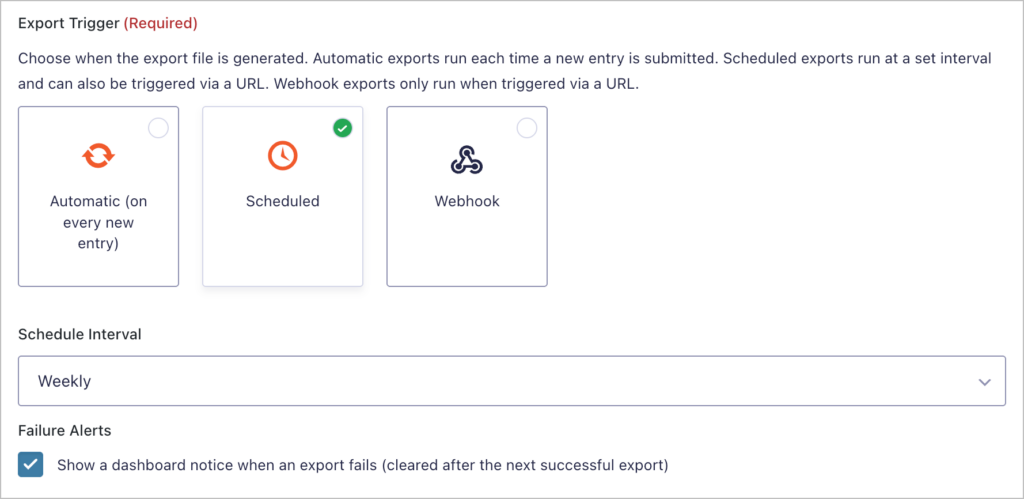
GravityExport v1.7.0 supports scheduled exports for Save feeds, with options for hourly, twice daily, daily, weekly, or custom intervals. This means you can set up recurring reports that run automatically without any manual intervention. Learn more about scheduled exports.
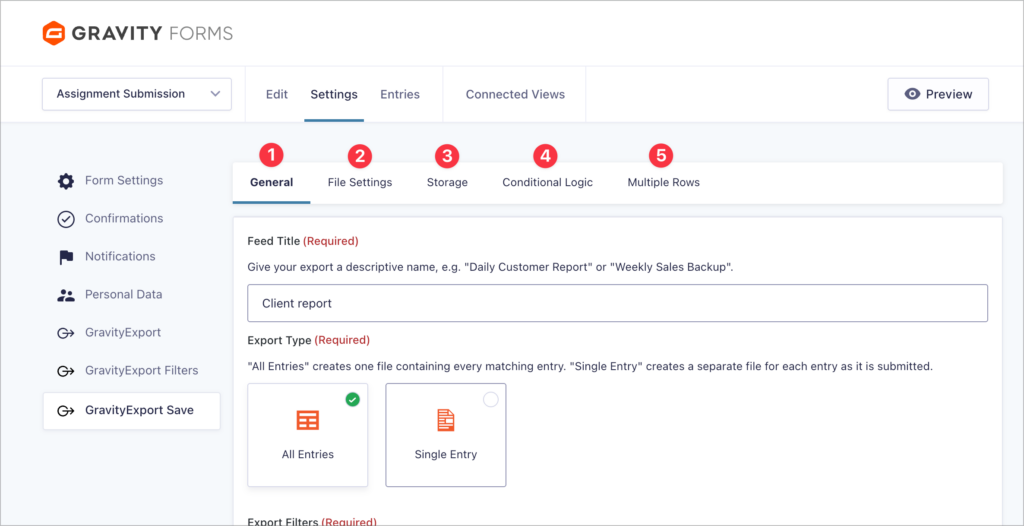
Both Save and Filter feed settings have also been reorganized into a tabbed interface, making configuration easier to navigate. Additionally, the “Filter Settings” section has been renamed to “Conditional Logic” for clarity.
Finally, we fixed an issue where date range values were not populated in the Filters feed Instant Download tab.
These updates are part of our latest round of releases, which also includes background processing: a big update that will improve multiple GravityKit products (and has already been added to GravityImport!).
Join us for our next episode of GravityKit Live! We’re kicking things off with a special guest appearance from Dave Smith of Gravity Wiz, who will demo their powerful new Dev Tools add-on for Gravity Forms!
We’ll also walk through several game-changing GravityKit updates, including background processing for imports and exports, scheduled reporting, and improved search. Finally, we’ll wrap up with a live Q&A where you can ask questions and chat with the team.
Shape the WordPress data dashboard you’ll actually use!
We’ve been working on something exciting behind the scenes, and we need your input. We’re building a new way to visualize, report on, and share WordPress data—starting with Gravity Forms and expanding to WooCommerce, payment tracking, and more.
This is your chance to shape what gets built. 3 short pages, under 2 minutes. All responses are confidential. As a thank you for completing the survey, you’ll receive:
$20 account credit if you’re an existing customer
$20 off your first purchase if you’re new to GravityKit
Want to export your Gravity Forms submissions to PDF without writing a single line of code? Whether you’re creating professional invoices, storing user submissions, or sending reports to Dropbox, we’ve got you covered. In this guide, you’ll learn four easy and reliable ways to convert Gravity Forms entries into PDF documents using trusted third-party plugins.
🧰 UPDATES TO THE ’KIT
Here are the plugins that got updates since our last newsletter:
Got two minutes? Share your input in our quick survey. It helps us build tools that truly benefit you. We’ll add $20 in account credit as a thank you 🥰
Until next time Zack with GravityKit
Get this every Friday
One short email a week: new releases, practical Gravity Forms tutorials, and subscriber-only discounts.