We shipped a stack of releases this week, led by real improvements to 3D maps in GravityView and the Dynamic Lookup field. And as always, there's plenty stirring in WordPress and AI: in "The Prompt," we take an early look at WordPress 7.1, the Classic block drama, and more AI enhancements coming to the WordPress editor.
In this edition:
🌟 Product spotlight: Updates to GravityView Maps & Dynamic Lookup
🤖 The Prompt: What WordPress 7.1 means for AI-assisted publishing
✍️ From the blog: How to build a full conference site using GravityView
🧰 Updates to the ’Kit
🌟 PRODUCT SPOTLIGHT
GravityView – Maps Layout
Display entries on an interactive Google Map with geolocation functionality.
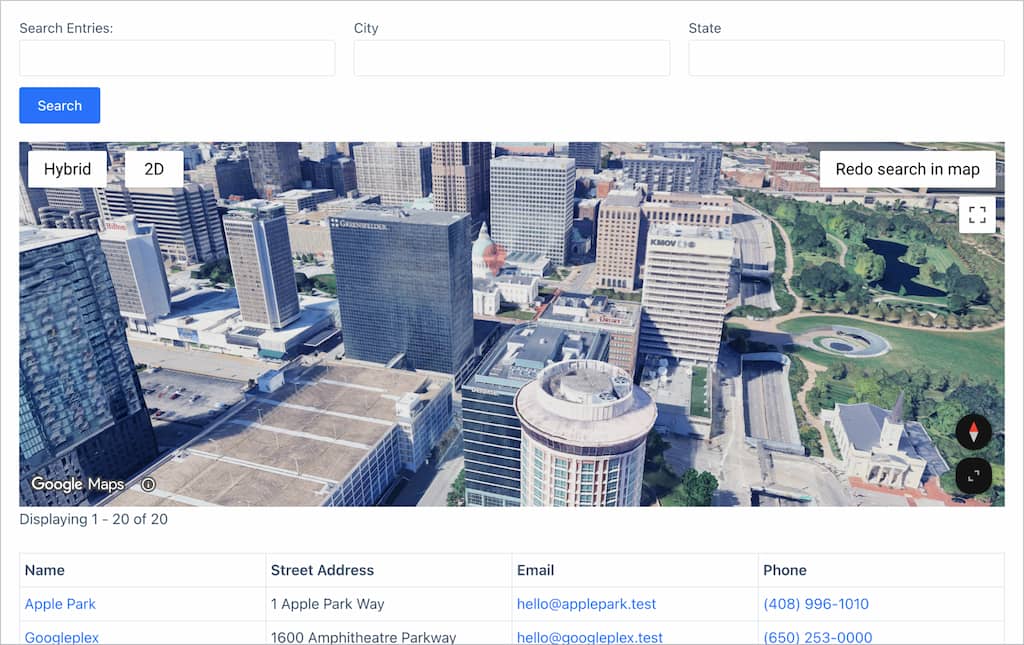
The 3D maps we rolled out recently just got the controls to match. With v3.10.0, you decide how a 3D map first opens: the new Starting View setting can launch it in full 3D, in 2D satellite, or in the flat 2D map, and a Minimum Zoom for 3D setting keeps the on-map 3D button hidden until visitors have zoomed in close enough for it to look right.
A GravityView Map View using the new 3D map option
The bigger win is for maps with a lot of pins. A new viewport loading mode loads only the markers in the visible area and pulls in more as people pan and zoom, so a directory with thousands of locations no longer builds every marker up front, improving performance.
Info boxes also load on demand when a marker is clicked, which keeps that first page load light. This release also includes a host of additional fixes and improvements. See the full Launch Log, linked below, for details.
Gravity Forms Dynamic Lookup
The Gravity Forms Dynamic Lookup add-on enables you to populate field choices dynamically with Gravity Forms entry data or WordPress users.
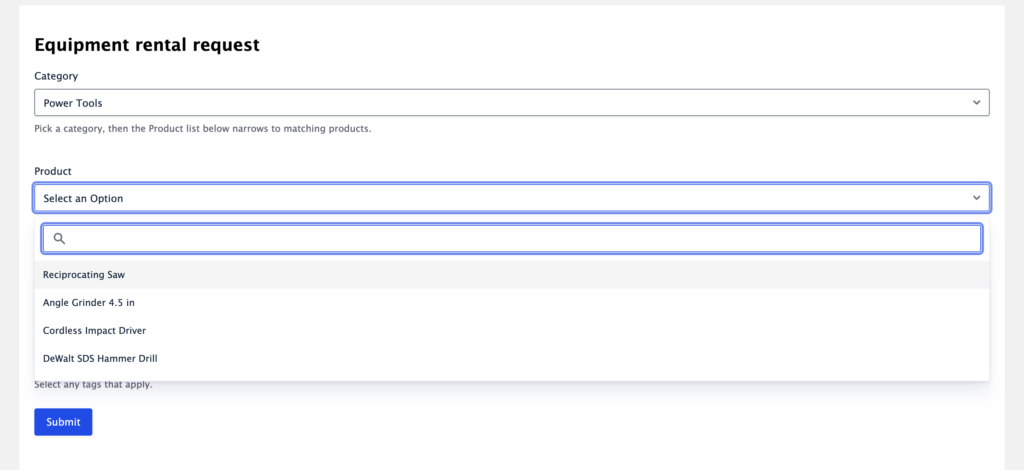
A Lookup field fills its own choices from the entries of another Gravity Forms form. The new Filter by Field setting makes those choices respond to an earlier answer on the same form, so you can create cascading dropdowns. Say a visitor picks a category near the top of the form. The Product dropdown below can then show only the products in that category, instead of the full list. You choose which value links the two (a category, an email address, a customer ID), and only the matching entries appear.
It's like how you'd narrow down a list of cities based on a user's country selection, but the entries come from another form.
Dropdown Lookup fields now also support Gravity Forms' Enable enhanced user interface setting, which turns the choice list into a searchable dropdown, so long lists stay easy to use even while they are being filtered.
Filtering the Product dropdown to only matching products shown as a searchable list
These updates are part of our latest round of releases, which also includes updates to Dashboard Views, DataTables, Advanced Filtering, and other add-ons.
What WordPress 7.1 means for AI-assisted publishing
The WordPress 7.1 roadmap is out (the release is due August 19, timed to WordCamp US), and the AI direction is worth a look if you publish with a team. The headline for us is a new feature called Guidelines: a structured, persistent place to store your editorial rules, brand voice, and content standards right inside WordPress.
When a human author or an external AI tool drafts something, they check against those guidelines instead of starting from a blank prompt, and you can export and import them across sites. Anyone who has watched an AI draft wander off-brand can see why that is useful.
The new "Guidelines" page planned for WordPress 7.1
And there's more under the hood! The AI Client gives plugin authors generation streaming, so AI text appears in real time instead of after a long pause, plus native embeddings that represent your content as vectors, enabling semantic search (search that matches meaning, not just keywords) across your site.
Worth stressing: WordPress is still not bundling a model. You connect your own through the core Connectors screen under Settings, and 7.1 just makes those connections smarter. It is all still planned, not final, so some things may change.
In fact, the 7.1 team originally intended to pull the Classic block from the editor's inserter as part of shedding legacy code, then reversed course in early July after community pushback, keeping the block in place and redirecting the effort toward smoother convert-to-blocks tools instead. A small reminder that a roadmap is a proposal, not a promise.
Running a conference means juggling a lot at once: people need to register, presenters need to submit talks or abstracts, someone has to build the program, and attendees want to see who else is coming. In this tutorial, Casey shows you how to build a complete WordPress conference website using Gravity Forms and GravityView. By the end, you’ll have attendee registration, abstract submission, a searchable attendee directory, a program of talks, a session calendar, and self-service editing so presenters can update their own profiles.
🧰 UPDATES TO THE ’KIT
Here are the plugins that got updates since our last newsletter:
One last thing. We're looking for more customer stories to feature, and yours could be next. Tell us what you built with GravityKit, and we'll write it up as a case study, which is a nice way to get your project and a link back to your site in front of the community.